


Like a modern arms race in silicon, you are choosing between raw power, compact efficiency, and budget-friendly value. From the GIGABYTE RX 9060 XT and PNY RTX 5070 to the ASRock Arc B580, MOUGOL RX 580, and leaner picks like the GT 710, GT 1030, and Arc A310, each GPU serves a different build.
The real question is which one fits your goals best. The answer is not always the obvious one.






More Details on Our Top Picks
GIGABYTE Radeon RX 9060 XT Gaming OC 16G Graphics Card
If you want a gaming-first GPU that also has room for creative work, the GIGABYTE Radeon RX 9060 XT Gaming OC 16G is an easy card to consider. It delivers AMD RDNA 4 performance, 16 GB of GDDR6 memory, and a 2,700 MHz GPU clock, so you can push modern games with confidence. WINDFORCE cooling, the Hawk Fan, and server-grade thermal gel help keep temperatures in check. You can connect via PCIe 5.0, use DisplayPort or HDMI, and benefit from AI acceleration in games and creative applications. The RGB finish adds visual flair, and a 3-year warranty provides additional peace of mind.
- GPU Model:Radeon RX 9060 XT
- VRAM:16 GB
- Memory Type:GDDR6
- Max Resolution:7680 x 4320
- Cooling:WINDFORCE
- PCIe Interface:PCIe 5.0 x16
- Additional Feature:20000 MHz memory clock
- Additional Feature:RGB lighting
- Additional Feature:3-year warranty
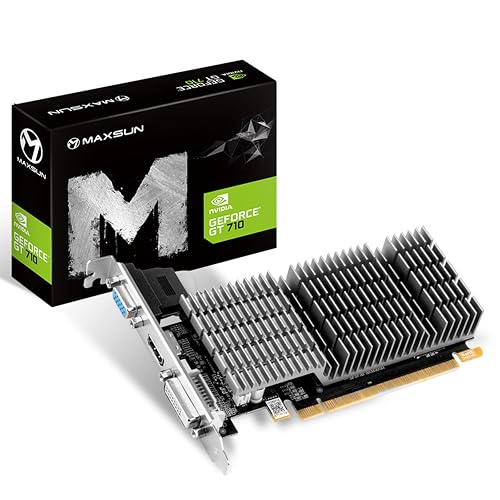
maxsun GeForce GT 710 2GB Low Profile Graphics Card
The maxsun GeForce GT 710 2GB Low Profile Graphics Card is a smart pick if you need a compact, power-efficient GPU for a slim desktop or small-form-factor build. It uses NVIDIA’s GT 710 chipset, has 2GB of GDDR3 memory, and supports HDMI, DVI-D, and VGA, so you can run multi-monitor setups with ease. Passive 0 dB cooling and a large heatsink keep things quiet, and the low-profile design fits ITX cases. It handles Full HD output, supports DirectX 12 and OpenGL 4.5, and includes a 3-year warranty for added peace of mind.
- GPU Model:GeForce GT 710
- VRAM:2 GB
- Memory Type:GDDR3
- Max Resolution:1920 x 1080
- Cooling:Passive
- PCIe Interface:PCIe x16/x8
- Additional Feature:Passive fanless cooling
- Additional Feature:Low-profile design
- Additional Feature:Multi-monitor support
PNY NVIDIA GeForce RTX 5070 Epic-X ARGB OC GPU
PNY’s NVIDIA GeForce RTX 5070 Epic-X ARGB OC Triple Fan is a strong pick for gamers who want high-end 1440p performance with modern features in a 2.4 slot, SFF-ready design. You get NVIDIA’s Blackwell GPU with 6,144 CUDA cores, DLSS 4, fifth gen Tensor Cores, and fourth gen ray tracing for sharper visuals and smoother play. The 12GB GDDR7 memory runs on a 192 bit bus with up to 672 GB/s bandwidth. It boosts to 2.685 GHz, uses PCIe 5.0 x16, and includes DisplayPort 2.1b, HDMI 2.1b, and an ARGB triple fan cooler.
- GPU Model:GeForce RTX 5070
- VRAM:12 GB
- Memory Type:GDDR7
- Max Resolution:7680 x 4320
- Cooling:Triple-fan
- PCIe Interface:PCIe 5.0 x16
- Additional Feature:DLSS 4 support
- Additional Feature:16-pin adapter included
- Additional Feature:Up to 4 displays
MOUGOL Radeon RX 580 8GB Gaming Graphics Card
MOUGOL’s Radeon RX 580 8GB Gaming Graphics Card suits gamers who want a solid 1080p upgrade without overspending. It offers 2,048 stream processors, 8GB of Samsung GDDR5, and a 256-bit memory bus, enabling smooth play in Fortnite, GTA V, Apex Legends, and Valorant. Dual fans and heat pipes manage temperatures, and the backplate provides extra support. Connect via DisplayPort, HDMI, or DVI to drive up to three monitors, and use AMD Adrenalin for tuning, recording, and driver updates. The card supports Windows 11, 10, and 7.
- GPU Model:Radeon RX 580
- VRAM:8 GB
- Memory Type:GDDR5
- Max Resolution:7680 x 4320
- Cooling:Dual-fan
- PCIe Interface:PCIe 3.0 x16
- Additional Feature:2048 stream processors
- Additional Feature:6-pin power connector
- Additional Feature:Dual-fan cooling
MSI GeForce GT 1030 4GB Graphics Card (GT 1030 4GD4 LP OC)
If you want a compact, low-profile graphics card for a basic gaming or media PC, MSI’s GeForce GT 1030 4GB Gaming GeForce GT 1030 4GD4 LP OC is worth a look. It uses NVIDIA’s Pascal GT 1030 with 4GB DDR4 memory, a 64-bit bus, and a 1430 MHz boost clock. The card fits desktop systems through PCIe x16 and uses a single fan to remain small. You can connect a 4K display via DisplayPort or HDMI 2.0b. It is also suitable for HD video, light editing, and driver tuning through GeForce Experience.
- GPU Model:GeForce GT 1030
- VRAM:4 GB
- Memory Type:DDR4
- Max Resolution:3840 x 2160
- Cooling:Single-fan
- PCIe Interface:PCIe x16
- Additional Feature:DisplayPort 1.4a output
- Additional Feature:HDMI 2.0b output
- Additional Feature:GeForce Experience software
ASRock Intel Arc B580 Challenger 12GB Graphics Card
The ASRock Intel Arc B580 Challenger 12GB is a smart pick for gamers who want solid 1440p performance without jumping to a higher power, higher cost card. You get Intel’s Arc B580 with Xe2-HPG, 20 compute units, 160 XMX engines, and XeSS 2 support for sharper, faster gameplay. Its 12GB GDDR6 memory, 192-bit bus, and 19 Gbps speed help keep textures smooth. The 2740 MHz boost clock, dual axial fans, 0dB cooling, and metal backplate keep it practical. Connect up to four displays through three DisplayPort 2.1 ports and HDMI 2.1a.
- GPU Model:Intel Arc B580
- VRAM:12 GB
- Memory Type:GDDR6
- Max Resolution:7680 x 4320
- Cooling:Dual-fan
- PCIe Interface:PCIe 4.0 x8
- Additional Feature:XeSS 2 support
- Additional Feature:20 compute units
- Additional Feature:650W PSU recommended
Sparkle Intel Arc A310 ECO Graphics Card
Sparkle’s Intel Arc A310 ECO is a sensible choice if you need a compact, low-power graphics card that handles 1080p gaming basics. It includes 4GB of GDDR6 memory, a 64-bit bus, and a 1000 MHz GPU, along with Intel Arc features such as ray tracing, XeSS, DirectX 12 Ultimate, and Vulkan 1.3. The 50 W design keeps heat and power consumption low, so it fits easily into small desktops. You also get HDMI 2.0, two mini-DisplayPort outputs, a low-profile single-slot body, and a short bracket.
- GPU Model:Intel Arc A310
- VRAM:4 GB
- Memory Type:GDDR6
- Max Resolution:1920 x 1080
- Cooling:Single-fan
- PCIe Interface:PCIe x16
- Additional Feature:Single-slot design
- Additional Feature:Short bracket included
- Additional Feature:Vulkan 1.3 support
Factors to Consider When Choosing Graphics Cards GPUs Available
When choosing a GPU, match its performance to your target resolution so you get smooth gameplay without wasting money. Check memory size and speed, power and cooling requirements, and the connectivity and outputs needed for your setup. Ensure the card fits your case and leaves sufficient room for proper airflow.
Performance And Resolution
For smooth gaming at your target resolution, match GPU horsepower to the workload. Higher clock speeds and more shader or compute units generally mean better frame rates, especially at 1440p and 4K. If you are aiming for 1080p, a mid-range card can usually handle 60 to 144 Hz well. Push to 1440p high refresh or 4K and you will need a stronger GPU, or you may have to rely on upscaling such as DLSS or XeSS to maintain smooth frame rates. Ray tracing and AI effects look impressive, but they can reduce performance quickly unless your card has dedicated RT and tensor or XMX cores. Also ensure your cooler and power delivery can sustain peak performance under load.
Memory Size And Speed
Memory size and memory speed are just as important as core count when you are choosing a GPU. You need enough VRAM to hold textures, framebuffers, and game assets, or the card will fall back to slower system RAM and cause stuttering. For 1080p gaming, 4 to 8 GB usually works. 1440p and 4K setups often benefit from 8 to 12 plus GB to keep textures sharp and avoid downsizing. Bandwidth matters too. Memory type, bus width, and clock speed all shape how fast the GPU moves data. A 256 bit bus at higher Gbps can deliver far more throughput than a 128 bit design. In games, aim for a balance of capacity and bandwidth. For AI or professional work, larger memory capacity can matter most.
Power And Cooling
Power and cooling can make or break a graphics card’s real-world performance, since even a fast GPU will throttle if it cannot get enough clean power or stay within safe temperatures. Check the card’s TDP and give your PSU 20 to 30 percent extra headroom for peak system draw and efficiency loss. Then verify the needed 6-pin, 8-pin, or 16-pin connectors, and make sure your PSU includes matching cables or safe adapters. Next, match the cooler to your case. Single-fan, dual or triple axial, blower, and passive designs all need different airflow and clearance. Also review sustained boost clocks, thermal limits, noise, and features like 0dB fan stop, heat pipes, and large heatsinks to keep performance steady and quiet.
Connectivity And Outputs
Once you have sorted power and cooling, the next thing to check is whether the GPU actually connects to your displays the way you need. Make sure it offers the right outputs, like HDMI 2.1 or DisplayPort 2.1, so you can run features such as 4K at 120 Hz or 8K at 60 Hz. If you use two or three monitors, confirm how many independent displays it can drive at once. Also check bandwidth and extras: HDMI 2.1 supports VRR and HDR, while DisplayPort 2.1 provides more raw headroom for demanding setups. If you still need DVI, VGA, or HDCP support, verify that the card includes them or that active adapters will work. Finally, note connector placement and any mini DisplayPort ports so your cables connect cleanly.
Form Factor Fit
Before you buy, make sure the graphics card actually fits your case. Check its length, height, and slot width against your available clearance, since cards can range from short low-profile models to 11 to 12 inch full-size designs that may take up two to three slots. Measure your chassis carefully, and confirm it supports low-profile or full-height cards. If you are building in a small form factor or ITX case, you may need a short bracket or riser. Also verify PSU connector clearance and airflow space around bulky shrouds and fans. Check your motherboard x16 slot placement, and make sure nearby drive cages or cards will not block installation. Finally, consider case cooling and GPU orientation, especially vertical mounts.
Warranty And Support
Warranty and support can matter as much as raw performance, because if something goes wrong you will want clear coverage and fast help. Check the manufacturer warranty length, since many GPUs ship with one to three years of protection. Make sure it applies to you, not just the original buyer, and read what it covers, such as defects in materials, workmanship, fan failures, or VRAM faults. Watch for exclusions, for example physical damage, overclocking, or incorrect installation. Before you buy, learn the RMA process, shipping costs, turnaround time, and whether you can get an advanced replacement. Also confirm support options like email, phone, or chat, plus driver updates, firmware tools, and troubleshooting guides. Some warranties require registration, proof of purchase, or specific maintenance steps, so keep records.
Frequently Asked Questions
Which Graphics Card Offers the Best Performance for 4K Gaming?
You will get the best 4K gaming performance from NVIDIA GeForce RTX 4090. It outperforms other cards in demanding titles, handles ray tracing most effectively, and maintains high frame rates. If you want the absolute fastest card, this is the one to choose.
How Much Power Supply Is Needed for High-End GPUS?
A stout power supply is your lifeline. For high-end GPUs, you typically want 750W to 850W, or more for power-hungry models and overclocking. Check your card’s recommended wattage and leave ample headroom.
Are These Graphics Cards Compatible With Older Motherboards?
Yes, often you can use them, but you will need a motherboard with the correct PCIe slot, sufficient BIOS support, and physical clearance. Check your board version, power delivery, and case space before buying.
Which GPU Is Best for Streaming and Content Creation?
You’ll want an NVIDIA RTX 4080 Super. It handles streaming and content creation like a beast; you get excellent CUDA support, fast NVENC encoding, and smooth performance in editing, rendering, and live broadcasts.
Do These Graphics Cards Support Ray Tracing and DLSS?
Yes. Most Nvidia RTX cards support ray tracing and DLSS. AMD supports ray tracing and FSR, though you should check each model, because older or budget cards can limit these features.




