


If you are planning an AM5 build, the right motherboard can save you time, reduce frustration, and prevent a few upgrade headaches later.
You have options that range from value-focused picks to premium boards with Wi-Fi 7, USB4, and stronger power delivery for newer Ryzen chips.
The tricky part is knowing which features actually matter for your setup. That is where the best choices start to stand apart.
| GIGABYTE B650 Eagle AX AM5 ATX Motherboard | 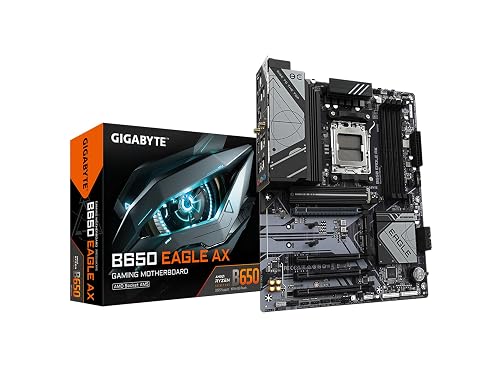 | Budget-Friendly Pick | Chipset: B650 | Socket: AM5 | Form Factor: ATX | VIEW LATEST PRICE | Read Our Analysis |
| MSI MAG X870 Tomahawk WiFi Gaming Motherboard | 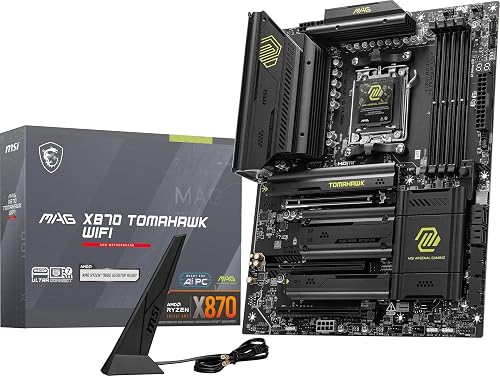 | Best for Enthusiasts | Chipset: X870 | Socket: AM5 | Form Factor: ATX | VIEW LATEST PRICE | Read Our Analysis |
| ASUS ROG Strix X870E-E Gaming WiFi Motherboard |  | Premium Flagship | Chipset: X870E | Socket: AM5 | Form Factor: ATX | VIEW LATEST PRICE | Read Our Analysis |
| MSI X670E Gaming Plus WiFi Motherboard | 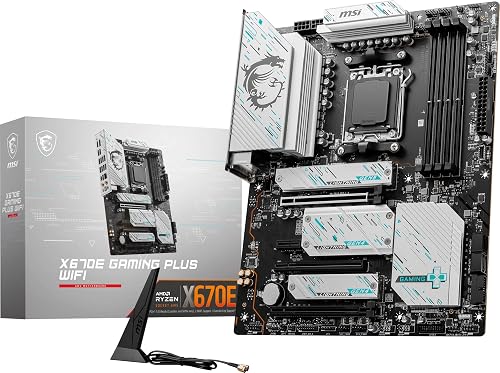 | Best for Gamers | Chipset: X670E | Socket: AM5 | Form Factor: ATX | VIEW LATEST PRICE | Read Our Analysis |
| MSI MPG B850 Edge TI WiFi Motherboard | 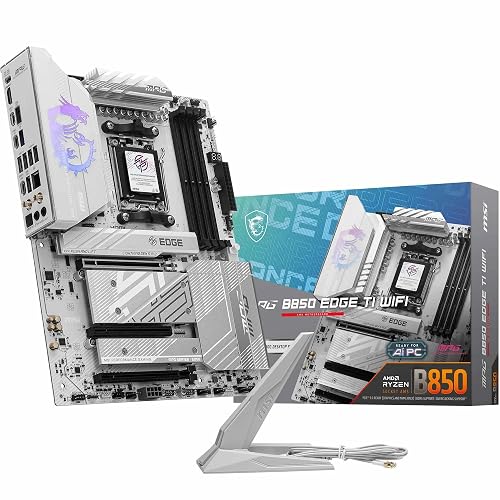 | Best Features | Chipset: B850 | Socket: AM5 | Form Factor: ATX | VIEW LATEST PRICE | Read Our Analysis |
| GIGABYTE B850 AORUS Elite WIFI7 AM5 Motherboard | 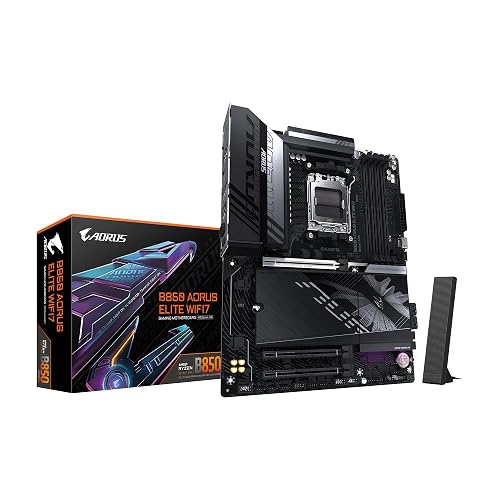 | Best Midrange | Chipset: B850 | Socket: AM5 | Form Factor: ATX | VIEW LATEST PRICE | Read Our Analysis |
More Details on Our Top Picks
GIGABYTE B650 Eagle AX AM5 ATX Motherboard
If you are building a Ryzen 7000 system and want a solid ATX board without overcomplicating the setup, the GIGABYTE B650 Eagle AX is a strong AM5 choice. It uses an AM5, LGA 1718 socket and supports DDR5 memory with four SMD DIMM slots, compatible with AMD EXPO and Intel XMP kits. The 12+2+2 phase digital VRM helps keep power delivery steady under load. For storage, the board offers one PCIe 5.0 M.2 slot and two PCIe 4.0 slots, all backed by M.2 Thermal Guard. You also get USB 3.2 Gen 2×2 Type-C, Wi-Fi 6E, and GbE LAN.
- Chipset:B650
- Socket:AM5
- Form Factor:ATX
- Memory Type:DDR5
- Wi‑Fi:Wi‑Fi 6E
- LAN:Gigabit Ethernet
- Additional Feature:12+2+2 VRM
- Additional Feature:PCIe 5.0 M.2
- Additional Feature:M.2 Thermal Guard
MSI MAG X870 Tomahawk WiFi Gaming Motherboard
The MSI MAG X870 Tomahawk WiFi Gaming Motherboard is a strong pick for gamers and high-performance PC builders who want an AM5 board ready for AMD Ryzen 9000, 8000, and 7000 series processors. It supports DDR5, PCIe 5.0, M.2 Gen5, SATA 6Gbps, and an ATX layout that keeps upgrades simple. USB4 delivers up to 40 Gbps. Wi Fi 7, Bluetooth 5.4, and 5 Gbps LAN keep you connected. MSI’s extended heatsinks, enhanced power design, and Audio Boost 5 help you run demanding CPUs smoothly and enjoy immersive sound.
- Chipset:X870
- Socket:AM5
- Form Factor:ATX
- Memory Type:DDR5
- Wi‑Fi:Wi‑Fi 7
- LAN:5Gbps LAN
- Additional Feature:USB4 40Gbps
- Additional Feature:Audio Boost 5
- Additional Feature:Extended heatsink design
ASUS ROG Strix X870E-E Gaming WiFi Motherboard
Built for AMD Ryzen 9000, 8000, and 7000 series CPUs, the ASUS ROG Strix X870E-E Gaming WiFi is a strong pick if you want a premium AM5 motherboard with serious upgrade headroom. This ATX X870 board uses 18+2+2 power stages, 110A per stage, and dual ProCool II connectors for confident overclocking. It also gives you five M.2 slots, PCIe 5.0 x16 SafeSlots, WiFi 7, Realtek 5 Gb Ethernet, dual USB4 Type-C ports, and AI tuning tools. Q-Latch, Q-Release, and Q-Code make building easier.
- Chipset:X870E
- Socket:AM5
- Form Factor:ATX
- Memory Type:DDR5
- Wi‑Fi:Wi‑Fi 7
- LAN:5Gb Ethernet
- Additional Feature:18+2+2 power stages
- Additional Feature:Dual USB4 ports
- Additional Feature:PCIe Slot Q-Release
MSI X670E Gaming Plus WiFi Motherboard
MSI’s X670E Gaming Plus WiFi is a strong AM5 pick for you if you want a well-rounded ATX board that can handle Ryzen 9000, 8000, or 7000 CPUs with serious headroom. You get a 14+2+1 Duet Rail power system, dual 8-pin CPU power, and Core Boost for stable performance. DDR5 support climbs past 7800 MHz with overclocking. PCIe 5.0 and Lightning Gen5 M.2 keep storage fast. Wi-Fi 6E, Bluetooth 5.3, 2.5 Gbps LAN, USB 3.2 Gen 2×2, HDMI, and DisplayPort round it out.
- Chipset:X670E
- Socket:AM5
- Form Factor:ATX
- Memory Type:DDR5
- Wi‑Fi:Wi‑Fi 6E
- LAN:2.5Gbps LAN
- Additional Feature:14+2+1 power system
- Additional Feature:7800+ MHz OC
- Additional Feature:M.2 Shield Frozr
MSI MPG B850 Edge TI WiFi Motherboard
If you want a high-end AM5 board for a Ryzen 7 or newer Ryzen 9000, 8000, or 7000 build, the MSI MPG B850 Edge TI WiFi is a strong fit thanks to its 14 Duet Rail Power System VRM with 80A SPS, which provides solid power delivery for demanding CPUs. You also get dual 8-pin CPU power, a server-grade PCB, and FROZR GUARD cooling with thick copper and thermal pads. Four DDR5 slots support 256GB and 8400+ MT/s overclocking. The board includes PCIe 5.0, four M.2 slots, Wi-Fi 7, 5 Gbps LAN, and USB-C 20 Gbps.
- Chipset:B850
- Socket:AM5
- Form Factor:ATX
- Memory Type:DDR5
- Wi‑Fi:Wi‑Fi 7
- LAN:5Gbps LAN
- Additional Feature:DDR5 8400+ OC
- Additional Feature:4 M.2 connectors
- Additional Feature:EZ M.2 Shield Frozr II
GIGABYTE B850 AORUS Elite WIFI7 AM5 Motherboard
The GIGABYTE B850 AORUS Elite WIFI7 AM5 Motherboard is a strong pick if you want a future-ready AM5 platform with a solid balance of performance and connectivity. It supports AMD Ryzen 9000, 8000, or 7000 series CPUs, and you can pair them with DDR5 across four DIMM slots. Its 14+2+2 power design, VRM Thermal Guard, and M.2 Thermal Guard help keep the system stable under load. You also get PCIe 5.0, three M.2 slots, USB-C, Sensor Panel Link, WiFi 7, 2.5GbE LAN, EZ-Latch, and a five-year warranty.
- Chipset:B850
- Socket:AM5
- Form Factor:ATX
- Memory Type:DDR5
- Wi‑Fi:Wi‑Fi 7
- LAN:2.5GbE LAN
- Additional Feature:14+2+2 power design
- Additional Feature:Sensor Panel Link
- Additional Feature:EZ-Latch
Factors to Consider When Choosing an Am5 Motherboard
When choosing an AM5 motherboard, first confirm it supports your CPU and provides the chipset features you need. Also verify memory compatibility, robust power delivery, and the correct expansion slots for your build. These considerations help you achieve the best performance and flexibility from your system.
CPU Compatibility
CPU compatibility should be one of your first checks when picking an AM5 motherboard. Confirm the board uses the AM5 socket and supports the Ryzen series you plan to install. AM5 boards can work with Ryzen 7000, 8000, or 9000 CPUs, but support varies by chipset and BIOS. Check the product page carefully before you buy, because some boards only support Ryzen 7000 chips, while others add later generation processors. If you want room to upgrade, pick a board that lists support for multiple Ryzen generations instead of just one. Also match compatibility to your performance goals, especially if you are planning a higher power Ryzen 9000 build. After purchase planning, verify the installed BIOS version so you do not get stuck with an unsupported CPU.
Chipset Features
Chipset choice determines what your AM5 motherboard can actually do, from CPU support and DDR5 memory handling to PCIe lane generation and storage options. You will get different feature sets as you move up the stack; higher-tier chipsets usually enable more PCIe 5.0 lanes, extra M.2 slots, and faster I/O such as USB4 or 20 Gbps ports. They can also improve networking with Wi‑Fi 6E or Wi‑Fi 7, plus 2.5 GbE or 5 GbE LAN and Bluetooth. Better chipsets often support stronger expansion, with PCIe 5.0 x16 slots, added M.2 cooling, and sturdier power delivery. If you want room to grow, choose a chipset that matches your upgrade plans and your need for speed.
Memory Support
AM5 motherboards use DDR5 memory, so your existing DDR4 kits will not work. Check the board’s DIMM layout, because most AM5 models give you four slots for dual-channel setups and future upgrades. If you plan to load up apps, games, or creative projects, look for higher-capacity support; some premium boards handle 192 GB or even 256 GB total. Memory speed also matters, since many AM5 boards support overclocking and can reach 7800+ MHz to 8400+ MT/s with the right settings. Make sure the board supports AMD EXPO or Intel XMP, too, so you can run your RAM closer to its advertised performance without extra hassle.
Power Delivery
Power delivery is where a motherboard proves its stamina, especially if you are pairing it with a high core count Ryzen chip or plan to tweak performance. You should look for strong VRM layouts like 12+2+2, 14+2+1, 14+2+2, or 18+2+2, because they feed the CPU cleaner, steadier power under load. Higher end stages rated at 80A or 110A each can boost efficiency and give you more thermal headroom for sustained performance and overclocking. Dual 8 pin CPU power connectors help the board handle heavy boost behavior without strain. You will also want larger VRM heatsinks, thermal pads, and heat spreading hardware, since they keep voltage regulation parts cooler. With better power delivery, you get less voltage droop and stronger stability than entry level boards.
Expansion Slots
Expansion slots shape how far you can take your AM5 system, since the number and generation of PCIe x16 and x4 lanes determine what you can add for graphics, capture, storage, or networking. If you want headroom, look for boards with PCIe 5.0 x16 support, which can deliver huge bandwidth for top-end add-in cards. You will also benefit from multiple full-length and smaller slots when you need a GPU alongside a network or capture card. Check the board layout carefully, because some lanes get shared and can disable slots when other connectors are used. Reinforced slots and retention clips matter too, especially if you will install a heavy graphics card and upgrade often.
Storage Options
Storage options can make or break your AM5 build, especially if you plan to run multiple NVMe drives. You should check how many M.2 slots the board provides, since AM5 models can offer anywhere from three to five connectors. If you need top-end speed, look for at least one PCIe 5.0 M.2 slot; Gen5 SSDs can deliver far more peak bandwidth than PCIe 4.0 drives. Also make sure the layout fits your mix of speed and capacity, because some boards pair Gen5 and Gen4 M.2 slots with SATA 6Gb/s ports. Do not overlook onboard M.2 heatsinks or thermal guards, as they help keep SSDs fast under load. Prioritize strong cooling and multiple high-speed slots for a future-ready setup.
Connectivity Needs
Connectivity needs can be just as important as raw performance, so match an AM5 motherboard’s wireless, wired, and USB features to how you actually use your PC. If you rely on wireless, check for Wi‑Fi 6E or Wi‑Fi 7, and Bluetooth 5.3 or 5.4 depending on the board. For wired networking, 2.5GbE is common; 5GbE can speed up local transfers. Make sure the USB-C ports fit your gear. Some boards offer USB 3.2 Gen 2×2 Type C, 20Gbps Type C, or USB4 up to 40Gbps. If you use integrated graphics or multiple displays, verify HDMI and DisplayPort outputs. Also look for front-panel USB C, S/PDIF, and useful internal headers.
Cooling Design
Cooling design matters a lot on an AM5 motherboard, especially if you run a high-end CPU or plan to overclock. Look for extended VRM heatsinks, as they help keep power delivery components cooler during long, demanding sessions. If you use fast PCIe 4.0 or PCIe 5.0 SSDs, M.2 thermal guards can cut drive temperatures and reduce throttling. Better boards may add heat pipes, high-conductivity thermal pads, and integrated I/O covers to spread heat more evenly. You will also benefit from dedicated M.2 cooling, chipset heatsinks, and reinforced thermal padding when installing multiple storage drives. For heavy workloads, stronger VRM cooling and larger heatsinks usually mean steadier performance, better stability, and longer-lasting hardware under load.
Frequently Asked Questions
Which AM5 Motherboard Best Supports Future CPU Upgrades?
Choose a strong AM5 board with robust VRMs and reliable BIOS support, for example an X670E or B650E model from ASUS, MSI, or Gigabyte. These boards are most likely to handle future Ryzen CPU upgrades effectively.
Do AM5 Motherboards Require a BIOS Update for Ryzen 9000?
Usually you do not need a BIOS update for Ryzen 9000 if your AM5 board already ships Ryzen 9000 ready, like a gate already opened. If it does not, you will likely need to update the BIOS first. After the update, the chip should boot smoothly.
Is Wi-Fi 7 Worth Choosing Over Wi-Fi 6E on AM5?
Wi-Fi 7 is worth it if you have a compatible router, you want lower latency, higher speeds, and improved congestion handling. If not, Wi-Fi 6E already performs well on AM5, so you can save money.
How Many M.2 Slots Do Most AM5 Boards Include?
Most AM5 boards provide two to four M.2 slots. Midrange models commonly include three. You should choose a board with extra slots if you plan to install multiple high-speed SSDs now.
What Cooling Features Matter Most on High-End AM5 Motherboards?
Prioritize robust VRM heatsinks, heatsinked M.2 slots, substantial chipset cooling, and adequate fan headers. These components keep the CPU, SSDs, and power delivery cooler, resulting in more stable performance and quieter operation.




