


If you are building on AM5 and want to keep costs in check, the right motherboard can make a bigger difference than you might expect.
You will need to weigh VRM quality, DDR5 support, storage options, and connectivity before you spend.
Some boards keep things lean, while others quietly add features that stretch your budget further.
The choices look close at first.
A few details separate the real value picks from the rest.
| GIGABYTE B550M K AM4 Micro-ATX Motherboard | 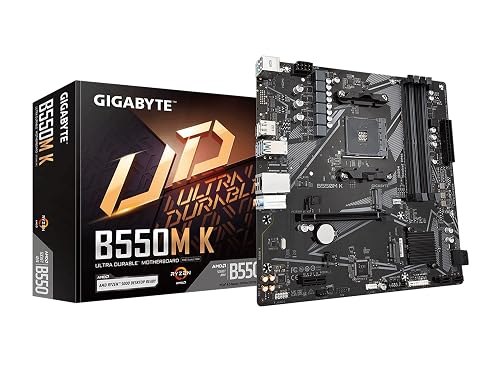 | Best Budget AM4 | Socket: AM4 | Form Factor: Micro-ATX | Memory Type: DDR4 | VIEW LATEST PRICE | Read Our Analysis |
| GIGABYTE B650M AORUS Elite AX Motherboard | 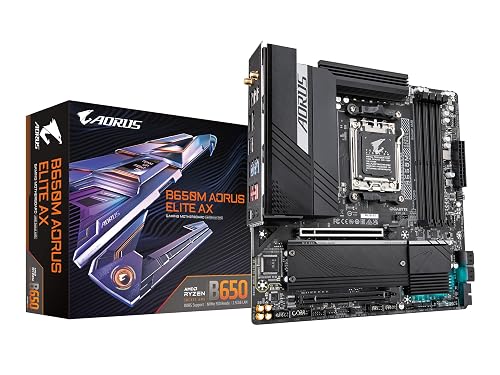 | Best Value | Socket: AM5 | Form Factor: Micro-ATX | Memory Type: DDR5 | VIEW LATEST PRICE | Read Our Analysis |
| ASUS ROG Strix X870-A Gaming WiFi Motherboard | 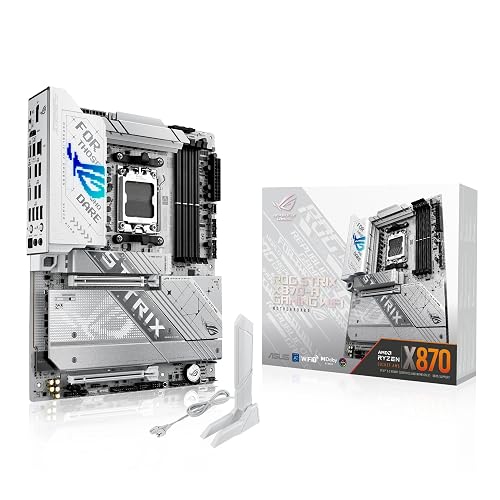 | Best Premium Pick | Socket: AM5 | Form Factor: ATX | Memory Type: DDR5 | VIEW LATEST PRICE | Read Our Analysis |
| GIGABYTE B550 Eagle WIFI6 AM4 ATX Motherboard | 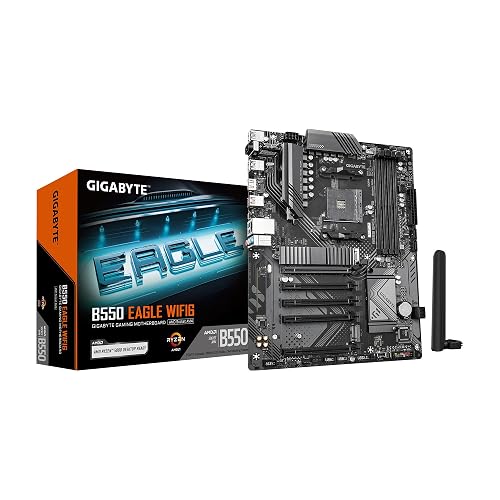 | Best WiFi Option | Socket: AM4 | Form Factor: ATX | Memory Type: DDR4 | VIEW LATEST PRICE | Read Our Analysis |
| ASUS Prime B650-PLUS WiFi AM5 ATX Motherboard | 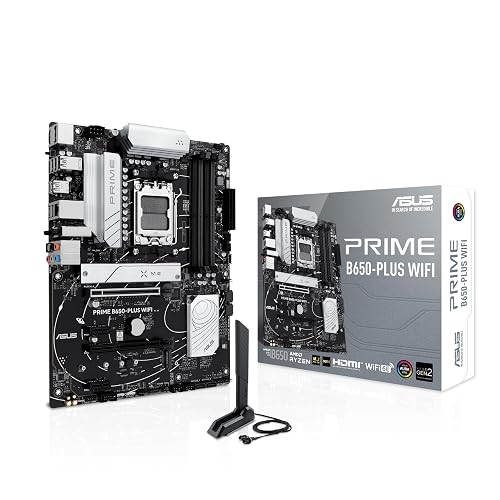 | Best Feature-Rich | Socket: AM5 | Form Factor: ATX | Memory Type: DDR5 | VIEW LATEST PRICE | Read Our Analysis |
| ASRock B650M-HDV M.2 White AM5 Motherboard |  | Best Compact Pick | Socket: AM5 | Form Factor: Micro-ATX | Memory Type: DDR5 | VIEW LATEST PRICE | Read Our Analysis |
More Details on Our Top Picks
GIGABYTE B550M K AM4 Micro-ATX Motherboard
The GIGABYTE B550M K AM4 Micro-ATX motherboard is a smart pick if you want a budget-friendly board that still gives you solid upgrade options for Ryzen 5000, 4000, and 3000 CPUs. It features an AM4 socket, a digital 3+3 VRM, and premium chokes and capacitors for steady power. Its thermal armor and chipset heatsinks help keep temperatures in check. You can install DDR4 across four DIMM slots and use XMP for faster memory. Expansion includes a PCIe 4.0 x16 slot and two M.2 slots. Connectivity offers four USB 3.2 Gen 1 ports, GbE LAN, and Q-Flash.
- Socket:AM4
- Form Factor:Micro-ATX
- Memory Type:DDR4
- Memory Slots:4 DIMM
- WiFi:No
- USB-C:No
- Additional Feature:3+3 VRM design
- Additional Feature:PCIe 4.0 x16
- Additional Feature:Q-Flash support
GIGABYTE B650M AORUS Elite AX Motherboard
Built around AMD’s AM5 socket and ready for Ryzen 9000, 8000, and 7000 chips, the GIGABYTE B650M AORUS Elite AX is a strong pick if you want a budget-friendly micro-ATX board that still feels premium. You get DDR5 support with four DIMM slots, plus AMD EXPO and Intel XMP for easy tuning. Its twin 12+2+2 phase VRM, 8-layer 2X copper PCB, and robust heatsinks help keep power delivery steady. It also provides PCIe 5.0, fast M.2 storage, WiFi 6E, 2.5GbE, USB-C, EZ-Latch, Q-Flash, and RGB Fusion, delivering real value.
- Socket:AM5
- Form Factor:Micro-ATX
- Memory Type:DDR5
- Memory Slots:4 DIMM
- WiFi:WiFi 6E
- USB-C:Yes
- Additional Feature:Twin 12+2+2 VRM
- Additional Feature:PCIe 5.0 NVMe
- Additional Feature:M.2 Thermal Guard
ASUS ROG Strix X870-A Gaming WiFi Motherboard
If you want a premium AM5 board that still makes sense for high-end Ryzen 7000, 8000, or 9000 builds, the ASUS ROG Strix X870-A Gaming WiFi is a strong fit thanks to its X870 chipset, PCIe 5.0 support, and four M.2 slots. You get DDR5 support up to 192 GB, a sturdy 16+2+2 power design with 90 A stages for confident boosting. USB4, WiFi 7, and 21 USB ports make it easy to connect everything. AI Overclocking, AI Cooling II, and AEMP help you tune performance, and the white ATX ROG styling looks sharp.
- Socket:AM5
- Form Factor:ATX
- Memory Type:DDR5
- Memory Slots:4 DIMM
- WiFi:WiFi 7
- USB-C:Yes
- Additional Feature:16+2+2 power stages
- Additional Feature:USB4 support
- Additional Feature:WiFi 7
GIGABYTE B550 Eagle WIFI6 AM4 ATX Motherboard
GIGABYTE’s B550 Eagle WIFI6 is a smart pick if you want a budget-friendly ATX board for a Ryzen 3000, 4000, or 5000 build without giving up essential modern features. It uses an AM4 socket and four DDR4 slots, with support for up to 128GB so you can scale your system easily. The 10+3 phase VRM, enlarged heatsinks, and thermal pads help keep power delivery steady. You also get PCIe 4.0, two M.2 slots, WiFi 6, 1GbE LAN, USB-C, and RGB Fusion. A 3-year warranty backs the board, providing solid everyday value.
- Socket:AM4
- Form Factor:ATX
- Memory Type:DDR4
- Memory Slots:4 DIMM
- WiFi:WiFi 6
- USB-C:Yes
- Additional Feature:Digital twin 10+3 VRM
- Additional Feature:Pre-installed I/O Armor
- Additional Feature:RGB Fusion
ASUS Prime B650-PLUS WiFi AM5 ATX Motherboard
The ASUS Prime B650-PLUS WiFi is a smart pick if you want an affordable AM5 board that does not skimp on modern essentials. You get support for Ryzen 7000, 8000, and 9000 processors, DDR5 memory, and PCIe 5.0 M.2 storage on an ATX B650 platform. WiFi 6E, 2.5Gb Ethernet, USB 10Gbps Type-C, and Thunderbolt 4 header support keep your setup flexible. ASUS also provides robust power delivery, VRM and M.2 heatsinks, BIOS FlashBack, and Aura Sync RGB. With four DIMM slots and a three year warranty, you are well covered.
- Socket:AM5
- Form Factor:ATX
- Memory Type:DDR5
- Memory Slots:4 DIMM
- WiFi:WiFi 6E
- USB-C:Yes
- Additional Feature:BIOS FlashBack
- Additional Feature:Thunderbolt 4 header
- Additional Feature:Aura Sync RGB
ASRock B650M-HDV M.2 White AM5 Motherboard
ASRock’s B650M-HDV M.2 White AM5 motherboard is a strong pick for budget builders who want modern AM5 support without paying for extras they will not use. It supports Ryzen 7000, 8000, and 9000 CPUs and features an 8+2+1 phase Dr.MOS power design that handles entry to midrange chips well. The board offers DDR5 support up to 8200+ OC, two M.2 slots, PCIe 5.0 x16, 2.5G LAN, and BIOS Flashback. Its white micro-ATX layout keeps your build clean, and HDMI, DisplayPort, and six total USB ports add useful flexibility.
- Socket:AM5
- Form Factor:Micro-ATX
- Memory Type:DDR5
- Memory Slots:2 DIMM
- WiFi:Optional
- USB-C:Yes
- Additional Feature:8+2+1 power design
- Additional Feature:PCIe 5.0 x16
- Additional Feature:BIOS Flashback
Factors to Consider When Choosing Budget AM5 Motherboards
When choosing a budget AM5 motherboard, confirm it matches your CPU socket and supports the memory you plan to use. Check the expansion options, power delivery, and connectivity features to ensure the board meets your needs. Balancing these factors lets you get the best value without sacrificing performance.
CPU Socket Compatibility
Before comparing chipsets or form factors, confirm the board uses AMD’s AM5 socket, since that is what physically fits Ryzen 7000, 8000, and 9000 CPUs. If the motherboard is labeled AM5, you are on the right platform for current Ryzen chips and future upgrades. Do not assume an AM5 label implies AM4 support, because those sockets use different designs and will not interchange. Some budget boards list support for all three Ryzen families, which gives you more upgrade room later. Also check whether the board requires a BIOS update before it can recognize newer processors, especially Ryzen 9000 or some Ryzen 8000 models. In short, socket compatibility matters more than chipset name or board size, because it determines whether your CPU will work at all.
Memory Support
Memory support is important on budget AM5 boards. Most use DDR5 and provide 4 DIMM slots, with capacities often topping out at 128 GB or even 192 GB depending on the model. Check the rated speed as well; some boards handle DDR5 8200+ overclocking, while others are listed at more modest clocks. AMD EXPO support helps you load stable settings quickly, and Intel XMP compatibility can make tuning easier if you already own those kits. If you are considering an entry-level board with only 2 DIMM slots, remember it may limit future upgrades even when total capacity looks fine. Features like OptiMem II can also improve signal quality, which matters when you push fast DDR5 modules.
Expansion Options
Expansion options matter just as much as core board specs, especially on budget AM5 models where every lane and connector counts. Check how many PCIe slots you get and how the board splits lanes, since you may need room for a graphics card plus a capture card, sound card, or other add-in. Also compare M.2 support carefully, as some boards give you just two slots while others offer three or four. The best budget picks usually include at least one PCIe 5.0 NVMe x4 slot. Do not ignore GPU interface, PCIe 5.0 provides more future headroom than PCIe 4.0. Finally, confirm SATA and USB counts, plus front-panel USB-C, so you will not run short on storage or convenient connectivity.
Power Delivery
Power delivery is the backbone of a budget AM5 board, especially if you want your Ryzen CPU to hold boost clocks steadily under load. Favor boards with stronger VRM phase counts and higher current-capable power stages, since they spread CPU power more evenly and reduce thermal stress. A 12+2+2 or 16+2+2 layout usually provides better headroom, but a well-built 8+2+1 design can still work for higher-core-count Ryzen chips. Check for quality chokes, capacitors, and Dr.MOS components, because they help keep voltage stable during gaming or productivity sessions. Larger VRM heatsinks and heatpipe cooling also matter, since they reduce throttling when the processor draws sustained power.
Connectivity Features
When it comes to connectivity, choose a budget AM5 motherboard that matches how you actually use your PC. Start with USB: look for enough fast ports, including rear USB 3.2 Gen 2, USB-C, and a front USB-C header if you use modern cases and drives. Budget boards can offer anywhere from 8 to 21 USB ports, so count your peripherals first. Next, check networking. Gigabit Ethernet is adequate, but 2.5GbE provides quicker transfers and smoother low-latency play. If you want wireless, confirm support for Wi‑Fi 6, Wi‑Fi 6E, or Wi‑Fi 7. Also compare storage options: some boards provide just one M.2 slot, while others include four, and not all support PCIe 5.0 NVMe. Finally, verify HDMI, DisplayPort, and PCIe x16 support.
Frequently Asked Questions
Can Budget AM5 Boards Support Future Ryzen Upgrades?
Yes, most budget AM5 boards can support future Ryzen upgrades, though you will trade current savings for possible BIOS limits and weaker power delivery. Check vendor support, VRM quality, and BIOS update history before buying.
Do These Motherboards Need BIOS Updates for Newer CPUS?
Yes. You will often need a BIOS update for newer CPUs. Check the motherboard support list first, because some budget AM5 models ship with older firmware and will not boot the latest Ryzen chips until updated.
Which Budget AM5 Boards Offer the Best Overclocking Headroom?
You will get the best overclocking headroom from strong B650 boards with 8+2 or 14+2 VRMs. About 70% of budget AM5 picks handle PBO well. Prioritize VRM heatsinks, comprehensive BIOS options, and dual EPS power connectors.
Are Budget AM5 Motherboards Good for Compact Gaming Builds?
Yes, you can use budget AM5 motherboards for compact gaming builds if you choose mATX or ITX models. You will save space, maintain good performance, and still get solid connectivity, but expansion options will be limited.
How Important Is VRM Quality for Long-Term Reliability?
VRM quality is important. Poor power delivery can reduce component lifespan by up to 50%. Choose motherboards with robust power phases, effective heatsinks, and stable operating temperatures, because these features protect the CPU and improve long-term system reliability.




