


Nearly 80% of PC gamers still play at 1080p, so the right card can matter more than the newest one. If you want smooth frame rates without overspending, you have real options, from older workhorses to newer, more efficient picks.
The tricky part is knowing which card actually fits your monitor, budget, and future plans. That is where the list ahead becomes useful.




More Details on Our Top Picks
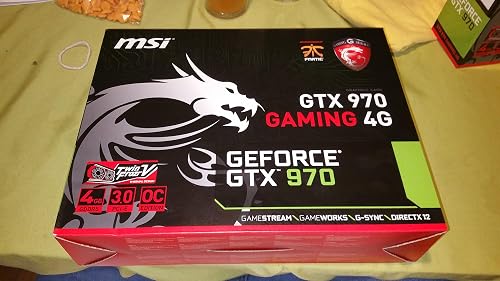
MSI GTX 970 GAMING 4G Graphics Cards GTX 970 GAMING 4G
If you want a solid 1080p gaming card with reliable 4GB GDDR5 performance, the MSI GTX 970 GAMING 4G is a strong fit. It features NVIDIA’s GeForce GTX 970 GPU, 4GB of 256-bit GDDR5 memory, and a 7010 MHz memory clock for steady desktop gaming. MSI pairs it with Twin Frozr V cooling, two fans, and Military Class 4 components to help keep temperatures and stability in check. You can connect displays through DL-DVI-D, DL-DVI-I, HDMI, or DisplayPort. It is 3-way SLI ready for upgrade flexibility.
- GPU:NVIDIA GeForce GTX 970
- VRAM:4 GB
- Memory Type:GDDR5
- Cooling:Dual-fan
- Video Outputs:DVI, HDMI, DisplayPort
- Desktop Card:Yes
- Additional Feature:Twin Frozr V
- Additional Feature:3-way SLI ready
- Additional Feature:Military Class 4
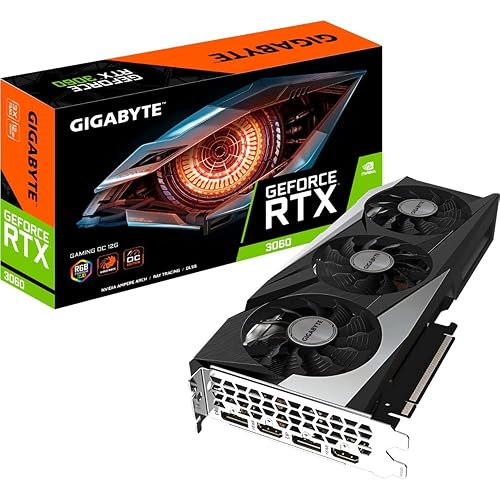
Gigabyte GeForce RTX 3060 Gaming OC Graphics Card
The Gigabyte GeForce RTX 3060 Gaming OC is a strong fit if you want smooth 1080p gaming with extra headroom for ray tracing, DLSS, and streaming or creative work. It includes 12 GB of GDDR6 memory and a 1837 MHz boost clock, plus Ampere features such as 2nd generation RT Cores and 3rd generation Tensor Cores. That allows you to push higher settings, use NVIDIA Reflex for lower latency, and rely on NVIDIA Broadcast or Studio tools when creating. The WINDFORCE 3X cooler helps keep noise and temperatures in check.
- GPU:NVIDIA GeForce RTX 3060
- VRAM:12 GB
- Memory Type:GDDR6
- Cooling:Triple-fan
- Video Outputs:2x DP, 2x HDMI
- Desktop Card:Yes
- Additional Feature:Ampere architecture
- Additional Feature:DLSS support
- Additional Feature:NVIDIA Reflex
GIGABYTE Radeon RX 9060 XT Gaming OC 16G Graphics Card
Built for players who want extra breathing room at 1080p, the GIGABYTE Radeon RX 9060 XT Gaming OC 16G pairs AMD’s RDNA 4 architecture with 16GB of GDDR6 memory, making it a strong fit for demanding modern games and heavier texture settings. It offers a 2,700 MHz boost clock and PCIe 5.0 support, with outputs for DisplayPort or HDMI so your setup stays flexible. GIGABYTE’s WINDFORCE cooler, Hawk Fan, and server-grade thermal gel help keep temperatures in check. With AI acceleration support and a 3-year warranty, it is a practical desktop card for smooth, high-detail 1080p gaming.
- GPU:Radeon RX 9060 XT
- VRAM:16 GB
- Memory Type:GDDR6
- Cooling:WINDFORCE
- Video Outputs:DisplayPort, HDMI
- Desktop Card:Yes
- Additional Feature:RDNA 4 architecture
- Additional Feature:PCIe 5.0
- Additional Feature:Server-grade thermal gel
Gigabyte Radeon RX 7600 Gaming OC Graphics Card
Gigabyte’s Radeon RX 7600 Gaming OC 8G is a strong pick if 1080p gaming is the goal and you want a factory-overclocked card with extra cooling headroom. It features AMD’s Radeon RX 7600, 8GB of GDDR6 on a 128-bit bus, and a PCIe 4.0 interface for solid desktop performance. The triple WINDFORCE fan setup, metal backplate, and RGB Fusion provide improved cooling and a polished look. You also get HDMI 2.1 plus two DisplayPort 2.1 outputs, so the card is ready for high-refresh displays and light 4K output.
- GPU:AMD Radeon RX 7600
- VRAM:8 GB
- Memory Type:GDDR6
- Cooling:3X WINDFORCE
- Video Outputs:HDMI, DisplayPort
- Desktop Card:Yes
- Additional Feature:RGB Fusion
- Additional Feature:Protection metal backplate
- Additional Feature:Factory overclocked
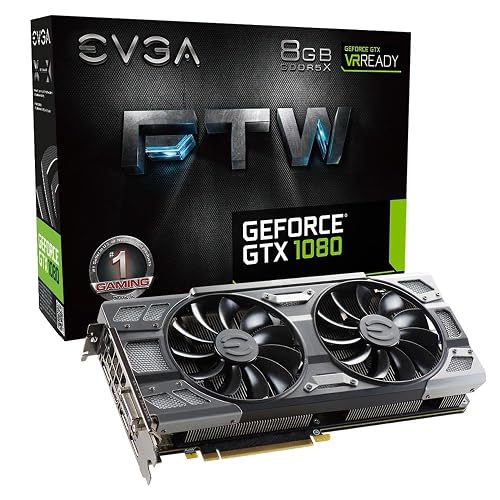
EVGA GeForce GTX 1080 FTW Gaming Graphics Card
If you want a high-end 1080p card that still leaves room for 1440p play, EVGA’s GeForce GTX 1080 FTW Gaming is a strong fit. It uses an NVIDIA Pascal GPU with 1,721 MHz base and 1,860 MHz boost clocks, and includes 8 GB of GDDR5X memory for demanding textures and smooth frame rates. EVGA’s ACX 3.0 cooler helps keep temperatures in check, and the card adds a 10-phase power design, dual BIOS, and RGB control through Precision XOC. It is VR-ready, supports Windows 7 through 10, and includes a 6-pin to 8-pin adapter for easier setup.
- GPU:NVIDIA GeForce GTX 1080
- VRAM:8 GB
- Memory Type:GDDR5X
- Cooling:ACX 3.0
- Video Outputs:HDMI
- Desktop Card:Yes
- Additional Feature:ACX 3.0 cooling
- Additional Feature:Double BIOS
- Additional Feature:Adjustable RGB LED
MOUGOL Radeon RX 580 Gaming Graphics Card 8GB
The MOUGOL Radeon RX 580 8GB is a solid pick if you want dependable 1080p performance without overspending, especially for esports staples like Fortnite, Valorant, and Apex Legends. It includes 8GB of Samsung GDDR5 memory, a 256-bit bus, and 2048 stream processors, so it can handle modern games and multitask well. The card fits mid-tower PCIe 3.0 systems, requires a 6-pin power connector, and supports Windows 7 through 11. You also get DisplayPort, HDMI, and DVI outputs with triple-monitor support, quiet dual-fan cooling, and AMD Adrenalin software for updates, tuning, and recording.
- GPU:AMD Radeon RX 580
- VRAM:8 GB
- Memory Type:GDDR5
- Cooling:Dual-fan
- Video Outputs:DP, HDMI, DVI
- Desktop Card:Yes
- Additional Feature:2048 stream processors
- Additional Feature:Triple-display support
- Additional Feature:AMD Adrenaline support
ASUS ROG Strix GTX 1660 Super Graphics Card (ROG-STRIX-GTX1660S-A6G-GAMING)
ASUS ROG Strix GTX 1660 Super is a smart pick if you want strong 1080p gaming performance without overspending, thanks to its 6GB GDDR6 memory and 1408 CUDA cores. It uses NVIDIA Turing architecture, and offers DisplayPort 1.4 and HDMI 2.0 for flexible monitor setups. It can drive up to four displays, which helps if you multitask. ASUS provides DirectCU II cooling, Wing-Blade fans, and FanConnect II headers for improved thermal control. Aura Sync RGB adds style, while GPU Tweak II and bundled utilities give you extra tuning and streaming options.
- GPU:NVIDIA GeForce GTX 1660 Super
- VRAM:6 GB
- Memory Type:GDDR6
- Cooling:DirectCU II
- Video Outputs:DisplayPort, HDMI
- Desktop Card:Yes
- Additional Feature:DirectCU II cooling
- Additional Feature:FanConnect II
- Additional Feature:Aura Sync RGB
Factors to Consider When Choosing Graphics Cards For 1080p Gaming
When choosing a graphics card for 1080p gaming, prioritize performance per dollar so you get the highest frame rates for your budget. Check VRAM capacity, confirm your monitor’s resolution and refresh rate, and ensure your power supply and connectors support the card. Also consider cooling and noise, since these factors affect sustained performance in your system.
Performance per Dollar
To judge performance per dollar, divide a card’s street price by its typical 1080p average FPS at your target settings, then compare that value across options. This gives you a clear dollars-per-frame number, and lower is better. Use normalized benchmarks across several modern games instead of relying on a single standout title, since one game can distort value. Compare high versus ultra settings, and check results with ray tracing or upscaling on and off, because those features can drop FPS quickly. Do not ignore platform costs: a GPU that requires a stronger PSU, better cooling, or a faster CPU can erase its apparent bargain. For long-term value, estimate how many years it will stay playable at 1080p, then amortize the price into a dollars-per-year metric.
VRAM Capacity Needs
While 4, 6 GB of VRAM is usually enough for older games and esports titles at 1080p, modern AAA games often benefit from 8 GB or more to keep high resolution textures smooth. Treat VRAM as a texture budget, not a raw speed booster. If you use ultra texture packs, heavy mods, or large open world games, 8 GB can still get tight and cause stutter or pop in. Heavier effects, multiple render targets, and multi monitor setups can raise demand further. More VRAM can help you keep detail settings high longer, but extra capacity will not make the GPU render faster. Check in game overlays to watch usage during play. If you are often near the limit, lower textures or choose a card with more memory.
Resolution and Refresh
At 1080p, the right graphics card is the one that matches your monitor’s refresh rate and the frame rate you actually want to play at. If you use a 60 Hz display, you need far less GPU muscle than for 144 Hz or 240 Hz gaming, where you will need much higher sustained FPS to take full advantage of the panel. Do not focus on peak benchmark spikes; look for average frame rates and strong 1% lows, because stutter stands out more at higher refresh rates. If you use G-Sync or FreeSync, keep performance inside the monitor’s variable refresh range to reduce tearing and hitching. For most players, that means picking a card around your target budget, 60 to 75 FPS for high settings, or 100 to 144+ FPS for competitive play.
Power and Connectors
Power matters as much as performance, because the right 1080p GPU has to fit your power supply as well as your frame rate target. Check the card’s TDP first. Some 1080p options sip around 75W and run on bus power alone, while others exceed 200W and need one or more PCIe plugs. Match those connectors exactly, whether the card uses 6-pin, 8-pin, or both, and only use adapters you trust. Leave enough headroom in your PSU, add roughly 100W to 150W above the GPU’s draw for your CPU, drives, and fans. Also verify strong +12V output from a quality unit. If you plan to overclock, expect power use to rise by 20% or more; size your PSU accordingly.
Cooling and Noise
Cooling matters just as much as raw performance, because a 1080p GPU has to stay cool and quiet under sustained gaming loads, not just post strong benchmark numbers. You should favor multi-fan cards or smart single-fan designs with heat pipes and a large heatsink, since they are more likely to keep temperatures under about 80°C. Check the card’s TDP and power draw; higher wattage models usually need stronger cooling and tend to sound louder with the same fan profile. Pay attention to fan count, size, and bearing type, because larger fans spinning slower usually make less noise. Semi-passive idle modes and GPU-controlled PWM fans help keep desktop use quiet. If you will game for hours at high FPS, consider a factory overclocked model with a beefier cooler.
Output Port Support
Ports are the bridge between a GPU and your display, so check them as carefully as the spec sheet’s frame rates. You will want at least one HDMI 2.0 or newer port so you can run 1080p at 60, 144 Hz on modern monitors and TVs without adapters. For higher refresh play, make sure the card also includes DisplayPort 1.2 or later; that is the easiest way to reach 120, 240 Hz and use adaptive sync features such as FreeSync or G-Sync Compatible. If you still use an older monitor, dual-link DVI can help, but confirm the connector and refresh limits. Also check how many outputs the card offers, since some combinations disable others. Verify each port’s maximum resolution and refresh rate before you buy.
Future-Proofing Features
If you want your 1080p GPU to last beyond the next upgrade cycle, focus on what it can handle over time, not just today’s frame rates. Choose at least 8 GB of modern GDDR6 memory and a 128 to 192 bit bus so you can load higher resolution textures and future game assets without constant compromises. If you plan to keep the card for years, 12 to 16 GB of VRAM gives you more breathing room for modern games and mods. Look for hardware ray tracing and AI upscaling support, since those features are becoming standard. A PCIe 4.0 or 5.0 x16 interface and a roomy board help with platform upgrades and cooling. Also check driver support and multi generation features, because software longevity matters.
Frequently Asked Questions
Which GPU Offers the Best Value for 1080P High-Refresh Gaming?
You’ll usually get the best value from an RTX 4060 or Radeon RX 7600, depending on pricing. If you want higher frame rates and strong efficiency, the RX 6700 XT is often the smarter 1080p high-refresh buy.
How Much VRAM Is Enough for Modern 1080P Games?
8GB is the baseline for modern 1080p games. 12GB gives you more breathing room, like a wider road. You will avoid texture stutter, handle newer releases better, and keep settings high longer.
Do These Cards Support Ray Tracing at 1080P?
Yes, most of these cards support ray tracing at 1080p, but you will usually need to lower other settings or use upscaling to maintain smooth frame rates. NVIDIA cards generally handle ray tracing better than similarly priced AMD options.
Which Card Has the Lowest Power Consumption?
You’ll usually see the lowest power draw from the RTX 4060 or the RX 7600, depending on the exact model. If you want the most efficient card, choose the RTX 4060; it consumes less power while gaming.
Can Older GPUS Still Handle New Games at 1080P?
Yes, many older GPUs still handle new 1080p games, but achieving about 60 fps usually requires lowering settings. You will get playable results in less demanding titles. Heavy ray tracing and ultra textures will push performance past comfortable levels.




