


Nearly 70% of creators say hardware upgrades cut export times enough to change daily workflow. If you are weighing which graphics card actually speeds up editing, rendering, and AI tasks, the answer is not always the most expensive one.
Some models deliver better value, more VRAM, or cooler operation than you might expect, and those differences can reshape your next build in ways you may not have anticipated.
| MSI GeForce RTX 2060 6GB Graphics Card | 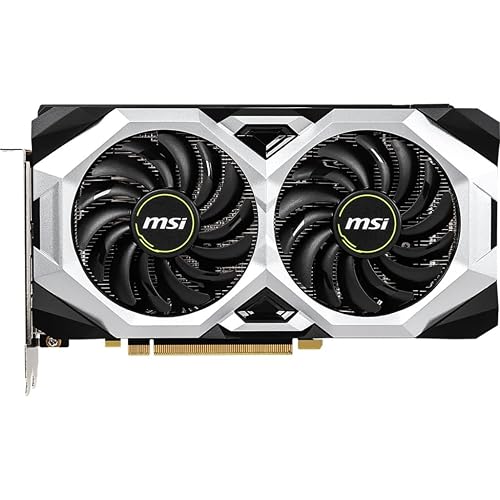 | Entry-Level Pick | GPU Architecture: Turing | VRAM: 6 GB | Memory Type: GDDR6 | VIEW LATEST PRICE | Read Our Analysis |
| PNY NVIDIA GeForce RTX 5070 Epic-X ARGB Graphics Card |  | Best Overall | GPU Architecture: Blackwell | VRAM: 12 GB | Memory Type: GDDR7 | VIEW LATEST PRICE | Read Our Analysis |
| ASUS Prime GeForce RTX 5070 Graphics Card |  | Best for SFF | GPU Architecture: Blackwell | VRAM: 12 GB | Memory Type: GDDR7 | VIEW LATEST PRICE | Read Our Analysis |
| ASRock Intel Arc B580 Challenger 12GB Graphics Card |  | Budget-Friendly Pick | GPU Architecture: Xe2-HPG | VRAM: 12 GB | Memory Type: GDDR6 | VIEW LATEST PRICE | Read Our Analysis |
| ASUS Dual GeForce RTX 5060 OC Edition 8GB |  | Best Value | GPU Architecture: Blackwell | VRAM: 8 GB | Memory Type: GDDR7 | VIEW LATEST PRICE | Read Our Analysis |
| GIGABYTE GeForce RTX 5070 AERO OC 12G Graphics Card |  | Creator’s Choice | GPU Architecture: Blackwell | VRAM: 12 GB | Memory Type: GDDR7 | VIEW LATEST PRICE | Read Our Analysis |
More Details on Our Top Picks
MSI GeForce RTX 2060 6GB Graphics Card
If you want a graphics card that handles content creation without complicating your setup, the MSI GeForce RTX 2060 Ventus GP OC is a strong choice. It features NVIDIA’s Turing-based RTX 2060 GPU, 6 GB of GDDR6 memory, and a 1710 MHz boost clock for smooth editing and rendering. Its 14 Gbps memory speed and 192-bit interface help maintain responsive performance. You can run multi-monitor workflows with three DisplayPort 1.4a outputs and one HDMI 2.0b port. With ray tracing, VR readiness, and 7680 x 4320 support, it remains versatile for creative tasks.
- GPU Architecture:Turing
- VRAM:6 GB
- Memory Type:GDDR6
- Memory Interface:192-bit
- Display Outputs:3x DP, 1x HDMI
- Max Resolution:7680 x 4320
- Additional Feature:Boost clock 1710 MHz
- Additional Feature:14 Gbps memory speed
- Additional Feature:VR Ready
PNY NVIDIA GeForce RTX 5070 Epic-X ARGB Graphics Card
The PNY NVIDIA GeForce RTX 5070 Epic-X ARGB OC Triple Fan is a strong pick for creators who need fast AI-accelerated performance, smooth multitasking, and reliable Studio support in a compact 2.4-slot design. It includes 12GB of GDDR7 memory, 6,144 CUDA cores, and up to 672GB/s bandwidth for editing, rendering, and motion graphics. DLSS 4, fifth-gen Tensor Cores, and fourth-gen ray tracing cores help you work faster. Three fans, ARGB lighting, and a 16-pin adapter keep it cool and make installation easy. It also supports up to four displays.
- GPU Architecture:Blackwell
- VRAM:12 GB
- Memory Type:GDDR7
- Memory Interface:192-bit
- Display Outputs:3x DP, 1x HDMI
- Max Resolution:7680 x 4320
- Additional Feature:DLSS 4 support
- Additional Feature:ARGB triple-fan cooling
- Additional Feature:16-pin adapter included
ASUS Prime GeForce RTX 5070 Graphics Card
Built for compact creator rigs, the ASUS Prime GeForce RTX 5070 is a strong pick if you want modern Blackwell performance in an SFF-ready card that does not sacrifice cooling. It includes 12 GB of GDDR7 memory, PCIe 5.0 support, and HDMI plus DisplayPort 2.1 outputs for flexible monitor setups. ASUS pairs Axial-tech fans with a 2.5-slot design and a phase-change GPU thermal pad to keep temperatures in check. DLSS 4 can speed up supported workloads, and Dual BIOS gives you extra control for tuning, quiet operation, or demanding content creation workflows.
- GPU Architecture:Blackwell
- VRAM:12 GB
- Memory Type:GDDR7
- Memory Interface:Not listed
- Display Outputs:HDMI + DP
- Max Resolution:7680 x 4320
- Additional Feature:Dual BIOS
- Additional Feature:Phase-change thermal pad
- Additional Feature:Axial-tech fans
ASRock Intel Arc B580 Challenger 12GB Graphics Card
ASRock’s Intel Arc B580 Challenger 12GB OC is a strong pick for creators who want solid 1440p performance with AI-assisted tools and modern display support. It features Intel Xe2-HPG, 20 compute units, 160 XMX engines, and a 2740 MHz boost clock, plus 12GB of GDDR6 on a 192-bit bus for heavier textures and timelines. Intel XeSS 2 helps when you need faster previews. The dual-fan cooler, metal backplate, and 0dB mode keep noise down. You also get three DisplayPort 2.1 outputs, HDMI 2.1a, and support for up to four displays.
- GPU Architecture:Xe2-HPG
- VRAM:12 GB
- Memory Type:GDDR6
- Memory Interface:192-bit
- Display Outputs:3x DP, 1x HDMI
- Max Resolution:7680 x 4320
- Additional Feature:XeSS 2 support
- Additional Feature:0dB Silent Technology
- Additional Feature:Single 8-pin power
ASUS Dual GeForce RTX 5060 OC Edition 8GB
If you are building a compact content-creation PC, the ASUS Dual GeForce RTX 5060 OC Edition 8GB is a strong fit thanks to its SFF-ready 2.5-slot design and NVIDIA Blackwell architecture. It delivers 623 AI TOPS, DLSS 4, and 8GB of fast GDDR7 memory for smoother editing and accelerated AI tasks. In OC mode it boosts to 2565 MHz. The dual Axial-tech fans, with 0dB support, help keep noise low when you are idle. You also get PCIe 5.0 compatibility, three DisplayPort 2.1b ports, HDMI 2.1b, and 7680 x 4320 output for high-resolution workflows.
- GPU Architecture:Blackwell
- VRAM:8 GB
- Memory Type:GDDR7
- Memory Interface:Not listed
- Display Outputs:3x DP, 1x HDMI
- Max Resolution:7680 x 4320
- Additional Feature:623 AI TOPS
- Additional Feature:0dB technology
- Additional Feature:Axial-tech fan design
GIGABYTE GeForce RTX 5070 AERO OC 12G Graphics Card
The GIGABYTE GeForce RTX 5070 AERO OC 12G is an excellent choice for creators who need a card that balances speed, modern AI features, and efficient cooling. It houses NVIDIA’s Blackwell GPU, 12 GB of GDDR7 memory, and a 2600 MHz clock for smoother editing, rendering, and AI-assisted tasks. DLSS 4, upgraded RT Cores, and Tensor Cores accelerate workflows in supported applications. The WINDFORCE cooling system with three fans maintains low temperatures, and connectivity options including DisplayPort, HDMI, and PCIe 5.0 support make it suitable for demanding desktop setups and high-resolution work.
- GPU Architecture:Blackwell
- VRAM:12 GB
- Memory Type:GDDR7
- Memory Interface:192-bit
- Display Outputs:DP + HDMI
- Max Resolution:7680 x 4320
- Additional Feature:WINDFORCE cooling system
- Additional Feature:3-fan design
- Additional Feature:3-year warranty
Factors to Consider When Choosing Graphics Cards For Content Creation
When choosing a graphics card for content creation, balance GPU memory capacity, AI acceleration features, and display output support with your workflow. Check cooling and power to ensure the card runs reliably in your system. Equally important, verify compatibility with the content applications you use daily.
GPU Memory Capacity
GPU memory capacity can make or break your workflow, especially if you work with 3D scenes, high-resolution video, or heavy texture packs. For 3D rendering and large texture workflows, target 12 GB or more so your scenes and assets stay in VRAM. If you edit or grade 4K and higher timelines with multiple layers, aim for 8 to 12 GB to avoid frame swaps to system RAM, which slow playback. Remember, capacity is not everything; memory bus width and memory speed also shape bandwidth and help with fast texture streaming and smooth previews. Choose extra headroom if you juggle multiple displays, high-resolution previews, or growing projects, because your needs can change quickly.
AI Acceleration Features
AI acceleration is becoming a major differentiator in content-creation GPUs, especially if you rely on upscaling, denoising, generative tools, or on-device model work. Look for dedicated AI hardware, such as tensor cores, Matrix cores, or XMX units, because they speed up matrix math for inference and training. Compare AI TOPS or similar throughput numbers, since higher scores usually mean faster local processing. Make sure your software stack supports the card’s AI SDKs and accelerated libraries, so your apps can tap those features without hassle. Do not ignore memory capacity, bandwidth, and bus width, either, since large models need both compute and fast VRAM. Finally, check power and cooling, because sustained AI workloads can throttle underpowered cards.
Display Output Support
Display output support matters just as much as raw rendering power, because you need the right ports to match your monitors and workflow. Confirm the GPU offers the connectors your displays need, such as DisplayPort 2.1 or HDMI 2.1, since they control the resolution and refresh rates you can actually use. If you edit on a large canvas, check that it can run three or four monitors at once without limitations. Make sure the port bandwidth supports your target mode, whether that is 4K at 120Hz or 8K at 60Hz, so you do not lose color detail or force chroma subsampling. Also verify the card’s maximum digital resolution and any per-port limits. Finally, use the right cable or an active adapter, because a passive one can restrict output features.
Cooling and Power
When choosing a graphics card for content creation, cooling and power delivery are as important as performance specs. Match the GPU TDP and recommended system power to your PSU with 100 to 200 watts of headroom, so long renders do not trigger instability. Pick a card with a multi-fan design or a large heatsink, ideally a 2 slot to 2.5 slot cooler, to keep temperatures in check. Check whether it uses axial fans, a blower, heat pipes, or a vapor chamber, since stronger heat dissipation helps maintain boost clocks and avoid throttling. Also verify the power connector type and amperage, and make sure your cables can handle continuous delivery. A 0dB or semi passive mode can keep things quiet when your workload is light.
Content App Compatibility
Just as important as raw GPU power, your content apps need to support the card’s APIs and vendor-specific features before you buy. Check your primary apps’ lists for CUDA, OptiX, Metal, DirectML, or OpenCL, because those APIs enable GPU rendering, denoising, and other acceleration. Then verify whether the software depends on vendor SDKs like CUDA/Tensor cores, XeSS, or Metal Performance Shaders; if it does, you will need a compatible architecture. Read the official system requirements and release notes for VRAM and driver guidance, especially for 4K timelines, layered projects, and large textures that can demand 12 GB or more. Also confirm plugin support for encoding, decoding, playback, and AI tools. When possible, test a trial project to judge real-world performance yourself.
Frequently Asked Questions
Which GPU Software Features Help With Video Editing Acceleration?
Even in the digital age, you’ll benefit from GPU features like hardware encoding, hardware decoding, AI denoising, and timeline acceleration. They speed exports, improve preview playback, and accelerate effects processing in Premiere, DaVinci Resolve, and other editors.
How Much VRAM Do 4K Content Creators Really Need?
You’ll usually want 12 GB minimum for 4K work, and 16 GB gives you room for heavier timelines, effects, and multitasking. For very large projects, 20 GB or more can help keep playback smoother and speed up exports.
Do Graphics Cards Improve 3D Rendering Export Times?
Yes, a strong graphics card often reduces 3D rendering export times in GPU-accelerated applications. You will still rely on the CPU, scene complexity, and software settings, but the right GPU can significantly speed the process.
Is Hardware Encoding Important for Livestreaming Workflows?
Absolutely, it is a lifesaver for livestreaming. You will reduce CPU load, keep gameplay smooth, and stream cleaner video with less hassle. If you broadcast often, hardware encoding can dramatically improve your workflow and reliability.
Can One GPU Handle Both Gaming and Professional Creation?
Yes, one GPU can handle both gaming and professional creation if you select a powerful card with sufficient VRAM. You will get smooth gaming and efficient editing, but very heavy workloads may still justify a separate workstation.




