


If you want a smoother experience at 1080p and 144Hz, there are several cards worth considering.
Options range from the RX 9060 XT and RTX 5070 to compact RTX 5060 models, and each balances performance, VRAM, and cooling differently.
The right choice depends on how much headroom you want; some picks may be better than they first appear.
| GIGABYTE Radeon RX 9060 XT Gaming OC 16G Graphics Card |  | Best Overall | GPU Class: Radeon RX 9060 XT | Memory Size: 16 GB | Memory Type: GDDR6 | VIEW LATEST PRICE | Read Our Analysis |
| ASUS Prime GeForce RTX 5070 Graphics Card |  | Best for SFF Builds | GPU Class: GeForce RTX 5070 | Memory Size: 12 GB | Memory Type: GDDR7 | VIEW LATEST PRICE | Read Our Analysis |
| MOUGOL AMD Radeon RX 580 Gaming Graphics Card |  | Best Budget AMD | GPU Class: Radeon RX 580 | Memory Size: 8 GB | Memory Type: GDDR5 | VIEW LATEST PRICE | Read Our Analysis |
| MSI GeForce GT 1030 4GB Graphics Card |  | Ultra Budget Pick | GPU Class: GeForce GT 1030 | Memory Size: 4 GB | Memory Type: DDR4 | VIEW LATEST PRICE | Read Our Analysis |
| ASRock Intel Arc B580 Challenger 12GB Graphics Card |  | Best Intel Choice | GPU Class: Intel Arc B580 | Memory Size: 12 GB | Memory Type: GDDR6 | VIEW LATEST PRICE | Read Our Analysis |
| ASUS Dual GeForce RTX 5060 8GB OC Edition |  | Best Value NVIDIA | GPU Class: GeForce RTX 5060 | Memory Size: 8 GB | Memory Type: GDDR7 | VIEW LATEST PRICE | Read Our Analysis |
| GIGABYTE GeForce RTX 5060 WINDFORCE OC 8G Graphics Card | 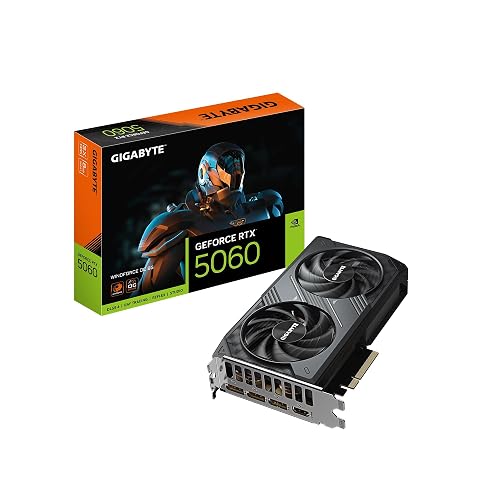 | Best 1080p Pick | GPU Class: GeForce RTX 5060 | Memory Size: 8 GB | Memory Type: GDDR7 | VIEW LATEST PRICE | Read Our Analysis |
More Details on Our Top Picks
GIGABYTE Radeon RX 9060 XT Gaming OC 16G Graphics Card
If you want smooth 1080p 144Hz gaming with extra headroom for creative work or AI tasks, the GIGABYTE Radeon RX 9060 XT Gaming OC 16G is a strong fit. It delivers AMD RDNA 4 performance, 16 GB of GDDR6 memory, and a 2.7 GHz boost clock to help you run demanding games and applications. WINDFORCE cooling, Hawk Fan, and server-grade thermal gel keep temperatures in check, and RGB lighting adds style. You also get DisplayPort and HDMI outputs, PCIe 5.0 compatibility, and support for 4K and even 8K displays when you need more versatility.
- GPU Class:Radeon RX 9060 XT
- Memory Size:16 GB
- Memory Type:GDDR6
- PCIe Interface:PCIe 5.0
- Display Outputs:DisplayPort/HDMI
- Cooling:WINDFORCE
- Additional Feature:16GB GDDR6
- Additional Feature:RGB lighting
- Additional Feature:3-year warranty
ASUS Prime GeForce RTX 5070 Graphics Card
The ASUS Prime GeForce RTX 5070 is a strong pick if you want a modern 1080p 144Hz card that balances high-end performance with broad system compatibility. It features NVIDIA Blackwell architecture, DLSS 4, and 12 GB of GDDR7 memory, so your games can run smoothly with sharp visuals. Its PCIe 5.0 interface and RTX 5070 GPU add future-ready headroom. ASUS keeps it compact with an SFF-ready, 2.5 slot design, and Axial-tech fans plus a phase-change thermal pad help keep temperatures down. HDMI, DisplayPort 2.1, and dual BIOS round out the package.
- GPU Class:GeForce RTX 5070
- Memory Size:12 GB
- Memory Type:GDDR7
- PCIe Interface:PCIe 5.0
- Display Outputs:HDMI/DisplayPort
- Cooling:Axial-tech
- Additional Feature:Blackwell architecture
- Additional Feature:DLSS 4 support
- Additional Feature:Dual BIOS
MOUGOL AMD Radeon RX 580 Gaming Graphics Card
With 8GB of Samsung GDDR5 VRAM, a 256-bit memory bus, and 2048 stream processors, the MOUGOL AMD Radeon RX 580 Gaming Graphics Card is a practical pick for gamers who want smooth 1080p play without paying for a higher-end GPU. It has a 1206 MHz core clock, dual-fan cooling, and a sturdy backplate for reliable mid-tower installs. It handles Fortnite, GTA V, Apex Legends, and Valorant well. HDMI, DisplayPort, and DVI let you run triple monitors. AMD Adrenalin support also helps with driver tuning, recording, and hardware-accelerated editing.
- GPU Class:Radeon RX 580
- Memory Size:8 GB
- Memory Type:GDDR5
- PCIe Interface:PCIe 3.0 x16
- Display Outputs:HDMI/DP/DVI
- Cooling:Dual-fan
- Additional Feature:2048 stream processors
- Additional Feature:Triple-monitor support
- Additional Feature:6-pin power
MSI GeForce GT 1030 4GB Graphics Card
MSI’s GeForce GT 1030 4GB is a low-profile, budget-friendly card for basic desktop upgrades. It is not a serious choice for high-refresh 1080p gaming. The card uses a Pascal-based NVIDIA chip, 4GB of DDR4 memory, a 64-bit memory bus, and a single fan in a compact PCIe x16 design. It boosts to 1430 MHz, supports DirectX 12, HDCP, and 4K output, and provides DisplayPort 1.4a plus HDMI 2.0b. If you only need light media playback, office work, or older games, it will be sufficient. MSI backs it with a 3-year warranty and provides driver updates.
- GPU Class:GeForce GT 1030
- Memory Size:4 GB
- Memory Type:DDR4
- PCIe Interface:PCIe x16
- Display Outputs:DisplayPort/HDMI
- Cooling:Single-fan
- Additional Feature:Low-profile design
- Additional Feature:4K UHD output
- Additional Feature:GeForce Experience support
ASRock Intel Arc B580 Challenger 12GB Graphics Card
If you want a budget-friendly card that can stretch beyond 1080p 144Hz and still give you room to grow, the ASRock Intel Arc B580 Challenger 12GB is worth a look. It uses Intel’s Arc B580 on Xe2-HPG, with 20 compute units, 160 XMX engines, and a 2740 MHz boost clock. Its 12GB GDDR6 memory, 192-bit bus, and PCIe 4.0 x8 link help at 1440p, while XeSS 2 can boost frame rates. The dual-fan cooler stays quiet with 0 dB mode, and the 650W-ready, 2-slot card offers DisplayPort 2.1 and HDMI 2.1a support.
- GPU Class:Intel Arc B580
- Memory Size:12 GB
- Memory Type:GDDR6
- PCIe Interface:PCIe 4.0 x8
- Display Outputs:3x DP + HDMI
- Cooling:Dual-fan
- Additional Feature:Intel XeSS 2
- Additional Feature:0 dB silent cooling
- Additional Feature:Metal backplate
ASUS Dual GeForce RTX 5060 8GB OC Edition
The ASUS Dual GeForce RTX 5060 8GB OC Edition is a smart pick if you want a compact, SFF-ready GPU that can still push modern 1080p games at high refresh rates. You get NVIDIA’s Blackwell RTX 5060, 8GB of fast GDDR7, and DLSS 4 for smoother frame rates. ASUS clocks it up to 2565 MHz in OC mode, and Dual Axial-tech fans plus a 2.5 slot heatsink help it stay cool. With HDMI 2.1b, three DisplayPort 2.1b outputs, and PCIe 5.0 support, it fits a modern desktop build nicely.
- GPU Class:GeForce RTX 5060
- Memory Size:8 GB
- Memory Type:GDDR7
- PCIe Interface:PCIe 5.0
- Display Outputs:HDMI + 3x DP
- Cooling:Dual Axial-tech
- Additional Feature:623 AI TOPS
- Additional Feature:SFF-ready
- Additional Feature:3-year warranty
GIGABYTE GeForce RTX 5060 WINDFORCE OC 8G Graphics Card
Need a strong 1080p 144Hz gaming card with modern features? Count on the GIGABYTE GeForce RTX 5060 WINDFORCE OC 8G, which pairs NVIDIA’s Blackwell architecture with DLSS 4, upgraded RT Cores and Tensor Cores for smoother play. Its 2512 MHz boost clock, 8 GB of GDDR7 memory and PCIe 5.0 support help you stay ready for fast-paced games. The dual-fan WINDFORCE cooler keeps temperatures in check, and DisplayPort plus HDMI outputs make setup easy. You also get a compact 7.83-inch design, a 3 year warranty and strong user feedback.
- GPU Class:GeForce RTX 5060
- Memory Size:8 GB
- Memory Type:GDDR7
- PCIe Interface:PCIe 5.0
- Display Outputs:DisplayPort/HDMI
- Cooling:WINDFORCE
- Additional Feature:128-bit memory
- Additional Feature:0.75 kg weight
- Additional Feature:3-year warranty
Factors to Consider When Choosing Graphics Cards GPUs for 1080p 144Hz
When choosing a GPU for 1080p at 144Hz, aim for hardware that reliably reaches your target frame rates without paying for unnecessary excess performance. Check VRAM capacity to ensure textures and frame buffers are handled smoothly. Confirm the card can sustain the monitor refresh rate and that it has robust cooling to maintain steady performance under load. Finally, verify your power supply has adequate capacity and the correct connectors so the system runs reliably.
Frame Rate Targets
To make the most of a 1080p 144Hz monitor, you will want a GPU that can push at least 144 average FPS, with 200+ FPS being ideal for faster input response and smoother motion in competitive games. If you play esports shooters, aim higher, often 200 to 300+ FPS, because those titles reward every extra frame. For AAA single-player games, 90 to 144 FPS at high settings usually feels great. Match your target to the settings you actually use, since dropping quality can lift performance by 30 to 60 percent in some games. Do not judge a card by averages alone; you also want strong 1% lows, ideally above 100 FPS, to keep gameplay from stuttering. At 1080p, CPU limits, background tasks, and game engine behavior often shape your real frame rate.
VRAM Capacity
VRAM deserves as much attention as raw GPU power, because running 1080p at 144Hz can still stutter if memory runs short. For modern AAA games at high settings, aim for at least 8 GB so textures stay loaded and streaming hitches stay away. If you mainly play esports titles like Valorant or CS:GO, 4 to 6 GB can work when you lower settings, but that headroom will not last forever. Texture quality, anti-aliasing, and bigger frame buffers all raise VRAM use. Some newer games can require 10 to 12 GB or more. If you use texture mods or multiple monitors, choose 10 to 12 GB for better longevity.
Refresh Rate Match
A GPU for 1080p 144Hz should be strong enough to keep your games close to 144 frames per second at the settings you actually use, whether that means high settings in esports titles or medium to high in AAA games. Don’t focus only on peak FPS; check average performance and, more importantly, 1% lows, so fast motion stays smooth and stutter free. If a game falls short, you can enable temporal upscaling or trim a few heavy settings to lift sustained frame rates without ruining image quality. Make sure your GPU plays well with your monitor’s adaptive sync support as well, because VRR, G Sync, or FreeSync can hide dips below 144Hz. Finally, verify your CPU is not the bottleneck, since a weak processor can stop even a capable GPU from reaching your target.
Cooling Efficiency
Cooling matters just as much as raw speed, because a GPU that runs hot can throttle and lose the boost clocks you need for smooth 1080p/144Hz play. You should look for cards that stay under about 85°C on the junction or edge sensor during sustained gaming. Dual or triple fan axial coolers, plus large heatsinks, heat pipes, or vapor chambers can trim core temperatures by 5 to 15°C versus simpler designs, which helps keep frame rates steady. Check for smart fan control, 0 dB, or semi-passive modes so you can balance noise and cooling. Your case matters too; front intake and rear or top exhaust fans improve airflow. Also, make sure the card seats well and uses quality thermal paste and pads.
Power Supply Needs
Even the coolest-running GPU will not deliver consistent 1080p/144Hz performance if your power setup cannot keep up. Check the card’s recommended system power, which is often 450 to 750W for modern mid to high end models, and buy a PSU with 20 to 30% extra headroom for spikes and upgrades. Make sure it has the right PCIe connectors, whether that is one 6-pin, one or two 8-pin plugs, or more, and that your cables match. Also verify +12V amperage; many GPUs can pull 15 to 30 or more amps, so weak rails can cause instability. Measure case space and cable reach so leads do not bend sharply. Finally, prefer an 80+ Bronze or better PSU in good condition, because older units may struggle to hold steady voltages during fast changing 1080p/144Hz loads.
Frequently Asked Questions
Which GPU Offers the Best Ray Tracing at 1080P 144HZ?
You’ll get the best ray tracing at 1080p 144Hz from Nvidia’s RTX 4080 Super. The RTX 4090 tops it if you can spend more, and both handle high settings, DLSS, and smooth frame rates.
How Much VRAM Is Ideal for Future-Proof 1080P Gaming?
For future-proof 1080p gaming, aim for 12 GB of VRAM. Eight GB still works today, but newer games can exceed it. If you want extra longevity, 16 GB provides more breathing room.
Do These GPUS Support AV1 Encoding for Streaming?
Not all of them do. You will find AV1 encoding on newer NVIDIA RTX 40 series and AMD RX 7000 series cards, but older GPUs usually do not. Check the exact model before you stream.
Which Card Has the Lowest Power Consumption?
You’ll usually get the lowest power draw from the RTX 4060. You can stream and game efficiently without sacrificing much performance. It sips power, runs cool, and keeps your system quieter overall.
Can These GPUS Handle Dual-Monitor Gaming Setups?
Yes, you can run dual-monitor gaming setups, but it requires planning. Typically you will game smoothly on one screen while the other handles chat, streams, or monitoring, provided your GPU has enough outputs and horsepower.




