


If you are shopping for an Nvidia GPU right now, the choice is not as simple as picking the fastest card on paper. You should balance power, size, cooling, and the type of work or games you actually run.
From quiet entry-level picks like the GT 1030 and GT 710 to serious options like the RTX 5070 and 5070 Ti, the right fit depends on a few details that can change everything.
| ASUS GeForce GT 1030 2GB GDDR5 HDMI DVI Graphics Card (GT1030-2G-CSM) | 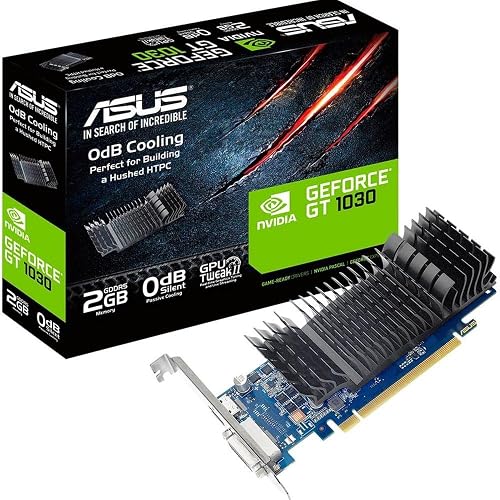 | Budget HTPC Pick | GPU Model: GeForce GT 1030 | Memory: 2GB GDDR5 | Form Factor: Low profile | VIEW LATEST PRICE | Read Our Analysis |
| maxsun GeForce GT 710 Low Profile Graphics Card | 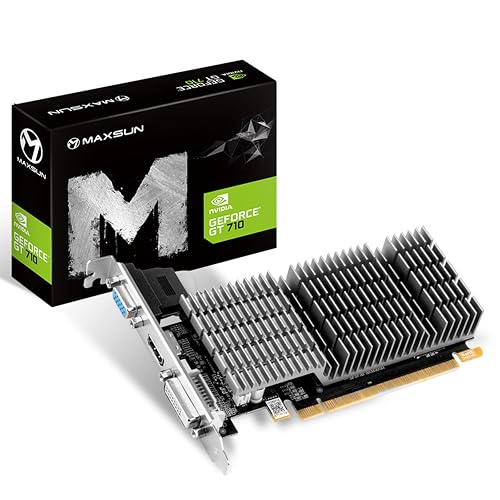 | Ultra Budget | GPU Model: GeForce GT 710 | Memory: 2GB GDDR3 | Form Factor: Low profile | VIEW LATEST PRICE | Read Our Analysis |
| PNY NVIDIA GeForce RTX 5070 Epic-X ARGB OC Graphics Card |  | Best Performance | GPU Model: GeForce RTX 5070 | Memory: 12GB GDDR7 | Form Factor: SFF-ready | VIEW LATEST PRICE | Read Our Analysis |
| PNY NVIDIA GeForce RTX 5070 Slim Graphics Card | 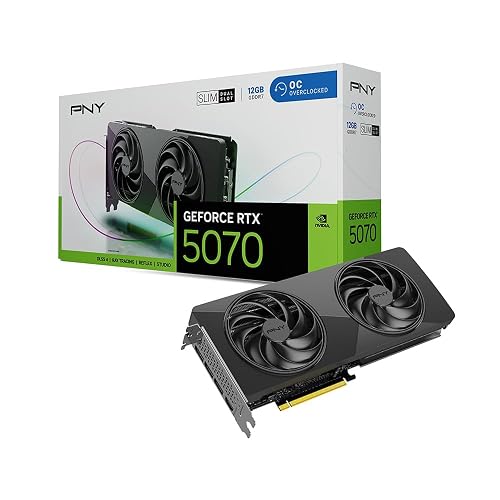 | Best Compact | GPU Model: GeForce RTX 5070 | Memory: 12GB GDDR7 | Form Factor: Slim, dual-slot | VIEW LATEST PRICE | Read Our Analysis |
| ASUS Prime GeForce RTX 5070 Graphics Card |  | Best Overall | GPU Model: GeForce RTX 5070 | Memory: 12GB GDDR7 | Form Factor: SFF-ready, 2.5-slot | VIEW LATEST PRICE | Read Our Analysis |
| ASUS TUF GeForce RTX 5070 Ti Graphics Card |  | Best High-End | GPU Model: GeForce RTX 5070 Ti | Memory: 16GB GDDR7 | Form Factor: 3.125-slot | VIEW LATEST PRICE | Read Our Analysis |
| MSI GeForce GT 1030 4GB Graphics Card |  | Best Entry-Level | GPU Model: GeForce GT 1030 | Memory: 4GB DDR4 | Form Factor: Low-profile | VIEW LATEST PRICE | Read Our Analysis |
More Details on Our Top Picks
ASUS GeForce GT 1030 2GB GDDR5 HDMI DVI Graphics Card (GT1030-2G-CSM)
If you are building a compact, quiet PC and still want an Nvidia-powered card, the ASUS GeForce GT 1030 2GB GDDR5 is a smart fit. It provides Pascal-based graphics, 2GB of GDDR5 memory, and a 1506 MHz boost clock in a low-profile design that fits smaller systems. ASUS pairs HDMI and DVI outputs with a passive heatsink, allowing you to keep noise down for HTPC or media use. Auto-Extreme production and Super Alloy Power II components add reliability. You can also tune performance with GPU Tweak II, Game Booster, and XSplit Gamecaster.
- GPU Model:GeForce GT 1030
- Memory:2GB GDDR5
- Form Factor:Low profile
- Cooling:Passive heatsink
- Video Outputs:HDMI, DVI
- PCIe:PCIe x16
- Additional Feature:Passive cooling
- Additional Feature:Auto-Extreme manufacturing
- Additional Feature:Super Alloy Power II
maxsun GeForce GT 710 Low Profile Graphics Card
The maxsun GeForce GT 710 2GB Low Profile is a smart pick for Nvidia fans who need a compact, quiet card for basic gaming, office work, or media playback. It features a fanless design with a large heatsink, so it runs silently and helps keep temperatures down. Its 2GB GDDR3 memory and HDMI, DVI-D, and VGA outputs give you flexible setup options. HDCP and multi-screen support add convenience. You can install it in ITX, SFF, or slim desktops. The card fits PCIe x16 and x8 slots, making upgrading easy. It also supports DirectX 12, OpenGL 4.5, CUDA, and PhysX.
- GPU Model:GeForce GT 710
- Memory:2GB GDDR3
- Form Factor:Low profile
- Cooling:Passive heatsink
- Video Outputs:HDMI, DVI-D, VGA
- PCIe:PCIe x16/x8
- Additional Feature:HDCP support
- Additional Feature:Multi-screen support
- Additional Feature:CUDA support
PNY NVIDIA GeForce RTX 5070 Epic-X ARGB OC Graphics Card
With 12GB of GDDR7 memory, Blackwell architecture, and triple-fan ARGB cooling, the PNY NVIDIA GeForce RTX 5070 Epic-X ARGB OC is a strong choice for Nvidia fans who want a modern, factory-overclocked card that can handle high-refresh 1440p gaming and light creative work. It delivers 2685 MHz boost speeds, a 192-bit bus, PCIe 5.0 support, and HDMI and DisplayPort 2.1 outputs. Its 2.4-slot, SFF-ready design helps with compatibility, and DLSS and Reflex improve responsiveness. Fifth-generation Tensor Cores, fourth-generation ray tracing, and Studio drivers also support AI and creative workflows.
- GPU Model:GeForce RTX 5070
- Memory:12GB GDDR7
- Form Factor:SFF-ready
- Cooling:Triple fan
- Video Outputs:HDMI, DisplayPort 2.1
- PCIe:PCIe 5.0
- Additional Feature:ARGB lighting
- Additional Feature:Fifth-Gen Tensor Cores
- Additional Feature:NVIDIA Studio drivers
PNY NVIDIA GeForce RTX 5070 Slim Graphics Card
PNY’s NVIDIA GeForce RTX 5070 Slim is a smart pick for Nvidia fans who want modern Blackwell performance in a compact, SFF-ready card. It includes 12GB of GDDR7 memory, a 192-bit bus, PCIe 5.0 support, and HDMI plus DisplayPort 2.1 outputs, so you can drive up to 8K displays. The factory overclock boosts clocks to 2,587 MHz. DLSS 4.5 and AI acceleration improve gaming and creative workloads. You also get dual 100 mm fans, a metal backplate, Studio driver support, and VelocityX tuning.
- GPU Model:GeForce RTX 5070
- Memory:12GB GDDR7
- Form Factor:Slim, dual-slot
- Cooling:Dual fan
- Video Outputs:HDMI, DisplayPort 2.1
- PCIe:PCIe 5.0
- Additional Feature:Dual 100mm fans
- Additional Feature:Metal backplate
- Additional Feature:VelocityX software
ASUS Prime GeForce RTX 5070 Graphics Card
If you want an Nvidia-first upgrade that fits a smaller build without giving up modern features, the ASUS Prime GeForce RTX 5070 SFF-Ready is a strong pick. You get NVIDIA’s Blackwell-powered RTX 5070 with 12 GB of fast GDDR7 memory, DLSS 4, and PCIe 5.0 support. ASUS keeps it practical with a 2.5 slot design, Dual BIOS, and three Axial-tech fans that push air harder through the shroud and heatsink. You also get HDMI 2.1b, three DisplayPort 2.1b outputs, and support for up to 8K displays in gaming, work, or office builds.
- GPU Model:GeForce RTX 5070
- Memory:12GB GDDR7
- Form Factor:SFF-ready, 2.5-slot
- Cooling:Triple fan
- Video Outputs:HDMI 2.1b, DisplayPort 2.1b
- PCIe:PCIe 5.0
- Additional Feature:Dual BIOS
- Additional Feature:Phase-change thermal pad
- Additional Feature:Three Axial-tech fans
ASUS TUF GeForce RTX 5070 Ti Graphics Card
ASUS TUF GeForce RTX 5070 Ti is a strong pick for Nvidia fans who want cutting-edge performance without sacrificing durability. It features NVIDIA Blackwell architecture, DLSS 4 support, 16GB of GDDR7 memory, and boost clocks up to 2610 MHz in OC mode. The PCIe 5.0 card includes HDMI and DisplayPort 2.1 outputs for modern displays. Its 3.125 slot cooler uses three Axial-tech fans, a massive fin array, and a phase change thermal pad to keep temperatures in check. Military grade components, Auto-Extreme build quality, and GPU Tweak III help you tune, monitor, and trust the card.
- GPU Model:GeForce RTX 5070 Ti
- Memory:16GB GDDR7
- Form Factor:3.125-slot
- Cooling:Triple fan
- Video Outputs:HDMI, DisplayPort 2.1
- PCIe:PCIe 5.0
- Additional Feature:Protective PCB coating
- Additional Feature:Military-grade components
- Additional Feature:GPU Tweak III
MSI GeForce GT 1030 4GB Graphics Card
The MSI GeForce GT 1030 4GB is a practical choice if you want an NVIDIA-based card that fits into a compact desktop without much fuss. It has a low-profile, single-fan design, a 1430 MHz boost clock, and 4GB of DDR4 memory on a 64-bit bus. The card includes DisplayPort 1.4a and HDMI 2.0b, so you can drive a 4K display with ease. You also get DirectX 12, HDCP support, and GeForce Experience for driver updates and tuning. With MSI’s 3-year warranty, it is a sensible option for light gaming, video playback, and basic editing.
- GPU Model:GeForce GT 1030
- Memory:4GB DDR4
- Form Factor:Low-profile
- Cooling:Single fan
- Video Outputs:DisplayPort, HDMI 2.0b
- PCIe:PCIe x16
- Additional Feature:GeForce Experience
- Additional Feature:4K UHD support
- Additional Feature:One-fan design
Factors to Consider When Choosing Graphics Cards GPUs Brand for Nvidia
When choosing an Nvidia graphics card brand, compare GPU architecture because it affects performance and feature support. Make sure the card has sufficient memory, effective cooling, and good power efficiency, so it operates reliably in your system. Also verify the output ports, as proper connectivity simplifies setup and preserves your display options.
GPU Architecture
GPU architecture is one of the biggest factors to weigh when choosing an Nvidia graphics card, because it shapes everything from raw shader performance and ray tracing to AI features and power efficiency. Look at how the shader or SM layout handles parallel work, since that affects game and creator workloads. Newer generations can add hardware ray tracing, tensor cores, and mesh engines, which enable DLSS-style upscaling and faster lighting effects. Also note the memory subsystem built into the architecture, including bus width and cache design, because it changes bandwidth behavior. Finally, check software support. Architecture generation determines API compatibility, CUDA capabilities, driver features, and how well the card scales at different clocks.
Memory Capacity
Beyond architecture, pay close attention to memory capacity, since VRAM can make or break how well an Nvidia card handles modern games and creative work. If you play at 1080p, 4 to 6 GB often gets the job done. 1440p really benefits from 8 to 12 GB, and 4K or demanding creation tasks usually need 12 GB or more. More VRAM lets you keep larger textures and framebuffers on the card, which cuts texture streaming and reduces stutter. You should also consider memory type and bandwidth, because GDDR6 or GDDR7 with a wider bus can move data faster in memory bound scenes. If you skimp here, the GPU may spill into system RAM or storage, causing big frame time spikes. Choosing extra headroom now helps you stay ready for future updates.
Cooling Design
Cooling design matters just as much as raw specs, because it affects how long your Nvidia card can sustain boost clocks without turning your case into an oven. Look at the cooler type first. Dual or tri-fan open-air models usually push more air through the heatsink, while blower cards dump hot air out of the case. Check the heatsink too, since more fins, thicker metal, and extra heat pipes usually move heat away faster. Slot width matters as well; a 2.5 slot card often cools better than a slim 1.5 slot model, but it needs more room. If you want silence, passive cards can work, though they rely on strong case airflow. Quality TIM, vapor chambers, and backplates can also reduce temperatures and limit throttling.
Power Efficiency
Power efficiency matters because it indicates how much performance you get for every watt your Nvidia card consumes. Check GPU TDP first, since it provides a practical idea of typical power draw under load. Then compare performance per watt, for example frames per second or TFLOPS divided by TDP, to identify cards that do more work without wasting power. Newer architectures and smaller process nodes generally deliver better efficiency, because they extract more performance from less energy. Do not ignore memory, either; GDDR6 or GDDR7 can handle bandwidth heavy tasks with less overhead than older standards. Finally, look for dynamic clock scaling, low power idle states, and intelligent driver power profiles, since these features reduce consumption when you are not gaming hard.
Output Connectivity
After checking efficiency, make sure the card’s output ports fit how you actually use your display setup. Match HDMI 2.1, DisplayPort 2.1, DVI, or VGA to your monitor’s inputs, or plan on active adapters if the card omits legacy connectors. Check each port’s resolution and refresh limits so you know it can deliver 4K at 120 Hz or 8K at 60 Hz when required. If you run multiple screens, confirm how many displays the GPU supports simultaneously and whether every connector remains usable together. Also verify HDR, HDCP, and audio-over-HDMI support if you watch protected content or want richer audio and video. If your build is compact, ensure port spacing and layout align with your case and cables.
Form Factor
Form factor matters because even a great Nvidia GPU is a bad fit if it does not physically work in your case. Check the card’s slot width first, since single, dual, and 2.5, 3+ slot designs can crowd nearby PCIe slots, block connectors, and restrict airflow. Next, compare the GPU’s length and height with your case’s clearance and side ventilation cutouts so installation goes smoothly. If you are building in a small form factor or low profile system, choose a compact card with the right bracket and cooler size. Also confirm the power connector layout and make sure your PSU cables can reach without bending sharply. Finally, consider cooler thickness and fan placement, because bulky heatsinks can squeeze components and raise temperatures.
Software Features
Software features can make an Nvidia graphics card feel faster and easier to live with, so check more than raw specs. Look at the driver ecosystem first. Game Ready and Studio branches should receive frequent updates, useful fixes, and optimizations that match how you play or create. Then inspect the tuning suite. You want fan and power curve control, clock adjustments, temperature monitoring, and simple performance presets that help you test stability without guesswork. Also check for AI upscaling and denoising tools that use dedicated cores to boost frame rates and sharpen images. If you stream or record, built-in capture tools and hardware encoding can reduce CPU load. Finally, confirm OS, API, and codec support so your GPU software stack actually fits your workflow.
Warranty Coverage
Once you’ve checked the software side, warranty coverage is the next brand factor that can save you trouble later. You should compare how long each GPU’s warranty lasts, since consumer cards usually get one to three years of parts and labor coverage. Then verify exactly what’s included, most brands cover manufacturing defects and component failures, but they often exclude physical damage, overclocking related failures, and cosmetic wear. Make sure you know whether the warranty follows the card if you sell it, and whether you must register it first. You’ll also want to review the RMA process, shipping costs, turnaround times, and whether the company offers cross ships or charges diagnostics. Finally, check for separate accessory coverage and extra protection plans.
Frequently Asked Questions
Which Nvidia GPU Suits 1080P Gaming Best?
You’ll get the best 1080p gaming balance with an Nvidia GeForce RTX 4060. It handles modern games smoothly, uses little power, and gives you room for high settings without overpaying.
Do RTX 5070 Cards Support DLSS 4?
Yes. RTX 5070 cards can use DLSS 4 if NVIDIA enables it in drivers and if the game supports it. You will get the latest frame generation and upscaling features, though exact availability will vary by title.
Are Low-Profile GPUS Good for Compact PCS?
Like a tailor-made glove, yes, you can use low-profile GPUs in compact PCs when space is tight. You will get easier fitting, lower power draw, and solid everyday performance, but you will sacrifice some gaming muscle.
How Much Power Do These Nvidia Cards Require?
You will typically need 450 to 750 watts, depending on the card. Check the GPU manufacturer’s recommended PSU, since higher-end NVIDIA models can draw 200 to 450 watts, and your CPU, drives, and cooling also consume power.
Which Card Offers the Quietest Cooling?
You will usually get the quietest cooling from larger triple-fan cards; they can stay under 35 dB in many tests. Choose an MSI, ASUS, or Gigabyte model with a big heatsink and a low RPM fan mode.




