


If you are building a mining rig, choose GPUs that balance hash performance, power consumption, and resale value. The right card can lower electricity costs and keep your setup flexible as algorithms change.
Options range from budget picks to efficient midrange models, each standing out for different reasons. Determining which ones pay off over time requires attention to the details.
| ASRock H110 Pro BTC+ 13GPU Mining Motherboard Cryptocurrency | 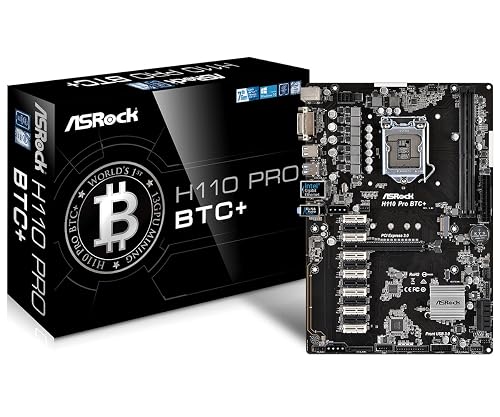 | Best Mining Motherboard | Product Type: Mining motherboard | PCIe Interface: PCIe slots | Cryptocurrency Use: Dedicated mining | VIEW LATEST PRICE | Read Our Analysis |
| GIGABYTE Radeon RX 9060 XT Gaming OC 16G Graphics Card |  | Best High-End GPU | Product Type: Graphics card | PCIe Interface: PCIe x16 | Cryptocurrency Use: Mining-friendly | VIEW LATEST PRICE | Read Our Analysis |
| MOUGOL Radeon RX 580 8GB Gaming Graphics Card |  | Budget Mining GPU | Product Type: Graphics card | PCIe Interface: PCIe 3.0 x16 | Cryptocurrency Use: Mining-capable | VIEW LATEST PRICE | Read Our Analysis |
| TB360-BTC PRO 2.0 Mining Motherboard for Intel CPUs | 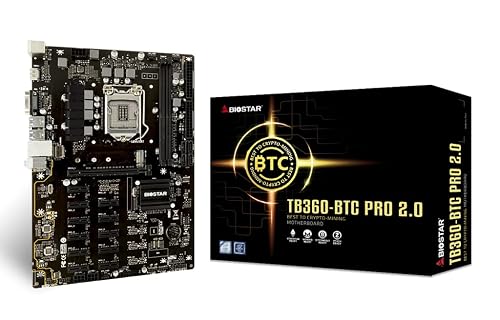 | Best 12-GPU Board | Product Type: Mining motherboard | PCIe Interface: PCIe slots | Cryptocurrency Use: Dedicated mining | VIEW LATEST PRICE | Read Our Analysis |
| MSI GeForce GT 1030 4GB Graphics Card (GT 1030 4GD4 LP OC) |  | Best Low-Profile GPU | Product Type: Graphics card | PCIe Interface: PCIe x16 | Cryptocurrency Use: Mining-capable | VIEW LATEST PRICE | Read Our Analysis |
| ASRock Intel Arc B580 Challenger 12GB Graphics Card |  | Best Modern GPU | Product Type: Graphics card | PCIe Interface: PCIe 4.0 x8 | Cryptocurrency Use: Mining-capable | VIEW LATEST PRICE | Read Our Analysis |
| JSER PCI-E Mining Extender Riser Adapter with USB 3.0 |  | Best Mining Riser | Product Type: Mining riser adapter | PCIe Interface: PCI-E 1x to 16x | Cryptocurrency Use: Mining riser | VIEW LATEST PRICE | Read Our Analysis |
More Details on Our Top Picks
ASRock H110 Pro BTC+ 13GPU Mining Motherboard Cryptocurrency
If you are building a serious mining rig, the ASRock H110 Pro BTC+ is a strong choice because it is designed for cryptocurrency GPU mining and supports up to 13 graphics cards. It offers one PCIe 3.0 x16 slot and twelve PCIe 2.0 x1 slots, and it uses the Intel H110 chipset with LGA 1151 support for 6th and 7th generation Intel Core, Pentium, and Celeron CPUs. It also supports DDR4 memory up to 32 GB, includes four SATA3 ports and one M.2 slot, provides seven USB ports, and uses a 24-pin power connector.
- Product Type:Mining motherboard
- PCIe Interface:PCIe slots
- Cryptocurrency Use:Dedicated mining
- Display Outputs:Not listed
- Power Connector:24-pin
- Cooling:Not listed
- Additional Feature:13 PCIe slots
- Additional Feature:LGA 1151 socket
- Additional Feature:32 GB max RAM
GIGABYTE Radeon RX 9060 XT Gaming OC 16G Graphics Card
The GIGABYTE Radeon RX 9060 XT Gaming OC 16G is a strong choice for miners who want a modern AMD RDNA 4 card with 16GB of GDDR6 memory, high 2700 MHz boost clocks, and efficient PCIe 5.0-ready support in a desktop build. You will also get a 20,000 MHz memory speed, DisplayPort and HDMI outputs, and support for 8K-capable displays if you use it beyond mining. The WINDFORCE cooler, Hawk fan, and server-grade thermal gel help manage heat during long runs. It is a dedicated GPU built for steady performance, and it is backed by GIGABYTE’s 3-year warranty.
- Product Type:Graphics card
- PCIe Interface:PCIe x16
- Cryptocurrency Use:Mining-friendly
- Display Outputs:DisplayPort/HDMI
- Power Connector:Not listed
- Cooling:WINDFORCE
- Additional Feature:16GB GDDR6 memory
- Additional Feature:RDNA 4 architecture
- Additional Feature:3-year warranty
MOUGOL Radeon RX 580 8GB Gaming Graphics Card
MOUGOL’s Radeon RX 580 8GB Gaming Graphics Card suits miners and budget builders who want solid 1080p performance while retaining useful headroom. It includes 8GB Samsung GDDR5 on a 256-bit bus, 2048 stream processors, and a 1206 MHz core clock for steady throughput. The dual-fan cooler, heat pipes, and smart fan control help keep temperatures in check and remain quiet at idle. You can connect HDMI, DisplayPort, and DVI displays, run triple monitors, and fit it into ATX or Micro-ATX builds using a single 6-pin power plug.
- Product Type:Graphics card
- PCIe Interface:PCIe 3.0 x16
- Cryptocurrency Use:Mining-capable
- Display Outputs:HDMI/DP/DVI
- Power Connector:6-pin
- Cooling:Dual-fan
- Additional Feature:2048 stream processors
- Additional Feature:256-bit memory bus
- Additional Feature:Triple-monitor support
TB360-BTC PRO 2.0 Mining Motherboard for Intel CPUs
Biostar’s TB360-BTC PRO 2.0 is a smart pick when you’re building a 12 GPU mining rig around Intel 8th or 9th gen LGA1151 CPUs with integrated graphics. You get an Intel B360 board with 12 PCIe 3.0 slots, but you will need to adjust BIOS settings to enable full GPU support. It runs DDR4 in dual channel mode, up to 32 GB, and includes four SATA 3 ports plus M.2 SATA III storage. With HDMI, USB 2.0, Ethernet, and a 24 pin power connector, it fits a Windows 10 mining setup.
- Product Type:Mining motherboard
- PCIe Interface:PCIe slots
- Cryptocurrency Use:Dedicated mining
- Display Outputs:HDMI
- Power Connector:24-pin
- Cooling:Not listed
- Additional Feature:12 GPU support
- Additional Feature:Intel B360 chipset
- Additional Feature:Dual-channel DDR4
MSI GeForce GT 1030 4GB Graphics Card (GT 1030 4GD4 LP OC)
MSI’s GeForce GT 1030 4GB DDR4 low-profile card is a smart pick if you want a compact, low-power option for light crypto mining or a budget desktop build, and it also handles everyday tasks well. It uses NVIDIA’s Pascal-based GT 1030 with a 1430 MHz boost, 4GB of DDR4, and a single-fan cooler that fits tight cases. The card supports DirectX 12, HDCP, 4K output, plus DisplayPort and HDMI. Install it easily in a PCIe x16 desktop, then use GeForce Experience for updates. With a 3-year warranty, it is a practical, affordable card.
- Product Type:Graphics card
- PCIe Interface:PCIe x16
- Cryptocurrency Use:Mining-capable
- Display Outputs:DisplayPort/HDMI
- Power Connector:Not listed
- Cooling:Single-fan
- Additional Feature:Low-profile design
- Additional Feature:4K UHD output
- Additional Feature:HDCP support
ASRock Intel Arc B580 Challenger 12GB Graphics Card
If you want a modern card that balances solid efficiency with enough memory headroom for mining and other GPU-heavy tasks, the ASRock Intel Arc B580 Challenger 12GB is worth a look. It uses Intel’s Arc B580 GPU on Xe2-HPG with 20 compute units and 160 XMX engines, and includes 12GB of GDDR6 on a 192-bit bus. Its 2740 MHz boost and PCIe 4.0 x8 interface keep throughput strong. Dual axial fans, a 0 dB mode, and a metal backplate support cooler, quieter running. Confirm your case and a 650W PSU fit before you buy.
- Product Type:Graphics card
- PCIe Interface:PCIe 4.0 x8
- Cryptocurrency Use:Mining-capable
- Display Outputs:DisplayPort/HDMI
- Power Connector:8-pin
- Cooling:Dual-fan
- Additional Feature:Xe2-HPG architecture
- Additional Feature:Intel XeSS 2
- Additional Feature:650W PSU recommended
JSER PCI-E Mining Extender Riser Adapter with USB 3.0
The JSER PCI-E 1x to 16x Mining Machine Enhanced Extender Riser Adapter with USB 3.0 and 6‑pin power cable is a solid choice for building a multi-GPU mining rig when you need a stable, easy-to-manage connection for your cards. It supports PCI-E 1x, 4x, 8x and 16x GPUs, and the 60 cm USB 3.0 cable allows flexible placement. The SATA 15-pin to 6-pin power cable shifts GPU power off the motherboard, and four FP solid capacitors improve stability. The lockable 16x slot helps keep your card secure.
- Product Type:Mining riser adapter
- PCIe Interface:PCI-E 1x to 16x
- Cryptocurrency Use:Mining riser
- Display Outputs:Not listed
- Power Connector:6-pin/SATA
- Cooling:Not listed
- Additional Feature:USB 3.0 cable
- Additional Feature:60 cm length
- Additional Feature:4 solid capacitors
Factors to Consider When Choosing Graphics Cards GPUs For Mining Cryptocurrency
When selecting a GPU for mining, balance hash rate efficiency with memory capacity so you achieve strong output without wasting resources. Monitor power consumption and cooling performance, since both affect long term costs and system stability. Finally, confirm the card is compatible with your motherboard to ensure the mining rig runs smoothly.
Hash Rate Efficiency
Hash rate is the first number you should check, because it shows how many cryptographic hashes a GPU can compute per second and directly affects mining output. You will see it listed in MH/s, GH/s, or TH/s, depending on the coin’s algorithm. Do not stop there. Hash rate per watt tells you how much work you get for each unit of power, and that is what protects your profit when electricity bills hit. For memory hard coins, bandwidth and VRAM can lift and stabilize your hash rate. You should also tune core clock, memory clock, power limits, and drivers, since smart overclocking often boosts MH/s per W. Always compare GPUs on the same algorithm and settings, or benchmark numbers will not mean much.
Memory Capacity Needs
VRAM matters because memory-heavy mining algorithms depend on large datasets, and if your card runs out of video memory, you will see stale shares, invalid shares, or the miner will not load the DAG at all. You should target at least 6 to 8 GB for current mining, and 12 to 16+ GB if you want longer usefulness as DAGs grow. Some algorithms stay comfortable on 4 GB because they are compute-bound, but memory-hard coins can outgrow that quickly, so check each algorithm’s DAG trend before you buy. Keep a safe margin of about 5 to 10 percent above the dataset size, or you will hit errors. Also consider bandwidth, a wider bus and fast GDDR6 can boost throughput. For multi-GPU rigs, use similar VRAM sizes to keep setup simple.
Power Consumption
After you check memory size, power draw is the next big number to watch because it directly affects mining profit. Compare each GPU’s wattage to its hash rate, since a higher H/W ratio usually means better long-term returns. Don’t look only at peak numbers, though; idle draw can still be 10% to 30% of full load, and that adds up quickly in a multi-GPU rig. Factor in your power supply’s 80 PLUS efficiency as well, because losses can push total system use 5% to 15% higher than the GPU alone suggests. Finally, keep temperatures under control, since hotter cards can pull more power and downclock, hurting sustained efficiency.
Cooling Performance
When you mine around the clock, cooling performance matters as much as raw hash rate, because sustained workloads turn every GPU into a constant heat source. Favor cards with multi-fan coolers, large heatsinks, and directed airflow that can dump several hundred watts per card without pushing core temperatures past 80 to 85°C. Do not ignore VRAM cooling, since memory chips often become the weak point; better thermal pads and lower junction temperatures help cut errors and extend life. Also check your rig’s intake and exhaust, because good airflow can drop temperatures by 10 to 20°C and reduce fan speed and power draw. Aim for a 60 to 70°C operating range, then balance RPM, noise, wear, and maintenance so the card stays stable long term.
Motherboard Compatibility
Motherboard compatibility can make or break a mining rig, because even the fastest GPU is useless if the board cannot support enough cards or keep them stable. Verify that the board offers enough PCIe slots in the right mix for your planned GPU count, and that its CPU socket and chipset support the BIOS features your mining setup needs. Check that your OS and drivers work with the platform as well. Make sure the board has solid 24-pin and auxiliary power support, and clean power delivery for multi-GPU use. Ensure there is enough physical spacing for card length, risers, and airflow. Finally, look for BIOS options and documented mining support to reduce setup headaches and keep your rig running reliably.
PCIe Slot Support
PCIe slot support is the next thing to verify, because your motherboard may fit the rig on paper but still limit how many GPUs you can actually run. You need enough physical slots and PCIe lanes for every card you plan to mine with, whether you use x16, x8, x4, or x1 connections. Check the PCIe version, but do not overpay for bandwidth you will not use; most mining workloads perform about the same on PCIe 2.0, 3.0, or newer links. If you are using risers, make sure the board handles multiple downstream devices cleanly in BIOS, and will not share lanes in a way that blocks GPUs. Also confirm power delivery, connector layout, and slot spacing so you can avoid hot, cramped cards.
Driver Stability
Driver stability matters because a mining rig must run for days or weeks at a time. Favor GPUs with strong long-term Linux and Windows support, frequent bug-fix updates, and a proven record of reliable hash rates under sustained load. Check that the driver changelog focuses on compute or kernel fixes, not just gaming tweaks. Make sure your mining software and OS kernel match the driver build you plan to use, since mismatches can trigger rejected shares or runtime errors. Watch for reports of DAG failures, GPU hangs, or bad fan and temperature readings on specific versions. In production, stick with proven drivers and test updates on one rig first. Track hash rate, errors, and uptime so you can roll back quickly if needed.
Resale Value
Resale value matters because the GPU you buy for mining should still be easy to sell when you upgrade or exit the market. You will usually get more back from cards built on newer architectures with larger VRAM, since they remain useful for evolving algorithms and other workloads. Popular models with broad driver support and proven hashrates often fetch better used prices because buyers trust their performance. Avoid units that run hot, use too much power, or show heavy overclocking damage, because those signs make buyers expect a shorter lifespan. Keep in mind that crypto prices and protocol changes can quickly shrink demand. If possible, keep the box, warranty paperwork, and extras, such as adapters or risers, because they lower buyer risk and help you ask for a higher price.
Frequently Asked Questions
Which Cryptocurrencies Are Most Profitable for GPU Mining?
Ethereum Classic, Ravencoin, Flux, and Ergo often pay best for GPU mining, though profitability changes quickly. Check network difficulty, coin price, and your electricity costs before choosing what to mine.
How Much Electricity Does GPU Mining Usually Consume?
You’ll usually consume about 100 to 350 watts per GPU, so a rig can draw 0.1 to 3 kWh per hour. Bigger cards use more, and your total depends on overclocking, efficiency, and uptime.
Can I Mine With a Regular Gaming PC Safely?
Yes, you can mine with a regular gaming PC safely if you monitor temperatures, set power limits, and keep dust under control. You should not expect nonstop mining, though. Heat buildup, component wear, and unstable power can shorten your hardware’s life.
How Often Should Mining GPUS Be Maintained?
A stitch in time saves nine. You should maintain your mining GPUs every 1 to 3 months. Clean dust, check fans, replace thermal paste if needed, and monitor temperatures to keep them running efficiently and safely.
Does GPU Mining Still Make Money in 2026?
You can still make money mining with a GPU in 2026, but only if you have cheap power, efficient hardware, and careful coin selection. Otherwise your profits will likely shrink or disappear quickly.




