


You might not realize that sim racing often stresses a GPU more than many flat-screen games, especially when you run multiple monitors or VR.
That means the right card is not just about raw speed; it is about VRAM, cooling, and display outputs too.
From budget picks to high-end options, the seven cards ahead cover very different setups, and one of them could fit your rig better than you expect.
| ASUS GeForce GT 1030 2GB GDDR5 HDMI DVI Graphics Card (GT1030-2G-CSM) | 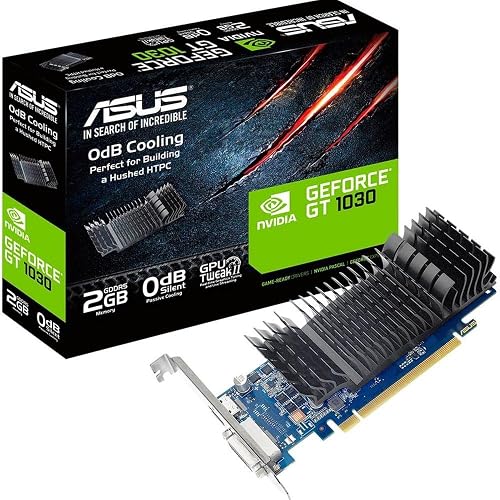 | Budget Pick | GPU Architecture: Pascal | Video Memory: 2 GB GDDR5 | Interface: PCIe | VIEW LATEST PRICE | Read Our Analysis |
| GIGABYTE Radeon RX 9060 XT Gaming OC 16G Graphics Card |  | Best for 4K | GPU Architecture: RDNA 4 | Video Memory: 16 GB GDDR6 | Interface: PCIe x16 | VIEW LATEST PRICE | Read Our Analysis |
| PNY NVIDIA GeForce RTX 5070 Epic-X ARGB OC Graphics Card |  | Best Overall | GPU Architecture: Blackwell | Video Memory: 12 GB GDDR7 | Interface: PCIe 5.0 x16 | VIEW LATEST PRICE | Read Our Analysis |
| ASUS Prime GeForce RTX 5070 Graphics Card |  | Best SFF | GPU Architecture: Blackwell | Video Memory: 12 GB GDDR7 | Interface: PCIe 5.0 x16 | VIEW LATEST PRICE | Read Our Analysis |
| MOUGOL Radeon RX 580 8GB Gaming Graphics Card |  | Budget Performer | GPU Architecture: Radeon RX 580 | Video Memory: 8 GB GDDR5 | Interface: PCIe 3.0 x16 | VIEW LATEST PRICE | Read Our Analysis |
| ASUS TUF GeForce RTX 5070 Ti Graphics Card |  | Premium Pick | GPU Architecture: Blackwell | Video Memory: 16 GB GDDR7 | Interface: PCIe 5.0 | VIEW LATEST PRICE | Read Our Analysis |
| ASRock Intel Arc B580 Challenger 12GB Graphics Card |  | Best Midrange | GPU Architecture: Xe2-HPG | Video Memory: 12 GB GDDR6 | Interface: PCIe 4.0 x8 | VIEW LATEST PRICE | Read Our Analysis |
More Details on Our Top Picks
ASUS GeForce GT 1030 2GB GDDR5 HDMI DVI Graphics Card (GT1030-2G-CSM)
If you are building a budget sim racing rig and just need a reliable card to get you on track, the ASUS GeForce GT 1030 2GB GDDR5 is a solid pick. It features a Pascal-based GPU with 2GB of GDDR5 memory, and HDMI and DVI outputs for simple monitor setups. Its low-profile design fits compact desktops, and the quiet cooling keeps noise down when you also use the rig for media. You will not push max settings, but you can handle lighter racing titles well. ASUS backs the card with Auto-Extreme build quality, Super Alloy Power II components, and a three year warranty.
- GPU Architecture:Pascal
- Video Memory:2 GB GDDR5
- Interface:PCIe
- Max Resolution:1920 x 1200
- Cooling:Single-fan passive
- Desktop Use:Desktop
- Additional Feature:Low profile form factor
- Additional Feature:Passive cooling emphasis
- Additional Feature:GPU Tweak II
GIGABYTE Radeon RX 9060 XT Gaming OC 16G Graphics Card
The GIGABYTE Radeon RX 9060 XT Gaming OC 16G is an excellent choice for sim racers who want smooth high-resolution gameplay and room to grow, thanks to 16GB of GDDR6 memory, a fast 2,700 MHz GPU clock, and AMD RDNA 4 architecture. It delivers strong 4K racing support, up to 7,680 x 4,320 output, and a PCIe 5.0-ready x16 interface. GIGABYTE WINDFORCE cooling, Hawk Fan, and server-grade thermal gel help keep temperatures in check during long sessions. HDMI and DisplayPort outputs, RGB lighting, and a 3-year warranty round out this capable desktop card.
- GPU Architecture:RDNA 4
- Video Memory:16 GB GDDR6
- Interface:PCIe x16
- Max Resolution:7680 x 4320
- Cooling:WINDFORCE fan
- Desktop Use:Desktop
- Additional Feature:WINDFORCE cooling system
- Additional Feature:RGB lighting
- Additional Feature:Server-grade thermal gel
PNY NVIDIA GeForce RTX 5070 Epic-X ARGB OC Graphics Card
Built for sim racers who want sharp 1440p or 4K visuals with plenty of headroom, the PNY NVIDIA GeForce RTX 5070 Epic-X ARGB OC Triple Fan delivers 6,144 CUDA cores, 12 GB of fast GDDR7 memory, and DLSS 4 to help keep frame rates high and latency low. You also get DisplayPort 2.1b outputs, HDMI 2.1b, and support for up to four displays, so you can run a cockpit setup with ease. Its triple-fan ARGB cooler and 250 W design fit modern builds, and Reflex and Blackwell features keep your racing responsive and smooth.
- GPU Architecture:Blackwell
- Video Memory:12 GB GDDR7
- Interface:PCIe 5.0 x16
- Max Resolution:7680 x 4320
- Cooling:Triple-fan
- Desktop Use:Desktop
- Additional Feature:DLSS 4 support
- Additional Feature:16-pin adapter included
- Additional Feature:ARGB triple-fan design
ASUS Prime GeForce RTX 5070 Graphics Card
ASUS’s Prime GeForce RTX 5070 is a smart pick for sim racers who want strong 1440p to 4K performance in a compact, SFF-friendly card. You get NVIDIA’s Blackwell GPU, 12GB of fast GDDR7, DLSS 4, and a boost clock up to 2542 MHz for smooth frame rates in demanding rigs. Its three Axial-tech fans, phase-change thermal pad, and tuned heatsink help keep temps down, and the 2.5-slot layout fits tighter cases. You also get dual BIOS, HDMI 2.1b, three DisplayPort 2.1b outputs, and a three-year warranty.
- GPU Architecture:Blackwell
- Video Memory:12 GB GDDR7
- Interface:PCIe 5.0 x16
- Max Resolution:7680 x 4320
- Cooling:Triple Axial-tech fans
- Desktop Use:Desktop
- Additional Feature:Dual BIOS
- Additional Feature:SFF-ready design
- Additional Feature:Phase-change thermal pad
MOUGOL Radeon RX 580 8GB Gaming Graphics Card
If you want an affordable card that handles sim racing at 1080p reliably, the MOUGOL Radeon RX 580 8GB is a solid entry-level choice. It includes 8GB of Samsung GDDR5 on a 256-bit bus, and 2048 stream processors that deliver steady performance in racing titles and other games. The dual-fan cooler and heat pipes keep temperatures under control, and the 6-pin power connector makes setup simple. You can run triple displays, stream, or edit with AMD Adrenalin support. The card fits mid-tower and Micro-ATX builds nicely.
- GPU Architecture:Radeon RX 580
- Video Memory:8 GB GDDR5
- Interface:PCIe 3.0 x16
- Max Resolution:7680 x 4320
- Cooling:Dual-fan
- Desktop Use:Desktop
- Additional Feature:Triple-display capable
- Additional Feature:6-pin power connector
- Additional Feature:AMD Adrenalin compatible
ASUS TUF GeForce RTX 5070 Ti Graphics Card
The ASUS TUF GeForce RTX 5070 Ti is ideal for sim racers who want top-tier performance, strong cooling, and long-term reliability. It uses NVIDIA Blackwell architecture and DLSS 4, and it reaches a boost clock up to 2610 MHz in OC mode so demanding titles run smoothly. With 16GB GDDR7 memory, a PCIe 5.0 interface, and HDMI 2.1 plus DisplayPort 2.1 outputs, your setup stays ready for high-resolution, high-refresh racing. Three Axial-tech fans, a massive fin array, a phase-change thermal pad, and military-grade components help it remain cool and durable. GPU Tweak III lets you tune, monitor, and control the card.
- GPU Architecture:Blackwell
- Video Memory:16 GB GDDR7
- Interface:PCIe 5.0
- Max Resolution:7680 x 4320
- Cooling:Triple Axial-tech fans
- Desktop Use:Desktop
- Additional Feature:Military-grade components
- Additional Feature:Protective PCB coating
- Additional Feature:GPU Tweak III
ASRock Intel Arc B580 Challenger 12GB Graphics Card
Built for sim racers who want strong 1440p performance without jumping to a power-hungry flagship, the ASRock Intel Arc B580 Challenger 12GB stands out with its 12GB of GDDR6 memory, PCIe 4.0 x8 interface, and Intel XeSS 2 support. You get an Intel Arc B580 GPU with Xe2-HPG architecture, 160 XMX engines, and a 2740 MHz boost clock. The 2 slot, 249 mm card fits many rigs, but you should check clearance. It needs a 650W PSU and one 8 pin connector. Dual fans and a metal backplate help keep it cool and quiet.
- GPU Architecture:Xe2-HPG
- Video Memory:12 GB GDDR6
- Interface:PCIe 4.0 x8
- Max Resolution:7680 x 4320
- Cooling:Dual striped fans
- Desktop Use:Desktop
- Additional Feature:0 dB Silent Cooling
- Additional Feature:Intel XeSS 2
- Additional Feature:Recommended 650W PSU
Factors to Consider When Choosing Graphics Cards GPUs for Sim Racing
When choosing a GPU for sim racing, check VRAM capacity, display output support, and refresh rate performance so your setup can handle your game settings and monitor configuration smoothly. Also consider cooling and noise, since a loud card can spoil long practice sessions. Do not forget power and PSU requirements, because the right card must fit your system without causing stability issues.
VRAM Capacity
VRAM capacity matters because it determines how much texture, track detail, and HUD data your GPU can keep ready without stuttering. For 1080p sim racing, 6 to 8 GB is often enough. 1440p and ultrawide setups usually benefit from 8 to 12 GB or more. If you race in VR, aim for at least 8 to 12 GB, since headsets, texture mods, and 90 plus Hz targets demand more memory. For 4K or triple-monitor rigs, 12 to 16 plus GB helps prevent out of memory hitches when you load high resolution cars and tracks. Remember, textures, frame buffers, anti aliasing, and post processing all eat VRAM. Check usage while testing your settings; if you are nearing the limit you will feel hitching and drops. Lower detail or choose a card with more VRAM.
Display Output Support
After you have matched VRAM to your resolution and mod load, the next thing to check is display output support. You need the exact ports your rig uses, whether that is HDMI 2.1 for 4K at 120 Hz, or DisplayPort 2.1 for wide, high bandwidth multi monitor setups. Do not assume every connector can drive the same resolution and refresh rate. Some ports top out at 4K at 60 Hz, while others support 4K at 120 Hz or even 8K at 60 Hz. If you are building a triple screen cockpit, make sure the GPU offers enough distinct outputs and can run three or more displays at your target resolution. Also verify VRR, HDR pass through, and HDCP support. Finally, check if you will need active adapters, especially for DisplayPort to HDMI. Ignore power cables, they do not affect video compatibility.
Refresh Rate Performance
For sim racing, refresh rate performance matters because smoother frame delivery lowers motion blur and input latency. You want a GPU that can sustain frame rates at or above your monitor’s refresh rate, 120 FPS for 120 Hz, 240 FPS for 240 Hz, and so on. Your GPU should also keep frame pacing steady, because inconsistent delivery causes judder even when average FPS looks high. If your FPS fluctuates, G-Sync or FreeSync can help by reducing tearing and keeping motion feeling smooth. On ultrawide or triple-monitor rigs, pixel load rises quickly, so higher refresh targets require much more rendering power. Plan for that workload by estimating pixels multiplied by refresh rate. Do not ignore headroom, since sustained high-FPS rendering increases power draw and can reduce effective performance over time.
Cooling And Noise
Cooling and noise matter just as much as raw speed in sim racing. Long sessions can push a GPU hard enough to throttle or become distracting. Favor cards with strong coolers, including multi-fan designs, large fin stacks, heat pipes, and quality thermal pads that keep boost clocks steady. A 2 to 3 plus slot card usually gives you the thermal headroom to shed 200 to 300 plus watts without sounding strained. Check fan curves and zero RPM modes so the card stays quiet at idle and then ramps smoothly under race loads instead of spiking loudly. Match the cooler to your case, open-air models suit roomy, well ventilated builds, while blower or directed-exhaust designs work better in tight small-form-factor rigs. Measure in-game temperatures and decibel levels, and aim for comfortable headset-free immersion.
Power And PSU Needs
Power matters as much as performance, so check your GPU’s typical draw and make sure your PSU can handle it with room to spare. Modern sim racing GPUs often pull 150 W to 350+ W, so add your CPU, storage, fans, and peripherals before you size the supply. Aim for a PSU with 20 to 30 percent headroom above peak system load to stay stable during long sessions. Confirm you have the right PCIe plugs, 6-pin, 8-pin, or 12/16-pin adapters, and avoid splitters that cannot safely carry peak current. If you overclock or run maximum DLSS and high frame rates, expect higher sustained draw. Finally, keep case airflow strong, because excess heat can still throttle your card even when power delivery looks fine.
Frequently Asked Questions
Which GPU Supports Triple-Monitor Sim Racing Setups Best?
You’ll get the best triple-monitor sim racing support from an NVIDIA GeForce RTX 4080 Super or RTX 4090, they handle high resolutions smoothly. If you’re on a tighter budget, an RTX 4070 Ti Super can work well.
Do These Graphics Cards Work Well With VR Headsets?
Yes, these cards work well with VR headsets, providing strong performance and smooth motion through complex scenes. You will get sharp visuals and low latency when they are paired with a capable CPU and sufficient memory.
How Much Power Supply Capacity Do I Need for a Sim Racing GPU?
You will need a 650 W to 850 W power supply for most sim racing GPUs, depending on the specific graphics card and CPU. Check the GPU manufacturer’s recommended wattage, allow additional headroom, and choose a quality unit with a strong 12 V rail.
Will These GPUS Reduce Input Lag in Competitive Sim Racing?
Yes, they will modestly reduce visual delay, but you will notice input lag improvements mainly if your GPU was the bottleneck. You will get smoother frame delivery, yet your wheel and pedals still depend more on the CPU, game settings, and display latency.
Are These Graphics Cards Compatible With Direct Drive Wheel Systems?
Yes. Direct drive wheel systems connect via USB or their own controller, so you can use these GPUs with them. You only need a compatible graphics card for display output; the wheel does not require GPU compatibility.




