


Choosing the right GPU can change how smoothly you game, create, and multitask, but the best option is not always the most expensive.
You will see how the RTX 5070 and 5070 Ti compare to AMD’s RX 9060 XT and RX 7600 series, plus where value picks like the RX 580 still fit in.
The real question is which card matches your needs, budget, and future plans.






More Details on Our Top Picks
GIGABYTE Radeon RX 9060 XT Gaming OC 16G Graphics Card
If you want a powerful mid-range card that can deliver high frame rates at 1440p and handle 4K displays when needed, the GIGABYTE Radeon RX 9060 XT Gaming OC 16G is a strong choice. It features AMD’s Radeon RX 9060 XT with RDNA 4, 16GB of GDDR6, and a 2700 MHz boost clock for fast gaming and creative work. The WINDFORCE cooler, Hawk fan, and thermal gel help keep temperatures under control, and RGB provides visual flair. You can connect via DisplayPort or HDMI, and the PCIe 5.0 compatible interface fits modern desktops. A three year warranty is included.
- GPU Brand:AMD Radeon
- Memory Capacity:16 GB
- Memory Type:GDDR6
- Desktop Use:Compatible
- Max Resolution:7680 x 4320
- Cooling:WINDFORCE
- Additional Feature:RDNA 4 architecture
- Additional Feature:RGB lighting
- Additional Feature:3-year warranty
GIGABYTE Radeon RX 7600 XT Gaming OC 16G Graphics Card
The GIGABYTE Radeon RX 7600 XT Gaming OC 16G is a strong pick if you want a modern 1080p to 1440p gaming card with extra headroom from 16GB of GDDR6 memory. It features AMD’s Radeon RX 7600 XT GPU, a 128-bit bus, and an 18000 MHz memory clock for smooth everyday play. GIGABYTE adds three WINDFORCE fans, RGB Fusion, and a metal backplate to keep temperatures and style in check. You can connect displays through HDMI 2.1a and DisplayPort 2.1. The card is covered by a 3-year warranty.
- GPU Brand:AMD Radeon
- Memory Capacity:16 GB
- Memory Type:GDDR6
- Desktop Use:Compatible
- Max Resolution:7680 x 4320
- Cooling:WINDFORCE
- Additional Feature:PCIe 4.0 x8
- Additional Feature:Metal backplate
- Additional Feature:RGB Fusion
PNY NVIDIA GeForce RTX 5070 Epic-X ARGB OC Graphics Card
With factory-overclocked 12GB GDDR7 memory, triple-fan Epic-X ARGB cooling, and Blackwell-powered RTX 5070 performance, the PNY NVIDIA GeForce RTX 5070 Epic-X ARGB OC is a strong choice for gamers and creators seeking 1440p-ready speed, modern ray tracing, and AI-boosted features in a compact, SFF-ready design. It delivers 2685 MHz boost clocks, supports PCIe 5.0, and provides DisplayPort 2.1 output for current displays. Fourth-generation RT cores and fifth-generation Tensor Cores power DLSS and Reflex to help you play smoother and react faster. NVIDIA Studio drivers and RTX acceleration also help you create with confidence.
- GPU Brand:NVIDIA GeForce
- Memory Capacity:12 GB
- Memory Type:GDDR7
- Desktop Use:Compatible
- Max Resolution:7680 x 4320
- Cooling:Triple-fan
- Additional Feature:Blackwell architecture
- Additional Feature:DLSS neural rendering
- Additional Feature:ARGB lighting
ASUS Prime GeForce RTX 5070 Graphics Card
The ASUS Prime GeForce RTX 5070 Graphics Card is well suited for compact, high-performance builds, especially if you want modern Blackwell-powered gaming in a smaller chassis. It features 12 GB of GDDR7 memory, a 2542 MHz GPU clock, and PCIe 5.0 support for smooth desktop performance. The 2.5-slot SFF-ready design, three Axial-tech fans, and a phase-change thermal pad help keep temperatures under control. Additional features include DLSS 4, Dual BIOS, HDMI 2.1b, three DisplayPort 2.1b outputs, and support for 7680 x 4320 resolution. ASUS backs the card with a 3-year warranty.
- GPU Brand:NVIDIA GeForce
- Memory Capacity:12 GB
- Memory Type:GDDR7
- Desktop Use:Compatible
- Max Resolution:7680 x 4320
- Cooling:Axial-tech
- Additional Feature:Dual BIOS
- Additional Feature:DLSS 4 support
- Additional Feature:Phase-change thermal pad
MOUGOL Radeon RX 580 Gaming Graphics Card 8GB
If you want a budget-friendly 1080p card that still handles Fortnite, GTA V, Apex Legends, and Valorant smoothly, the MOUGOL Radeon RX 580 Gaming Graphics Card, 8GB is a smart pick. It includes 8GB of Samsung GDDR5 memory, a 256-bit bus, and 2048 stream processors for steady performance. The dual-fan cooler and heat pipes keep temperatures in check. Its compact design fits most mid-tower and Micro-ATX cases. You can run triple displays via DisplayPort, HDMI, and DVI, and AMD Adrenalin helps you tune, record, and update easily.
- GPU Brand:AMD Radeon
- Memory Capacity:8 GB
- Memory Type:GDDR5
- Desktop Use:Compatible
- Max Resolution:7680 x 4320
- Cooling:Dual-fan
- Additional Feature:2048 stream processors
- Additional Feature:Triple-display outputs
- Additional Feature:6-pin power connector
ASUS TUF GeForce RTX 5070 Ti OC Graphics Card
Built for gamers and creators who want high-end 4K-ready performance without stepping into the absolute top tier, the TUF GeForce RTX 5070 Ti OC Edition pairs NVIDIA’s Blackwell architecture with 16GB of GDDR7 memory and a factory boost up to 2610 MHz. It offers PCIe 5.0 compatibility, three DisplayPort 2.1a ports, two HDMI 2.1b outputs, and support for 8K resolution. ASUS backs it with a 3.125-slot cooler, Axial-tech fans, a phase-change thermal pad, military-grade parts, and a protective PCB coating. GPU Tweak III helps you tune, monitor, and cool the card.
- GPU Brand:NVIDIA GeForce
- Memory Capacity:16 GB
- Memory Type:GDDR7
- Desktop Use:Compatible
- Max Resolution:7680 x 4320
- Cooling:Axial-tech
- Additional Feature:Military-grade components
- Additional Feature:Protective PCB coating
- Additional Feature:GPU Tweak III
XFX Speedster SWFT210 Radeon RX 7600 Graphics Card
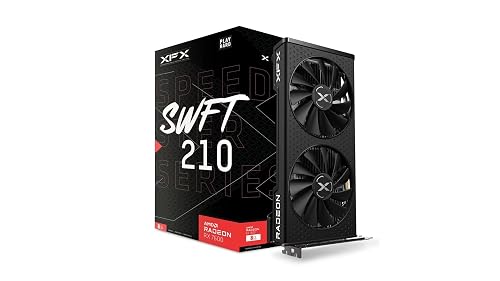
The XFX Speedster SWFT210 Radeon RX 7600 is a smart pick if you want solid 1080p gaming performance with a compact, dual fan design that fits a standard desktop build. You get AMD’s RDNA 3 graphics, 8 GB of GDDR6 memory, and a boost clock up to 2655 MHz for smooth play in modern games. It also provides HDMI and three DisplayPort outputs, with support for 8K resolution. XFX’s SWFT Dual Fan cooling helps manage heat, and the card’s 9.49 inch length keeps installation simple.
- GPU Brand:AMD Radeon
- Memory Capacity:8 GB
- Memory Type:GDDR6
- Desktop Use:Compatible
- Max Resolution:7680 x 4320
- Cooling:Dual-fan
- Additional Feature:RDNA 3 architecture
- Additional Feature:2655 MHz boost
- Additional Feature:2-fan design
Factors to Consider When Choosing Graphics Cards GPUs in Market
When choosing a graphics card, prioritize performance and frame rates so games and creative applications run smoothly. Also evaluate memory capacity and type, power and cooling requirements, and display output compatibility. Finally, compare price to value to ensure the GPU matches your system and your budget.
Performance And Frame Rates
To judge performance and frame rates, start by comparing core and boost clock speeds, since higher MHz usually means stronger raw gaming output. You should also check how many shader or compute units the GPU has, because more cores usually improve rasterization and demanding compute tasks. Don’t stop at specs alone, look at benchmark results for average FPS, plus 1% and 0.1% lows at your chosen resolution and settings. Those numbers show whether the card stays smooth or stutters under load. If you game at higher resolutions, you will want enough memory bandwidth and VRAM headroom, and PCIe version or lane width matters only when you are pushing bandwidth heavy setups. Compare real world tests, not marketing claims, and you will pick a GPU that matches your performance target better.
Memory Capacity And Type
After you have checked FPS and smoothness, memory capacity and memory type are the next big limits to weigh. You need enough VRAM to hold textures, framebuffers, and scene data without forcing slow swaps. For 1440p or 4K gaming, 12 to 16 GB can keep high detail settings and texture packs running smoothly, while 8 GB may feel tight in newer titles. Also look at the memory standard, GDDR6, GDDR6X, and GDDR7 usually move data faster than older GDDR5, so they help when bandwidth limits performance. Bus width matters too; a 256 bit design can feed the GPU better than a 128 bit one if clocks are similar. Cache and compression can change results, so compare full cards, not just VRAM numbers.
Power And Cooling Needs
Power and cooling can make or break a GPU choice, so check the card’s TDP and make sure your power supply can handle the recommended wattage with at least 20 to 30% headroom. You should also verify the required power plugs, whether that is 6-pin, 8-pin, or a PCIe Gen5 connector, and confirm your PSU has the right cables and enough 12V amperage. Next, measure your case carefully, long cards and multi-slot coolers need clearance and adequate airflow. Aim for at least two intake fans and one exhaust fan so hot air escapes efficiently. If you want lower temperatures or less noise, choose a cooler with a strong heatsink or be ready for higher fan curves or liquid cooling.
Display Output Compatibility
Once you have confirmed a GPU fits your power budget and cooling setup, make sure its display outputs match your monitors and devices. Check whether it offers HDMI 2.1, DisplayPort 2.1, or DisplayPort 1.4, since the version determines if you can drive 4K at 120 Hz or 8K at 60 Hz. Count the ports and compare their mix so you can run multiple monitors or a VR headset without adapters. Also verify the card’s maximum resolution supports your display’s native resolution, up to 7680×4320 if needed. Make sure your monitor and GPU support the same adaptive sync and HDR features, or you may lose them. Finally, confirm your cable and adapter needs, because older HDMI or DP cables can bottleneck bandwidth.
Price And Value Balance
Price matters, but real value comes from what you get for it. Compare performance per dollar by dividing benchmarked frame rates or synthetic scores by the card’s street price. You will spot which GPUs deliver the most gaming or compute power for your budget. Do not ignore VRAM and bandwidth, higher memory capacity and wider buses help at 1440p, 4K, and in creative apps, but they usually cost more. Also count total ownership costs, including PSU upgrades, extra cooling, and case changes. Then judge features like ray tracing, AI acceleration, encoder quality, and PCIe version against how you actually use your system. If you do not need them, do not pay for them. Finally, watch sales and launch cycles. Older cards often become the best buys after refreshes.
Frequently Asked Questions
Which GPU Is Best for 4K Gaming and Future-Proof Performance?
You should choose the RTX 4090, which is exceptional for 4K gaming and its large VRAM helps maintain performance over time. If the price is prohibitive, the RTX 4080 Super still provides strong future-proofing.
How Much VRAM Is Ideal for Modern Gaming and Creative Work?
You should have at least 12 GB of VRAM for modern gaming. For video editing, AI tools, or 3D work, 16 GB is preferable. For 4K gaming and intensive creative tasks, 24 GB provides additional headroom.
Do These Graphics Cards Support Ray Tracing and DLSS or FSR?
Yes, ray tracing is supported on both Nvidia and AMD cards. DLSS is exclusive to Nvidia, while AMD uses FSR, which is compatible with many GPUs. Check each model for specific support before buying.
Which GPU Offers the Best Value for Money Overall?
You’ll usually get the best value from the AMD Radeon RX 7800 XT. It delivers strong 1440p performance, ample VRAM, and a lower price than many rivals, making it a smart buy overall.
What Power Supply Is Needed for High-End Graphics Cards?
For high-end graphics cards, choose a quality 750W to 1000W power supply, depending on your GPU and CPU. Select an 80+ Gold unit to ensure clean, consistent power delivery.




