


If you think every Intel cooler is basically the same, 2026 has a few that can make that idea collapse fast.
You should check which one fits your CPU, your case, and your noise limits, because the best pick is not always the biggest tower or the most expensive liquid unit.
The list ahead sorts out the standouts, and one option may surprise you.
| Cooler Master Hyper 212 Spectrum V3 CPU Cooler | 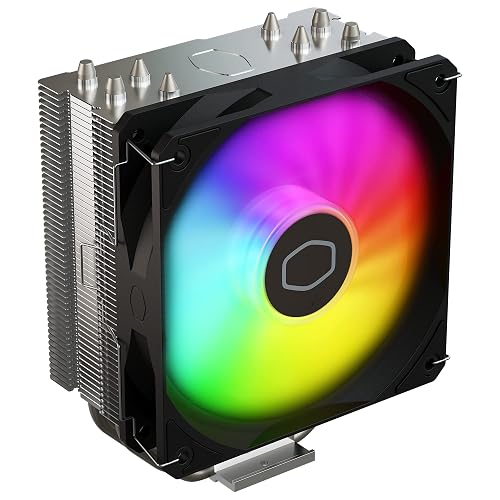 | Best Budget Tower | Cooler Type: Air cooler | Socket Support: AM5 / AM4 / LGA 1851 / 1700 / 1200 | Fan Count: 1 fan | VIEW LATEST PRICE | Read Our Analysis |
| Thermalright Phantom Spirit 120SE CPU Air Cooler | 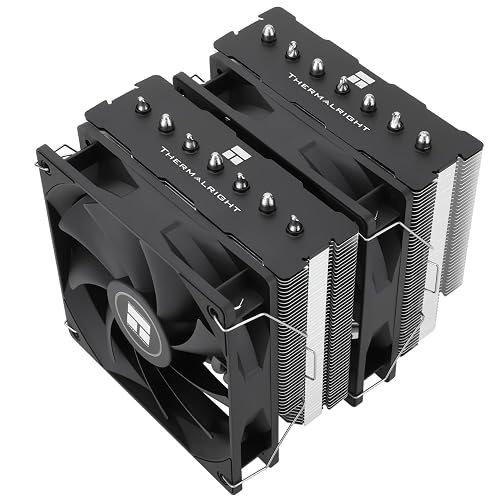 | Best Dual-Fan | Cooler Type: Air cooler | Socket Support: LGA1851 / 1700 / 1200 / 1150 / 1151 / 1155 / 1156 / AM4 / AM5 | Fan Count: 2 fans | VIEW LATEST PRICE | Read Our Analysis |
| Intel CPU Cooler for Socket 1150/1155/1156 Desktop PC | 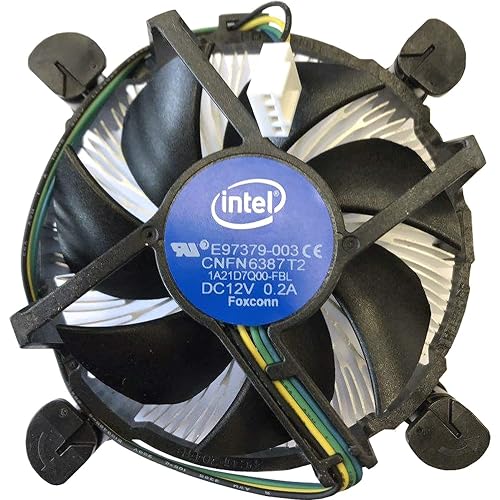 | Best Stock Replacement | Cooler Type: Air cooler | Socket Support: 1150 / 1155 / 1156 / 1151 | Fan Count: 1 fan | VIEW LATEST PRICE | Read Our Analysis |
| CORSAIR Nautilus 360 RS Liquid CPU Cooler | 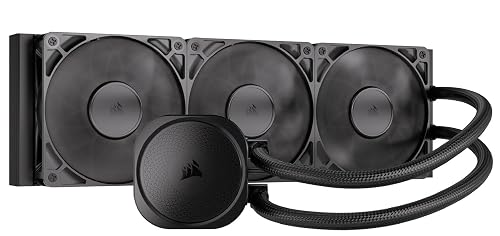 | Best Liquid Cooler | Cooler Type: Liquid cooler | Socket Support: LGA 1851 / 1700 / AM5 / AM4 | Fan Count: 3 fans | VIEW LATEST PRICE | Read Our Analysis |
| Vetroo Eclipse Low-Profile ARGB CPU Cooler | 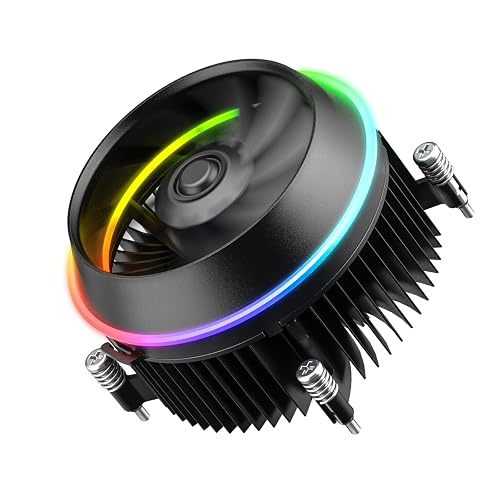 | Best Low-Profile | Cooler Type: Air cooler | Socket Support: LGA 1851 / 1700 | Fan Count: 1 fan | VIEW LATEST PRICE | Read Our Analysis |
| ARCTIC Freezer 36 CPU Cooler with Dual Fans | 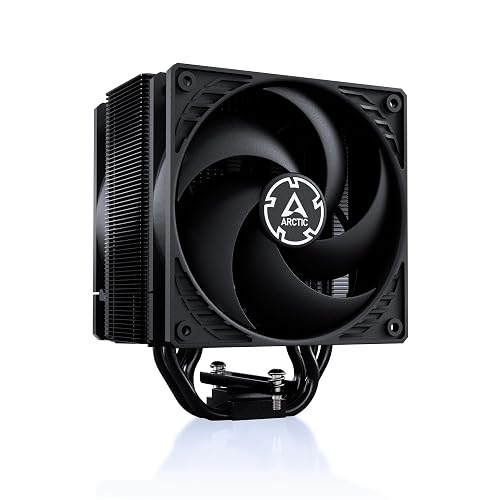 | Best Air Cooler | Cooler Type: Air cooler | Socket Support: AM4 / AM5 / LGA1851 / LGA1700 | Fan Count: 2 fans | VIEW LATEST PRICE | Read Our Analysis |
More Details on Our Top Picks
Cooler Master Hyper 212 Spectrum V3 CPU Cooler
If you are building an Intel system and want a simple, well-rounded air cooler, the Cooler Master Hyper 212 Spectrum V3 is a solid option to consider. It includes four copper heat pipes, a nickel-plated base, and a 120 mm PWM fan that runs from 650 to 1,750 RPM while maintaining 27.2 dB. It supports LGA 1851, 1700, and 1200, and the simplified brackets make mounting easier. At 152 mm tall, it fits many cases, and the ARGB frosted blades provide a clean, modern look.
- Cooler Type:Air cooler
- Socket Support:AM5 / AM4 / LGA 1851 / 1700 / 1200
- Fan Count:1 fan
- Fan Size:120 mm
- Height:152 mm
- Noise Level:27.2 dB
- Additional Feature:4 copper heat pipes
- Additional Feature:Frosted aRGB fan blades
- Additional Feature:Nickel-plated copper base
Thermalright Phantom Spirit 120SE CPU Air Cooler
The Thermalright Phantom Spirit 120SE is a strong pick if you want an Intel CPU cooler that packs serious performance into a compact 154 mm dual-fan tower. It uses seven 6 mm AGHP heat pipes, a finely machined copper base, and an anodized black aluminum fin stack that moves heat quickly. Dual TL-C12B V2 120 mm PWM fans deliver up to 66.17 CFM while operating at 25.6 dB(A). It fits LGA1851, 1700 and older Intel sockets, installs easily, and Thermalright’s S-FDB bearings are rated for up to 20,000 hours.
- Cooler Type:Air cooler
- Socket Support:LGA1851 / 1700 / 1200 / 1150 / 1151 / 1155 / 1156 / AM4 / AM5
- Fan Count:2 fans
- Fan Size:120 mm
- Height:154 mm
- Noise Level:25.6 dB(A)
- Additional Feature:AGHP 4th-gen heat pipes
- Additional Feature:S-FDB bearing
- Additional Feature:UL Class A insulation
Intel CPU Cooler for Socket 1150/1155/1156 Desktop PC
For owners of Intel desktop PCs with Socket 1150, 1155, 1156, or 1151 CPUs, the Intel E97379-003 is a solid stock style air cooler that fits Core i3, i5, and i7 chips with ease. You get an aluminum heatsink with a copper insert, a 3.5 inch fan, and a 4 pin connector for simple installation. It runs on 12 VDC, draws 0.28 A, and spins from 1,200 to 2,500 RPM while staying quiet at 22 dBA. At 4.33 x 4.09 x 2.95 inches, it works well when you want reliable, compact cooling.
- Cooler Type:Air cooler
- Socket Support:1150 / 1155 / 1156 / 1151
- Fan Count:1 fan
- Fan Size:3.5-inch
- Height:4.33 × 4.09 × 2.95 in
- Noise Level:22 dBA
- Additional Feature:Copper insert heatsink
- Additional Feature:Delta-manufactured fan
- Additional Feature:260W power rating
CORSAIR Nautilus 360 RS Liquid CPU Cooler
CORSAIR’s Nautilus 360 RS stands out for builders who want strong Intel cooling without extra noise or wiring headaches. You get a 360 mm black AIO that supports LGA 1851 and LGA 1700, plus AM5 and AM4 if you upgrade later. Its three RS120 fans use high static pressure, AirGuide technology, and Magnetic Dome bearings to push air efficiently and quietly. The pump runs at just 20 dBA, and the convex cold plate with pre-applied paste helps you install it fast. Direct motherboard power and daisy-chained fans keep your setup clean.
- Cooler Type:Liquid cooler
- Socket Support:LGA 1851 / 1700 / AM5 / AM4
- Fan Count:3 fans
- Fan Size:120 mm
- Height:360 mm class
- Noise Level:20 dBA
- Additional Feature:360mm AIO radiator
- Additional Feature:Convex cold plate
- Additional Feature:Pre-applied thermal paste
Vetroo Eclipse Low-Profile ARGB CPU Cooler
If you are building a compact Intel rig, the Vetroo Eclipse Low-Profile ARGB CPU Cooler fits the bill with LGA 1851 and 1700 support only, making it a strong pick for small form factor cases. You get a low-profile heatsink that pushes airflow top to bottom, helping cool your CPU and nearby board parts. Its 90mm PWM fan runs from 800 to 2500 RPM, so you can balance noise and airflow. With 95W TDP capacity, ARGB dual-ring lighting, aluminum fins, and a removable upper butterfly fan, it remains practical and easy to maintain.
- Cooler Type:Air cooler
- Socket Support:LGA 1851 / 1700
- Fan Count:1 fan
- Fan Size:90 mm
- Height:Low-profile
- Noise Level:Not listed
- Additional Feature:95W TDP capacity
- Additional Feature:Dual-ring ARGB lighting
- Additional Feature:Removable butterfly fan
ARCTIC Freezer 36 CPU Cooler with Dual Fans
The ARCTIC Freezer 36 Black is a smart pick if you want a budget-friendly Intel cooler that still provides strong contact and steady airflow. It supports LGA1700 and LGA1851, and ARCTIC’s improved mounting frame ensures even CPU contact. Its single-tower, side-flow design uses four offset copper heat pipes, aluminium fins, and dual pressure-optimized 120 mm P fans in push-pull. The click system makes installation easy, and the bundled MX-6 paste helps as well. With 200 to 1800 RPM control, 56.3 CFM airflow, and a 6 year warranty, you can rely on it.
- Cooler Type:Air cooler
- Socket Support:AM4 / AM5 / LGA1851 / LGA1700
- Fan Count:2 fans
- Fan Size:120 mm
- Height:6.25 in tall
- Noise Level:Not listed
- Additional Feature:MX-6 thermal compound
- Additional Feature:Click installation system
- Additional Feature:6-year warranty
Factors to Consider When Choosing Intel CPU Coolers
When choosing an Intel CPU cooler, ensure it fits your socket and provides the cooling performance required by your processor. Also check noise levels, case clearance, and installation ease. Balancing these factors helps you avoid fit issues and keeps your system running smoothly.
Socket Compatibility
Socket compatibility should be your first check, since Intel mounting standards change from generation to generation and the hole pattern, bracket design, and CPU contact area are not always the same. Verify that the cooler explicitly lists your socket, whether it is LGA 1851, 1700, 1200, or an older 115x model. Then confirm the box includes the right brackets or backplate, because some coolers need separate hardware for newer Intel platforms. You should also check cooler height and RAM or VRM clearance, since socket changes can shift the cooler’s position on the board. Finally, look for manufacturer notes on contact compatibility with your CPU family. A cooler can fit your socket and still not suit your platform well.
Cooling Performance
Cooling performance should match what your Intel CPU can actually demand, so start by checking the cooler’s thermal rating against the chip’s peak power draw and leave some headroom for sustained boosts. Choose an air cooler or AIO rated at or above the CPU’s TDP, then consider airflow and surface area. Higher CFM fans, larger radiators, and denser fin stacks move heat away faster. Also weigh fan RPM range and PWM control, since broader adjustment helps you cover light browsing and heavy rendering. More and larger heat pipes, plus a well machined copper base or cold plate, improve heat transfer. Finally, make sure the cooler fits your case, because height, thickness, and tower depth can limit real world cooling if airflow becomes cramped.
Noise Levels
Noise matters just as much as raw cooling power, especially if your Intel CPU cooler will sit under your desk for long gaming or work sessions. You should compare noise ratings in dB(A), since quiet to moderate coolers often land around 20 to 28 dB(A). Fan speed matters too; higher RPM usually means more noise, so check the RPM range and whether PWM control lets the cooler slow down when you do not need full output. Also look at fan count and bearing quality, since dual fan setups and cheaper bearings can add sustained hum or tonal whine. If you are considering an AIO, include pump noise with the fans. Manufacturer numbers are useful, but real world airflow and distance can change what you hear, so independent tests help.
Case Clearance
Before you buy an Intel CPU cooler, make sure your case can physically fit it. Check the case’s maximum cooler height first; many mid towers allow about 150 to 160 mm, so your cooler must stay within that limit. If you’re using a tall air cooler, confirm it will not overhang your RAM, especially modules with large heatspreaders. Also leave room around the socket for CPU power cables and nearby motherboard components, because bulky heatsinks or push-pull fans can crowd connectors. With liquid cooling, verify radiator size, thickness, and mounting depth so a 120, 240, or 360 mm unit will not clash with drive cages or your GPU. Finally, check side-panel and front-panel clearance, including filters and stock fans, so nothing rubs when the case closes.
Installation Ease
Installation ease matters just as much as raw cooling performance, especially when you want a smooth Intel build. Check socket compatibility first and confirm the cooler includes the right bracket or a pre-mounted mount for your Intel socket, since some modern platforms need specific retention hardware. Pick coolers with tool-free or click-in systems and clear instructions so you can finish faster and seat them correctly. Measure RAM height and case clearance before you buy, because a large heatsink can block nearby parts. Choose models with pre-applied paste or quality included paste, and follow simple application guidance. If you are using multiple fans or a pump, verify 4-pin PWM, pump headers, and daisy chain options to keep wiring neat and control easy.
Frequently Asked Questions
Which Cooler Is Quietest Under Full Gaming Load?
Under full gaming load, the Noctua NH-D15 and be quiet! Dark Rock Pro 5 are typically the quietest options. You will not hear much, because their large fans spin slower and operate more smoothly.
Do These Coolers Include Intel LGA 1851 Mounting Hardware?
Yes. Most coolers include LGA 1851 mounting hardware, but check the box contents before buying. Some models include it while older stock may require a separate kit from the manufacturer.
Which Option Fits in Small ITX Cases Best?
Choose the lowest-profile option, ideally a slim 120mm cooler or a compact top-down cooler. These clear RAM and side panels better in tight ITX cases. Check height first, then select the quietest fit.
How Often Should I Replace Thermal Paste?
Replace thermal paste every 2 to 5 years, or sooner if your CPU temperatures rise. Reapply after removing the cooler, because old paste will not perform well.
Can RGB Lighting Be Disabled on These Coolers?
Yes. You can usually disable RGB lighting on these coolers. Use the provided software or the hardware switch to turn it off.




