


If you want a gaming build that feels fast without wasting money, the right motherboard and CPU combo can make that happen.
Some pairs keep your budget calm and still handle modern games with ease.
Others open the door to DDR5, PCIe 5.0, and stronger cooling for longer upgrades.
The tricky part is knowing which combo truly fits your needs, so let us sort through the best options and show which one gives you the most for your setup.


More Details on Our Top Picks
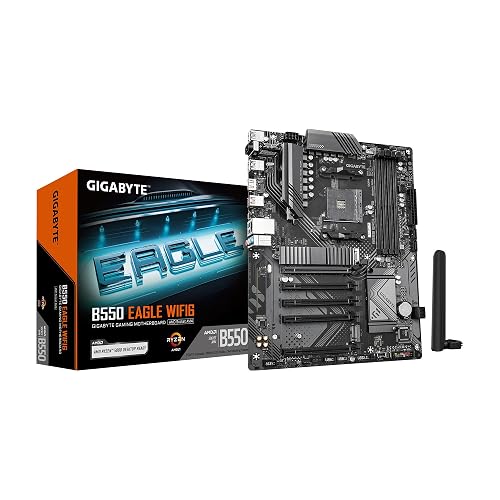
GIGABYTE B550 Eagle WIFI6 AMD AM4 Motherboard
The GIGABYTE B550 EAGLE WIFI6 is a strong pick if you want a gaming motherboard that keeps up without making setup feel like a chore. It supports AM4 for Ryzen 3000, 4000, and 5000 chips, so your CPU options stay wide. The 10+3 phase VRM, large heatsinks, and thermal armor help it stay cool under load. Building is easier thanks to pre-installed I/O armor and EZ-Latch slots. Add DDR4 support up to 128 GB, PCIe 4.0, dual M.2 slots, WiFi 6, and 1 GbE, and you are covered.
- Platform:AMD AM4
- Form Factor:ATX
- Memory Type:DDR4
- Max Memory:128 GB
- Warranty:3 years
- Processor Cores:Not included
- Additional Feature:WiFi 6 support
- Additional Feature:PCIe 4.0 support
- Additional Feature:Dual M.2 slots
ASUS TUF GAMING B760-PLUS WIFI Motherboard
Built for serious 1080p and 1440p gaming rigs, the ASUS TUF GAMING B760-PLUS WIFI is a strong pick if you want a sturdy Intel-based motherboard that will not flinch under daily play. This LGA 1700 ATX board is ready for 14th, 13th, and 12th Gen Intel Core chips. Its 12+1+1 DrMOS power stages, Digi+ VRM, and six-layer PCB help keep boosts steady. With DDR5 support, three M.2 slots, PCIe 5.0, WiFi 6, 2.5Gb Ethernet, and robust cooling, it is built for smooth, reliable gaming.
- Platform:Intel LGA 1700
- Form Factor:ATX
- Memory Type:DDR5
- Max Memory:128 GB
- Warranty:3 years
- Processor Cores:Not included
- Additional Feature:PCIe 5.0 slot
- Additional Feature:USB4 header support
- Additional Feature:Two-way AI noise cancelation
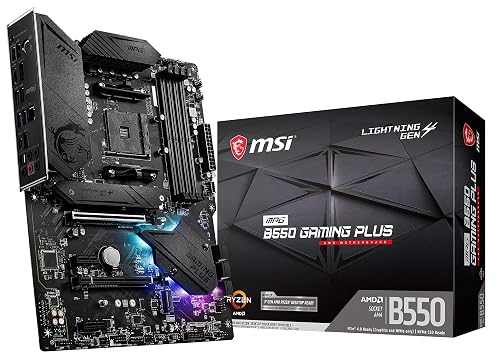
MSI MPG B550 Gaming Plus V1 Motherboard
MSI’s MPG B550 Gaming Plus V1 motherboard is a strong AM4 foundation for a Ryzen 5000 gaming build, without paying for extras you will not use. It offers PCIe 4.0, a Gen4 M.2 slot with M.2 Shield Frozr, and support for up to 128 GB of DDR4 across four slots. The extended heatsink, thickened copper, and Core Boost let you push performance while keeping thermals under control. You also get HDMI, DisplayPort, USB 3.2 Gen 2, Mystic Light RGB, and a 3 year warranty, delivering solid value.
- Platform:AMD AM4
- Form Factor:ATX
- Memory Type:DDR4
- Max Memory:128 GB
- Warranty:3 years
- Processor Cores:Not included
- Additional Feature:M.2 Shield Frozr
- Additional Feature:Mystic Light RGB
- Additional Feature:DisplayPort output
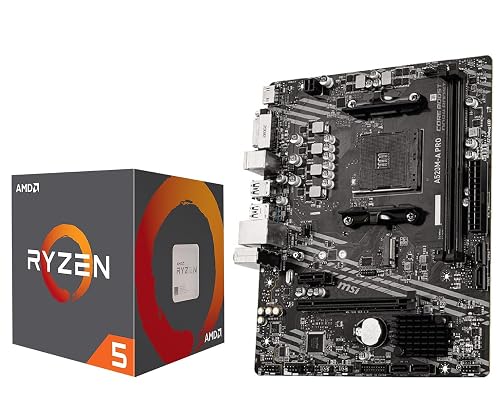
INLAND AMD Ryzen 5 5500 Desktop Processor with Motherboard
If you want a budget-friendly gaming setup that still feels smooth and capable, the INLAND AMD Ryzen 5 5500 combo is a smart pick for you. You get 6 cores, 12 threads, and boost speeds up to 4.2 GHz, so your games and everyday tasks stay responsive. Since it is overclockable, you can push more performance if you like tinkering. The bundled Wraith Stealth cooler helps keep things simple. The MSI A520M-A PRO adds DDR4 support, M.2 storage, a sturdy power design, clean audio, and easy upgrade paths. Pair it with a discrete GPU, and you can chase 100+ FPS in many popular games.
- Platform:AMD AM4
- Form Factor:Micro-ATX
- Memory Type:DDR4
- Max Memory:Not listed
- Warranty:Not listed
- Processor Cores:6 cores
- Additional Feature:Wraith Stealth cooler
- Additional Feature:100+ FPS gaming
- Additional Feature:2 oz copper PCB
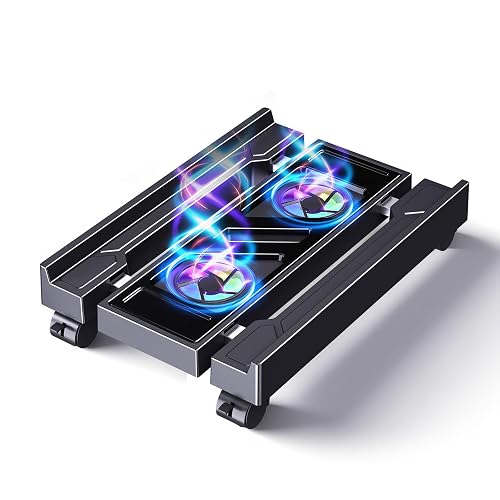
Adjustable Computer Tower Stand with Cooler Fan
An adjustable computer tower stand with a cooler fan is a practical choice for gamers who want improved airflow, easier access, and a cleaner setup with minimal effort. The width adjusts from 9.05 to 12.59 inches, so it fits most PC towers. Dual bottom fans push air upward to reduce heat and can extend the lifespan of the main unit. RGB gradient lighting provides a lively glow, while steel and ABS construction ensure durability. Four caster wheels with wheel locks allow easy movement and secure placement under your desk, and the stand supports up to 110 pounds.
- Platform:PC tower stand
- Form Factor:Adjustable stand
- Memory Type:Not applicable
- Max Memory:Not applicable
- Warranty:Not listed
- Processor Cores:Not applicable
- Additional Feature:Dual bottom fans
- Additional Feature:110 lb capacity
- Additional Feature:Lockable caster wheels
Micro Center Ryzen 5 5500 with ASUS TUF Motherboard
The Micro Center Ryzen 5 5500 with ASUS TUF motherboard combo is a smart pick for gamers who want a solid AM4 upgrade without paying for extras they may never use. You get 6 cores, 12 threads, and a 4.2 GHz boost, so your games stay smooth. The included Wraith Stealth cooler helps you start fast. Since the CPU lacks built-in graphics, you will need a discrete card. The ASUS TUF board adds Wi-Fi, dual-channel DDR4, M.2 storage, and robust protection for calmer, longer gaming sessions.
- Platform:AMD AM4
- Form Factor:MicroATX
- Memory Type:DDR4
- Max Memory:128 GB
- Warranty:Refer to manufacturer
- Processor Cores:6 cores
- Additional Feature:BIOS FlashBack button
- Additional Feature:Wi-Fi 5 support
- Additional Feature:Aura Sync RGB
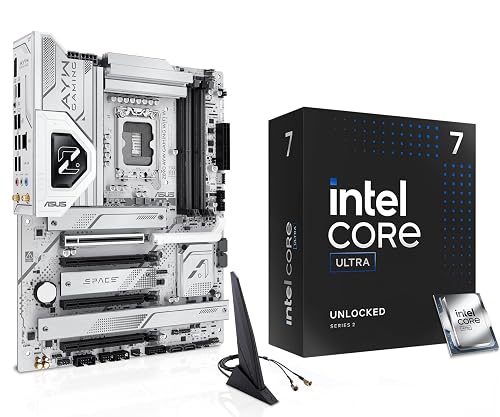
MICRO CENTER CPU Motherboard Combo with Ultra7 265K and ASUS Z890 WiFi Motherboard
Micro Center’s CPU motherboard combo with the Ultra 7 265K and the ASUS Z890 WiFi board is a strong pick for gamers who want serious speed without assembling each part separately. You get 20 cores, up to 5.5 GHz, and an overclockable CPU, so games feel snappy and multitasking stays smooth. The Z890 ATX board adds DDR5 support, Wi‑Fi 6, PCIe 5.0 M.2 storage, and a solid 12+1+2+1 power delivery design. BIOS FlashBack, Q-Latch, and improved cooling make setup less stressful.
- Platform:Intel LGA 1851
- Form Factor:ATX
- Memory Type:DDR5
- Max Memory:Not listed
- Warranty:See manufacturer info
- Processor Cores:20 cores
- Additional Feature:PCIe 5.0 M.2
- Additional Feature:USB 20Gbps Type-C
- Additional Feature:BIOS FlashBack button
Factors to Consider When Choosing a Motherboard CPU Combo for Gaming
When choosing a motherboard and CPU combo for gaming, begin by confirming the socket compatibility so the processor and board work together without problems. Next, verify the chipset, memory support, expansion slot layout, storage options, and the cooling and power delivery design, as these factors determine how well your system performs now and how easily it can be upgraded later. A correct match here prevents the common “why will this not fit” issue on build day.
CPU Socket Match
Socket match is the first thing you should check, because it determines whether your CPU and motherboard can physically fit together. If you buy the wrong socket, the parts will not seat, and that becomes a frustrating dead end. You need the same socket type, such as AM4, LGA1700, or LGA1851, so the chip can lock in safely. After that, check BIOS support for your CPU generation. Some boards require an update before they will boot. Then evaluate the board’s power delivery. A stronger VRM helps keep your CPU stable during long gaming sessions, especially if you plan to overclock. Finally, think ahead. A socket that supports more than one CPU generation can save money later and make upgrades much less painful.
Chipset Feature Set
Just as important as the socket, the chipset determines what your gaming build can actually do. It defines PCIe lanes and version, so you can run a fast GPU, a speedy NVMe drive, and still keep room for future upgrades. It also determines how many M.2 and SATA ports you get, which matters if you store lots of games. Next, check the USB layout. Better chipsets provide more ports, faster speeds, and support for front-panel connectors on newer cases. Pay attention to networking and audio as well. Built-in Ethernet, Wi-Fi support, and solid sound can save you from buying extra cards. Finally, the chipset controls overclocking and CPU feature support, giving you more tuning room and a smoother path to your next upgrade.
Memory Generation Support
Memory generation support is one of the first things you should check, because your CPU and motherboard have to speak the same RAM language. If one side wants DDR4 and the other only accepts DDR5, they will not fit. That is game over before you even boot. DDR5 provides more bandwidth and better power handling, but it usually costs more and can require BIOS support. Next, look at the board’s top memory speed and make sure it supports XMP, EXPO, or manual tuning, so your kit can run at its rated pace. Also check the DIMM count and maximum capacity, since four slots and 128 GB can matter for gaming and multitasking. Finally, weigh latency and frequency together, because timings can sharpen responsiveness.
Expansion And Storage
Once your CPU and RAM are matched, the next thing to check is how well the board handles expansion and storage, because that decides how easy your gaming rig will be to grow later. You should look for at least two M.2 slots, and one should run PCIe 4.0 x4 or faster for your main NVMe drive. Four or more SATA III ports help you add bulk storage without trouble. Make sure the primary PCIe x16 slot supports PCIe 4.0 or 5.0 for your GPU, then check for extra x4 or x1 slots for cards you may add later. If you plan multiple drives, confirm RAID support and enough chipset lanes. M.2 heatsinks and open airflow around drives also help your SSDs stay quick during long matches.
Cooling And Power
When you pick a motherboard and CPU combo for gaming, cooling and power delivery matter just as much as raw speed because a fast chip can still stumble if the board cannot feed it clean power or shed heat well. Check the VRM first. Look for 8 plus or 10 plus phase digital designs, large heatsinks, and quality thermal pads. Then match the board’s EPS power plugs and DrMOS stages to your CPU’s TDP and any overclocking plans. If you want long gaming sessions, pick a board with strong chipset and M.2 cooling, plus fan and pump headers you can tune. Also make sure your case airflow helps. For heavier builds, reinforced power parts and heat spreaders keep things steady.
Connectivity And Networking
Strong cooling means little if your games still stutter from a weak network link, so the motherboard matters in a very real way. Pick a board with at least 1 GbE; 2.5 GbE or faster is better when you stream, download, and play at once. If you use wireless, choose Wi‑Fi 6 or newer for steadier latency in crowded homes. Dual-band or tri-band support, plus Bluetooth 5.x and extra antenna headers, helps your headset and controller stay linked without drama. Also look for rear USB-C or USB 3.2 Gen 2×2 Type-C, and several USB 3.2 Gen 2 ports so your SSDs and installs move fast. Hardware QoS, or traffic prioritization, can keep game packets first.
Form Factor Fit
Before you fall in love with a CPU or a shiny GPU, make sure the motherboard actually fits your case, because size matters more than people think. You need to match ATX, microATX, or Mini-ITX to your case’s mounting holes and internal space, or you will fight the build from the start. ATX boards provide more PCIe slots, M.2 and SATA ports, and room for stronger VRMs and heatsinks, which helps with hot, high-core CPUs. Smaller boards save space, but they usually reduce RAM slots, storage, and expansion options. Also check cooler height and GPU length so nothing bumps or bends. Finally, leave room for front-panel plugs and cable routing, because tidy airflow improves cooling and makes the build process less frustrating.
Frequently Asked Questions
Which Combo Is Best for 1440P Gaming?
For 1440p gaming, choose the Ryzen 7 7800X3D with an X670E or B650E motherboard; it hits the sweet spot. You will get top-tier frame rates, and your GPU will not feel constrained.
Do These Motherboards Support Future CPU Upgrades?
Yes, but it depends on the socket and chipset. You will usually get a few upgrade options; however, do not expect every future CPU to work. Check motherboard BIOS support and AMD or Intel platform roadmaps first.
Is Wi-Fi Worth Paying Extra for in a Gaming Build?
You’ll notice the difference only if cables clutter your desk like vines; otherwise Wi‑Fi is worth paying extra for its convenience, cleaner setup, and generally acceptable gaming latency. If you already use a wired connection, skip it and save money.
Which Combo Offers the Best Value for Competitive Esports?
You’ll get the best value from an AM4 Ryzen 5 5600 or an Intel i5-12400F paired with an affordable B550 or B660 motherboard. It’s fast, inexpensive, and easily handles esports at high frame rates.
Can These Setups Handle Streaming While Gaming?
Yes. Pair a strong CPU with fast RAM and efficient cooling, and you can stream, game, and multitask smoothly. That will keep frame rates steady, reduce stutter, and handle broadcasts without bottlenecks.




