


If you want your gaming setup to look sharp and stay cool, the right case does more than hold parts. The best options in this lineup provide strong airflow, roomy interiors, and clean glass panels that show off your build without turning it into a dusty oven.
Next, you will see which cases handle big GPUs, thick radiators, and easy cable routing best, so you can pick one that fits your space and your style without second guessing it.
| NZXT H5 Flow 2024 PC Gaming Case | 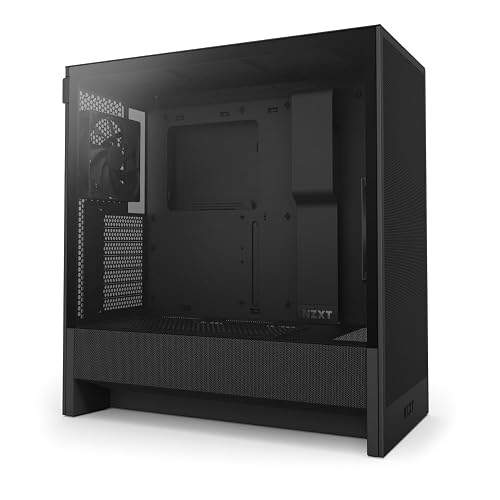 | Best Overall | Case Type: Compact ATX mid-tower | Motherboard Support: E-ATX/ATX/Micro-ATX/Mini-ITX | Tempered Glass: Side panel | VIEW LATEST PRICE | Read Our Analysis |
| MUSETEX ATX PC Case with 6 ARGB Fans |  | Best RGB Value | Case Type: ATX mid-tower | Motherboard Support: ATX/Micro-ATX/Mini-ITX | Tempered Glass: 270° dual panels | VIEW LATEST PRICE | Read Our Analysis |
| MUSETEX Y6 ATX Mid Tower PC Case with ARGB Fans | 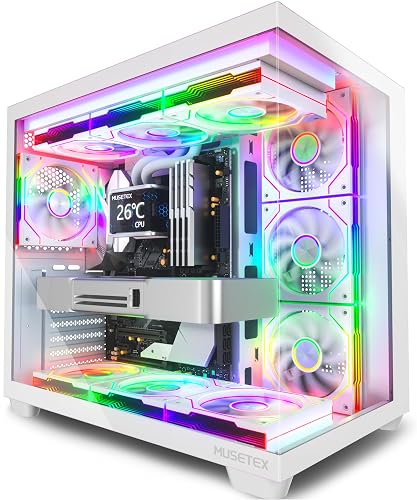 | Best for Showcase | Case Type: ATX mid-tower | Motherboard Support: ATX/Micro-ATX/Mini-ITX | Tempered Glass: 270° dual panels | VIEW LATEST PRICE | Read Our Analysis |
| GAMDIAS White ATX Mid Tower Gaming PC Case | 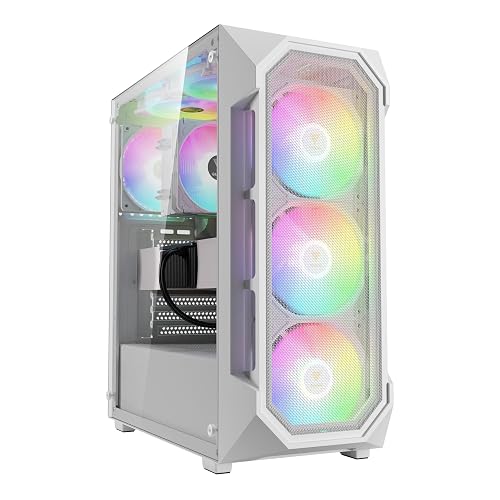 | Best Airflow | Case Type: ATX mid-tower | Motherboard Support: ATX | Tempered Glass: Panoramic side panel | VIEW LATEST PRICE | Read Our Analysis |
| MONTECH XR-B ATX Mid-Tower Gaming Case with ARGB Fans | 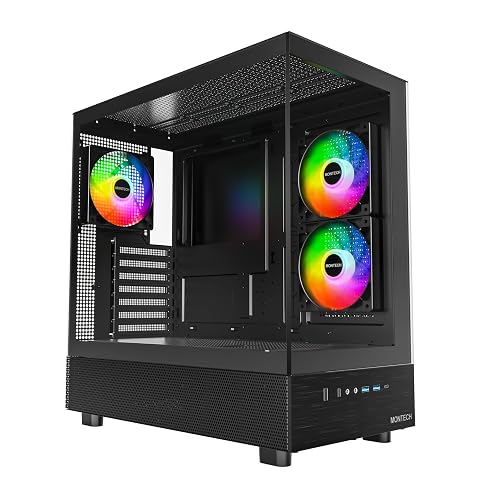 | Best Premium Pick | Case Type: ATX mid-tower | Motherboard Support: ATX/Micro-ATX/Mini-ATX | Tempered Glass: Full-view dual panels | VIEW LATEST PRICE | Read Our Analysis |
| FOIFKIN F600 ATX Mid-Tower PC Case (Black) |  | Best Cooling | Case Type: ATX mid-tower | Motherboard Support: ATX/Micro ATX/Mini ITX | Tempered Glass: 270° panoramic | VIEW LATEST PRICE | Read Our Analysis |
| MUSETEX ATX PC Case with 3 Fans Type-C Y6 | 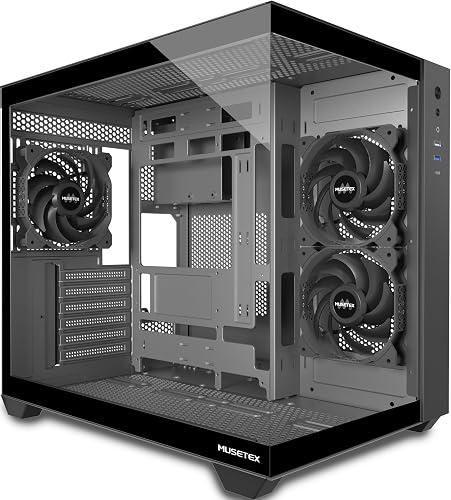 | Best Budget RGB | Case Type: ATX mid-tower | Motherboard Support: ATX hardware | Tempered Glass: 270° dual panels | VIEW LATEST PRICE | Read Our Analysis |
More Details on Our Top Picks
NZXT H5 Flow 2024 PC Gaming Case
If you want a compact gaming case that keeps your build cool without making cable management feel like a wrestling match, the NZXT H5 Flow 2024 is a smart pick. It is a black ATX mid-tower with a tempered glass side panel and a sturdy metal frame. Its mesh top, front, and side panels push air through the case, and the perforated PSU shroud helps your GPU breathe. Two Quiet Airflow fans come preinstalled, and you can add up to a 360 mm front radiator. Wide channels, hooks, and straps keep your wiring tidy.
- Case Type:Compact ATX mid-tower
- Motherboard Support:E-ATX/ATX/Micro-ATX/Mini-ITX
- Tempered Glass:Side panel
- Fan Setup:2 pre-installed
- Radiator Support:Up to 360mm front
- RGB Lighting:No
- Additional Feature:Perforated PSU shroud
- Additional Feature:Wide cable channels
- Additional Feature:Two-year warranty
MUSETEX ATX PC Case with 6 ARGB Fans
The MUSETEX Y6 is a strong choice if you want a clean-looking gaming case that also keeps heat under control. Its six pre-installed ARGB fans, 270° tempered glass view, and roomy mid-tower layout work together to showcase your build while making setup straightforward. It supports ATX, Micro-ATX, and Mini-ITX motherboards, and offers space for a 400 mm GPU and a 176 mm cooler. Top support for a 360 mm radiator and magnetic dust filters help keep the system cool and tidy. The white finish, Type-C port, and quiet glass panels give your desk a polished look.
- Case Type:ATX mid-tower
- Motherboard Support:ATX/Micro-ATX/Mini-ITX
- Tempered Glass:270° dual panels
- Fan Setup:6 pre-installed
- Radiator Support:Up to 360mm top
- RGB Lighting:ARGB
- Additional Feature:270° dual glass
- Additional Feature:Magnetic dust filters
- Additional Feature:10-year warranty
MUSETEX Y6 ATX Mid Tower PC Case with ARGB Fans
MUSETEX Y6 ATX Mid Tower PC Case with ARGB Fans is a strong pick for gamers who want their build to feel like a showcase, not just a box under a desk. You get 270 degree dual tempered glass, so your parts stay visible from almost every angle. Its seven 120 mm ARGB fans add bright rainbow flow while helping airflow stay steady. Because it fits ATX, Micro ATX, and Mini ITX boards, you can build with room for a 410 mm GPU, a 360 mm radiator, and tidy cable paths. The white finish keeps your setup looking clean and bold.
- Case Type:ATX mid-tower
- Motherboard Support:ATX/Micro-ATX/Mini-ITX
- Tempered Glass:270° dual panels
- Fan Setup:7 pre-installed
- Radiator Support:Up to 360mm top
- RGB Lighting:ARGB
- Additional Feature:Infinity mirror fans
- Additional Feature:410 mm GPU clearance
- Additional Feature:Seven-fan package
GAMDIAS White ATX Mid Tower Gaming PC Case
With a white finish, panoramic tempered glass side panel, and four pre-installed 120mm ARGB fans, the GAMDIAS AURA GC1 ELITE WH ARGB is a smart pick for gamers who want strong airflow and a clean, showy build without extra hassle. It uses an ATX mid-tower layout with a mesh front intake, so components stay cooler during long sessions. It accommodates graphics cards up to 340mm and CPU coolers up to 160mm, and it supports a 360mm radiator. You can add more fans, use the LED button, and enjoy easy USB 3.0 access.
- Case Type:ATX mid-tower
- Motherboard Support:ATX
- Tempered Glass:Panoramic side panel
- Fan Setup:4 pre-installed
- Radiator Support:Up to 360mm
- RGB Lighting:ARGB
- Additional Feature:Panoramic tempered glass
- Additional Feature:LED control button
- Additional Feature:Five expansion slots
MONTECH XR-B ATX Mid-Tower Gaming Case with ARGB Fans
MONTECH’s XR-B ATX mid-tower gaming case is a smart pick if you want a clean-looking build that still leaves room for serious hardware. It features dual tempered-glass panels, a warm wood-grain I/O touch, and is available in black or white. Inside, it supports ATX, Micro-ATX, and Mini-ITX motherboards, and accommodates large 40-series GPUs. Cooling is straightforward with three preinstalled 120 mm ARGB PWM fans, support for up to nine fans in total, and filters on the top, bottom, and side. You can also mount a 360 mm radiator on top and maintain tidy cable management.
- Case Type:ATX mid-tower
- Motherboard Support:ATX/Micro-ATX/Mini-ATX
- Tempered Glass:Full-view dual panels
- Fan Setup:3 pre-installed
- Radiator Support:Up to 360mm top
- RGB Lighting:ARGB
- Additional Feature:Mature wood-grain I/O
- Additional Feature:750W PSU support
- Additional Feature:Nine-fan capacity
FOIFKIN F600 ATX Mid-Tower PC Case (Black)
The FOIFKIN F600 ATX Mid-Tower PC Case in black is designed for builders who want a clean showcase case without sacrificing cooling performance. You get 270 degrees of tempered glass, keeping your hardware in view while the black frame maintains a sharp look. Inside, seven 120 mm ARGB PWM fans move air with purpose, and support for up to three 360 mm radiators gives you room to push cooling further. The dual-chamber layout helps manage cables, and the dust filter simplifies maintenance. With Type-C, generous GPU clearance, and flexible motherboard compatibility, it is ready for your build.
- Case Type:ATX mid-tower
- Motherboard Support:ATX/Micro ATX/Mini ITX
- Tempered Glass:270° panoramic
- Fan Setup:7 pre-installed
- Radiator Support:Up to 360mm multiple
- RGB Lighting:ARGB
- Additional Feature:Dual-chamber design
- Additional Feature:Three 360mm radiators
- Additional Feature:Ten expansion slots
MUSETEX ATX PC Case with 3 Fans Type-C Y6
MUSETEX’s Y6 case is ideal if you want a striking showpiece that still keeps your build cool, clean, and easy to manage. It has a black matte finish, 270° tempered glass, and a compact mid-tower shape that feels premium without taking over your desk. Inside, the dual-chamber layout helps you separate parts neatly, and it supports full ATX components, including a 400 mm GPU and a 360 mm top radiator. Three preinstalled fans, magnetic dust filters, and a PSU vent maintain steady airflow. Tool-free panels and USB Type-C make setup smoother and faster.
- Case Type:ATX mid-tower
- Motherboard Support:ATX hardware
- Tempered Glass:270° dual panels
- Fan Setup:3 pre-installed
- Radiator Support:Up to 360mm top
- RGB Lighting:No
- Additional Feature:Snap-on side panels
- Additional Feature:Dual-chamber layout
- Additional Feature:Tool-free installation
Factors to Consider When Choosing PC Gaming Cases
When choosing a PC gaming case, prioritize airflow and cooling, because components need steady fresh air to remain fast and stable. Next verify motherboard compatibility, GPU clearance, radiator support, and cable management, so your build fits properly and looks clean without the usual wrestling match. These details matter, because the right case helps your system run cooler, makes assembly easier, and reduces stress.
Airflow And Cooling
Airflow and cooling can make or break your gaming case choice, because even a powerful PC starts to feel sluggish if hot air gets trapped inside. Look for mesh or perforated panels on the front, top, or side, since they let cool air move in and warm air escape quickly. Next, check fan support. Cases with several 120 mm or 140 mm mounts provide better intake and exhaust paths, so your components stay cooler under load. If you plan to use liquid cooling, confirm radiator support for 240 mm to 360 mm units and verify there is enough clearance. Also, a vented PSU shroud, or a separate chamber, helps prevent heat from looping back to the GPU. Finally, choose easy to clean dust filters, because clear airflow today saves you from dusty problems later.
Motherboard Compatibility
Once you have good airflow and cooling, the next step is confirming the case actually fits your motherboard and its components. Match the form factor first, whether ATX, Micro-ATX, Mini-ITX, or E-ATX, because the wrong size will not mount correctly. Then check the standoffs and expansion slots so the board sits flat and add-in cards line up cleanly. After that, verify CPU socket clearance, since large coolers and radiator mounts can crowd VRM heatsinks or headers. Also confirm the rear I O opening, USB and front-panel hookups, and the cable paths near the PSU and drives. When these details align, the build is neater and much less likely to feel like a puzzle missing one small but important piece.
GPU Clearance
A roomy case can save you a lot of stress, but only if your graphics card actually fits with a little breathing room around it. Check the case’s maximum GPU length and compare it to your card’s full size, including backplates and brackets. Leave 10 to 20 mm for power cables and airflow. Next, look at the expansion slots and the mount style. If you want a vertical GPU, make sure the case supports it, since risers can crowd the space and alter cooling. Also inspect the PSU shroud, drive cages, and front mounts, because they can steal room quickly. For hotter high end cards, clear intake paths matter a lot. If you plan to upgrade later, aim for 30 to 50 mm of extra clearance.
Radiator Support
After you check GPU clearance, the next thing to size up is radiator support, because even a strong gaming case can run out of room fast once you add cooling hardware. Match the case front, top, and rear radiator limits to your AIO or loop, and check thickness as well. A slim 240 mm unit can still clash with RAM or VRM heatsinks if the fan stack sits too close. You also want good airflow and dust filtering at the mounting spot, so the radiator can breathe without roasting nearby parts. For custom loops, make sure the case has solid mounts, proper spacing, and room for tubing and fittings. If you plan a big loop, confirm there is space for the PSU shroud, drive cages, and reservoir.
Cable Management
Cable management can make or break how clean your gaming PC feels, so check it before you buy a case. Look for wide channels, routing cutouts, and Velcro straps that help you guide cables quickly and keep airflow open. Also check the space behind the motherboard tray. About 18 to 25 mm gives you room for thick power and GPU leads without forcing the side panel. Rubber grommets and mixed-size holes matter too, because they protect wires and accommodate PSU, fan, and front-panel plugs neatly. For the cleanest build, pick a dual-chamber layout that hides the PSU and excess slack. Modular drive mounts and removable brackets also free up space and make cable runs easier.
Front I/O Ports
Once your cable runs are tidy, the next thing that can shape your daily experience is the front I/O panel. You will want enough ports for the gear you use most, so check for USB-A 3.0, USB-A 2.0, USB-C, and audio in and out. If you move files often, a front USB-C or USB 3.x port can save you time and feel much smoother. Also, make sure the case gives you the right audio jacks for your headset or mic, so you are not crawling behind the tower like a detective. Placement matters too: top ports may suit one desk, front ports may suit another. Finally, extra buttons for power, reset, fan speed, or LEDs can make daily use easier.
Build Materials
The materials in a gaming case determine how it feels, looks, and holds up over time, so pay close attention. Steel provides strong, rigid support, giving your build a solid feel and longer lifespan. Aluminum reduces weight and resists corrosion, but it usually costs more and does not dampen vibration as well. Tempered glass adds a premium, display-ready shine when you want to show your parts, but handle it with care. Plastic trims and drive cages save money and allow complex shapes, though they can feel less sturdy near heat. Mesh and perforated metal improve airflow, but they can let in more dust, so use filters. Choose the combination that matches your available space, cooling needs, and aesthetic preferences.
Frequently Asked Questions
How Much Desk Space Do Full-Size Gaming Cases Usually Require?
You’ll usually need about 20 to 24 inches of width, 18 to 24 inches of depth, and enough height for airflow, and possibly a little more, because full-size cases can be larger than expected.
Do Tempered Glass Panels Affect Cooling Performance Significantly?
No, tempered glass panels usually do not affect cooling significantly if you maintain good airflow and use adequate fans. You will see higher temperatures only when intake is restricted, exhaust is blocked, or the case is packed too tightly.
Can I Hide Cables Easily in Most Modern PC Cases?
Yes, you can hide cables easily in most modern cases. You will usually get tie-down points, a PSU shroud, and routing cutouts, so you can tuck wires away neatly and keep your build looking clean.
Are Front USB-C Ports Necessary for Gaming Builds?
No, front USB-C is not required for gaming, but it is convenient for quickly connecting headsets, drives, or phones. If your motherboard lacks the header you cannot use a front USB-C port anyway, so prioritize airflow and GPU clearance.
How Often Should Case Dust Filters Be Cleaned?
Clean them every 2 to 4 weeks. Think of filters as your case’s lungs; neglect them and airflow suffocates. If you have pets or lots of dust, check them weekly and vacuum gently.




