If you want a 1440p gaming monitor under $300 in 2026, you do not have to settle for weak color, slow response times, or bare-bones features.
You can still find sharp QHD panels, high refresh rates, adaptive sync, and solid ergonomics if you know where to look.
Some budget options perform well above their price, while others fall short in ways that matter more than the spec sheet suggests.
| Acer Nitro 27-Inch QHD Gaming Monitor (KG271U) |  | Budget-Friendly Pick | Resolution: 2560 x 1440 | Panel Type: IPS | Refresh Rate: 180Hz | VIEW LATEST PRICE | Read Our Analysis |
| Acer Nitro 27-inch WQHD Gaming Monitor (XV272U) |  | Competitive Gaming Pick | Resolution: 2560 x 1440 | Panel Type: IPS | Refresh Rate: 240Hz | VIEW LATEST PRICE | Read Our Analysis |
| Z-Edge 34-Inch Curved Gaming Monitor (AG34P) |  | Best Ultrawide | Resolution: 3440 x 1440 | Panel Type: VA | Refresh Rate: 240Hz | VIEW LATEST PRICE | Read Our Analysis |
| LG 27GR83Q-B 27-inch UltraGear QHD Gaming Monitor |  | Editor’s Choice | Resolution: 2560 x 1440 | Panel Type: IPS | Refresh Rate: 240Hz | VIEW LATEST PRICE | Read Our Analysis |
| Alienware 27 Gaming Monitor AW2725DM | Best Overall | Resolution: 2560 x 1440 | Panel Type: Fast IPS | Refresh Rate: 180Hz | VIEW LATEST PRICE | Read Our Analysis | |
| Acer Nitro 27-inch WQHD Gaming Monitor (XV272U) |  | Fastest Refresh Rate | Resolution: 2560 x 1440 | Panel Type: IPS LCD | Refresh Rate: 300Hz | VIEW LATEST PRICE | Read Our Analysis |
| AOC 27-Inch QHD Gaming Monitor (Q27G41ZE) |  | Best Value | Resolution: 2560 x 1440 | Panel Type: IPS | Refresh Rate: 240Hz / 260Hz OC | VIEW LATEST PRICE | Read Our Analysis |
| Samsung Odyssey G5 27” QHD Gaming Monitor |  | Best For Console | Resolution: 2560 x 1440 | Panel Type: IPS | Refresh Rate: 200Hz | VIEW LATEST PRICE | Read Our Analysis |
| LG 27GX704A-B 27-inch UltraGear OLED Gaming Monitor |  | Premium Upgrade Pick | Resolution: 2560 x 1440 | Panel Type: OLED | Refresh Rate: 240Hz | VIEW LATEST PRICE | Read Our Analysis |
| ZZA 32-Inch Curved QHD Gaming Monitor | 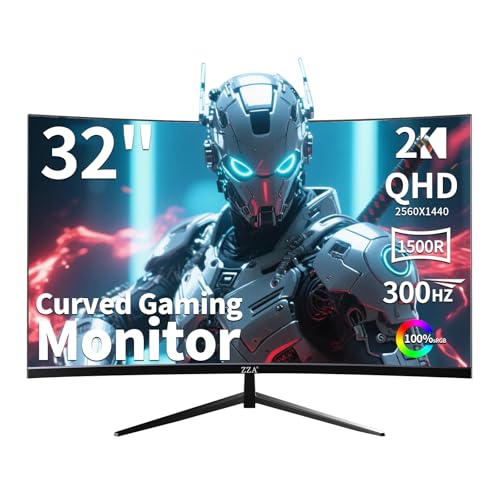 | Best Big-Screen Pick | Resolution: 2560 x 1440 | Panel Type: VA | Refresh Rate: 300Hz | VIEW LATEST PRICE | Read Our Analysis |
More Details on Our Top Picks
Acer Nitro 27-Inch QHD Gaming Monitor (KG271U)
When you want a 27-inch 1440p gaming monitor under $300 that prioritizes speed without sacrificing image quality, the Acer Nitro KG271U stands out right away. It features a QHD IPS panel with a 180Hz refresh rate, 0.5ms GTG response time, AMD FreeSync, and HDR10 support. It keeps gameplay smooth by reducing tearing, stuttering, ghosting, and input lag.
You’ll also appreciate its 95% DCI-P3 color coverage, matte screen, and 178-degree viewing angles for vivid, consistent visuals. The zero-frame design works well in multi-monitor setups, while tilt adjustment, wall-mount support, and built-in speakers add convenience. DisplayPort, dual HDMI, and a three-year warranty complete the package.
- Resolution:2560 x 1440
- Panel Type:IPS
- Refresh Rate:180Hz
- Response Time:0.5ms GTG
- Sync Support:AMD FreeSync
- Video Ports:1 DP, 2 HDMI
- Additional Feature:HDR10 support
- Additional Feature:Built-in speakers
- Additional Feature:3-year warranty
Acer Nitro 27-inch WQHD Gaming Monitor (XV272U)
Acer’s Nitro XV272U is one of the best picks under $300 for competitive players who want 1440p sharpness without giving up speed. It features a 27-inch IPS panel with a crisp 2560 x 1440 resolution, 240Hz over DisplayPort, 144Hz over HDMI, and up to 0.5ms G-to-G response time. AMD FreeSync Premium and Adaptive Sync help keep motion smooth and tear-free.
It also delivers strong color performance with 99% sRGB, DisplayHDR 400, and 400 nits brightness. The matte screen helps reduce glare, while height, tilt, swivel, and pivot adjustments make it easier to find a comfortable setup. It includes DisplayPort, HDMI, USB, built-in speakers, VESA support, and a warranty.
- Resolution:2560 x 1440
- Panel Type:IPS
- Refresh Rate:240Hz
- Response Time:0.5ms-1ms GTG
- Sync Support:AMD FreeSync Premium
- Video Ports:1 DP, 2 HDMI
- Additional Feature:DisplayHDR 400
- Additional Feature:Full ergonomic stand
- Additional Feature:USB 2.0 ports
Z-Edge 34-Inch Curved Gaming Monitor (AG34P)
Z-Edge’s AG34P is a strong choice for gamers who want an ultrawide 1440p experience for under $300, especially for fast-paced FPS, racing, and action games. It features a 34-inch 3440 x 1440 VA panel, a 21:9 aspect ratio, and a 1500R curve that creates a more immersive view. With a 240Hz refresh rate over DisplayPort, 1ms MPRT, and Adaptive Sync with FreeSync, it delivers smoother motion with reduced blur, ghosting, and input lag.
It also offers solid contrast, an anti-glare screen, height, tilt, and swivel adjustments, plus PIP/PBP multitasking and HDMI 2.1 and DisplayPort 1.4 connectivity for flexible setup options.
- Resolution:3440 x 1440
- Panel Type:VA
- Refresh Rate:240Hz
- Response Time:1ms MPRT
- Sync Support:Adaptive Sync / FreeSync
- Video Ports:2 DP, 2 HDMI
- Additional Feature:34-inch ultrawide
- Additional Feature:1500R curved screen
- Additional Feature:PIP/PBP multitasking
LG 27GR83Q-B 27-inch UltraGear QHD Gaming Monitor
LG’s 27GR83Q-B is a strong choice for competitive players who want a fast 1440p monitor without giving up IPS image quality. It features a 27-inch QHD IPS panel with a 240Hz refresh rate, 1ms GtG response time, and wide 178-degree viewing angles. With 95% DCI-P3 coverage, 400 nits brightness, and DisplayHDR 400 support, games look vivid and detailed.
For smoother gameplay, it supports both G-SYNC Compatible and FreeSync Premium to reduce tearing and stutter. LG also includes Black Stabilizer, Dynamic Action Sync, Crosshair, and an FPS Counter. HDMI 2.1, DisplayPort, USB connectivity, and ergonomic adjustments make it easy to integrate into your setup.
- Resolution:2560 x 1440
- Panel Type:IPS
- Refresh Rate:240Hz
- Response Time:1ms GtG
- Sync Support:G-SYNC Compatible / FreeSync Premium
- Video Ports:DisplayPort, 2 HDMI
- Additional Feature:DisplayHDR 400
- Additional Feature:DTS Headphone:X
- Additional Feature:FPS Counter
Alienware 27 Gaming Monitor AW2725DM
If you want a 27-inch 1440p monitor under $300 that still feels premium, the Alienware 27 Gaming Monitor AW2725DM stands out with its 180Hz refresh rate, 1ms gray-to-gray response time, and Fast IPS panel. It delivers sharp 2560 x 1440 visuals, 95% DCI-P3 color, DisplayHDR 400, and adaptive sync support for G-SYNC, FreeSync, and VESA AdaptiveSync.
It also features a matte anti-glare screen, hardware-based low blue light, and a fully adjustable stand with height, tilt, swivel, and pivot. With two HDMI ports, DisplayPort 1.4, three USB ports, console mode, and Dell’s three-year Advanced Exchange Service, it is a smart, versatile buy.
- Resolution:2560 x 1440
- Panel Type:Fast IPS
- Refresh Rate:180Hz
- Response Time:1ms GtG
- Sync Support:G-SYNC / FreeSync / AdaptiveSync
- Video Ports:DP 1.4, 2 HDMI
- Additional Feature:Console mode
- Additional Feature:Low blue light
- Additional Feature:3-year exchange warranty
Acer Nitro 27-inch WQHD Gaming Monitor (XV272U)
Acer’s Nitro XV272U stands out for competitive players who want unusually high speed from a 1440p monitor under $300, thanks to its 300Hz refresh rate and up to 0.5ms GTG response time. You get smooth, low lag gameplay with FreeSync Premium, plus less smearing and ghosting in fast shooters.
Its 27 inch IPS panel delivers sharp 2560 x 1440 visuals, 99% sRGB color, and DisplayHDR 400 support, while the matte ZeroFrame design works well in multi monitor setups. You can adjust height, tilt, swivel, and pivot with the ErgoStand, or VESA mount it. HDMI 2.1 and DisplayPort 1.4 make connecting PCs and consoles simple.
- Resolution:2560 x 1440
- Panel Type:IPS LCD
- Refresh Rate:300Hz
- Response Time:0.5ms GTG
- Sync Support:AMD FreeSync Premium
- Video Ports:1 DP 1.4, 2 HDMI 2.1
- Additional Feature:HDMI 2.1 ports
- Additional Feature:ErgoStand adjustments
- Additional Feature:Built-in speakers
AOC 27-Inch QHD Gaming Monitor (Q27G41ZE)
For competitive players who want 1440p sharpness without sacrificing speed, the AOC 27-inch QHD Gaming Monitor (Q27G41ZE) stands out with a 240Hz refresh rate over DisplayPort and an overclock option up to 260Hz. Its 27-inch IPS panel delivers crisp QHD detail, while Adaptive-Sync, G-Sync Compatible, and FreeSync support help prevent tearing and keep input lag low.
It also features a 0.3ms MPRT response time, Shadow Control, Game Mode presets, and a graphical OSD for quick adjustments. The three-sided frameless design looks clean, tilt adjustment improves comfort, and the three-year warranty with Zero-Bright-Dot support provides added peace of mind.
- Resolution:2560 x 1440
- Panel Type:IPS
- Refresh Rate:240Hz / 260Hz OC
- Response Time:0.3ms MPRT
- Sync Support:Adaptive-Sync / G-Sync Compatible / FreeSync
- Video Ports:1 DP 1.4, 2 HDMI 2.0
- Additional Feature:Overclock to 260Hz
- Additional Feature:Shadow Control
- Additional Feature:Zero-Bright-Dot support
Samsung Odyssey G5 27” QHD Gaming Monitor
Samsung’s Odyssey G5 27-inch QHD is a strong pick if you want a fast 1440p gaming monitor under $300 without sacrificing image quality. It features a 27-inch IPS panel, sharp 2560 x 1440 resolution, 200Hz refresh rate, and 1ms MPRT for smoother competitive play. HDR10, wide viewing angles, and a matte finish help games and media look clean.
You also get FreeSync Premium, Adaptive Sync, Black Equalizer, and Virtual Aim Point to reduce tearing and improve visibility. Two HDMI ports, DisplayPort, and Auto Source Switch+ make setup simple. The flat design, tilt adjustment, and desk-friendly size make it practical for everyday use.
- Resolution:2560 x 1440
- Panel Type:IPS
- Refresh Rate:200Hz
- Response Time:1ms MPRT
- Sync Support:AMD FreeSync Premium
- Video Ports:DisplayPort, 2 HDMI
- Additional Feature:HDR10 support
- Additional Feature:Auto Source Switch+
- Additional Feature:Virtual Aim Point
LG 27GX704A-B 27-inch UltraGear OLED Gaming Monitor
LG’s 27GX704A-B UltraGear is a strong choice if you want elite motion clarity in a 1440p display, with a 240Hz refresh rate, 0.03ms response time, and OLED panel technology. It delivers deep blacks, a 1,500,000:1 contrast ratio, DisplayHDR True Black 400, and 98.5% DCI-P3 color for vivid, high-impact visuals. G-SYNC Compatible, FreeSync Premium Pro, and Adaptive Sync help keep gameplay smooth and tear-free.
You can connect a PC or console through HDMI 2.1 or DisplayPort 1.4, then adjust tilt, height, swivel, and pivot for a more comfortable setup. OLED Care, an anti-glare surface, low blue light, and automatic pixel care features help protect the screen during extended gaming sessions.
- Resolution:2560 x 1440
- Panel Type:OLED
- Refresh Rate:240Hz
- Response Time:0.03ms
- Sync Support:G-SYNC Compatible / FreeSync Premium Pro
- Video Ports:DP 1.4, 2 HDMI 2.1
- Additional Feature:OLED panel
- Additional Feature:True Black 400
- Additional Feature:Hexagon lighting
ZZA 32-Inch Curved QHD Gaming Monitor
Whenever fast-paced shooters are your priority, the ZZA 32-Inch Curved QHD Gaming Monitor stands out with its 300Hz refresh rate, 1ms response time, and motion blur reduction. You’ll notice smoother tracking, less ghosting, and a competitive edge in Call of Duty or Valorant. Its 32-inch 1500R curved VA panel combines QHD resolution with strong 2000:1 contrast, HDR support, and 122% sRGB for punchy visuals.
You also get FreeSync Premium, G-SYNC compatibility, and Adaptive Sync for tear-free play on AMD and NVIDIA systems, plus PS5 and Xbox Series X. Height adjustment, tilt, swivel, low blue light, flicker-free technology, and on-screen crosshairs also improve comfort.
- Resolution:2560 x 1440
- Panel Type:VA
- Refresh Rate:300Hz
- Response Time:1ms
- Sync Support:FreeSync Premium / G-SYNC Compatible / Adaptive Sync
- Video Ports:1 HDMI, outputs x2
- Additional Feature:32-inch curved screen
- Additional Feature:Height/swivel adjustment
- Additional Feature:On-screen crosshairs
Factors to Consider When Choosing 1440p Gaming Monitors Under $300
When you compare 1440p gaming monitors under $300, focus on the features that have the biggest impact on image quality and gameplay. Start with resolution and panel type, then consider refresh rate, response time, and adaptive sync support to judge how each monitor performs in real use. You should also evaluate HDR and brightness, since both affect how vivid and clear your games look.
Resolution And Panel Type
Start with true 1440p resolution, 2560 × 1440, because it packs about 78% more pixels than 1080p and gives you sharper text, cleaner edges, and finer in-game detail. That extra clarity matters in both competitive and cinematic games, and it also makes everyday use look better.
For panel type, IPS is usually your safest all-around pick. You’ll get stronger color accuracy and wide 178° viewing angles, so the image stays consistent from different positions. VA panels trade some speed for much deeper contrast, often 2000:1 to 4000:1, which helps dark scenes look richer and more immersive. OLED offers incredible black levels and near-instant response, but you won’t see many true OLED 1440p gaming monitors under $300. Choose based on whether you value balanced image quality, contrast, or top-tier speed most.
Refresh Rate Limits
Why does refresh rate matter so much at 1440p? It directly affects how smooth motion looks while you play. In this price range, 144Hz is the usual baseline, while 180Hz, 200Hz, 240Hz, and even 300Hz deliver faster visual updates. Moving from 144Hz to 240Hz cuts frame time from about 6.9 ms to 4.2 ms, so tracking targets and aiming can feel more responsive.
You should also check the monitor’s actual limit over each connection. Some models reach their top refresh rate only through DisplayPort, while HDMI may cap them at 144Hz or 165Hz. Also make sure your PC or console can deliver enough frames at 2560 x 1440. If it cannot, the extra headroom will not help much. For most buyers, 180Hz to 200Hz is the practical sweet spot.
Response Time Claims
Although response time numbers look simple on a spec sheet, they are not measured the same way. If you are shopping for a 1440p gaming monitor under $300, remember that 0.03 ms, 0.3 ms MPRT, 0.5 ms GtG, and 1 ms are not interchangeable. Brands often use “1 ms” as shorthand for fast pixel transitions, while lower claims usually reflect more aggressive motion tuning.
This matters because faster response times can reduce motion blur, ghosting, and dark smearing, especially in FPS and racing games. Still, the advertised number may apply only in an overclocked mode or at a specific refresh rate, such as 144Hz, 240Hz, or 300Hz. To judge value accurately, compare response time with refresh rate instead of treating it as a standalone promise. Check reviews for real world performance before you buy.
Adaptive Sync Support
Adaptive Sync is one of the most important features to check on a 1440p gaming monitor under $300 because it keeps the display aligned with your GPU’s frame output and reduces tearing, stutter, and input lag.
You should also verify which standards the monitor supports. FreeSync, G-SYNC Compatible, and VESA AdaptiveSync help deliver smoother gameplay across different graphics cards, so you are not limited to a single ecosystem. Even if you buy a 144Hz, 180Hz, 200Hz, 240Hz, or 300Hz panel, Adaptive Sync still matters when frame rates drop below the monitor’s maximum refresh rate. It is even more useful when the feature works over both DisplayPort and HDMI, since that gives you more flexibility for PC and console gaming. Pair it with roughly 1ms response times for clearer motion.
HDR And Brightness
When you compare 1440p gaming monitors under $300, HDR and brightness deserve a closer look because spec sheets can be misleading. Treat HDR10 or DisplayHDR 400 as a baseline, not as proof of strong HDR performance. In this price range, many HDR-ready displays offer only a modest improvement.
For everyday indoor gaming, 250 to 300 nits is usually enough. If your room gets bright, 400 nits or more can improve visibility and help highlights stand out. Contrast matters too, since HDR looks more convincing when blacks stay deep and bright areas have better separation. VA panels often reach 2000:1 to 4000:1, while many IPS options stay closer to 1000:1. For richer HDR color, look for wide gamut coverage, such as 95% DCI-P3 or 99% sRGB.
Ports And Connectivity
You should also check how many HDMI ports the monitor has. Two HDMI inputs are common and let you keep a PC and a console or laptop connected without constantly swapping cables. It is also helpful when a monitor includes both DisplayPort and HDMI cables in the box, so you can start gaming right away. If you plan to use headphones or speakers, look for an audio-out jack or built-in speakers. Extra USB ports can also help keep your desk tidy by managing peripherals more neatly.
Stand And Ergonomics
Stand adjustability has a bigger impact on daily comfort than many buyers expect. Look for height, tilt, swivel, and pivot adjustments so you can position a 27-inch monitor correctly and reduce neck and shoulder strain during long gaming sessions. A stable stand matters more than spec sheets suggest, because most 27-inch QHD gaming monitors still weigh around 5 to 6.2 kg, and wobble quickly becomes annoying in fast matches.
You should also look for VESA 100 x 100 mm support so you can switch to a monitor arm or wall mount later. If you run dual screens, prioritize a space-saving base that will not crowd your desk. Do not overlook ergonomic extras either. Flicker-free panels, low blue light modes, and wide 178° viewing angles improve comfort far more than flashy styling.
Warranty And Value
Although low prices grab attention at first, warranty coverage often reveals more about a budget 1440p monitor’s real value. When shopping under $300, a 3-year warranty generally offers much stronger protection than a basic 1-year plan, especially if problems appear after months of regular gaming.
Value should not be measured by the lowest sticker price alone. A monitor that costs a little more but includes 3-year parts-and-labor coverage can save money by reducing replacement risk over time. When comparing two displays with similar refresh rates, resolution, and response times, the model with longer coverage often delivers better long-term ownership value. It is also worth checking for advanced exchange policies or full parts-and-labor support, because those benefits add meaningful value beyond panel specs and marketing claims.
Frequently Asked Questions
Do Budget 1440P Monitors Require Firmware Updates for Best Performance?
Usually, budget 1440P monitors do not require firmware updates for best performance, and most users will not notice major improvements after updating. Still, it is worth checking for available updates. Firmware releases can fix VRR issues, improve device compatibility, and make overall performance more stable. The best approach is to update selectively when a specific fix or improvement applies to your monitor.
How Long Do Dead Pixel Warranties Usually Last on Budget Monitors?
They usually last from 30 days to one year, although budget monitors often come with stricter dead pixel thresholds. Check each brand’s pixel policy, because warranty length and replacement eligibility can vary significantly.
Are Replacement Monitor Stands Easy to Find for These Models?
Yes, replacement stands are usually easy to find for popular budget models, especially from Acer, ASUS, LG, and Dell. Verify VESA compatibility first, since aftermarket arms and OEM stands do not always fit every monitor.
Do 1440P Gaming Monitors Consume Significantly More Power Than 1080P Models?
No, 1440p gaming monitors usually do not consume significantly more power than 1080p models. In most cases, panel size, brightness, refresh rate, and HDR have a much greater effect on everyday power use than resolution alone.
Can These Monitors Be Safely Mounted on Adjustable Monitor Arms?
Yes, these monitors can be safely mounted on adjustable monitor arms if they are VESA compatible and the arm is rated for the monitor’s size and weight. Be sure to tighten all mounting hardware properly and confirm the monitor is stable after installation.