


Teens need machines that can handle classwork, streaming, video calls, and a stack of browser tabs without turning daily tasks into a waiting game. The right fit depends on screen size, storage, keyboard comfort, and how much portability matters between home, school, and travel.
This roundup leans into those everyday realities. You’ll see compact Chromebooks, full Windows laptops, a desktop for desk setups, and a tiny Android option for very light use.
The Shortlist At A Glance

Samsung Galaxy Chromebook Go 14″ XE340XDA-KA2US

HP 14″ HD Laptop, Windows 11 (Renewed)

Lenovo IdeaPad Slim 3 Chromebook 2024

HP ProDesk Desktop Intel Core i5 6500
acer Gateway Chromebook 314 CBO314-1H-C476
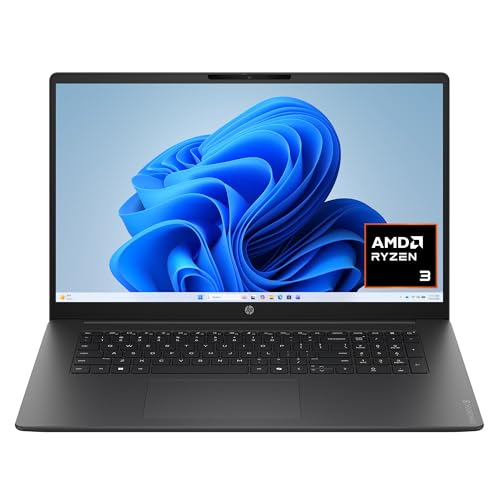
HP OmniBook 3 17.3 inch Laptop PC 17-dp0199nr

10.1 Inch Mini Netbook Android 12

HP 14″ Ultra-Portable Laptop 2026 Lavender
More Details On Our Top Picks
ChromeOS keeps this Samsung focused on classwork, browsing, and web apps rather than heavy software. The 14-inch frame suits backpack carry, and the slim build fits a student desk without crowding it. That makes it a sensible match for teens who live in tabs, docs, and video calls.
The Intel Celeron N4500 and 4GB of RAM point to light everyday use, so the trade-off is speed headroom, not portability. Four gigabytes of memory is the modest side for multitasking, yet it can be enough for school portals and one or two apps at a time. The honest read is that this works best as a tidy, low-fuss school machine.
Bright Spots
- ChromeOS keeps the interface simple for first-time laptop users.
- Fourteen inches is a practical size for class and commuting.
- Lightweight design helps it disappear into a school bag.
- Good fit for browser-based assignments and note taking.
Areas To Watch
- 64GB of storage leaves little room for large local files.
- 4GB RAM can feel tight with many tabs open.
- Best suited to web apps rather than demanding desktop software.
Core Details
Who It Suits Best
Teens who mostly use school platforms, docs, and browser tools will get the most from this compact Chromebook.
A Better Fit Elsewhere
HP OmniBook 3 17.3 inch Laptop PC 17-dp0199nr suits teens who want a larger display and more room for split-screen work.
This HP keeps the formula familiar, but it adds Windows 11 and a built-in webcam, which matters for classes that lean on video meetings. The 14-inch HD panel is modest rather than flashy, yet it’s a workable size for homework, email, and forms. For teens moving from a tablet to a real laptop, that familiarity can be the point.
The Intel Celeron dual-core chip, 4GB of RAM, and 64GB SSD place it firmly in basic-use territory. SSD storage means quicker startup behavior than older spinning drives, though the capacity stays small for lots of downloaded media. You may find it most useful as a school-first device, not a machine for heavy editing or many open apps.
What We Like
- Windows 11 opens the door to standard school software.
- Webcam support helps with remote classes and group calls.
- SSD storage usually feels snappier than older mechanical drives.
- 14-inch size stays manageable on a dorm or bedroom desk.
Small Caveats
- 4GB RAM limits heavier multitasking.
- 64GB storage is tight for large files and media.
- Renewed condition calls for a closer look at cosmetic wear.
Who Should Grab It
Students who need a straightforward Windows laptop for homework, web tools, and video check-ins fit this model well.
Reach For A Different Pick When
Lenovo IdeaPad Slim 3 Chromebook 2024 is the cleaner choice for teens who want lighter ChromeOS upkeep and easier day-to-day simplicity.
Compared with the Samsung Chromebook Go, this Lenovo adds a stronger entertainment angle through Waves MaxxAudio speakers and a 720p camera for calls and online classes. The 14-inch HD display keeps the footprint familiar, while the Chromebook format still favors fast logins and simple upkeep. That mix suits teens who split time between schoolwork and streaming.
The MediaTek Kompanio 520 processor is built for efficiency, not raw power, so it fits the same browser-first world as the first two picks. Battery life is another practical strength for a backpack day or a long stretch away from an outlet. The trade-off is clear, though: this is a light-use laptop, not a workstation.
Positives
- Waves MaxxAudio speakers give it a nicer media feel.
- 720p camera is enough for class check-ins and family calls.
- Efficient processor helps stretch day-to-day battery use.
- ChromeOS keeps upkeep simple and uncluttered.
- Light build suits students who carry a laptop often.
Worth Noting
- HD resolution keeps the panel in basic territory.
- 4GB memory limits heavier multitasking.
- 64GB storage fills fast with offline media.
Perfect Match For
Teens who want a simple school laptop that also handles music, calls, and light streaming will appreciate this one.
Swap It Out When
HP OmniBook 3 17.3 inch Laptop PC 17-dp0199nr fits better for teens who need a bigger screen and more headroom for multitasking.
This ProDesk shifts the conversation from portable school gear to a fixed desk setup with more room to breathe. The Intel Core i5 6500, 8GB of RAM, and 256GB SSD give it a more capable feel than the smaller Chromebooks above, especially for a teen’s homework station or family desktop corner. The included keyboard and mouse also remove a bit of setup friction.
RGB lighting and Windows 11 Pro make it feel more personal, though the renewed format means condition can vary more than a brand-new system. Desktop ownership also asks for more space and a monitor, so it’s not the easy carry option. In a busy kitchen table setup or a bedroom desk, the trade-off is worth it for steadier, sit-down use.
Standout Traits
- Desktop format usually leaves more thermal breathing room than tiny laptops.
- 256GB SSD is more forgiving for files and apps.
- Keyboard and mouse are already in the box.
- Windows 11 Pro suits a more traditional computing setup.
Room For Improvement
- Needs desk space and a monitor.
- Renewed condition can bring cosmetic variation.
- Not the right choice for carry-around school days.
Built With In Mind
Teens who study at a desk and want a more traditional computer setup will get the most from this desktop.
Where Another Pick Shines
Samsung Galaxy Chromebook Go 14″ XE340XDA-KA2US fits better for teens who need to move between classes, home, and travel.
The Gateway Chromebook 314 stands out here because it gives you a 14-inch Full HD panel, which looks sharper than the HD screens on the earlier Chromebooks. That matters in a real homework session, especially with split-screen docs, web research, and video playback side by side. The 3.31-pound body also keeps it portable enough for a backpack.
ChromeOS and the Intel Celeron N4500 keep the setup simple and familiar, while Wi-Fi 5 support covers standard home and school networks. The trade-off is the same one you see in other entry Chromebooks, there’s not a lot of horsepower for heavy local software. For teens who value screen clarity more than raw speed, that’s a fair exchange.
Highlights
- Full HD display looks sharper for homework and streaming.
- Lightweight body supports daily carry.
- ChromeOS stays easy to manage.
- Good screen size for multi-tab school work.
Softer Spots
- 4GB memory is still modest.
- 64GB storage leaves little local breathing room.
- Basic chip suits school tasks more than demanding apps.
The Right Fit
Teens who want a clearer display for online classes, browsing, and writing assignments should look closely at this Chromebook.
Skip It When
HP OmniBook 3 17.3 inch Laptop PC 17-dp0199nr fits better for teens who need a larger screen and a more desktop-like workspace.
Among these computers for teens, this HP is the roomiest option by a clear margin. The 17.3-inch FHD display gives you space for notes, streaming, and side-by-side tabs, which helps in households where one machine does double duty for school and family use. The AMD Ryzen 3 processor, 8GB of RAM, and 512GB SSD also push it beyond the entry-level crowd.
The larger footprint is the trade-off, and you’ll feel it on a crowded desk or in a backpack. Still, for teens who mostly work from one place, that extra screen space can make long sessions easier on the eyes. It feels more like a shared home workstation than a grab-and-go laptop.
Best Bits
- Large screen supports split-screen school work.
- 512GB SSD offers generous room for files.
- 8GB RAM handles more everyday multitasking.
- AMD graphics add a bit more visual headroom.
Points To Note
- Bulkier than 14-inch choices.
- Less convenient for constant travel.
- Large display takes more desk space.
Whose Shelf It Belongs On
Teens who study at a home desk and like extra screen room will appreciate this larger laptop.
Look Elsewhere When
Samsung Galaxy Chromebook Go 14″ XE340XDA-KA2US fits better for teens who value light carry over display size.
This mini netbook is the smallest thing in the group, and that size is the whole point. A 10.1-inch display and Android 12 make it feel closer to a portable companion for very light tasks than a full school laptop. It suits note checks, simple web work, and quick browsing in spaces where a larger machine would be awkward.
The quad-core processor, 2GB of memory, and 64GB of storage set firm limits, so expectations need to stay modest. The included webcam, Wi-Fi, Bluetooth, keyboard, and mouse help round out the package, but you’re still looking at basic everyday use. One thing worth considering is how little room 2GB RAM leaves once multiple tabs or apps pile up.
Reasons To Buy
- Very small footprint for travel and tight desks.
- Android 12 keeps the software side familiar.
- Included accessories reduce extra setup purchases.
- Good for light online tasks and quick checks.
Minor Gripes
- 2GB RAM is very limited.
- 64GB storage leaves little room for files.
- Small screen can feel cramped for long sessions.
Who Will Love This
Teens who need a tiny, simple device for brief tasks and travel bags fit this model best.
A Better Fit Elsewhere
acer Gateway Chromebook 314 CBO314-1H-C476 is the smarter choice for teens who want a much more comfortable screen for schoolwork.
This HP aims at teens who want a laptop that feels more complete out of the box. The 14-inch size keeps it portable, while the 628GB storage figure, split between 128GB UFS and a 500GB external drive, gives you far more room than the entry Chromebooks above. For school documents, downloads, and media, that extra space changes the day-to-day feel.
The Intel 4-core processor, 4GB RAM, Windows 11 Pro, and included Office and Copilot features make it more versatile for mixed school and family use. UFS, or Universal Flash Storage, is a fast storage format that helps responsiveness, though 4GB memory still keeps multitasking in the light-to-moderate range. The honest read is that this is a stronger all-rounder than the budget picks, but it still rewards sensible app habits.
Standout Traits
- Much more storage room than the basic models.
- Windows 11 Pro expands compatibility.
- 14-inch body stays easy to carry.
- Included software adds immediate classroom usefulness.
Honest Caveats
- 4GB RAM is still on the lean side.
- External storage means one more piece to keep track of.
- Best suited to practical everyday work, not heavy creative tasks.
Right Fit For
Teens who want a portable Windows laptop with extra storage and broad everyday usefulness fit this model well.
Another Choice May Suit
HP OmniBook 3 17.3 inch Laptop PC 17-dp0199nr suits teens who would rather trade portability for a larger display and more desk comfort.
What Matters Most Before Choosing Computers For Teens
Battery, Screen, And Carry Weight
School days reward laptops that stay light, open quickly, and last through classes without constant charging. A 14-inch Chromebook usually hits that balance better than a 17.3-inch desktop replacement, though the larger screen helps with split windows and long writing sessions.
Storage And Memory Limits
4GB of RAM can handle school portals and browsing, but it gets tight with many tabs, video calls, and downloads. Storage matters just as much, because 64GB fills fast once apps, files, and media start stacking up.
Windows, ChromeOS, Or Android
ChromeOS keeps maintenance simple and works well for web-based schoolwork. Windows brings broader software compatibility, while Android on a mini netbook fits only the lightest tasks.
A Quick Reality Check Before You Choose
Common Shopping Slip Ups
Many shoppers focus on screen size alone and miss the memory limit hiding underneath. That can leave a teen with a nice-looking laptop that slows down the moment schoolwork gets busy.
The Case For Spending Up
Higher-priced models usually bring more storage, a larger display, or a fuller Windows setup. That extra room matters most for teens who multitask, work from one desk, or keep files stored locally.
Frequently Asked Questions
What matters most in a teen laptop?
Portability, battery life, and enough memory for schoolwork matter most. A good keyboard and a screen size that matches the teen’s routine help just as much.
Is ChromeOS enough for school?
For web-based assignments, docs, and video calls, ChromeOS is usually enough. Teens who need specialized Windows software should lean toward a Windows laptop instead.
How much storage should you look for?
64GB works only for very light, cloud-first use. More storage gives you breathing room for downloads, offline files, and software updates.
Do teens need 17-inch screens?
Large screens help with split-screen work and long desk sessions. They are less convenient for backpacks and constant carry.
Are renewed laptops a sensible choice?
Renewed models can make sense for budget-conscious setups. You’ll want to pay close attention to condition and stick with a seller that gives clear details about the unit’s state.
