


Video editing leans hard on CPU speed, graphics muscle, memory capacity, and storage that keeps up with large project files. You need a desktop that fits your workflow, whether you cut family clips, client work, or layered 4K timelines in a busy studio.
This roundup focuses on towers and mini PCs with the specs that matter most for editing, plus a few practical trade-offs that show up in day-to-day ownership. Some picks favor raw power, others favor quiet desks, small footprints, or simpler office use.
The Shortlist At A Glance
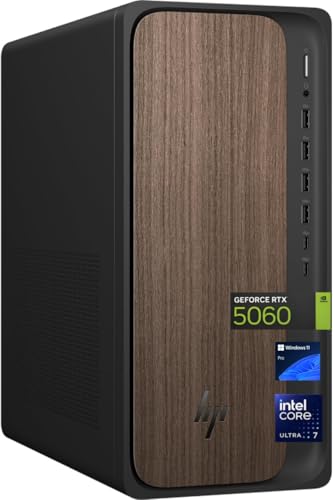
HP OmniDesk (M03-0060) Desktop PC, Intel Core Ultra 7 265, RTX 5060, 32 GB DDR5, 2TB SSD

GEEKOM IT13 Mini PC 2026, 13th Gen Intel i5-13600H, 1TB SSD, 16GB RAM
GEEKOM GT15 Max Desktop-Class Mini PC, Intel Core Ultra 9 285H, 1TB SSD, 32GB

Dell Tower Desktop, Intel Core Ultra 7-265, 32GB RAM, 1TB PCIe NVMe SSD

Alienware Aurora Gaming Desktop, RTX 5070, Intel Core Ultra 7 265F

ZYNEEX Ryzen 5 5500 Gaming Desktop, RTX 3050 6GB, 16GB DDR4, 1TB NVMe SSD

Dell Pro Tower Desktop Computer, Intel Core i3-14100, 16GB DDR5, 512GB SSD

HP Workstation PC Desktop Computer, Quadro K1200 4GB, Intel Core i5, 32GB DDR4 RAM
More Details On Our Top Picks
That RTX 5060 and Core Ultra 7 pairing puts this HP squarely in serious editing territory, especially for long timelines and layered effects. The 32 GB of DDR5 memory helps keep multitasking steadier, while the 2TB SSD gives you room for source footage, exports, and scratch files without immediate juggling.
The included wired keyboard and mouse make setup simple, and Windows 11 Pro fits a work-first desk better than a casual living-room rig. The trade-off is size and budget, because this is the kind of tower that makes sense for people who actually need the horsepower.
Strong Points
- RTX 5060 graphics gives you useful headroom for GPU-assisted editing and effects.
- 32 GB DDR5 supports smoother multitasking across editing, browser tabs, and asset tools.
- 2TB SSD reduces how quickly you run into storage limits on video projects.
- Windows 11 Pro suits a workstation-style setup better than a basic home desktop.
Things To Consider
- It’s a full desktop, so it needs more desk space than a mini PC.
- The stronger parts make it a better fit for users with real editing demands.
Core Details
Who It Suits Best
It fits you best when video projects are part of your regular workday and you want a desktop that can stay busy without feeling cramped.
A Better Fit Elsewhere
GEEKOM GT15 Max Desktop-Class Mini PC, Intel Core Ultra 9 285H, 1TB SSD, 32GB suits someone who wants a smaller chassis with strong power for a tighter desk.
Mini PCs usually ask you to give up expansion, but this GEEKOM offsets that with a practical mix of ports and a business-minded layout. Dual USB4 ports, a microSD slot, and support for four 8K displays make it easy to build a tidy desk for editing, asset review, or client presentations.
Compared with the larger HP OmniDesk, this one is the cleaner fit for small studios, shared offices, or a home desk that can’t swallow a tower. The 16GB memory ceiling is the main restraint, so it suits lighter editing better than dense multi-layer work.
What We Like
- Small footprint keeps your desk open for monitors, tablets, or notes.
- Two USB4 ports give you fast peripheral and storage options.
- Quad-display support helps when you manage timelines, bins, and reference windows at once.
- Intel i5-13600H is a sensible middle ground for everyday editing and office use.
Room For Improvement
- 16GB RAM is fine for modest projects, but it leaves less room for heavier compositions.
- Mini PC cooling and port layout reward neat cable management.
Built With In Mind
You’ll get the most from it in a compact workstation where silence, order, and a small chassis matter as much as performance.
Where A Sibling Pick Shines
HP OmniDesk (M03-0060) Desktop PC, RTX 5060, 32 GB DDR5, 2TB SSD suits heavier project files and longer editing sessions.
This is the compact option for someone who wants a smaller chassis but doesn’t want to back off on processor class. The Core Ultra 9 285H and 32GB memory are a stronger match for editing stations that also juggle creative apps, local AI tools, or heavy browser use.
Relative to the IT13, the GT15 Max is the more ambitious mini PC, while still staying far tidier than a tower like the Dell Pro. The honest read is that it fits best when desk space is tight and your work leans technical rather than purely casual.
Highlights
- Core Ultra 9 285H puts it in a higher-performance class for a mini PC.
- 32GB RAM supports smoother switching between editing, utilities, and background apps.
- Small format makes it easy to fit into a minimalist studio or home office.
- Good match for modern workflows that mix editing with AI-assisted tools.
Soft Spots
- Mini PC designs usually trade away easy internal expansion.
- The compact body may run warmer than a larger tower during long sessions.
Whose Shelf It Belongs On
It suits you best when you want a tiny desktop for advanced editing and you prefer a cleaner workspace over upgrade room.
Swap It Out When
Alienware Aurora Gaming Desktop, RTX 5070, Intel Core Ultra 7 265F is the stronger call for users who want a graphics-heavy desktop with more room to grow.
Dell keeps this tower focused on balance rather than flash. The Core Ultra 7, 32GB of memory, and 1TB PCIe NVMe SSD make it a comfortable match for editing projects that need dependable speed without stepping all the way into a gaming-first setup.
Compared with the HP OmniDesk, you give up the discrete RTX card, so the Dell makes more sense for lighter effects work and general creative use. For most home offices, that trade looks sensible, especially when you want a straightforward desktop that doesn’t dominate the room.
Upsides
- 32GB RAM helps keep editing tools and other apps open together.
- PCIe NVMe SSD supports quick booting and faster file access.
- Tower format usually makes maintenance and cable access easier than a mini PC.
- Windows 11 Home fits a general-purpose workstation setup well.
Points To Note
- Intel UHD graphics is fine for basic creative work, but it is not the strongest option here.
- The tower takes more space than the mini PCs in this roundup.
Right Fit For
You’ll appreciate it most in a home office that needs an everyday editing computer with a sensible desk footprint.
A Better Fit Elsewhere
HP OmniDesk (M03-0060) Desktop PC, RTX 5060, 32 GB DDR5, 2TB SSD suits you better if GPU-assisted editing matters more than a simpler graphics setup.
Feature Rundown
Alienware gives this Aurora a cleaner, more restrained look than the brand’s older showy machines, and that matters in a studio or shared office. The RTX 5070 pushes it into a stronger class for GPU-heavy creative work, while the Core Ultra 7 265F keeps the system anchored for editing, rendering, and serious play.
The trade-off is obvious: this is a premium tower for people who need more than a basic video box. Compared with the Dell Tower, you’re paying for stronger graphics focus and a more specialized build, which makes sense for heavier workloads and longer ownership horizons.
Reasons To Buy
- RTX 5070 gives you substantial graphics headroom for editing and gaming.
- Minimal chassis design fits better in a room where appearance matters.
- Airflow-focused layout is a practical choice for sustained workloads.
- AlienFX lighting zones add a customizable desktop touch.
Areas To Watch
- It makes the most sense only when you’ll use the stronger graphics hardware.
- The premium class can be more machine than a casual editor needs.
Perfect Match For
This suits you best if your editing machine also pulls double duty for gaming or demanding creative work.
Look Elsewhere When
GEEKOM IT13 Mini PC 2026, 13th Gen Intel i5-13600H, 1TB SSD, 16GB RAM is the neater fit for smaller desks and lighter workloads.
This ZYNEEX tower sits in the middle ground between a work-first desktop and a casual gaming box. The Ryzen 5 5500, RTX 3050 6GB, and 1TB NVMe SSD make it a workable starting point for lighter video editing, 1080p gaming, and everyday multitasking.
Compared with the HP OmniDesk and Alienware Aurora, it is less suited to heavier effects work, but that’s the trade-off for a more approachable parts mix. In most home setups, the ARGB cooling adds visual flair without changing the core job: keep the machine running and the files moving.
Best Bits
- Ryzen 5 5500 offers solid everyday desktop performance.
- RTX 3050 6GB helps with entry-level creative and gaming tasks.
- 1TB NVMe SSD gives you decent room for projects and installs.
- ARGB air cooling adds a more styled look for a gaming desk.
Small Caveats
- 16GB DDR4 is workable, but it’s less roomy than the 32GB systems above.
- The graphics card is better for light to moderate editing than heavy timelines.
- Decorative cooling and case lighting can mean more dust care over time.
The Right Fit
This fits you best if you want one desktop for lighter editing, streaming, and gaming without chasing premium-tier hardware.
Another Choice May Suit
HP OmniDesk (M03-0060) Desktop PC, RTX 5060, 32 GB DDR5, 2TB SSD is the stronger option for longer editing sessions and larger projects.
Dell’s Pro Tower keeps the formula lean: Intel Core i3-14100, 16GB DDR5, and a 512GB SSD for a straightforward desktop setup. That makes it a sensible fit for office editing, web-based creative tools, and lighter project work where speed matters more than rendering muscle.
Compared with the Dell Tower and HP OmniDesk, this one sits lower in the stack, so the strengths are responsiveness and simplicity rather than raw capacity. The honest read is that it suits basic stations very well, but dense timelines and lots of media files will push you toward a stronger model.
Positives
- Core i3-14100 is a clean fit for everyday desktop tasks.
- 16GB DDR5 keeps the system current for lighter creative work.
- 512GB SSD helps startup feel snappy and organized.
- Tower form makes future access easier than many mini PCs.
Trade Offs
- Storage is limited sooner than on the 1TB and 2TB options above.
- The i3 class is best for basic editing, not demanding multi-layer work.
Who Should Grab It
You’re in the right place here if your editing needs are modest and you want a dependable office desktop first.
Where A Sibling Pick Shines
GEEKOM GT15 Max Desktop-Class Mini PC, Intel Core Ultra 9 285H, 1TB SSD, 32GB gives you more headroom in a much smaller shell.
This renewed HP workstation is built around a different kind of editing logic, one that favors workstation behavior over flashy gaming hardware. The Quadro K1200 4GB, Intel Core i5, 32GB DDR4 RAM, and dual-storage setup give you a practical mix for design work, project files, and a desktop that can stay organized over time.
It compares well against the ZYNEEX tower for content work, though the older platform means you should value compatibility and storage layout more than modern GPU speed. For a studio that handles editing, graphics, and lots of local files, the 1TB SSD plus 4TB HDD split is the detail that stands out most.
Positives
- 32GB DDR4 memory gives you a comfortable multitasking cushion.
- 1TB SSD and 4TB HDD create a practical fast-plus-archive setup.
- Quadro graphics is aimed more at workstation-style creative tasks than gaming.
- Windows 11 Pro fits a work-focused desktop environment.
Honest Caveats
- It’s a renewed unit, so condition and appearance can vary by listing.
- The older Core i5 platform trails the newer Ultra and 13th-gen options above.
- 4GB graphics memory is useful for some jobs, but not the strongest match for heavy modern effects.
Made For
You’ll get the best fit here when your editing work leans toward design tasks, file storage, and a workstation-style setup.
Consider Something Else When
Alienware Aurora Gaming Desktop, RTX 5070, Intel Core Ultra 7 265F is the sharper choice for stronger graphics performance and newer platform hardware.
Details At A Glance
What Matters Most Before You Choose
Core Parts That Deserve Attention
For video editing, prioritize the processor, memory, graphics, and SSD before you chase cosmetic extras. A stronger CPU helps with scrubbing, exports, and multitasking, while enough RAM keeps timelines from feeling cramped.
Match The Form Factor To Your Desk
Mini PCs save space, but towers usually give you more breathing room for cooling and future access. A small editing nook pairs well with the GEEKOM models, while a fuller workstation setup suits the HP and Dell towers.
Think About Storage Like A Working Shelf
Video files grow quickly, so a 1TB drive can fill faster than expected and a 2TB drive buys real comfort. The HP Workstation’s SSD plus HDD split also makes sense when you keep active projects and archives separate.
A Quick Reality Check
Hidden Buying Traps
Don’t focus only on the processor name, because memory and storage can cap a machine faster than the CPU does. A compact box with limited RAM may feel tight long before the chip itself does.
The Upgrade Payoff
Higher-tier desktops cost more because they usually combine faster graphics, larger memory pools, and better cooling. That extra spend earns its keep when your editing sessions run long or your files are large and layered.
Frequently Asked Questions
What specs matter most for video editing?
Start with the CPU, then check memory and storage, because those shape most day-to-day editing speed. A discrete graphics card helps more as your effects and timelines get heavier.
Is a mini PC enough for editing?
Yes, for lighter work and smaller desks, a mini PC can make sense. The trade-off is usually less expansion room and less thermal headroom than a tower.
How much storage feels practical?
1TB works for many starter setups, but video projects can crowd it quickly. 2TB or a dual-drive setup gives you more breathing space.
Do I need Windows 11 Pro?
You don’t need it for basic editing, but it suits workstation-style setups and business use well. Windows 11 Home is fine for general creative work.
Is a workstation-style PC better than a gaming desktop?
Not always, because the right fit depends on your software and workload. Gaming desktops usually lean harder into graphics power, while workstations often balance storage and productivity features more carefully.
