


Virtual reality puts more strain on a setup than a standard desktop does. You need enough graphics muscle, stable connections, and the right ports, but you also need a machine that fits your room, your headset, and the kind of games you actually play. This list covers a mix of full gaming desktops, headset add-ons, and a refurbished console-based option for people who want a more focused VR path.
Quick Look At The Shortlist
CyberPowerPC Gamer Xtreme VR Gaming PC GXiVR8080A39

msi Codex Z2 Gaming Desktop A8NVP-436US
msi Aegis R2 AI Gaming Desktop C2NVR9-1452US

The Horizon Autherium Dragon RGB I9 RTX Gaming PC

HTC VIVE Wired PC Streaming Kit

Gaming PC Desktop Computer RTX 4060
More Details On Our Top Picks
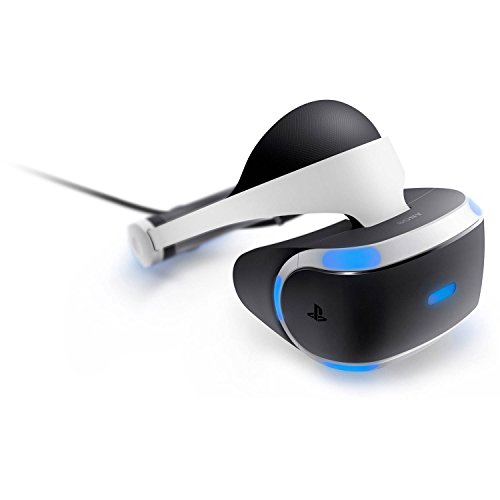
For PlayStation 4 households, this headset points you toward a simpler VR path than a full gaming tower. The renewed format also makes sense for someone who wants the headset ecosystem without starting from scratch.
The trade-off is obvious: it only fits the PlayStation 4 side of the room, so PC VR shoppers should skip it. For console players with limited space, it can feel like the most direct entry point here.
Highlights
- Built around the PlayStation 4 ecosystem, so setup stays focused.
- Good match for living-room play where a desktop tower would be overkill.
- Renewed condition gives you a more accessible way into VR hardware.
Things To Consider
- It only serves PlayStation 4 owners, which narrows the fit fast.
- Refurbished gear can arrive with the usual small packaging surprises.
Who It Suits Best
Console gamers who already live inside the PlayStation 4 ecosystem will get the cleanest match from this headset.
Where Another Pick Suits Better
Choose the CyberPowerPC Gamer Xtreme VR Gaming PC if you want a true desktop route for PC VR and broader game support.
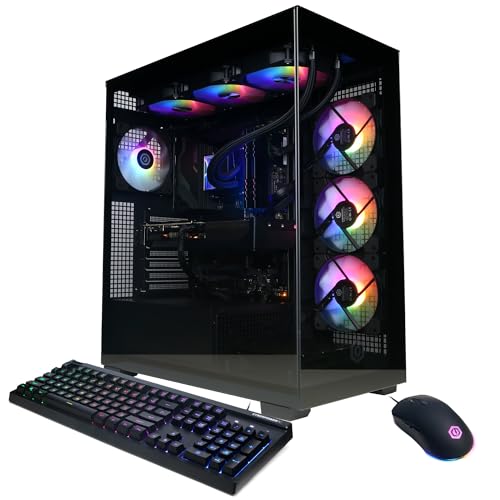
This tower is built for people who want VR headroom first and desk flair second. The Intel Core i9-14900KF, RTX 5070, and 32GB of DDR5 memory give you a spec stack that suits demanding games, while the 2TB PCIe 4.0 NVMe SSD helps large installs stay practical.
The liquid-cooled processor and tempered side panel add polish, but the real value sits in the port mix, with USB-C, multiple USB-A ports, HDMI, DisplayPort outputs, LAN, WiFi 5, and Bluetooth 4.2. That makes it a strong fit for a room where headset cables, controllers, and extra gear all need a place.
Strong Points
- High-end CPU and RTX 5070 graphics suit demanding VR workloads.
- 32GB of DDR5 memory helps with heavy multitasking and modern game loads.
- 2TB PCIe 4.0 SSD gives you room for a large game library.
- Rear I/O is generous, which matters in a busy gaming setup.
Minor Gripes
- WiFi 5 and Bluetooth 4.2 are behind the newest wireless standards.
- The desktop footprint is not small, so cable management matters.
- Liquid cooling usually rewards a little dust care over time.
Made For
PC VR gamers who want a strong all-around desktop for current titles, streaming, and everyday use.
Another Choice May Suit
Pick the Evounic Gaming PC Desktop Computer RTX 4060 when you want a more restrained tower for lighter VR entry work.
Compared with the CyberPowerPC above, this MSI cuts to a slightly simpler core, but it still keeps the parts that matter for VR in place. The Ryzen 7 8700F, RTX 5070, 32GB of DDR5, and 2TB NVMe SSD form a clean base for current games and headset software.
The USB Type-C port is useful for newer accessories, and the VR-ready labeling fits the hardware story. For a desk that also handles schoolwork, editing, or a shared family account, this one keeps the build sensible without feeling stripped down.
What We Like
- RTX 5070 graphics give it real breathing room for VR play.
- 32GB of DDR5 helps with background apps and larger game installs.
- 2TB NVMe storage leaves room for a mixed library of games.
- USB Type-C adds useful flexibility for modern accessories.
Softer Spots
- The source details do not spell out the rest of the rear port layout.
- Like most glass-and-fan desktops, it will need normal dust upkeep.
Perfect Match For
Shoppers who want a tidy VR-capable desktop for mixed gaming and everyday work.
Look Elsewhere When
Choose the CyberPowerPC Gamer Xtreme VR Gaming PC if you want more explicit connectivity detail and an Intel-based platform.
Feature Rundown
Built With In Mind
VR players who want a balanced desktop without stepping all the way up to a premium chassis.
Reach For A Different Pick When
The Horizon Autherium Dragon RGB I9 RTX Gaming PC makes more sense for you if storage volume is a bigger priority than this MSI’s cleaner spec list.
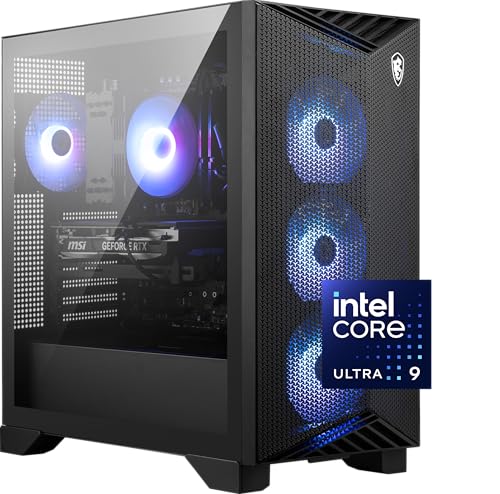
This MSI leans a little harder into premium desktop territory than the Codex Z2. The Core Ultra 9 285 and GeForce RTX 5070Ti give it a stronger top-end feel, while 32GB of DDR5 and a 2TB NVMe SSD keep the rest of the build aligned with that class.
Air cooling keeps the cooling setup simpler than liquid-cooled towers, which some people prefer for maintenance reasons. In a home office that doubles as a gaming corner, that can feel calmer and less fussy, though you still want enough airflow around the case.
Upsides
- Core Ultra 9 and RTX 5070Ti make it a stronger headroom play.
- Air cooling keeps the system simpler than liquid-based alternatives.
- 32GB DDR5 suits modern games and parallel desktop tasks.
- 2TB SSD gives you generous room for installs.
Points To Note
- Air cooling still depends on good room airflow around the tower.
- The source details do not outline the full port mix.
Who Should Grab It
PC VR shoppers who want a premium-feeling desktop without stepping into a very elaborate cooling setup.
Skip It When
Go with the CyberPowerPC Gamer Xtreme VR Gaming PC if you want more detailed connectivity information and a liquid-cooled CPU setup.
This one stands out for sheer capacity. With 64GB of RAM, 5TB of total storage, a Core i9 that can boost up to 5.4GHz, and an RTX 5070 OC card, the spec sheet reads like a machine meant for VR, streaming, and everything else running at once.
The 360mm all-in-one liquid cooler adds more thermal muscle than the simpler towers above, though it also adds a little more maintenance awareness. For a power user who keeps game captures, mod files, and several large libraries on hand, the storage mix is unusually roomy.
Best Bits
- 64GB of memory gives the desktop a very wide multitasking margin.
- 5TB storage suits large game libraries and media-heavy setups.
- 360mm liquid cooling supports the higher-performance parts.
- Windows 11 Pro adds a more work-friendly software base.
Small Caveats
- The larger cooling setup can be more involved than air-cooled builds.
- The big storage mix makes this more machine than casual starter rig.
- Desk space and cable routing matter more with a tower this loaded.
The Right Fit
Heavy multitaskers and VR power users who want lots of headroom and storage in one tower.
Swap It Out When
The MSI Aegis R2 AI Gaming Desktop suits you better if you want a simpler, air-cooled premium build.
Core Details
This is the add-on that matters most to VIVE Focus Vision owners who want a wired path to a PC. The package includes a 5-meter cable and a converter, and the DisplayPort mode support points toward a more direct connection than a loose adapter chain.
That setup suits people who stay near a desktop and care more about stable tethered play than roaming around the room. The honest read is that it’s a niche accessory, but for the right headset owner, it solves a very specific connection problem cleanly.
Bright Spots
- Built for the VIVE Focus Vision, so compatibility is clear.
- 5-meter cable gives you workable reach near a PC setup.
- DisplayPort mode supports a more direct streaming path.
- Cable plus converter package keeps the kit self-contained.
Areas To Watch
- It serves a very specific headset, not a broad group of systems.
- The cable length still asks for sensible desk and room planning.
Whose Shelf It Belongs On
VIVE Focus Vision owners who keep their headset near a PC and want a wired streaming setup.
A Better Fit Elsewhere
The CyberPowerPC Gamer Xtreme VR Gaming PC makes more sense if you still need the computer itself, not just the accessory.
Feature Card
This tower lands in the more approachable part of the range. The RTX 4060, Core i7-11700F, 16GB of DDR4 memory, and 1TB NVMe SSD make it a straightforward step into VR-capable gaming without the heft of the higher-end desktops above.
The 9 ARGB fans give it a showier case profile, and WiFi 6 plus Bluetooth 5.4 improve wireless convenience for a typical room setup. For a first serious gaming tower, that mix feels sensible, though the memory and GPU class set a clearer ceiling than the RTX 5070 and 5070 Ti machines.
Positives
- RTX 4060 gives you an accessible entry point for VR-friendly gaming.
- 1TB NVMe SSD keeps everyday load times snappy enough.
- WiFi 6 and Bluetooth 5.4 help with modern wireless gear.
- 9 ARGB fans deliver a more styled desktop presence.
Room For Improvement
- 16GB DDR4 is usable, though less roomy than the 32GB systems above.
- The GPU tier sits below the RTX 5070 and 5070 Ti desktops here.
- Multiple fans mean more surfaces to keep dust-free over time.
Best Suited To
Shoppers who want a more approachable VR-ready tower for everyday gaming and general use.
Where A Sibling Pick Shines
The msi Codex Z2 Gaming Desktop suits you better if you want 32GB DDR5 and a stronger overall VR-ready balance.
What Matters Most Before Choosing Computers For Vr
Mistakes Worth Dodging
Start with the headset path, not the flashiest desktop spec. A PlayStation-focused setup and a PC VR setup solve different problems, and the wrong platform wastes both money and desk space.
Port count matters too. DisplayPort, USB-C, and solid wireless support are the details that keep a VR room usable once controllers, sensors, and charging cables pile in.
The Case For Spending Up
Higher-tier machines usually pay for stronger graphics, larger memory pools, and faster storage, which helps when games get heavier or you keep several apps open at once. Better cooling also matters in a tower that stays on for long sessions.
That extra spend makes the most sense for people who want smoother headroom now and fewer upgrade decisions later.
Things Worth Knowing First
Common Shopping Slip Ups
Many people focus on the GPU and forget the rest of the system. A VR setup also needs the right ports, enough RAM, and a case that leaves room for cooling and cable routing.
Where The Extra Money Goes
Premium models tend to spend more on the CPU, graphics card, and thermal design. That matters most for long sessions, heavier titles, and mixed use with streaming or editing.
Frequently Asked Questions
What makes a desktop computer good for VR?
You want enough graphics power, enough memory, and the right display outputs for the headset path. Stable cooling and sensible port layout matter almost as much.
Do you need 32GB of memory for VR?
32GB gives you more breathing room for modern games and background apps. 16GB can work for lighter use, but it leaves less margin.
Is a wired headset setup better than wireless?
A wired setup usually gives you a simpler connection and fewer battery concerns. Wireless can feel cleaner in the room, but it depends on the headset and network path.
Can a midrange graphics card handle VR?
Yes, for many current titles a midrange card can be a practical starting point. Heavier games and higher refresh goals push you toward stronger graphics hardware.
Why does storage matter so much for VR computers?
VR games often take more space than casual desktop apps. A larger SSD also helps your library stay easier to manage.
