


Trading work asks for more than raw speed. You need stable multitasking, clear screens, quiet hardware, and enough connectivity to keep charts, browser tabs, and order tools open without friction.
This roundup focuses on desktop-style setups and one display option that fit real trading desks, home offices, and tighter work areas. You’ll see where compact mini PCs make sense, where tower systems give you more headroom, and where a wide monitor changes the whole layout.
Quick Look At The Shortlist

GEEKOM IT13 Mini PC 2026, 13th Gen Intel i5-13600H, 1TB SSD 16GB RAM

JIKIOU Stock Market Invest Day Trader Trading Mouse Pad

Dell Tower Desktop, Intel Core Ultra 7-265, 32GB RAM, Windows 11 Home
KAMRUI E3B Mini Gaming PC 2026, AMD Ryzen 7 7730U 16GB RAM 1TB SSD

HP Elitedesk 800 G3 SFF Desktop PC – Intel i7-6700,32GB DDR4,1TB NVMe SSD + 2TB HDD

INNOCN 49″ Curved Gaming Monitor 49C1G
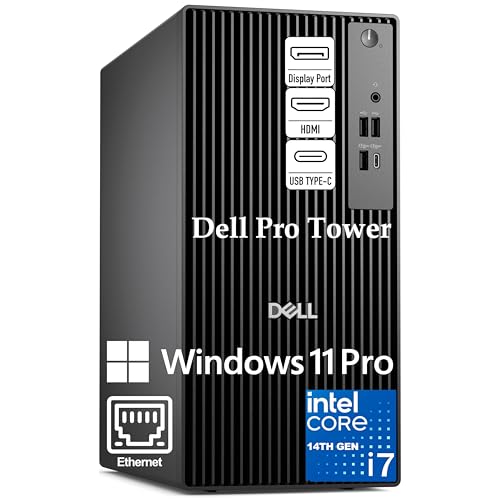
Dell Desktop Computers, Intel 20-Core i7-14700, 16GB DDR5 RAM, 1TB PCIe SSD
HP Envy Desktop PC 2TB SSD 64GB RAM Win 11 Pro
More Details On Our Top Picks
Mini PCs suit trading desks that need open space, not another large chassis. The IT13 brings a 13th Gen Intel Core i5-13600H, 1TB SSD, and 16GB RAM, so it’s built for the usual mix of charts, browser tabs, and platform windows without crowding the desk.
The two USB4 ports matter more than they sound, because USB4 is a fast connection standard that helps with modern docks and high-speed peripherals. Compared with the Dell tower later in the list, this one gives you a smaller footprint and less bulk, though you give up the roomy upgrade feel of a full tower.
Strong Points
- Small chassis leaves more room for monitors and notes.
- 1TB SSD gives you comfortable storage for trading apps and files.
- 16GB RAM fits everyday multitasking without constant tab juggling.
- USB4 support helps with docks and modern accessories.
Things To Consider
- Compact systems can feel cramped beside a pile of cabling.
- The smaller body usually means less room for internal expansion later.
Feature Card
Who It Suits Best
Desk-based traders who want a compact system with enough headroom for daily platform work will get the most from it.
A Better Fit Elsewhere
Dell Desktop Computers, Intel 20-Core i7-14700, 16GB DDR5 RAM, 1TB PCIe SSD suits heavier workstation-style use and more demanding multitasking.
A trading desk often gets judged by the little things first, and this mouse pad leans into that role. The stitched edges help the mat keep its shape, which matters when your mouse moves all day beside charts, hotkeys, and a keyboard.
Its stock-market graphic gives the setup a clear theme without taking over the whole desk. Compared with the plain hardware picks in this list, it’s the easiest way to add personality, though it won’t change performance the way a stronger PC or larger monitor will.
Highlights
- Stitched border helps reduce edge wear over time.
- Large desk mat format gives your mouse a steadier surface.
- Graphic style suits chart-heavy workspaces and home offices.
Minor Gripes
- It’s a styling choice, not a productivity upgrade.
- Surface care matters, since desk mats collect dust and crumbs.
Who Will Love This
Traders who care about a tidy, themed workspace and want a better mouse surface than a bare desk will appreciate it.
Where A Sibling Pick Shines
GEEKOM IT13 Mini PC 2026, 13th Gen Intel i5-13600H, 1TB SSD 16GB RAM is the stronger choice for anyone focused on actual system power.
A tower still makes sense for trading desks that run multiple windows all day and keep growing. The Core Ultra 7-265, 32GB RAM, and 1TB PCIe NVMe SSD point to a system that can handle a dense workflow without feeling cramped.
The included wired keyboard and mouse reduce the number of extra parts you need to source, which helps with a clean setup. Compared with the GEEKOM mini PC, this Dell gives you a more traditional desktop layout and more breathing room for future use, though the tower form takes up more physical space.
Upsides
- 32GB RAM suits heavy browser use and trading platforms.
- 1TB NVMe SSD keeps launches and saves snappy.
- Included keyboard and mouse make setup simpler.
- Wi-Fi 6 and Bluetooth support modern desktop connections.
Points To Note
- Tower size needs more desk or floor space than a mini PC.
- Intel UHD Graphics is fine for routine display work, not a graphics-first workload.
- Windows Home may be enough for many desks, though some office setups prefer Pro.
Core Details
Built With In Mind
Traders who want a fuller desktop system with more room for multi-window work will get the clearest payoff here.
Another Choice May Suit
KAMRUI E3B Mini Gaming PC 2026, AMD Ryzen 7 7730U 16GB RAM 1TB SSD fits smaller desks and simpler layouts better.
Some trading setups need a small box that still keeps up with a busy morning session. The Ryzen 7 7730U, 16GB RAM, and 1TB SSD give this mini PC a practical balance for charts, browser tabs, and the usual background tools.
The “gaming” label matters less than the hardware underneath it, and that hardware suits a compact office just fine. Compared with the Dell tower, you get a cleaner footprint and simpler placement, though you lose the broader desktop feel and expansion comfort of a larger case.
Best Bits
- Small footprint suits crowded desks and shared work areas.
- Ryzen 7 class processor gives solid day-to-day pace.
- 1TB SSD keeps room for software, logs, and files.
- 16GB RAM handles the standard trading mix well.
Small Caveats
- Mini PCs usually require more care with cable routing.
- Internal growth options are often tighter than in tower systems.
Whose Shelf It Belongs On
This suits traders who want a low-profile desktop and value a cleaner work surface over maximum expansion.
Where Another Pick Suits Better
Dell Desktop Computers, Intel 20-Core i7-14700, 16GB DDR5 RAM, 1TB PCIe SSD is the better call for heavier multi-app days.
This HP bundle leans hard into convenience, since it ships as a fuller desk setup rather than a bare system. The 32GB DDR4 memory, 1TB NVMe SSD, 2TB HDD, and dual 24-inch monitors make it easier to get a trading station running without piecing together every part separately.
The storage split is practical: NVMe means fast loading for active apps, while the hard drive gives you extra room for archives and documents. Compared with the mini PCs above, this setup takes more space, but the included monitors and accessories can make that trade feel worth it for a first trading desk.
Reasons To Buy
- Dual monitors help with side-by-side charts and watchlists.
- 32GB RAM supports a busy multitasking routine.
- SSD plus hard drive gives speed and extra storage.
- Wireless keyboard and mouse cut down on extra shopping.
Areas To Watch
- Refurbished gear can vary more in cosmetic condition than new stock.
- The older i7-6700 platform trails newer processors in headroom.
- Monitor-heavy bundles need more desk width and cable management.
Technical Sheet
Perfect Match For
New traders or home-office setups that want an all-in-one desk bundle will get the clearest value here.
Look Elsewhere When
HP Envy Desktop PC 2TB SSD 64GB RAM Win 11 Pro is the stronger path for power-hungry workflows and more future headroom.
A wide monitor can matter more than another small hardware bump, especially once your trading day spreads across several windows. The 49-inch curved panel uses a 32:9 aspect ratio, which means a long, ultrawide workspace that fits multiple charts and tools without stacking everything vertically.
The 144Hz refresh rate, 3840 x 1080 resolution, and USB Type-C, DisplayPort, and HDMI inputs give it real flexibility. Compared with the HP bundle, this pick is less about bundled convenience and more about turning one screen into a broad control center, though it demands enough desk width to make sense.
Bright Spots
- Ultrawide shape reduces constant window switching.
- 144Hz suits smoother motion across charts and feeds.
- Height and tilt adjustment help with placement comfort.
- Built-in speakers trim accessory clutter on the desk.
Room For Improvement
- The large panel needs a roomy desk and sensible mounting plan.
- Extra width can feel excessive for very compact work areas.
Feature Rundown
Right Fit For
Active traders who want a broad visual field and keep several platforms open at once will benefit most.
Swap It Out When
JIKIOU Stock Market Invest Day Trader Trading Mouse Pad suits setup finishing touches, not screen-heavy workflows.
For trading setups that also run research tools, spreadsheets, and heavier background tasks, this Dell goes straight to the point. The Intel Core i7-14700 brings 20 cores and 16GB DDR5 RAM, which is a strong match for multi-app days that would slow lesser systems down.
DDR5 is the newer memory standard here, and it helps the machine stay current in a category where you may keep a desktop for years. Compared with the older HP Elitedesk bundle, this Dell has a much newer platform and a cleaner focus on core performance, though it doesn’t bundle monitors or extras.
Standout Traits
- 20-core processor suits dense multitasking.
- DDR5 memory gives the platform a newer foundation.
- 1TB PCIe SSD helps launches stay quick.
- Fits traders who also run demanding work apps.
Honest Caveats
- 16GB RAM is workable, though some heavy desks may want more.
- Only the core system is described, so you may need more accessories.
Feature Snapshot
The Right Fit
Traders who run research, spreadsheets, and other office software beside the market platform will appreciate the extra processor strength.
Where A Sibling Pick Shines
HP Envy Desktop PC 2TB SSD 64GB RAM Win 11 Pro is the better fit for users who want a fuller premium desktop package.
This HP Envy sits at the high end of the list for traders who keep a lot open at once and don’t want the system to feel crowded. The 64GB RAM and 2TB SSD set it apart immediately, while the Intel Core i9-14900K and RTX 3050 8GB add more muscle than the typical office desktop.
The trade-off is straightforward: this is more machine than a casual chart watcher needs, and the graphics card matters less unless your work also leans into visual tasks. Compared with the Dell i7-14700 pick, it pushes harder on memory and storage, which is exactly where serious desk-heavy workflows feel the difference.
Positives
- 64GB RAM gives a wide cushion for multitasking.
- 2TB SSD leaves generous room for software and archives.
- i9-14900K class processor suits demanding daily use.
- RTX 3050 adds a discrete graphics layer.
- Win 11 Pro fits many office environments cleanly.
Worth Noting
- Higher-tier hardware makes sense only for busier, more demanding desks.
- The graphics card can be more than basic trading work needs.
Core Details
Who Should Grab It
This fits power users who want a desktop that can stay busy across trading, research, and other heavy office work.
Not Your Match When
JIKIOU Stock Market Invest Day Trader Trading Mouse Pad is the simpler choice for shoppers refining a desk setup rather than replacing a workstation.
What To Weigh Before Choosing Computers For Trading
Desk Space And Display Room
A trading setup needs enough room for more than one window. Compact mini PCs save space, but a wide monitor or dual-screen arrangement often matters more once charts, watchlists, and order tools start stacking up.
Memory And Storage Balance
RAM keeps multiple apps active without constant slowdowns, while SSD storage helps software open quickly. Larger drives matter once you store screenshots, downloads, logs, and archived notes for later review.
Expansion And Cable Planning
Mini PCs keep the footprint clean, but towers usually leave more room for future growth. A neat cable path matters too, especially beside ultrawide displays and docking gear.
A Quick Reality Check
Mistakes Worth Dodging
Do not focus only on processor names and ignore RAM, storage, and display space. A fast chip still feels cramped on a cluttered desk with too little memory or the wrong monitor size.
The Upgrade Payoff
Higher-tier desktops cost more because they usually bring more memory, faster storage, and stronger processors together. That extra spend makes sense once your trading day also includes research, editing, or heavy multitasking.
Frequently Asked Questions
How Much RAM Makes Sense For Trading?
16GB works for many simple setups with a few apps open. 32GB or more suits heavier multitasking and longer sessions with many tabs.
Is A Mini PC Enough For Market Work?
Yes, for a compact desk and standard browser-based platforms. A tower feels better once you want more internal room and a fuller desktop layout.
Do You Need A High-Refresh Monitor?
A 144Hz monitor can make motion feel smoother across active charts and scrolling. It matters less than resolution and size for many trading desks.
What Matters More, CPU Or Storage?
The processor keeps multiple apps moving, while SSD storage helps everything open quickly. For trading, both matter, but RAM and monitor space can shape comfort just as much.
Should You Choose Bundles Or Bare Systems?
Bundles help when you want monitors and accessories in one purchase path. Bare systems suit shoppers who already own a display and keyboard setup.
