


Building a cleaner, faster desktop setup starts with the right Accessories For Pc, not just a bigger case or a stronger graphics card. The items below cover memory, lighting control, cable styling, cleaning, placement, webcam use, and desktop audio, so your setup feels more complete in daily use. For a gaming tower, a work desk, or a streaming corner, the right accessory can solve a small annoyance that keeps showing up every day.
Quick Look At The Shortlist

TEAMGROUP T-Create Expert CL30 DDR5 32GB Kit
Airgoo Magnetic 16-Port ARGB Controller

airgoo Addressable RGB ATX Strimer

airgoo Addressable RGB PC LED Strip

CAGIWIRU Cordless Air Duster 130000RPM

YOSE Computer Tower Stand, Adjustable Mobile CPU Stand
Angetube Streaming Webcam with Microphone

LENRUE G11 Computer Speakers for Desktop
More Details On Our Top Picks
Memory sits at the center of a responsive desktop, and this 32GB dual-kit suits a system that moves between games, creative work, and heavy tab use. The 6000MHz rating points to fast DDR5 performance, while CL30 keeps latency tight enough to matter in a tuned build. That XMP 3.0 and EXPO support makes setup easier across Intel and AMD desktops, which is helpful for you if the rest of the machine is already performance-minded.
Compared with the lighting-focused picks later in the list, this one is about frame rates, load times, and multitasking headroom. The trade-off is simple, it solves speed rather than style, so it only earns its place in a tower that can actually use DDR5. For a gaming rig or a work PC that runs large projects, it feels like the sensible upgrade path.
What We Like
- 32GB split across two 16GB modules gives a practical balance for gaming, editing, and heavy browser use.
- 6000MHz DDR5 speed supports a snappier desktop feel in systems built for current-generation platforms.
- CL30 latency is a solid match for a performance build that values quicker response.
- XMP 3.0 and EXPO support makes compatibility easier across Intel and AMD setups.
- Black finish keeps the look restrained, so it works in a plain tower as easily as a showcase rig.
Things To Consider
- DDR5 only makes sense in a motherboard and CPU combination that supports it.
- You are paying for speed headroom, so a basic office PC will not use much of what it offers.
- Heavier-duty thermal handling depends on the rest of the system airflow, not the kit alone.
Feature Card
Who It Suits Best
Performance-focused desktop owners who want fast DDR5 memory for gaming or content work will get the most from this kit.
Where A Sibling Pick Shines
The airgoo Addressable RGB PC LED Strip fits you better when visual styling matters more than system memory speed.
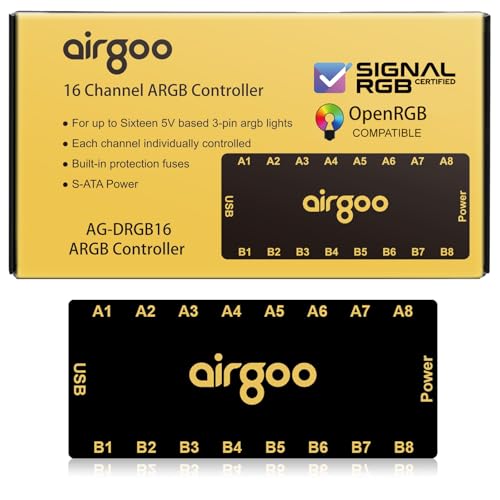
Lighting control gets messy fast once a tower starts collecting fans, strips, and cooler accents, and this hub is built for that kind of load. The 16-port layout lets you centralize a lot of 5V 3-pin ARGB gear, while SATA power gives the controller its own supply path instead of leaning on a motherboard header alone. Its magnetic housing is the practical part that stands out, especially in a mid-tower or full-tower where tidy mounting matters.
The catch is software discipline, because it wants the correct SignalRGB or OpenRGB release before configuration makes sense. That means it suits a setup you plan to manage rather than ignore. Compared with the simpler airgoo LED strip later in the list, this is the more serious hub for a build with lots of lighting layers.
Positives
- 16 ports give you room to organize a large ARGB setup from one place.
- SATA power helps keep the load off a motherboard lighting header.
- Magnetic mounting makes placement easier in larger cases.
- Support for SignalRGB and OpenRGB suits users who want software-based control.
Minor Gripes
- Software setup comes first, so the learning curve is higher than a simple plug-in accessory.
- It makes sense mainly in builds with several ARGB parts to manage.
- Smaller cases may not need a hub this expansive.
Built With In Mind
You get the most from this controller in a mid-tower or full-tower with several ARGB components and a clean cable route.
A Better Fit Elsewhere
The airgoo Addressable RGB PC LED Strip suits lighter setups that only need a straightforward lighting accent without the extra controller layer.
Power cables usually disappear into the case, and that is exactly why this ARGB extension exists. With 126 LEDs, it creates a much more animated visual line than a plain sleeved extension, so the cable run becomes part of the build’s look instead of something to hide. The practical warning is the compatibility ceiling, because many motherboard 3-pin ARGB headers only handle 120 LEDs, so pairing it with a stronger controller is the cleaner route.
That makes it a natural fit for showcase PCs that already lean into lighting symmetry. Compared with the Airgoo controller, this is the decorative piece, not the management piece, and the honest read is that both can work together. You notice the difference most in a case with a side panel and a neat interior.
Best Bits
- 126 LEDs create a strong lighting effect across the power cable run.
- Turns an ordinary PSU extension into a visible design element.
- Works well in themed builds that already use ARGB fans and strips.
- Pairs naturally with a separate lighting controller.
Worth Noting
- Many motherboard headers top out below the LED count here, so controller planning matters.
- The styling value is the main reason to choose it.
- It makes the most sense in a case with a windowed side panel.
The Right Fit
PC builders who care about visual cohesion and already run an ARGB ecosystem will get the most from this cable.
Where Another Pick Suits Better
The TEAMGROUP T-Create Expert CL30 DDR5 32GB Kit is the better choice when performance parts matter more than lighting flair.
Some lighting upgrades feel fussy, but this pair of ARGB strips keeps the job straightforward. Each strip sits in a silicone rubber tube, so the shape is soft and easy to position along a case interior, and the material also helps diffuse the light instead of leaving bright points scattered everywhere. At 15.75 x 0.55 x 0.28 inches, the strips are long enough to frame a tower without overpowering it.
The trade-off is maintenance, because silicone-style surfaces can pick up dust more readily than bare plastic in an open desk setup. For a standard gaming case or a work PC under a desk, that is manageable. Compared with the Strimer, this is the cleaner, subtler option for broad ambient glow rather than a single dramatic cable run.
Highlights
- Silicone rubber housing gives the strips a flexible, easy-to-place shape.
- Light diffusion softens the look inside a case.
- Two-strip layout gives you more placement options around the interior.
- Modest size makes it suitable for a wide range of tower layouts.
Areas To Watch
- Dust buildup can show up on the flexible tubing, so occasional wiping helps.
- The look is subtle, not dramatic.
- It works best in a build that already has ARGB support in place.
Who Will Love This
You will get the most out of these strips in a mid-size tower where you want gentle interior glow without bulky add-ons.
Look Elsewhere When
The airgoo Addressable RGB ATX Strimer suits you better when one vivid cable accent matters more than a wider light wash.
Dust builds up everywhere a PC breathes, and this cordless blower is aimed at that problem without relying on canned spray. The brushless motor is the important detail, because brushless designs usually cut down on wear points, and the 130000RPM figure suggests enough force for keyboard seams, vents, and case filters. The built-in LED light is a small but useful touch in darker corners of a tower or behind desk equipment.
Three speed settings give you some control, which matters around delicate connectors or a crowded desk shelf. The honest read is that high output tools can feel more aggressive than a soft brush, so you still want a careful hand. Compared with the YOSE tower stand, this is the accessory that keeps the machine itself cleaner rather than just better placed.
Positives
- Cordless operation keeps the cleaning routine untethered.
- Three speed levels let you tailor airflow to the task.
- LED lighting helps you spot dust in shadowed spaces.
- Works beyond PCs, so it can handle desk gear, car nooks, and household corners too.
Small Caveats
- High airflow deserves care around loose cables and fragile attachments.
- Battery tools need periodic charging, so they suit planned cleaning sessions better than emergency use.
- The strongest setting is more about power than finesse.
Best Suited To
Desktop owners, keyboard collectors, and anyone who regularly clears dust from vents and filters will appreciate this kind of tool.
Swap It Out When
The LENRUE G11 Computer Speakers fit better when your desk upgrade is about sound rather than maintenance gear.
Placing a tower on the floor is often a compromise, and a rolling stand is the cleaner answer for desks that need access without a full rearrangement. Caster wheels make the case easier to shift for cable changes, vacuuming, or seasonal desk resets, and the adjustable frame is the part that matters most when tower footprints vary. That mobility is handy on carpet, where dragging a heavy chassis gets old fast.
One thing worth considering is the space it adds under the tower, because a stand like this works best when the floor area is already part of the plan. Compared with the airgoo lighting pieces, this pick is purely about placement and access. For a home office or gaming room that gets cleaned often, that feels like the practical route.
Upsides
- Rolling casters make tower movement much easier.
- Adjustable sizing helps the stand fit different desktop cases.
- Raises the chassis off carpet for easier repositioning and cleaning access.
- Useful in rooms where the PC gets moved a few times a year.
Points To Note
- Wheels can take up more floor space than a fixed base.
- The stand makes most sense when your tower sits low and heavy.
- You still need enough room for the case to roll freely.
Right Fit For
Desktop owners with floor-bound towers, especially those on carpet or in rooms that get reconfigured often, will find this the most useful.
Another Choice May Suit
The CAGIWIRU Cordless Air Duster 130000RPM is the better call for desks that need frequent cleaning rather than mobile tower storage.
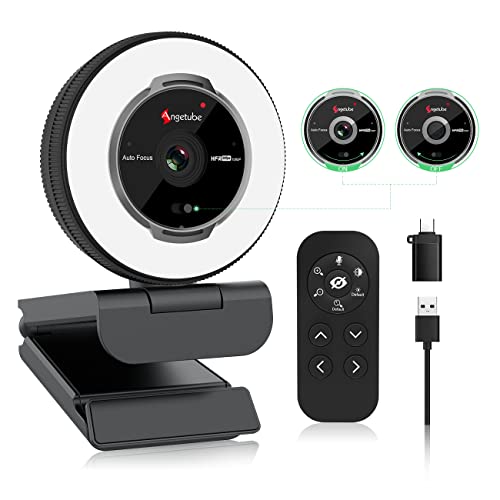
A webcam with built-in lighting solves two problems at once, which is useful for calls in a room that never quite gets enough daylight. The ring light offers three color modes with stepless brightness adjustment, so you can soften the image without reaching for separate desk lighting. For quick meetings, the touch control is a nicer route than digging through software menus every time the room changes.
The microphone adds another layer of convenience, though the room itself still shapes how clean your voice sounds. Compared with the LENRUE speakers later in the list, this is about sending your image and voice outward, not filling the desk with sound. It suits streamers, remote workers, and anyone who wants a simpler camera setup with less hardware on the desk.
Reasons To Buy
- 1080P capture fits common video call and streaming needs.
- Integrated ring light reduces the need for extra desk lamps.
- Three light tones and stepless brightness give you finer control over the look.
- Touch-based adjustment keeps daily use quick and uncluttered.
Honest Caveats
- Ring lights can look harsh in a small room if brightness is pushed too high.
- The microphone helps with convenience, but room acoustics still matter.
- Best results usually come from a stable monitor or tripod position.
Perfect Match For
Remote workers, streamers, and regular video callers who want a simple all-in-one camera setup will get the most from this model.
Skip It When
The LENRUE G11 Computer Speakers make more sense for desk setups where audio output matters more than on-camera lighting.
Desktop speakers make the most sense when you want a cleaner desk than a headset allows, and this pair keeps the footprint small. USB C, USB, and AUX input options give you flexible hookup paths, which helps across desktops, laptops, and older gear. The touch-controlled lighting also keeps the front face uncluttered, a neat detail for setups that already have enough buttons and cables.
Compared with the webcam in the previous slot, this is the sound side of the desk rather than the camera side. The honest read is that small speakers rarely aim for room-filling output, so the real strength is convenience and tidy placement. For daily music, call audio, or casual gaming at a compact desk, that is usually enough.
Standout Traits
- Multiple power and input paths make the speakers easy to slot into different setups.
- Touch lighting keeps the design simple from the front.
- Compact form suits a crowded desk.
- Useful for music, game audio, and video playback without a headset.
Room For Improvement
- Compact speakers can suit small desks better than large rooms.
- The light feature is a style touch, not a reason alone to choose them.
- Desk placement still affects how full the sound feels.
Who Should Grab It
You get the best fit here on a small to medium desk where simple wired audio and a tidy footprint matter more than bulky speaker cabinets.
Reach For A Different Pick When
The Angetube Streaming Webcam with Microphone fits better for setup priority around video calls and on-camera work.
What Matters Most Before Choosing Accessories For Pc
Match The Accessory To The Job
A memory kit, lighting controller, and tower stand solve different problems, so the first mistake is treating them like interchangeable upgrades. A performance desktop benefits from DDR5 and cooling-aware cleaning tools, while a showcase build gets more value from ARGB control and clean cable styling.
Check Compatibility First
5V 3-pin ARGB gear, DDR5 memory, and webcam or speaker connections each depend on the rest of the system. The right accessory fits your motherboard, case, desk space, and port layout without forcing awkward workarounds.
Think About Daily Use
The best accessory is the one that removes friction you feel every week, like dusting vents, moving a tower, or joining a video call. A small convenience often matters more than a flashy spec line.
A Quick Reality Check
Common Shopping Slip Ups
A lot of setup problems start with buying lighting parts before checking header support or cable routing. Another common miss is choosing a tower accessory that looks compact on paper, then discovering it crowds the floor space.
Why The Higher Tier Costs More
You pay more for broader compatibility, smarter control, stronger materials, or better fit in a more demanding setup. That extra spend makes sense when you run several ARGB parts, use the PC daily, or want less clutter around the desk.
Frequently Asked Questions
What kind of Accessories For Pc help most in a gaming setup?
Memory, lighting control, and a cleaning tool usually give the clearest payoff. Those pieces affect performance, appearance, and upkeep all at once.
Do ARGB accessories need special compatibility checks?
Yes, especially with 5V 3-pin parts and LED counts. A controller or header mismatch can turn a simple upgrade into a frustrating one.
Is a tower stand worth it on carpet?
It usually helps because it raises the case and makes movement easier. The main concern is choosing a size that suits the case footprint and floor space.
What makes a cordless air duster useful for desk gear?
It clears dust from vents, keyboards, and filters without relying on canned spray. A variable-speed design gives you more control around delicate areas.
Are webcam light combos useful for everyday calls?
They are, especially in rooms with weak natural light. A built-in ring light can make the setup simpler than juggling a separate lamp.
