


Affordable Computers cover a wide spread, from compact desktops to slim laptops and all-in-ones. The right choice depends on your desk space, your workload, and how much storage or screen size you need for daily work, school, and home use.
This roundup keeps the focus on practical fit. You’ll see older business towers for basic office tasks, small-form-factor machines for tight setups, and lighter systems for browsing, streaming, and document work without paying for extras you may never use.
The Shortlist At A Glance
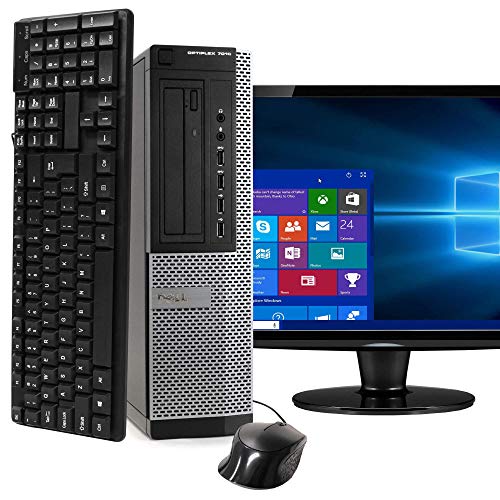
Dell Optiplex 7010 Desktop Package with 19-Inch LCD

Dell Optiplex 7050 SFF Desktop PC i7-7700 32GB RAM 1TB SSD

Dell Latitude 3190 11.6-Inch 2-In-1 Touchscreen Laptop

Acer Chromebook 315 Laptop CB315-4H-C8XU Silver

Dell Optiplex 3050 SFF Desktop PC i5-6500 16GB RAM 256GB SSD

GEEKOM NEW IT12 Mini PC i3-12300HE 16GB RAM 256GB SSD
Lenovo IdeaCentre All-In-One Desktop Computer 24-Inch FHD
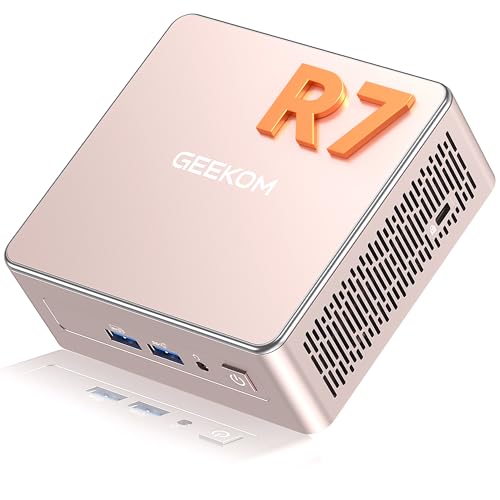
GEEKOM A5 2027 Edition Mini PC Ryzen 7 7730U 16GB RAM 512GB SSD
More Details On Our Top Picks
This bundle makes sense for a desk that needs everything in one shipment. You get the tower, 19-inch LCD, keyboard, and mouse, so the setup burden stays light. The i5 processor, 8GB RAM, and 500GB hard drive fit email, browsing, and office work without fuss.
The trade-off is clear, though, because the hard drive will feel slower than the SSD-based options later in the list. The included WiFi and Windows 11 Pro help, and the package format is handy for a spare room, a basic home office, or a first work-from-home station.
Strong Points
- Full desktop package cuts down on separate purchases.
- 19-inch display keeps the footprint modest for small desks.
- 8GB RAM is enough for common office tasks and web tabs.
- Windows 11 Pro suits work-focused setups better than a bare-bones system.
Points To Note
- 500GB HDD storage is the slowest part of the setup.
- The screen size is practical, but not roomy for side-by-side spreadsheets.
- Renewed equipment often rewards a quick dusting and careful cable check at arrival.
Feature Snapshot
Who It Suits Best
You suit this pick best when you want a complete starter desktop for routine home or office work.
Where A Sibling Pick Shines
Dell Optiplex 3050 SFF Desktop PC i5-6500 16GB RAM 256GB SSD suits you better when quicker storage matters more than an all-in-one bundle.
Compared with the 7010 bundle, this one is built for heavier day-to-day work. The i7-7700, 32GB DDR4, and 1TB SSD give you much more breathing room for large browser sessions, office suites, and file-heavy routines. Small form factor design helps it stay unobtrusive beside a monitor.
The dual-monitor support matters in a busy home office, especially for spreadsheets, chat, and reference windows at once. Bluetooth and WiFi make it easier to keep the desk tidy, though the compact case still leaves less room for internal expansion than a larger tower.
What We Like
- 32GB RAM gives you headroom for multitasking.
- 1TB SSD should feel much quicker than a mechanical drive.
- Dual-monitor support suits focused work layouts.
- Small chassis saves desk space without sacrificing desktop-class hardware.
- Bluetooth and WiFi reduce cable clutter.
Areas To Watch
- Compact cases can be less forgiving for future upgrades.
- Renewed condition is a plus on value, but cosmetic variation is common.
- You may find the small footprint less convenient for frequent port swapping.
Who Will Love This
You suit this machine best when your workday includes lots of tabs, remote meetings, and split-screen documents.
Another Choice May Suit
Dell Optiplex 3050 SFF Desktop PC i5-6500 16GB RAM 256GB SSD fits better for lighter office use with less emphasis on heavy multitasking.
This Latitude leans portable rather than roomy. The 11.6-inch HD touch display, 2-in-1 hinge, and 128GB SSD make it easier to carry between classrooms, meetings, or couch-side note-taking. The touchscreen adds convenience for quick scrolling and sketching without needing a full keyboard posture.
Compared with the larger Dell desktops, it gives up raw workspace for mobility. The N5030 processor and 4GB RAM fit lighter use, so it suits document editing and web access better than heavy multitasking. The honest read is that you want this for movement, not for juggling a dozen demanding apps.
Upsides
- 2-in-1 design gives you laptop and tablet-style use in one body.
- Touchscreen input feels handy for quick taps and short notes.
- 128GB SSD is quicker to wake and open files than a hard drive.
- Small size works well in backpacks and tight workspaces.
Things To Consider
- 4GB RAM keeps the workload modest.
- 11.6-inch screen can feel tight for long spreadsheet sessions.
- Touch hinges and portable builds deserve careful handling in daily carry.
Core Details
Built With In Mind
You suit this pick best when portability and touch input matter more than screen size.
Look Elsewhere When
Acer Chromebook 315 Laptop CB315-4H-C8XU Silver fits better for a larger screen and a more web-centered workflow.
This Chromebook is built around a large, simple display and a lightweight operating system. The 15.6-inch Full HD IPS screen gives you more room than the Latitude 3190, while Chrome OS keeps the setup focused on browsing, web apps, and Google tools. It’s a sensible fit for a kitchen counter, dorm desk, or family shared space.
The trade-off is storage and app scope. The 64GB eMMC storage and 4GB LPDDR4X memory fit cloud-first use better than heavy local file work, so the machine stays quick for basics but not roomy for offline archives. One thing worth considering is that Chromebook ownership works best with a steady internet connection.
Reasons To Buy
- 15.6-inch Full HD IPS panel gives you clearer workspace than smaller budget machines.
- Chrome OS keeps everyday setup straightforward.
- Wi-Fi 6 helps in busy networks with many connected devices.
- USB Type-C gives you a modern, flexible port option.
- Built-in Google app support suits docs, slides, and sheets work.
Minor Gripes
- 64GB eMMC storage leaves limited room for local files.
- 4GB memory keeps heavy tab use in check.
- Chrome OS is strongest for web-centric routines, not desktop software that needs a traditional install path.
Right Fit For
You suit this pick best when your days revolve around email, web browsing, and school or family work in the cloud.
Swap It Out When
Lenovo IdeaCentre All-In-One Desktop Computer 24-Inch FHD suits you better when you want a fuller desk setup with a larger screen.
The 3050 feels like the middle ground in this lineup. It brings 16GB DDR4 and a 256GB SSD, so it should feel quicker and more responsive than the 7010 while staying simpler than the 7050. For a home office that handles forms, email, and light media, that balance is useful.
Display support also helps. DP and HDMI make it easier to run a monitor setup that fits your desk, and 4K support gives the machine a little more flexibility for higher-resolution screens. The catch is that the i5-6500 is older hardware, so you’re buying a compact business desktop rather than a fast new workstation.
Best Bits
- 16GB RAM gives you comfortable headroom for everyday multitasking.
- 256GB SSD is a stronger fit for quick booting and loading.
- DP and HDMI make monitor hookup straightforward.
- Small form factor keeps desk clutter under control.
Room For Improvement
- The processor generation is older than the newer Intel picks above it.
- Storage is reasonable, though power users will fill 256GB faster than they expect.
- Compact business desktops can need a careful port plan once everything is plugged in.
Best Suited To
You suit this machine best when you want a tidy desk computer with enough speed for daily office work.
Reach For A Different Pick When
GEEKOM NEW IT12 Mini PC i3-12300HE 16GB RAM 256GB SSD fits better when you want a smaller chassis with a newer platform feel.
Small mini PCs usually matter most when desk space is tight, and this GEEKOM model leans hard into that advantage. The i3-12300HE, 16GB RAM, and 256GB SSD point to a compact system that should feel snappier than the more basic Dell options for opening apps and handling office routines. That makes it a smart fit for a monitor, keyboard, and very little else.
Compared with the 3050 SFF, the footprint is even easier to tuck away, though expansion room is naturally more limited. The honest read is that this shape suits organized desks and users who value a clean setup more than internal flexibility. The spec sheet also signals a stronger lane for multitasking than the Chromebook or Latitude.
Highlights
- Mini PC size keeps the setup nearly invisible on a desk.
- 16GB RAM supports smoother everyday multitasking.
- 256GB SSD helps the system feel quicker to wake and launch.
- Modern Intel platform is a stronger fit for work-heavy routines than the entry picks.
Small Caveats
- Mini PCs trade some upgrade room for compact size.
- You’ll want to plan port access carefully, since small bodies can crowd cables.
- The 256GB storage size is practical, but not generous for large media libraries.
At A Glance
The Right Fit
You suit this pick best when you want a tiny desktop for work, browsing, and everyday software.
Where A Sibling Pick Shines
Lenovo IdeaCentre All-In-One Desktop Computer 24-Inch FHD suits you better if you prefer the screen and system built into one unit.
An all-in-one like this changes the feel of a room fast, because the screen and computer live together in a single footprint. The 24-inch FHD IPS panel gives you more room than the Chromebook 315, and the anti-glare finish is helpful in bright home offices or rooms with side light. That setup suits family desks and cleaner workstations well.
8GB RAM and a 512GB SSD round out the experience with sensible everyday capacity. The integrated approach is neat, though it also means you’re tied to the built-in display size and placement. In most homes, that trade-off is worth it for the clutter reduction alone.
Positives
- One-piece design keeps the desk uncluttered.
- 24-inch display offers more room for side-by-side work than smaller budget systems.
- 512GB SSD gives you a comfortable amount of quick storage.
- IPS panel helps with viewing angles during shared use.
Honest Caveats
- The display is built in, so you don’t get the same flexibility as separate desktop parts.
- 8GB RAM suits normal routines, but heavy multitaskers may want more.
- All-in-one designs are less convenient to reposition than a small tower and monitor pair.
Who Should Grab It
You suit this pick best when you want a tidy family or home office setup with a larger screen.
Not Your Match When
GEEKOM NEW IT12 Mini PC i3-12300HE 16GB RAM 256GB SSD fits better if you want a tiny box you can pair with your own monitor.
This mini PC sits at the stronger end of the compact lineup. A Ryzen 7 7730U, 16GB RAM, and 512GB SSD suggest a better fit for heavier multitasking, large browser sessions, and workdays that stretch beyond basic email and documents. Compared with the IT12, it’s the pick that makes more sense for people who want extra headroom without losing desk space.
The compact chassis still keeps it easy to place behind a monitor or under a shelf, which is where mini PCs earn their keep. The trade-off is the same one you see across the category, meaning fewer upgrade options than a roomy tower. For a small apartment office or a streamlined home setup, that balance is easy to respect.
Bright Spots
- Ryzen 7 class hardware gives you a stronger baseline for work-heavy use.
- 16GB RAM helps with multitasking across apps and browser tabs.
- 512GB SSD offers more room than the smaller mini PCs in this roundup.
- Compact footprint keeps the desk clean and flexible.
Areas To Watch
- Mini PC design still limits internal expansion.
- You’ll want a separate monitor, keyboard, and mouse.
- More capable hardware usually comes with a higher ask, so the fit depends on how hard you work the machine.
Feature Rundown
Whose Shelf It Belongs On
You suit this pick best when you want compact hardware that can handle a busy desk without taking over the room.
A Better Fit Elsewhere
Lenovo IdeaCentre All-In-One Desktop Computer 24-Inch FHD suits you better if you value the screen and system in one neat package.
What Matters Most Before Choosing Affordable Computers
Wrong Turns To Avoid
Storage type matters more than many shoppers expect. A solid-state drive feels quicker in daily use than a hard drive, even at the same capacity. Screen size, RAM, and port count should match the way you work, not just the headline processor line.
Where The Extra Money Goes
Higher-tier models usually pay for newer processors, more memory, faster storage, and better displays. That upgrade makes sense for heavy multitasking, shared workspaces, or anyone who keeps a system for several years. For email and browsing, the spend often buys comfort more than necessity.
A Quick Reality Check
Common Shopping Slip Ups
Do not overbuy hardware for simple tasks. A basic office desk does not need a powerhouse mini PC, and a cloud-first laptop does not need large local storage. Matching the machine to your actual routine keeps the purchase sensible.
The Upgrade Payoff
Spending more helps most when you need smoother multitasking, a larger screen, or a more flexible setup. That usually matters in a home office, shared family space, or any desk that stays busy all day.
Frequently Asked Questions
What makes a computer affordable without feeling too basic?
Balanced parts, usable storage, and a display size that fits daily work usually matter most. You get the best value when the machine matches your tasks instead of padding the spec sheet.
Are renewed desktops a sensible choice?
They can be, especially for office work and browsing. The key is choosing one with enough RAM and an SSD, since those parts shape everyday speed more than older branding does.
Is a Chromebook enough for school and home use?
Yes, for web work, documents, and app-based routines. It’s less suited to desktop software that needs a traditional install path or lots of local storage.
Do mini PCs need special accessories?
They usually need a separate monitor, keyboard, and mouse. That setup gives you flexibility, but it also means you should factor in the full desk arrangement.
What should you prioritize first, processor or storage?
Storage type and RAM shape daily responsiveness very quickly, so they matter a lot. After that, the processor should match how many apps and tabs you keep open at once.
