


Budget gaming laptops live or die on fit. You need enough RAM for multitasking, a storage floor that doesn’t feel cramped, and a screen size that matches your desk, commute, or dorm setup.
This roundup focuses on machines that make sense for study, light gaming, streaming, and everyday work. Some lean on portability, some on display size, and some on a sturdier feature mix, so you can match the laptop to your own routine instead of chasing a spec sheet.
Quick Shortlist For Everyday Gaming Use

FUNYET Laptop Computer 16GB RAM 512GB SSD
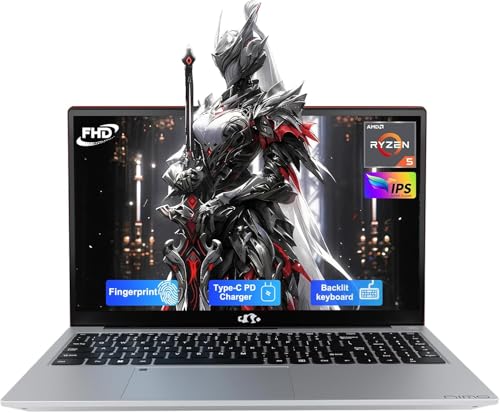
NIMO 15.6” IPS FHD-Laptop 8GB RAM 256GB SSD

ASUS Vivobook Business Laptop 14″ FHD Display

DUNHOO Laptop 15.6 inch N150 Processor
Light Gaming Laptop AMD Ryzen 7 5700U

KAIGERR Gaming Laptop AMD Ryzen 4300U 16.0 inch
Gaming Laptop N95 15.6″ 2K Display

Gaming laptop Core processor 15.6 Inch FHD Display
More Details On Our Top Picks
FUNYET leans into the bigger-screen lane, which helps when you keep documents, tabs, and a game window open at once. The 16-inch format gives you more breathing room than the 14-inch ASUS Vivobook above, though it also takes a little more desk space and bag room.
With 16GB RAM and 512GB SSD storage, you get a practical floor for daily multitasking and local installs. The backlit keyboard and fingerprint unlock are useful touches for late study sessions and quick sign-ins, while the 2-year warranty note stands out in a group where many listings lean on the same basic feature set.
Strong Points
- 16GB RAM helps with split-screen work and lighter gaming runs.
- 512GB SSD leaves room for games, school files, and media without feeling cramped.
- Fingerprint unlock saves time during repeat logins.
- Backlit keys suit low-light dorm rooms and evening desk use.
Things To Consider
- The 16-inch body is less pocketable than the 14-inch ASUS Vivobook.
- Source details do not spell out display panel quality beyond FHD, so screen expectations should stay measured.
- Fingerprint hardware adds convenience, but like most sensors, it depends on clean placement and regular care.
Who It Suits Best
You get the most out of this one in a dorm, a small home office, or a shared table where a larger display helps keep work and play organized.
A Better Fit Elsewhere
NEOBIHIER Gaming Laptop N95 15.6″ 2K Display suits commuters better, since it trims the screen size and adds a slimmer carry profile.
NIMO lands in the sweet spot for students who want a standard-size laptop without extra bulk. The 15.6-inch IPS display matters because IPS, or in-plane switching, usually gives better side-angle viewing than basic panels, which helps during group work or couch use.
Compared with FUNYET, this one trims storage to 256GB, so it suits a lighter library of apps and files. The Ryzen 5 note, Type-C charging, fingerprint reader, backlit keyboard, and 180-degree hinge make it feel more complete than a bare-minimum school machine, though the storage ceiling can pinch sooner for game installs.
Highlights
- IPS panel is useful for sharing the screen across a table.
- Type-C charging reduces the clutter of carrying one more bulky adapter style.
- Fingerprint unlock keeps sign-in quick during a busy school day.
- 180-degree opening helps in flat presentations and note sharing.
Small Caveats
- 256GB storage fills faster than 512GB options in this roundup.
- The specs point more toward everyday computing than demanding gaming loads.
- Listings that rely on bundled service language can still vary by seller, so the support side deserves a quick look before checkout.
Built With In Mind
You benefit most here in class, in a shared apartment, or at a desk where you care more about dependable daily use than chasing a heavy spec stack.
Another Choice May Suit
KAIGERR Light Gaming Laptop AMD Ryzen 7 5700U suits multitaskers more, since it brings a stronger processor tier and more headroom for heavier app switching.
This ASUS model is the one you notice for size first, not raw spec muscle. A 14-inch body is easier to carry than the 15.6-inch machines in this list, and that matters on trains, in lecture halls, or across campus.
The Pentium N6000, 4GB RAM, and 224GB storage package puts it firmly in daily-task territory, not game-heavy territory. The 64GB eMMC plus 160GB docking-station set is unusual at this tier, so it can work for documents and browser work, though you should not expect much room for growing game libraries.
Upsides
- Smaller 14-inch size is easier to carry day after day.
- Webcam and Bluetooth cover common school and work routines.
- FHD screen keeps text and streaming sharp enough for long sessions.
- Star Black finish gives it a more understated look than the flashier gaming-styled entries.
Areas To Watch
- 4GB RAM is the tightest memory spec in this lineup.
- Storage is modest, so larger games and media collections need discipline.
- The hardware mix fits office work better than anything graphically demanding.
Right Fit For
You should lean here for travel, basic schoolwork, and a slim machine that spends more time in a bag than on a gaming desk.
Where A Sibling Pick Shines
FUNYET Laptop Computer 16GB RAM 512GB SSD suits you better for all-around use, since it gives more memory and much more storage headroom.
DUNHOO feels built for someone who wants a fuller feature mix without moving up in size. The metal shell gives it a sturdier first impression than plastic-heavy budget machines, and the fingerprint unlock plus mini HDMI add practical value for desk setups and TV or monitor use.
Compared with the lighter ASUS Vivobook, this one offers 16GB RAM and 512GB SSD storage, which makes it a better fit for switching between apps and keeping a larger file stash on hand. The N150 processor is still an entry-level part, so the honest read is that the extra memory and storage help the experience more than they transform it.
Reasons To Buy
- Metal shell gives the chassis a more solid feel in daily use.
- 16GB RAM supports smoother app switching.
- 512GB SSD is useful for games, downloads, and coursework.
- Mini HDMI helps with straightforward monitor or TV hookups.
- Fingerprint unlock keeps sign-in quick at a shared desk.
Worth Noting
- The processor class is still aimed at everyday tasks, not heavy gaming.
- Metal bodies can show fingerprints and marks more readily than some matte plastic finishes.
- The feature set is broad, so storage and connection benefits matter more than raw speed gains.
Perfect Match For
You fit this one well in a home office, dorm desk, or shared room where ports and storage matter as much as portability.
Look Elsewhere When
NEOBIHIER Gaming Laptop N95 15.6″ 2K Display suits you better for travel, thanks to its slimmer profile and lighter-day-to-day carry appeal.
This KAIGERR model sits toward the stronger end of the group on paper, and the processor spec is the reason. A Ryzen 7 5700U paired with 16GB RAM and 512GB SSD storage gives you more room for multitasking than the Pentium and N95 options, especially on a busy home desk.
That extra headroom matters most for people who keep multiple apps open, move between work and play, or handle heavier browser loads. It still lives in the light-gaming bracket, so a realistic view is that it suits casual play and general productivity far better than high-demand game setups.
Best Bits
- Ryzen 7 5700U gives it the strongest processor class in this lineup.
- 16GB RAM helps keep tabs and apps from crowding each other out.
- 512GB SSD is a sensible base for downloads and local storage.
- Good fit for work sessions that spill into evening gaming.
Softer Spots
- The source focuses on core performance, so display and port detail stay limited.
- Powerful enough for this group does not mean it belongs in demanding game territory.
- The larger battery or cooling story is not spelled out, so long-session expectations should stay cautious.
Whose Shelf It Belongs On
You fit this best as a home-use multitasker, especially in a setup where work projects and casual play share the same machine.
Swap It Out When
DUNHOO Laptop 15.6 inch N150 Processor makes more sense for you if you want a more feature-dense shell and fingerprint unlock at the expense of processor headroom.
This KAIGERR lands in a useful middle ground: larger than the 14-inch ASUS, but not as heavy-handed as a pure performance machine. The Ryzen 4300U, 16GB DDR4 memory, and 512GB SSD create a setup that feels suited to home desks, study sessions, and light gaming around the edges.
The 16.0-inch 1920P FHD display gives you more screen space for spreadsheets, browser tabs, and longer sessions. WiFi 6, USB 3.2, and Type-C round out the practical side, though the trade-off is that a bigger panel usually means you should expect a less travel-friendly footprint than the smaller picks.
Bright Spots
- 16GB DDR4 keeps standard multitasking comfortable.
- 512GB SSD helps avoid constant file shuffling.
- WiFi 6 is helpful in busier homes or shared networks.
- Type-C and USB 3.2 cover modern accessory needs.
- Large 16-inch screen suits side-by-side work windows.
Areas To Watch
- The 16-inch chassis is less convenient in tight bags.
- Display detail is strong on size, but the listing language stays light on broader panel characteristics.
- The machine makes more sense as a balanced desk laptop than a carry-everywhere option.
Who Should Grab It
You suit this pick best at a desk, in a shared apartment, or in a study corner where screen space matters more than ultra-light portability.
Another Choice May Suit
NIMO 15.6” IPS FHD-Laptop 8GB RAM 256GB SSD fits you better for lighter school use, especially where a slimmer storage load is enough.
NEOBIHIER takes a sharper-display approach than most of the budget field here. The 2K panel, which sits above standard FHD in detail, matters most for text clarity, media, and the kind of game or study session where screen crispness feels more important than raw processing muscle.
The slim, lightweight shell and fingerprint unlock make it easier to carry than the bigger desk-focused picks like FUNYET and KAIGERR 16.0-inch. The N95 processor and 16GB RAM set it up for everyday work and light play, though the honest trade-off is that this is more about display polish and mobility than sheer speed.
Positives
- 2K screen offers more detail than standard Full HD on paper.
- 16GB RAM gives you comfortable everyday multitasking room.
- Fingerprint unlock is handy for quick sign-ins on the move.
- Slim profile suits bags, backpacks, and frequent desk changes.
Minor Gripes
- The processor class is modest, so display quality carries more of the appeal than raw speed.
- Lightweight builds often ask for a little more care in transit.
- The 2K screen is a strong draw, but it does not turn entry hardware into a power machine.
The Right Fit
You fit this best as a commuter, student, or mobile worker who wants sharper visuals without carrying a large chassis.
Reach For A Different Pick When
KAIGERR Light Gaming Laptop AMD Ryzen 7 5700U suits you better for heavier multitasking, since it puts more emphasis on processor strength.
YOZISUAN closes the list with a plain-spoken mix that makes sense for students, commuters, and business use. The 15.6-inch FHD display is the familiar middle ground, large enough for daily work without pushing into the heavier footprint of the 16-inch machines.
The Core processor, 16GB RAM, 512GB SSD, WiFi, and Bluetooth 5.0 create the kind of setup that handles web work, documents, and media without drama. That balance is the point here, although the wording around the processor stays broad, so you should treat it as a general-purpose machine rather than a speed-first choice.
Best Bits
- 15.6-inch format gives you a familiar, workable screen size.
- 16GB RAM and 512GB SSD are a practical pairing for everyday use.
- WiFi and Bluetooth 5.0 help with common accessories and connectivity.
- Fits school, commuting, and office routines without much fuss.
Points To Note
- The processor naming stays generic, so exact performance expectations should stay measured.
- The feature set is sensible rather than flashy.
- It makes more sense as a dependable daily laptop than a showcase machine.
Who Will Love This
You suit this model best when you want a steady all-rounder for classes, meetings, and the evening browser-and-streaming routine.
Skip It When
NEOBIHIER Gaming Laptop N95 15.6″ 2K Display fits you better for sharper visuals and a more travel-friendly body.
What Matters Most Before Choosing Affordable Gaming Laptops Under 300
Screen Size And Storage Balance
Budget laptops can look similar until you compare screen size and storage side by side. A 14-inch model travels well, a 15.6-inch model feels more usable at a desk, and a 16-inch model helps when you want space for side-by-side windows.
Storage matters just as much. A 256GB SSD works for lighter use, while 512GB gives you more room for games, files, and app growth without constant cleanup.
Memory And Daily Smoothness
RAM, or random access memory, affects how many apps stay active without the laptop feeling boxed in. 16GB is the comfortable floor for this group, while 4GB or 8GB fits lighter school and browsing work.
For gaming, memory alone does not do all the work, but it helps the machine stay responsive during downloads, chat apps, and stream tabs. That matters more in real life than a headline claim on the listing page.
Ports, Convenience, And Carry Style
Fingerprints, Type-C charging, mini HDMI, and WiFi 6 each solve different daily annoyances. Those details become useful in dorms, shared homes, and workspaces where you plug and unplug often.
Also pay attention to the body size. A slim 14-inch machine suits transit, while a larger 16-inch shell gives you more room to work once you sit down.
A Quick Reality Check Before You Spend
Common Shopping Slip Ups
Shoppers often fixate on processor names and ignore memory, storage, and screen size. That leads to a machine that sounds stronger on paper but feels cramped in daily use.
The Upgrade Payoff
Higher-tier options in this category usually give you more RAM, more SSD space, better screen detail, or a sturdier chassis. That extra cost makes sense when you carry the laptop often, multitask heavily, or want fewer compromises.
Frequently Asked Questions
Can Affordable Gaming Laptops Under 300 Handle Schoolwork?
Yes, many of them handle documents, web tabs, and streaming without much trouble. The smoother choices usually have 8GB RAM or more.
Is 4GB RAM Too Low?
It works for very basic tasks, but it feels tight once you open several apps. For most everyday use, 8GB or 16GB is the safer lane.
Do You Need 512GB SSD Storage?
You do not need it for light browsing, but it helps once games, downloads, and media start piling up. Smaller drives fill fast in real use.
What Screen Size Fits Best For Travel?
Fourteen inches is the easiest to carry. A 15.6-inch model gives you a better balance between portability and usable screen space.
Are These Good For Light Gaming Only?
Yes, that is the honest expectation for this price band. They make more sense for casual play, school, and general productivity than demanding game loads.
