


Aluminum-framed 3D printers appeal when you want rigidity, speed, and a machine that feels built for serious use. In this roundup, you’re looking at large-format options, multicolor systems, and a few fast-core machines that make sense for home workshops, shared maker spaces, and small production work.
The trade-off is simple: more capability usually brings more setup, more space, and more things to understand. You’ll see which models suit beginners, which fit ambitious hobbyists, and which make the most sense for bigger parts or multicolor projects.
The Shortlist At A Glance
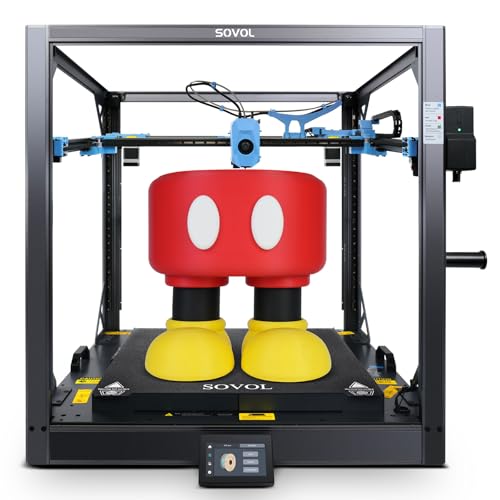
Sovol SV08 MAX CoreXY 3D Printer 19.7×19.7×19.7in

Creality K2 Plus Combo 3D Printer 13.78×13.78×13.78inch

Creality K2 Combo (A) 3D Printer 260*260*260mm
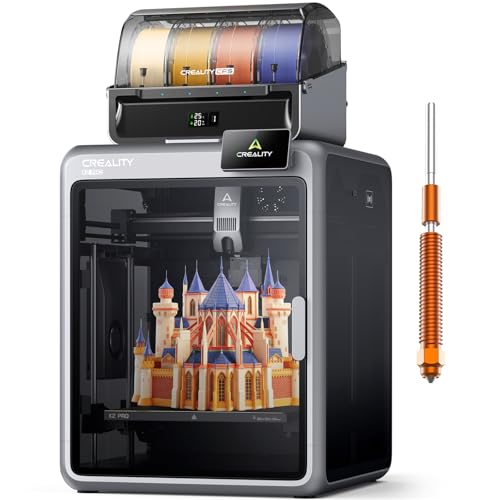
Creality K2 Pro Combo (A) 3D Printer 300×300×300mm
Creality K1C 3D Printer

Anycubic Kobra X Multicolor 3D Printer

Bambu Lab A1 Combo + LED Lamp Kit

Creality K2 Pro Combo (A) 3D Printer with CFS
More Details On Our Top Picks
Big-format printing starts to make sense here because the 19.7-inch cube gives you room for tall props, multi-part jigs, and chunky prototypes without constant slicing. CoreXY, a motion layout that keeps the print head light and fast, matters for people who want speed without turning every long print into a wobble risk.
The eddy current sensor leveling and full linear rails point to a machine that’s built for repeatable alignment and smoother carriage travel. In a garage shop or maker room, that combination is more practical than flashy, though the open-source angle may ask more from you than a closed, out-of-box system.
Strong Points
- Large build volume suits oversized parts and grouped projects.
- Linear rails support steadier motion during long runs.
- Eddy current leveling reduces manual setup time.
- CoreXY layout helps keep the frame compact for its size.
Things To Consider
- That much build space takes real bench room.
- Open-source hardware can suit tinkerers more than hands-off users.
- Large-format machines usually need a careful first calibration pass.
Feature Rundown
Who Should Grab It
Workshop users building large prototypes, fixtures, or display pieces get the most from it.
Look Elsewhere When
Creality K2 Combo (A) 3D Printer fits better for a smaller desk and simpler multicolor setup.
This pick leans hard into multicolor output, and the CFS system is the feature that gives it a clear job: handling several filaments without turning the process into a manual shuffle. The 13.78-inch cube is still generous for helmets, character builds, and functional parts, though it sits below the very large SV08 MAX.
Dual AI camera support and full auto-leveling make the workflow feel more guided, which suits you better than a bare-bones machine in a busy studio. The direct drive extruder also helps keep filament control tighter, and that matters when you want cleaner feeding across different material types.
What We Like
- Built-in color handling reduces manual filament swaps.
- Auto-leveling cuts down on first-layer guesswork.
- Dual AI cameras add useful process awareness.
- Direct drive extrusion helps with controlled feeding.
Softer Spots
- Multicolor hardware adds setup pieces and storage needs.
- The footprint is smaller than the biggest machines here.
- Color work can take more planning than single-material runs.
Core Details
Built With In Mind
Multicolor hobbyists and small studios needing cleaner workflow automation will get the most from it.
Another Choice May Suit
Anycubic Kobra X Multicolor 3D Printer fits you better for a simpler native four-color starting point.
Compared with the K2 Plus, this version aims for a friendlier setup path. The 95 percent pre-assembled frame and 260 mm cube make it easier to place on a sturdy desk or bench, and the multicolor CFS support keeps it relevant for creative work without pushing into the larger-machine footprint.
Smart AI camera support and auto leveling do the sort of background work that makes a first multicolor printer feel less intimidating. You may find it especially sensible for home makers who want speed and color features without jumping straight into the most complex chassis in the group.
Highlights
- Mostly assembled out of the box saves setup time.
- Auto leveling helps during early calibration.
- 600 mm/s speed supports brisk print cycles.
- Smaller cube size fits more desks than the larger Creality units.
Minor Gripes
- The build area is practical, not expansive.
- Multicolor gear still asks for filament management.
- Desk-space planning matters once accessories are added.
Right Fit For
Home hobbyists stepping into multicolor printing will appreciate the gentler setup and balanced size.
Swap It Out When
Creality K2 Pro Combo (A) 3D Printer 300×300×300mm suits larger projects and more demanding material plans.
The active chamber heating sets this model apart from the lighter-duty Creality options above it. Chamber heating means the build area is enclosed and warmed during operation, which helps create a more controlled environment for harder-to-manage filaments and taller jobs.
For a workshop that handles varied materials and bigger parts, that extra control is meaningful. Dual AI cameras and auto leveling round it out, while the 300 mm cube gives you enough room to avoid carving every idea into smaller pieces.
Upsides
- Active chamber heating supports more demanding print conditions.
- Large 300 mm cube suits bigger functional parts.
- Dual AI cameras add oversight for long jobs.
- CFS support keeps multicolor work in play.
Points To Note
- Enclosed, heated hardware usually takes more room and attention.
- The extra capability comes with a more serious setup feel.
- Best results depend on careful slicer settings and maintenance.
Feature Card
The Right Fit
Experienced hobbyists and small production shops handling bigger, more complex jobs will get the most from it.
Where A Sibling Pick Shines
Creality K2 Combo (A) 3D Printer works better for lighter desk setups and a simpler start.
This one reads like the practical speed pick in the group. The 600 mm/s top speed and auto leveling make it attractive for you if you want fast turnaround without moving into the larger, more complex multicolor stacks above it.
The clog-free direct extruder and 300°C print temperature support more demanding filament work, including carbon fiber blends listed by the manufacturer. That makes it a sharper fit for functional parts than decorative novelty prints, though the more technical material path does ask for a steadier hand with settings.
Best Bits
- Fast motion suits quick prototyping and repeat runs.
- Auto leveling helps keep setup time under control.
- Direct extruder design supports more consistent feeding.
- Carbon fiber filament support widens material choice.
Areas To Watch
- High-speed printing still needs tuned profiles.
- Technical filaments can demand more careful handling.
- Smaller than the biggest Creality bodies in this list.
Made For
Tinkerers and functional-part makers who want speed with a more compact machine will like it most.
A Better Fit Elsewhere
Anycubic Kobra X Multicolor 3D Printer suits you better for a gentler multicolor starting point.
Native four-color support makes this one easier to understand than the larger Creality systems, especially for someone starting multicolor work at home. There’s less hardware sprawl to plan around, so the setup feels better suited to a desk or compact studio than a heavy workshop corner.
The simple pitch is appealing: color variety without committing to the more elaborate expansion path used by the K2 series. That said, the built-in four-color approach leaves less headroom than the expandable Creality options, so you’re trading scope for simplicity.
Bright Spots
- Native four-color support keeps the workflow straightforward.
- Easy setup suits first-time multicolor users.
- Compact multicolor approach fits smaller spaces.
- Less expansion complexity than fuller CFS-based systems.
Small Caveats
- Four colors is helpful, but not as expandable as some rivals.
- Color planning still matters for filament changes.
Best Suited To
Home hobbyists who want a simpler entry into multicolor printing will feel comfortable here.
Skip It When
Creality K2 Plus Combo 3D Printer fits better for shoppers who want broader multicolor expansion.
This pick stands apart because it’s aimed at functional light projects, not just standard model output. The included LED kit changes the use case in a useful way, since you can turn compatible prints into working decor without treating the printer as a plain parts machine.
That makes it a smart fit for gifts, shelves, and room accents, especially when you already like the look of multicolor printing. You give up some of the heavy-duty industrial angle found in the Creality K2 Pro machines, but you gain a more creative lane.
Positives
- LED kit opens up functional lighting projects.
- AMS lite support broadens color handling.
- Well suited to decorative and gift-worthy prints.
- Creative use case feels distinct from the rest of the list.
Trade Offs
- Less focused on heavy workshop jobs than the larger Creality units.
- Best results depend on choosing compatible lamp designs.
- Accessory-based projects need more planning than plain models.
Feature Snapshot
Whose Shelf It Belongs On
DIY crafters and decor-focused hobbyists who want prints with a purpose will like it most.
Where Another Pick Shines
Sovol SV08 MAX CoreXY 3D Printer 19.7×19.7×19.7in suits users who care more about sheer build size.
This version lands near the top because it combines the K2 Pro format with CFS-based multicolor support in a straightforward package. For a workshop that wants serious color capability without moving all the way to the most complex layouts, that’s a strong middle ground.
The 300 mm class footprint is useful for larger parts, and the multicolor system keeps it relevant for detailed display work too. Same story with the Creality lineup overall, there’s real capability here, but your workspace and tolerance for accessory management need to match.
Reasons To Buy
- Multicolor support suits advanced creative projects.
- Large-format body helps with bigger prints.
- CFS keeps filament handling more organized.
- Good bridge between hobby use and workshop work.
Honest Caveats
- Multicolor systems reward careful setup and storage.
- Larger equipment needs bench space and planning.
- Feature depth may be more than casual users need.
Details At A Glance
Perfect Match For
Experienced makers who want color depth and large-format flexibility in one machine will get the most from it.
Reach For A Different Pick When
Creality K1C 3D Printer suits you better for a simpler, faster single-machine setup.
What Matters Most Before Choosing Aluminum 3d Printers
Build Size And Space
Large build volumes help when you print helmets, props, or functional parts in one piece. Desk space matters just as much, because bigger machines need room for access, airflow, and filament handling.
Color System Complexity
Native multicolor setups are convenient, but they also add storage, filament management, and a bit more setup thought. Simpler four-color systems suit casual use, while expandable CFS-based systems make more sense for deeper color work.
Motion, Leveling, And Speed
CoreXY frames, direct drive extruders, and auto leveling shorten the path from setup to first print. Higher speed only helps when the frame, rails, and calibration can keep up.
A Quick Reality Check
Wrong Turns To Avoid
Don’t buy a large printer for a tiny desk, and don’t expect multicolor hardware to stay simple once you add accessories.
The Upgrade Payoff
Higher-tier machines usually charge more for size, automation, and color handling. That extra spend makes sense when you print often, need larger parts, or want fewer manual steps.
Frequently Asked Questions
Are Aluminum 3d Printers only about the frame material?
No, this roundup uses the term for machines where the aluminum frame is part of the appeal. Speed, motion system, build volume, and color handling matter just as much.
Do multicolor printers need a lot more space?
Usually, yes, because the printer itself is only part of the setup. Extra filament modules and storage often add to the footprint.
Is a larger build volume always the better choice?
No, because bigger machines take more room and more careful setup. Smaller printers can be a smarter fit for desks, apartments, or occasional use.
What does auto leveling actually help with?
Auto leveling helps the printer map the bed before a job starts. That can reduce manual setup and improve first-layer consistency.
Who should spend more on a higher-tier model?
People printing often, handling larger parts, or working with multicolor projects tend to benefit most. Casual makers usually get farther with a simpler machine.
