


Android emulators can be software, but the right controller or accessory changes how usable that setup feels on a desktop. You get better control, less thumb strain, and a cleaner match for classic games, platformers, and older console libraries running through emulation. This roundup focuses on hardware that pairs well with emulator-heavy PC use, from wired retro pads to a USB drive emulator for legacy machines.
Quick Look At The Shortlist
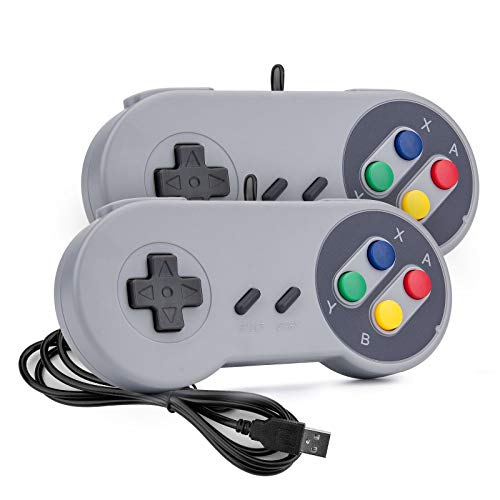
Rii Classic Retro USB Wired Game Controller 2 Pack

KIWITATA Classic N64 USB Controller for PC
KIWITATA Classic N64 USB Controller Clear Green

KIWITATA Classic N64 USB Controller Red

8Bitdo Sn30 Pro Wireless Bluetooth Controller G Classic Edition
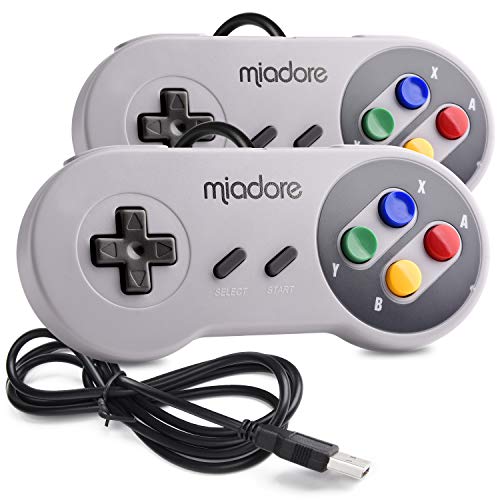
miadore SNES USB Classic Gamepad 2 Pack

GoTEK SFR1M44-U100 3.5 Inch USB Floppy Drive Emulator
More Details On Our Top Picks
The value here is plain: two wired pads, retro-style button layouts, and broad emulator support across PC and Raspberry Pi setups. That makes it a sensible fit for living-room play, especially if you want a spare controller ready for local multiplayer.
The shell is compact enough for classic game sessions, and the button count is aimed at older console maps rather than modern feature overload. The trade-off is just as clear, though, it skips newer-console compatibility and some specialty devices, so this is a retro-first tool rather than a universal pad.
Strong Points
- Two controllers in the box make shared play easier.
- The wired layout keeps latency concerns out of the equation for emulator use.
- Its classic button set suits older game maps without much remapping.
- The shape works well for short sessions on a desktop or sofa.
Things To Consider
- It is built for retro use, not newer console ecosystems.
- The cord means you need a tidy desk or nearby USB port.
- Device compatibility is broad, yet not universal across every box-style system.
Feature Snapshot
Who It Suits Best
Retro gamers setting up a dual-pad PC station get the most from this pair.
Where A Sibling Pick Shines
8Bitdo Sn30 Pro Wireless Bluetooth Controller G Classic Edition suits you better for a cleaner desk and fewer cables.
Some emulators feel better with a controller that matches the original layout, and this one leans hard into that idea. The N64-style button spread, shoulder inputs, and Z-trigger suit old 3D games that depend on a very specific hand position.
For Windows, Mac, and Raspberry Pi use, it keeps the setup familiar through USB, and the listed compatibility reaches older as well as current desktop systems. The honest read is that it makes the most sense for N64 emulation, because its shape is purpose-built and not as general as a modern twin-stick pad.
What We Like
- The N64 layout feels authentic to the games it targets.
- USB connection avoids battery upkeep.
- Shoulder inputs and the Z-trigger help with period-correct control maps.
- Support for Raspberry Pi adds flexibility for small emulator stations.
Worth Noting
- It is tuned for a specific style of game rather than every genre.
- The cord length may feel short in a larger entertainment setup.
- It does not fit Switch use, so that lane is out from the start.
At A Glance
Who Will Love This
You get the most from this pad during N64-heavy emulator sessions on a laptop or small desktop rig.
Another Choice May Suit
miadore SNES USB Classic Gamepad 2 Pack is the stronger fit for 2D platform fans who want a simpler face-button layout.
The clear green shell gives this KIWITATA model a more memorable look than the plain red version, while keeping the same N64-first control layout. That matters in a retro setup where the controller sits on the desk as often as it sits in your hands.
USB use, emulator support, and the 10-button layout all point to the same audience: people who want an N64-style pad without extra setup drama. The catch is familiar, though, because it still favors old-game emulation and skips newer console families.
Highlights
- The transparent colorway stands out without changing the control scheme.
- It keeps the same familiar N64-style input layout.
- The M-shaped grip is made for easier hand placement during longer sessions.
- USB power keeps battery management out of the picture.
Softer Spots
- The styling is the main difference, so the practical gain over the other KIWITATA model is modest.
- It still depends on a cable, which can clutter smaller desks.
- Like the rest of this group, it is more retro-specific than universal.
Details At A Glance
Who Should Grab It
You should favor this one for a retro desk setup where the controller’s look matters almost as much as the layout.
Skip It When
Rii Classic Retro USB Wired Game Controller 2 Pack makes more sense for shared sessions and a lower-friction two-pad setup.
This red KIWITATA pad keeps the formula straightforward, and that’s useful in a PC emulation rig where you care more about controls than extras. The N64-style button map, USB connection, and support for older desktop systems make it an easy match for classic library play.
Compared with the clear-green model, the big difference is just the shell color, so you are choosing on presentation rather than function. That’s fine for most setups, but the lack of broader system support means it stays in the retro lane.
Reasons To Buy
- The layout is well suited to old 3D console games.
- No batteries are needed, which keeps upkeep simple.
- The 6-foot cable gives enough reach for many desk setups.
- Its plain red finish looks clean next to a monitor or laptop.
Points To Note
- It is a single-purpose style of controller, not a broad all-rounder.
- The cable can be awkward in a tidy minimalist setup.
- Android box use is outside its intended lane.
Core Details
Best Suited To
You get the most from this one in a desktop retro rig where a simple N64-style pad is enough.
A Better Fit Elsewhere
8Bitdo Sn30 Pro Wireless Bluetooth Controller G Classic Edition suits you better if you want fewer cords and a more flexible living-room setup.
Compared with the wired retro pads above, this one shifts the conversation to wireless comfort and a denser feature set. The Bluetooth link and rechargeable battery suit a desk that stays clean, while the full control set helps it move beyond a narrow retro-only role.
The listed plan details are unrelated to the controller itself, so the real draw is the hardware design: clickable sticks, motion input, rumble, home and screenshot buttons, and USB-C charging. That breadth makes it a stronger fit for people who split time between emulation and broader PC or Switch use, though the added features also make it more expensive than the simple wired options.
Upsides
- Wireless play removes cable clutter from the desk.
- The rechargeable battery lowers routine battery swapping.
- Clickable joysticks and motion support widen game compatibility.
- USB-C charging is a modern convenience for daily use.
- The compact retro shape still keeps the nostalgic feel.
Room For Improvement
- Wireless convenience adds another battery to keep charged.
- The richer control set may be more than you need for basic emulator use.
- It makes less sense for shoppers who want the simplest possible pad.
Technical Sheet
Who Should Grab It
You should look at this one for a mixed-use setup where emulation, comfort, and a wireless desk matter.
Look Elsewhere When
Rii Classic Retro USB Wired Game Controller 2 Pack is the simpler call for shared sessions and no battery upkeep.
This is the most straightforward two-pad starter set in the group, and that matters for emulator setups that begin with a keyboard before graduating to proper controllers. The SNES-style shape keeps the learning curve low for 2D games, especially platformers and side-scrollers.
USB plug-and-play support is the headline here, so you can keep setup light as long as the emulator is configured first and the buttons are mapped as needed. The trade-off is obvious: it stays simple and affordable in spirit, but it does not try to be a premium feature piece.
Best Bits
- Two controllers make local co-op easier right away.
- The SNES layout suits side-scrolling games naturally.
- USB plug-and-play keeps setup work modest.
- It supports a broad spread of desktop and Pi environments.
Small Caveats
- Button mapping may still need a quick setup pass.
- The shape is better for 2D games than for complex 3D layouts.
- It depends on wired placement near the machine.
Feature Rundown
Made For
You get the best fit here for a first emulator setup with 2D classics and a second seat beside you.
Reach For A Different Pick When
KIWITATA Classic N64 USB Controller for PC fits better for games that need an original-style N64 control map.
This sits outside the controller crowd, but it earns a place because some emulator-style setups live on older hardware with a floppy bay. The 34-pin interface, 5V DC power, and USB flash storage approach make it a practical bridge for embroidery machines and industrial control gear that still depend on legacy media behavior.
Compared with the gamepads above, this is a maintenance-minded tool rather than a play accessory. The trade-off is narrow compatibility, so it only makes sense for equipment that expects a 1.44MB drive and the right formatting details.
Positives
- USB flash storage replaces physical floppy media.
- The 34-pin interface fits legacy machine bays.
- It is suited to equipment that still expects 1.44MB disk behavior.
- Installation stays relatively direct for matching systems.
Areas To Watch
- Compatibility is narrow, so it only belongs in the right machine.
- Formatting details matter, which adds setup care.
- It is not useful for standard game controller emulation.
Core Details
Whose Shelf It Belongs On
You should only consider this for a legacy machine that still depends on floppy-based workflow.
Swap It Out When
Rii Classic Retro USB Wired Game Controller 2 Pack is the better match for standard PC emulator play.
What Matters Most Before Choosing Android Emulators For Pc
Common Shopping Slip Ups
The biggest miss is buying for the wrong control style. A flat 2D pad suits SNES games, while N64 layouts need a different stick and button map.
Another common slip is ignoring connection type. Wired models stay simple, while wireless pads add charging to the routine.
The Upgrade Payoff
Higher-tier options usually spend more on wireless support, extra inputs, and better ergonomics. That matters for long sessions, mixed-use PC setups, and desks where cable clutter gets old fast.
Things Worth Knowing First
Pitfalls Shoppers Hit
Some setups need more than the box says, so platform fit matters more than branding. A controller that lists Raspberry Pi support can still be the wrong choice for your exact emulator or game style.
Another trap is assuming every retro pad works the same. N64 and SNES layouts solve different problems, so the shape should match the library first.
Where The Extra Money Goes
Cost climbs when you add wireless connectivity, rechargeable power, motion input, or a more specialized shell. Those extras help you move from basic emulator use to a wider living-room setup.
Frequently Asked Questions
Do These Controllers Work With Android Emulators On A PC?
Yes, the controllers in this roundup fit emulator play on Windows and Mac desktops, and several also support Raspberry Pi. The key is matching the controller layout to the system and game style.
Which Option Is Best For Two-Player Sessions?
Rii Classic Retro USB Wired Game Controller 2 Pack and miadore SNES USB Classic Gamepad 2 Pack both make shared play easy. The better one depends on whether you want an N64-style or SNES-style layout.
Is Wireless Better Than Wired Here?
Wireless is cleaner on a desk and easier for couch play. Wired is simpler, cheaper in setup effort, and one less thing to charge.
Why Do Some N64 Controllers Have Different Shapes?
The original N64 layout used a very specific mix of stick placement and button roles. That shape helps older games feel closer to their native control scheme.
Does The GoTEK Item Belong In A Gaming Setup?
No, it serves legacy floppy-based hardware rather than game emulation. You only need it for machines that still expect that drive format.
