


Computer art gets much easier once the pad matches your desk space, hand speed, and software habits. The right model can replace clumsy mouse work, tighten brush control, and make long sessions less fatiguing. For beginners, students, and experienced illustrators alike, the details that matter most are active area size, stylus feel, shortcut layout, and device compatibility.
The Shortlist At A Glance

XPPen IT640 6 x 4 inch Drawing Tablet
XPPen StarG640 6 x 4 inch Graphic Tablet

XPPen Deco 01 V3 10 x 6 Drawing Tablet

HUION Inspiroy H640P 6 x 4 inch Drawing Tablet

UGEE M708 10 x 6 inch Drawing Tablet
Wacom Intuos Small Wired Graphic Drawing Tablet

HUION Inspiroy H1060P 10 x 6.25 in Graphics Tablet

HUION Inspiroy 2 Large Drawing Tablet
More Details On Our Top Picks
A 6 x 4 inch tablet keeps the desk footprint tight, which helps on a laptop stand, a dorm desk, or a travel bag setup. The 16,384 pressure levels and 60 degree tilt support give you finer control over line weight and shading, so the pen can feel more like a real drafting tool than a basic pointer.
Battery-free stylus design also removes one more thing to charge, and that matters in everyday sketching sessions. The trade-off is plain enough: a small active area can feel cramped for large arm movements, so it suits detail work and compact spaces better than broad painterly strokes.
Strong Points
- Small surface fits tight desks without crowding the keyboard.
- Battery-free pen keeps the workflow simple during long sessions.
- High pressure resolution helps you vary strokes with control.
- Tilt support gives shading more natural variation.
Things To Consider
- The active area can feel narrow for sweeping hand motion.
- A compact pad asks for a short adjustment period.
- Best results come from tidy cable and shortcut placement on a crowded desk.
Feature Card
Who It Suits Best
You fit this best when you want a small, portable art pad for notes, sketches, or precise desktop editing.
Where A Sibling Pick Shines
HUION Inspiroy H1060P suits you better for broader strokes and more shortcut-heavy workflows.
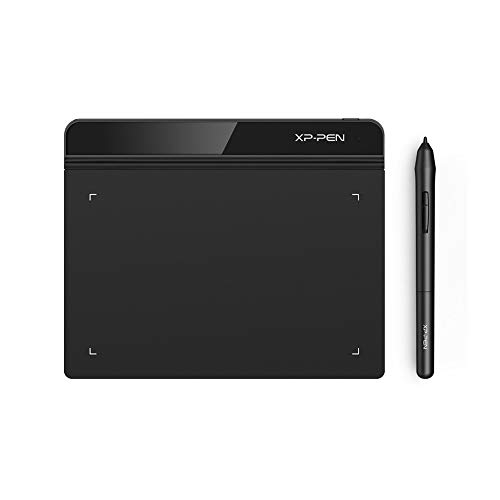
The StarG640 keeps the formula lean, which is useful for online classes, light sketching, and remote work notes. Its battery-free pen removes charging from the routine, and that alone makes it easier to keep beside a keyboard as a daily tool.
Compared with the IT640 above, this one stays in the same compact size lane but leans more toward straightforward entry use than feature chasing. The honest read is that you’re paying for simplicity here, so it makes sense for a first tablet or a backup setup rather than a workstation centerpiece.
What We Like
- Simple layout keeps setup and day-to-day use easy.
- Battery-free stylus avoids charging breaks.
- Compact body suits school desks and shared workstations.
- Good match for note taking and light drawing sessions.
Worth Noting
- The smaller work area limits broad, sweeping gestures.
- It is a plain tool, so shortcut depth stays modest.
- Desk users may want a sleeve or pouch for storage.
Made For
You suit this best when you need a simple art pad for classwork, remote tasks, or a first step into digital drawing.
A Better Fit Elsewhere
XPPen Deco 01 V3 suits you better once you want a larger surface and more shortcut control for longer creative sessions.
The wider 10 x 6 inch format gives you more room for arm movement, which helps when you sketch longer strokes or work across a larger canvas. Add the 8 shortcut keys and battery-free stylus, and you get a pad that feels built for a busier creative desk.
It sits noticeably above the compact XPPen models in this list, since you gain workspace without jumping into a bulky setup. You may find the larger surface more comfortable for painting and photo edits, though the extra size asks for more room beside your keyboard and mouse.
Upsides
- Larger active area supports wider hand motion.
- Eight express keys reduce trips to the keyboard.
- Battery-free pen keeps the workflow clean and simple.
- Good fit for sketching, painting, and editing on one desk.
- The layout suits a more serious hobby station.
Areas To Watch
- The larger body needs real desk space.
- Shortcut keys take a little driver setup to feel natural.
Core Details
Best Suited To
You suit this best when you spend long stretches drawing, painting, or editing on a desktop setup.
Skip It When
HUION H640P makes more sense for tighter desks and users who want a smaller, more compact pad.
The H640P stays close to the compact end of the range, but its six shortcut keys give it a more work-ready feel than the simpler XPPen G640 above. For note-taking, classroom diagrams, and light design tasks, that shortcut layer can save a lot of keyboard reach over the course of a week.
The 8192 pressure level stylus is a solid middle ground, especially for people who want a responsive pen without chasing the most extreme spec sheet. The catch is that the 6 x 4 inch working area still feels compact, so it suits focused control more than broad, sweeping illustration.
Positives
- Six shortcut keys help speed up common actions.
- Battery-free pen keeps the desk simpler.
- Compact body fits smaller work surfaces easily.
- 8192 levels give dependable stroke control for everyday drawing.
Small Caveats
- The active space stays limited for broad brushwork.
- Shortcut keys may need a little setup to match your habits.
- Small tablets benefit from careful cable routing on busy desks.
Right Fit For
You suit this best as a student, hobby sketcher, or home office user who wants a compact pad with usable shortcuts.
Look Elsewhere When
XPPen Deco 01 V3 fits you better once larger strokes and a wider drawing area matter more than desk savings.
A 10 x 6 inch active area gives you the breathing room that smaller pads cannot, and that matters a lot for long sketch sessions or layered painting work. The paper-like texture on the surface adds a bit of drag, which helps the pen feel steadier than a slick glassy finish.
UGEE also uses passive stylus technology, meaning the pen itself does not need charging. Compared with the slimmer HUION H640P, this one feels better suited to people who want a larger canvas first and foremost, even though the wide body will ask more from your desk layout.
Bright Spots
- Large working area supports freer arm movement.
- Textured surface adds control during sketching.
- Passive stylus keeps charging off your to-do list.
- Strong fit for longer digital art sessions.
Points To Note
- The larger footprint needs a more settled desk.
- Textured surfaces can pick up wear marks over time.
- It takes up more storage space than a compact tablet.
Details At A Glance
Who Should Grab It
You suit this best when you want a roomy digital sketch pad for home drawing, painting, or practice work.
Another Choice May Suit
Wacom Intuos Small fits you better if you want a lighter desk footprint and a more compact starter setup.
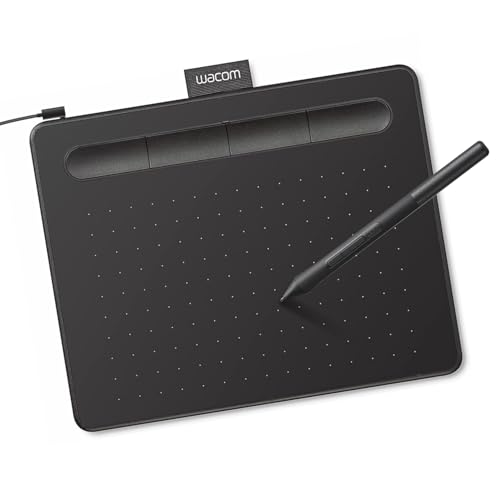
Wired connection keeps this one plain and predictable, which is useful on a desk where you want one less wireless device to manage. The included pen and software bundle make it especially sensible for a first-time setup, since you can move from unpacking to actual editing without hunting for extras.
Its smaller format is a double-edged sword, though. You gain a tidy footprint and easier storage, but the compact active area makes large gestures feel more constrained than they do on the UGEE M708 or HUION H1060P.
Highlights
- Wired setup keeps the connection straightforward.
- Included pen and software improve starter value.
- Compact shape suits shared desks and smaller workspaces.
- Good choice for editing, note work, and light illustration.
Honest Caveats
- The small work area can feel restrictive for big brush strokes.
- Wired use means cable management matters on cluttered desks.
- Storage is easy, but the format is less expansive than larger pads.
Quick Facts
Whose Shelf It Belongs On
You suit this best as a desktop beginner, editor, or student who wants a compact pen tablet with a tidy footprint.
Swap It Out When
XPPen Deco 01 V3 is the better match once you want a larger work area and more shortcut keys.
The H1060P leans into control, and the 10 x 6.25 inch working area plus 12+16 hot keys give it a more serious desktop presence than the smaller HUION H640P. For artists who bounce between brush changes, undo actions, and layer work, that many keys can trim a lot of keyboard travel.
The battery-free PW100 stylus adds the practical benefit of no charging, while the slim 10 mm body keeps the tablet from feeling bulky on the desk. The trade-off is simple: the shortcut density rewards organized habits, so casual doodlers may not use everything it offers.
Best Bits
- Large working area supports wider drawing motion.
- 12+16 hot keys suit shortcut-heavy workflows.
- Battery-free stylus keeps the routine uncluttered.
- Slim body helps it sit neatly on a desk.
Room For Improvement
- The many shortcuts make setup more involved at first.
- It works best when your desk habits are organized.
Built With In Mind
You suit this best when your desk time revolves around illustration, retouching, or repeated shortcut use.
Where Shoppers Go Wrong
UGEE M708 suits you better if you want a simpler large pad without as much shortcut overhead.
This is the most modern-feeling desktop option in the list, largely because HUION pairs the larger surface with PenTech 3.0 and a redesigned PW110 stylus. The slimmer body, soft silicone grip, and side buttons make the pen easier to hold through long sessions, which matters more than raw spec numbers once your desk time stretches out.
The 3-group, 8-customizable ExpressKeys layout gives you more room to build a workflow around your own habits. That flexibility is a real strength for illustration, retouching, and productivity work, although it also means setup takes patience before the tablet feels fully yours.
Reasons To Buy
- PenTech 3.0 supports refined line control.
- PW110 stylus adds a slimmer grip and easier handling.
- Customizable ExpressKeys fit more complex workflows.
- Large format works well for extended desktop use.
- Feels well suited to experienced tablet habits.
Softer Spots
- Custom layout takes time before it feels natural.
- The larger body needs a proper desktop home.
- Users who only sketch occasionally may not use all the controls.
Feature Rundown
The Right Fit
You suit this best when your tablet is part of a serious desktop workflow and you want more control over shortcuts and pen feel.
A Better Fit Elsewhere
Wacom Intuos Small suits you better for a simpler starter setup with less desk commitment.
What Matters Before You Choose Art Pads For Computer
Active Area Size Changes Everything
A 6 x 4 inch pad keeps your desk neat and travels well, but it asks for more precision from the wrist. A 10 x 6 inch pad gives you broader stroke room, which helps with painting, photo edits, and long sketches.
Pen Feel Shapes Daily Comfort
Battery-free pens remove charging from the routine, and pressure levels affect how smoothly line weight changes under your hand. Higher pressure counts matter most for detailed illustration, while casual note-taking can live with less.
Shortcut Layout Can Save Time
ExpressKeys and hot keys matter once you start repeating undo, brush, zoom, or layer actions all day. A crowded shortcut panel helps power users, yet a simpler layout stays easier for beginners.
Match The Tablet To Your Desk
A wired compact pad suits shared spaces and simple setups, while a larger tablet feels better on a permanent workstation. Storage, cable routing, and arm movement all deserve a look before you choose.
A Quick Reality Check
Common Shopping Slip Ups
Many people overbuy surface size and end up crowding a small desk. Others ignore shortcut placement, then spend more time reaching for the keyboard than drawing.
The Upgrade Payoff
Higher-tier tablets usually cost more because they add a larger drawing area, better pen ergonomics, and more customizable controls. That extra spend makes sense once you draw often enough for those small comfort gains to matter every day.
Frequently Asked Questions
What size art pad works best for a laptop desk?
A 6 x 4 inch pad fits tight spaces and keeps the setup simple. A larger desk supports 10 x 6 inch models much better.
Do battery-free pens need regular charging?
No, they do not. That makes them easier to keep in daily rotation beside your computer.
Are shortcut keys worth using?
Yes, especially for editing, layering, and brush changes. They matter most once you stop wanting to reach for the keyboard every few seconds.
Is a wired tablet still a smart choice?
Yes, especially for a fixed desk where cable management is easy. Wired setups stay straightforward and usually feel less fussy.
Which tablet suits a total beginner best?
Wacom Intuos Small and XPPen StarG640 both make sense for a first setup. The better match depends on whether you want bundled software or the simplest compact pad.
