


For home offices, shared desks, schoolwork, and everyday browsing, the right tower or all-in-one can save time and clutter fast. You want enough memory for multiple tabs, a display that’s easy on the eyes, and a setup that fits the space you actually have. That’s the real filter here. The eight picks below lean toward practical use, not showroom specs.
Quick Look At Our Shortlist
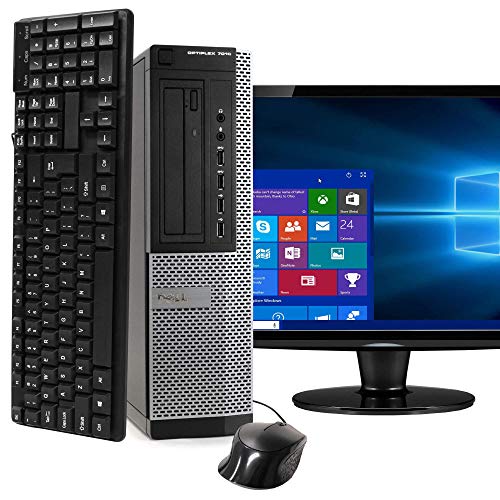
Dell Optiplex 7010 Desktop Package

HP ProDesk 600 G3 SFF Desktop Computer with 21.5″ FHD Monitor

GEEKOM IT12 Mini PC i3-12300HE 16GB/512GB

Dell 23.8″ All-in-One Desktop

HP 2025 22″ FHD All-in-One Desktop Computer
Lenovo IdeaCentre All-in-One Desktop Computer 24″ FHD
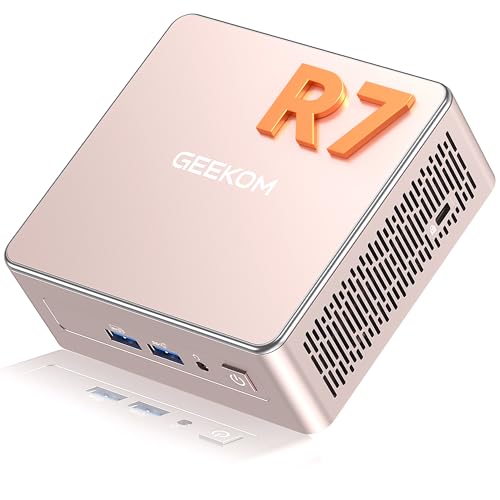
GEEKOM A5 2027 Edition Mini PC Ryzen 7 7730U
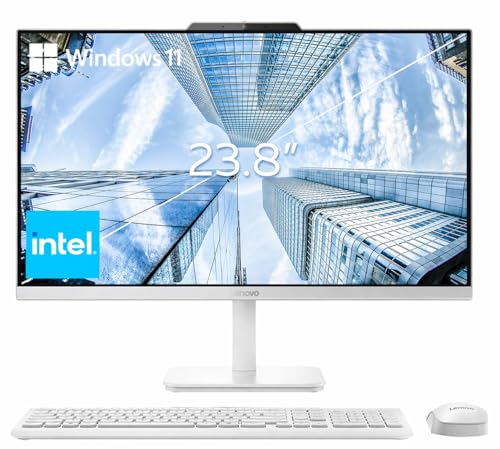
Lenovo 24″ FHD All-in-One Desktop Computer
More Details On Our Top Picks
This bundle makes sense for a home office that needs the basics in one box. You get a desktop, a 19-inch LCD, keyboard, mouse, WiFi, DVD support, and Windows 11 Pro, so setup feels less like assembling a project and more like plugging in a workstation.
The trade-off is that the 500GB hard drive will feel slower than the SSD-based picks later in this list, especially during boot and app loading. Still, for email, web work, documents, and a spare family computer, the Dell Optiplex 7010 package stays practical and familiar.
Strong Points
- All-in-one bundle reduces setup hassle.
- Windows 11 Pro suits work accounts and shared use.
- DVD drive helps with older discs and archives.
- Keyboard and mouse are already included.
Things To Consider
- HDD storage is slower than SSD storage for daily responsiveness.
- The 19-inch display is compact for long spreadsheets.
- Renewed hardware can show cosmetic wear.
Feature Snapshot
Who It Suits Best
Home users who want a straightforward desktop bundle without hunting for separate accessories fit this well.
A Better Fit Elsewhere
Lenovo IdeaCentre All-in-One Desktop Computer 24″ FHD suits anyone who wants a cleaner desk and a larger display.
This HP package reads like a cleaner step up from the Dell bundle because the 256GB SSD should feel snappier in normal daily use. The 21.5-inch FHD monitor also gives you a bit more breathing room than the previous 19-inch screen, which matters when you spend hours in documents or browser tabs.
Small form factor, or SFF, means the desktop case is built to save desk space. That helps in a dorm room, study nook, or office corner, though the bundled monitor and wireless extras still make it a full setup rather than a bare mini tower.
Upsides
- SSD storage improves startup and app loading.
- 16GB DDR4 is comfortable for heavier multitasking.
- The 21.5-inch screen is easier to live with than a smaller panel.
- DisplayPort, WiFi, and Bluetooth cover common connections.
Points To Note
- The i5-6500 is older silicon, so this is more practical than flashy.
- Small-form-factor cases can be less flexible for future expansion.
- The bundled color scheme is plain, which suits offices more than style-focused rooms.
At A Glance
Made For
You get the most from this setup in a compact office where desktop space is limited but you still want a monitor included.
Look Elsewhere When
GEEKOM IT12 Mini PC i3-12300HE 16GB/512GB fits you better if you want a smaller machine with newer feel and more storage.
This mini PC is the kind of setup that disappears behind a monitor and leaves your desk breathing room intact. The full metal chassis should appeal to shared workspaces, and the preinstalled operating system makes it easier to place into service without a lot of setup friction.
Compared with the HP ProDesk bundle, the IT12 gives you a much smaller footprint while keeping 16GB RAM and 512GB SSD capacity. That makes it a smart fit for home offices, branch desks, or anyone who values a tidy cable path more than a traditional tower.
Best Bits
- Mini chassis saves real desk space.
- 512GB SSD gives you more room than many bundled office PCs.
- 16GB memory supports steady multitasking.
- Metal housing feels suited to daily movement and shared use.
- USB4 support broadens accessory and display options.
Small Caveats
- You supply your own monitor and desk peripherals.
- The compact case limits internal expansion compared with larger desktops.
- Low-heat design is helpful, but airflow still matters in a crowded shelf.
Core Details
Perfect Match For
You should look here for a compact home office or studio desk where every inch matters.
Skip It When
Lenovo 24″ FHD All-in-One Desktop Computer suits you better if you want the display and computer in a single unit.
All-in-one desktops earn their keep by removing the tower from the equation, and this Dell makes that idea simple. The 23.8-inch FHD screen gives you a larger working area than the HP 22-inch model, which matters for split-screen work, family browsing, and streaming.
Windows 11 Home keeps the setup familiar, and the Core 3 100U should suit everyday web, office, and media use more than heavy content creation. In most homes, that is enough, especially when you want a neater desk and fewer visible cables.
Highlights
- One-piece design keeps the desk cleaner.
- 23.8-inch screen offers comfortable everyday viewing.
- Good fit for family rooms and casual offices.
- Less cable clutter than a tower-and-monitor setup.
Areas To Watch
- All-in-one machines are less flexible for upgrades.
- Core 3 class hardware suits everyday tasks more than demanding workloads.
- Cleaning around the rear stand and ports takes a little extra care.
Who Will Love This
You fit this best when you want a tidy desktop for browsing, schoolwork, and streaming in a shared space.
Where A Sibling Pick Shines
HP ProDesk 600 G3 SFF Desktop Computer with 21.5″ FHD Monitor makes more sense if you prefer a traditional desktop format and a lower-key footprint.
The HP 2025 sits in the middle ground between the Dell all-in-one and the larger Lenovo options. Its 22-inch FHD display keeps the footprint compact, while the 13th Gen Intel N100, DDR5 memory, and SSD storage give it a more current everyday platform than older office refurbs.
Type-C, HDMI, Wi-Fi, and an HD webcam make it easy to place in a family study, guest room, or remote-work corner. The 128GB storage is the main constraint, so this feels better for cloud-first use than for people who keep lots of local media.
Positives
- Modern daily-use parts suit routine tasks.
- DDR5 memory is a nice step up for responsiveness.
- HDMI and Type-C improve connection options.
- Built-in webcam helps with video calls and classes.
Room For Improvement
- 128GB storage fills quickly with photos, downloads, and apps.
- 22-inch display is practical, though not expansive.
- All-in-one design gives you less upgrade freedom later.
Feature Rundown
Right Fit For
You should look at this for light work, family browsing, and school tasks where a neat all-in-one matters more than big storage.
Another Choice May Suit
Lenovo IdeaCentre All-in-One Desktop Computer 24″ FHD is a better match if you want a larger screen and more storage room.
This Lenovo is the kind of all-in-one that feels easy to live with every day. The 24-inch FHD IPS panel, or in-plane switching panel, gives you broader viewing angles than basic screens, and the anti-glare finish helps when your desk sits near a window or lamp.
Compared with the HP 22-inch model, you get more screen room and a 512GB SSD, which is a much friendlier storage setup for files, downloads, and installed apps. That combination makes it a strong family or home office option where one machine serves several light-to-moderate tasks.
Bright Spots
- 24-inch screen gives you comfortable workspace.
- Anti-glare IPS display helps in brighter rooms.
- 512GB SSD is roomy for daily use.
- Wi-Fi 6 and Bluetooth 5.2 keep connections current.
Honest Caveats
- 8GB RAM is fine for basic multitasking, though heavy tab use can stretch it.
- The all-in-one form keeps internal access limited.
- Best suited to everyday work rather than demanding editing.
Details At A Glance
Whose Shelf It Belongs On
This fits a home office, family desk, or student setup that needs a bigger screen without adding a tower.
Reach For A Different Pick When
GEEKOM A5 2027 Edition Mini PC Ryzen 7 7730U fits you better if you want more processing headroom in a smaller chassis.
The Ryzen 7 7730U gives this GEEKOM a more capable feel than the entry-level mini PCs in the group. Paired with 16GB RAM and 512GB SSD storage, it suits heavier browser work, office multitasking, and mixed media use without claiming much desk space.
That balance makes sense for a home office where you want small hardware but not a stripped-down experience. One thing worth considering, though, is that the compact shell still asks you to plan your ports and monitor arrangement before it lands on the desk.
Positives
- Ryzen 7 CPU gives it stronger multitasking headroom.
- Mini PC size keeps the workspace open.
- 16GB memory and 512GB storage suit a broad range of daily tasks.
- Good fit for users who want speed without a large chassis.
- Useful for workstations that stay mostly stationary.
Minor Gripes
- You still need a monitor and peripherals.
- Mini PCs reward tidy cable planning.
- The compact case leaves less room for internal tinkering than a tower.
Feature Card
Best Suited To
You fit this best when you want a compact machine for office work, streaming, and busy browser sessions.
Swap It Out When
Dell 23.8″ All-in-One Desktop is the simpler choice if you want the screen and computer combined.
This Lenovo lands in a very usable middle ground for a home office or shared family desk. You get 16GB RAM, a 256GB PCIe SSD, Wi-Fi 6, Bluetooth 5.2, HDMI, and a 24-inch FHD screen, so the setup feels complete without pushing into bulky territory.
The included wireless keyboard and mouse help it feel ready for the room on day one. Compared with the HP 22-inch all-in-one, this one gives you more display space and memory, which should matter to anyone juggling schoolwork, documents, and everyday browsing in the same session.
Reasons To Buy
- 24-inch display gives comfortable working room.
- 16GB RAM supports a steadier multitasking rhythm.
- PCIe SSD helps the system feel responsive.
- Wireless keyboard and mouse cut desk clutter.
- Wi-Fi 6 and Bluetooth 5.2 keep the setup current.
Softer Spots
- 256GB storage is enough for many homes, though media hoarders may want more.
- All-in-one styling limits later internal upgrades.
- Speaker, camera, and display quality still matter to the final experience, so placement helps.
Core Details
The Right Fit
You should gravitate here if you want an all-in-one that feels balanced for home office work, school tasks, and shared use.
Consider Something Else When
GEEKOM A5 2027 Edition Mini PC Ryzen 7 7730U suits you better if you want more raw processor strength in a much smaller box.
What Matters Most Before Choosing At Home Computer
Space And Shape
A mini PC suits a tight desk, while an all-in-one keeps the screen and system in one footprint. A bundle with a separate tower and monitor gives you more serviceability, but it also takes more room.
Memory And Storage
8GB RAM works for basic browsing and office tasks, though 16GB feels calmer with more tabs and apps open. SSD storage is the cleaner choice for boot speed and day-to-day responsiveness, while a hard drive is better left to the most budget-conscious setups.
Screen Size And Comfort
A 22-inch display can fit a compact corner, but 24 inches usually feels easier for split-screen work and long sessions. Anti-glare and IPS panels matter in bright rooms because they cut reflections and keep viewing angles more forgiving.
Ports And Setup
HDMI, DisplayPort, USB-C, Wi-Fi, and Bluetooth decide how smoothly your desk comes together. The right mix saves you from adapters and clutter, which matters a lot in a home office that doubles as a family workspace.
Before You Click Buy
Common Shopping Slip Ups
A lot of home setups go wrong because the machine is chosen before the desk is measured. Another common miss is buying too little storage, then filling it with downloads, photos, and app installs almost immediately.
Why Top Tier Costs More
Higher-tier models usually pay for newer processors, more memory, faster SSDs, and better screens. The upgrade makes sense for long work sessions, heavier multitasking, or a shared computer that stays busy all day.
Frequently Asked Questions
What type of At Home Computer fits a small desk?
A mini PC or all-in-one usually makes the most sense. Both save space better than a traditional tower and separate monitor.
Is 8GB RAM enough for home use?
Yes, for browsing, email, streaming, and light office work. More memory helps once you start keeping many tabs and apps open at the same time.
Why choose an SSD over a hard drive?
An SSD feels faster during startup and everyday loading. A hard drive gives you capacity, but it usually feels slower in normal use.
Do all-in-one desktops make sense for families?
Yes, especially in shared spaces where you want a cleaner look and fewer cables. They also keep setup simple for schoolwork and casual use.
What should you check before setting one up?
Measure the desk, confirm the display size, and look at the ports you need for your accessories. That keeps the setup from feeling cramped or incomplete.
