


You need more than a desk and a tower when your studio has to stay organized, quiet, and ready for long sessions. This roundup focuses on audio workstation pcs that fit real production spaces, from compact interfaces for home recording to sturdy desks and a capable renewed PC for heavier project loads.
The mix here covers different budgets, room sizes, and workflows. You get practical choices for streaming, vocal tracking, MIDI work, and the kind of setup that keeps cables, screens, and controllers in reach.
Quick Look At The Shortlist

On-Stage WS7500 Series Wood Studio Workstation – Black

MAONO PS22 Lite USB Audio Interface for PC
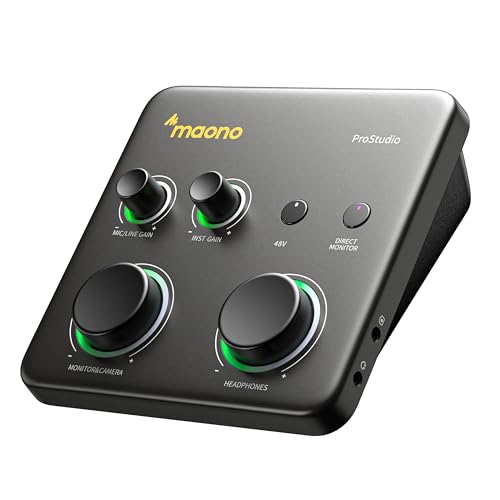
MAONO P1 USB Audio Interface with 70dB Gain

Universal Audio Volt 276 USB Audio Interface

Armocity Music Studio Desk Production Workstation

Dell Precision 3620 / T3620 Music Production Workstation PC

Armocity Music Studio Desk Production Workstation

Armocity Music Studio Desk Production Workstation
More Details On Our Top Picks
A wood workstation changes the feel of a room fast, and this one is aimed at studio layouts that need structure more than flash. The elevated monitor shelf, broad desktop, and pull-out keyboard tray create a clean tiered setup for a computer, controller, and mixer.
You may find it especially useful in a home studio where space has to work hard. The black finish keeps the look restrained, while the option to expand with a matching corner unit makes sense for a setup that tends to grow.
Strong Points
- Raised monitor placement helps keep screens at a more workable viewing height.
- Separate keyboard tray frees up the main desk for audio gear and notes.
- Wood construction gives the station a more furniture-like presence than metal racks.
- Spacious top surface suits a computer, controller, and compact mixer together.
Things To Consider
- Wood surfaces usually ask for a little more care than coated steel when drinks and cables share the same area.
- The fixed layout suits a set studio plan better than a room that changes every week.
Feature Snapshot
Who It Suits Best
Home producers who want an organized, desk-like station for computer-based recording will get the most from it.
A Better Fit Elsewhere
Armocity Music Studio Desk Production Workstation fits better for you if built-in power access matters more than a wood-furniture look.
For home recording, the useful part is not just the USB connection, it’s the mix of low-noise preamp design, loopback support, and 24-bit/192kHz capture. That combo suits you best when vocals, guitar, and streaming audio all need to travel through one small box.
The ASIO driver support matters for lower-latency monitoring, which means less lag between playing and hearing yourself. Compared with the On-Stage desk above, this is the signal-path piece, not the furniture around it.
Highlights
- 24-bit/192kHz capture gives you more detailed recorded files than basic entry-level interfaces.
- Loopback is handy for streaming, podcast routing, and screen-recorded tutorials.
- ASIO support helps reduce monitoring lag during performance and overdubs.
- Low-noise preamp design fits quiet vocal sessions and close-mic guitar work.
Minor Gripes
- Routing software adds flexibility, but that also means a little setup time.
- You still need compatible mics, cables, and a recording app to make the most of it.
Who Should Grab It
Solo creators, streamers, and home studio users who want a compact interface for voice and instrument capture will feel right at home here.
Another Choice May Suit
Universal Audio Volt 276 USB Audio Interface suits you better if you want a more characterful front end for vocals and instruments.
This interface leans hard into flexibility, especially for creators who jump between a phone, iPad, and computer. The 70dB gain is the headline spec, and it matters because high-gain dynamic mics often need more clean amplification without an extra booster in the chain.
Dual USB connectivity and independent mute control make it easier to keep a mobile recording rig moving. Compared with the PS22 Lite, this one is more adaptable, though that also means you’ll appreciate it most in a workflow that changes often.
What We Like
- 70dB gain gives demanding dynamic microphones more headroom to work with.
- 24-bit/192kHz recording keeps the file quality in the same conversation as more serious home-studio gear.
- -130dB EIN points to a very quiet signal path, which helps in modest rooms.
- Dual USB ports support a computer plus a phone or iPad in one setup.
- Independent mute control is useful during livestreams and quick pauses.
Points To Note
- The feature count is high, so first-time setup can take a little patience.
- Mobile-friendly flexibility helps most when you already know your capture workflow.
Whose Shelf It Belongs On
Multiplatform creators, podcasters, and musicians who move between devices will get the most from this unit.
Look Elsewhere When
MAONO PS22 Lite USB Audio Interface for PC fits better for you if your priority is a simpler PC-first recording path.
The Volt 276 stands out because it brings a more polished recording path to a compact USB interface. Vintage mode is aimed at a fuller preamp feel, while the built-in compressor, modeled after classic 1176-style behavior, helps vocals and instruments sit together more neatly.
That makes it a smart step up for you once a basic interface starts feeling plain. It also pairs naturally with the included LUNA DAW, which matters for anyone building a tighter recording-and-mix workflow on the same machine.
Upsides
- Vintage mode adds a fuller front-end character without extra hardware.
- Compressor control helps tame peaks during vocal takes and instrument tracking.
- LUNA DAW support makes the software side feel more integrated.
- Well suited to polished demo work and more deliberate home production.
Worth Noting
- The extra character is useful, but it’s more specialized than a bare-bones interface.
- It makes the most sense in a setup where you care about the whole signal chain.
Built With In Mind
Home producers and vocal recordists who want a more finished sound path, not just a connection box, should look closely here.
Where A Sibling Pick Shines
MAONO PS22 Lite USB Audio Interface for PC suits you better if you want simpler streaming tools and a more straightforward PC workflow.
Power access built into a studio desk saves you from stacking adapters around your monitor, laptop, and controller. This Armocity layout is built around that simple advantage, and the included USB ports plus outlet plugs make it easier to keep one corner of the room organized.
For a busy desk, that matters more than a flashy finish. It’s a better fit than the On-Stage workstation for setups that need charging and cable control baked into the furniture itself.
Best Bits
- Built-in USB ports and outlet plugs reduce the need for extra charging hardware.
- Helps keep cables more contained around a keyboard controller, monitor, and laptop.
- Useful for compact studio corners where every socket has to earn its place.
- The included velcro tie helps with everyday wire management.
Small Caveats
- Integrated power makes setup easier, but it also asks for a neater cable plan.
- The desk-first design is best for fixed rooms rather than frequent rearranging.
Right Fit For
Project studio owners who want a desk that handles both workstation duties and basic power access will benefit most.
Swap It Out When
On-Stage WS7500 Series Wood Studio Workstation – Black is the better call when you want a more furniture-like look and a slide-out keyboard tray.
This renewed Dell desktop is the most direct computer in the lineup, and the parts story matters: an Intel i7-6700, 32GB of DDR4 memory, a 512GB SSD for boot speed, and a 2TB hard drive for storage. That split storage setup is useful in studio work because your operating system and projects do not have to compete for the same space all the time.
For music production, HDMI, USB 3.0, and Windows 11 Pro round out a practical workstation base. Compared with the interface-focused picks above, this is the piece that gives your DAW room to breathe.
What We Like
- 32GB of memory gives DAW sessions more room for virtual instruments and plugins.
- SSD plus HDD storage helps separate fast boot tasks from bulk project storage.
- Windows 11 Pro supports a more businesslike workstation setup.
- USB 3.0 and HDMI keep it compatible with common studio peripherals and displays.
Areas To Watch
- As a renewed system, cosmetic condition can vary from unit to unit.
- The Intel HD Graphics 530 is fine for studio work, though it is not aimed at graphics-heavy tasks.
Core Details
Made For
Producers who want a ready-to-use desktop base for DAW sessions, sample libraries, and multi-track projects will appreciate this one.
Reach For A Different Pick When
MAONO P1 USB Audio Interface with 70dB Gain fits better if your main need is a compact recording interface, not a full desktop tower.
This version keeps the same studio-desk idea but makes the power side of the setup more central. Three USB ports and two outlet plugs are built in, so you can keep a monitor, laptop, iPad, and keyboard controller charged without turning the surface into a tangle of adapters.
That makes it especially useful in a room where everything stays connected most of the time. Compared with the On-Stage desk, this one leans harder into utility than furniture style, and the included velcro tie helps keep that practical side in order.
Positives
- Built-in charging access simplifies daily use around multiple studio devices.
- Three USB ports make it easier to keep smaller gear powered nearby.
- Helps reduce tabletop clutter in compact production spaces.
- The wire tie is a small but useful touch for routine cable cleanup.
Minor Gripes
- The integrated power setup is handy, but it also rewards careful cable routing.
- It suits fixed desks better than setups that change from week to week.
Perfect Match For
Home producers who keep several USB-powered devices on the desk at once will get the most value from it.
Where A Sibling Pick Shines
Armocity Music Studio Desk Production Workstation fits better if you want the same general approach but are working from a smaller footprint.
The smaller-studio angle shows up most clearly here. The product family is built around the same powered desk idea, but this version lands well for a tighter room or a layout that also has to make space for sheet music and accessory storage.
That makes it a neat fit for hybrid music spaces, not just production corners. It is less about looking like a showcase desk and more about keeping tools close, which is the right priority in a modest room.
Best Bits
- Works well in a compact studio that still needs room for essentials.
- Fits accessory-heavy setups without feeling overly specialized.
- Useful for music spaces that mix production, practice, and organization.
Softer Spots
- The compact angle trades away some of the spread-out room you’d get from a larger workstation.
- It makes the most sense when your gear count stays moderate.
Built With In Mind
Musicians who want a smaller desk for writing, practicing, and managing accessories should take a close look.
A Better Fit Elsewhere
Dell Precision 3620 / T3620 Music Production Workstation PC suits you better if the main gap in your setup is computer power rather than desk layout.
What Matters Before You Choose Audio Workstation Pcs
Where Shoppers Go Wrong
Desk size and computer power solve different problems, and it’s easy to mix them up. A producer with stacked monitors and controllers needs surface area first, while a session-heavy DAW setup needs memory, storage, and a stable CPU path first.
Port count matters too. USB ports, line inputs, monitor placement, and cable routing can save more time than a flashy finish.
The Case For Spending Up
Higher-tier audio workstation pcs usually cost more because they carry better CPUs, more memory, stronger interfaces, or more thoughtful furniture design. That extra spend makes sense once your sessions get larger, your mic needs more clean gain, or your desk has to hold several devices without feeling cramped.
For lighter use, a simpler interface or desk does the job. For heavier music production, the upgrade often shows up in comfort and fewer bottlenecks.
Frequently Asked Questions
What makes an audio workstation different from a normal desk?
An audio workstation usually adds raised monitor placement, keyboard trays, or cable-friendly layouts. Those details help keep music gear organized during long sessions.
Do you need a full PC or just an audio interface?
That depends on your setup. A full PC runs the DAW, while an interface handles the audio path between your mic, instrument, and computer.
Is high gain important for vocal recording?
It matters most with dynamic microphones that need more clean amplification. Lower-gain sources and condenser mics often need less help.
Why does loopback matter for streaming?
Loopback lets you route computer audio back into a recording or streaming session. That makes it easier to include game sound, system audio, or playback in one feed.
What should space-conscious studios prioritize first?
Start with the feature that removes the biggest bottleneck, whether that is desk layout, interface routing, or computer speed. Small rooms reward equipment that does one job cleanly instead of trying to do everything at once.
