


Basic Pcs still earn a place in 2026 because you need a desktop that handles email, documents, web work, and light multitasking without taking over your desk. For home offices, front desks, study spaces, and budget-minded upgrades, the right small-form-factor tower can feel almost invisible until you need it. These picks focus on practical ports, solid-state storage, and enough memory for daily work. You get straightforward machines, not showpieces, and that’s the point.
The Shortlist At A Glance
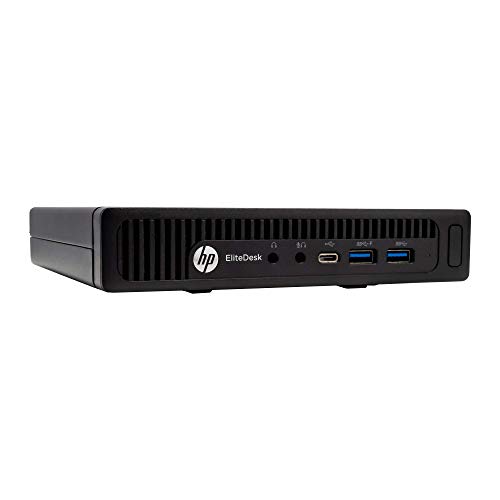
HP EliteDesk 800 G2 Desktop Mini Business PC 240GB SSD

Dell OptiPlex 7050 Micro Computer 256G SSD

Dell Optiplex 7040 SFF Intel Core i5-6500

Dell Optiplex 3050 SFF Desktop Computer PC 4K Support

Dell OptiPlex 5040 SFF Desktop Computer PC Bluetooth

Dell Optiplex 3040 SFF Business Desktop PC 256GB SSD
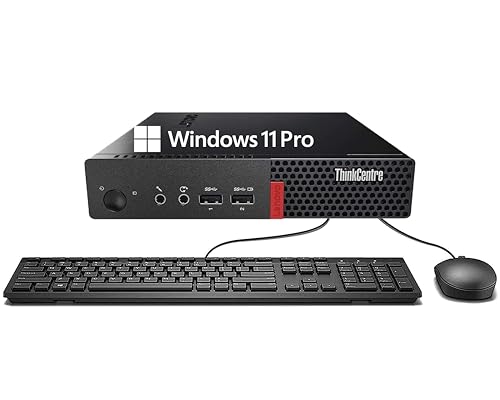
Lenovo ThinkCentre M710q Tiny Desktop 256GB SSD
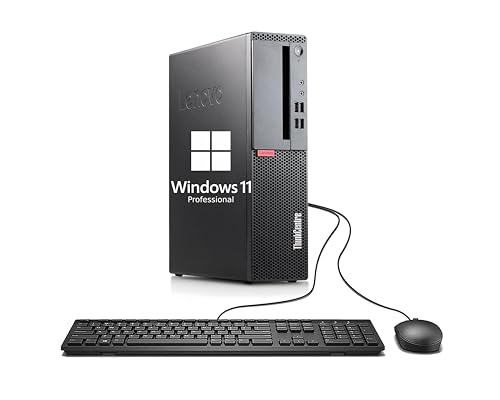
Lenovo ThinkCentre M710 SFF Desktop Computer PC VGA
More Details On Our Top Picks
Desk space is the whole story here, and this HP mini keeps the footprint tiny without stripping out everyday utility. The i5-6500T is a low-power quad-core chip, so it fits office work, browser tabs, and routine admin tasks better than heavy creative workloads.
The 16GB DDR4 memory and 240GB SSD help it feel responsive in normal use, while VGA and DisplayPort give you some monitor flexibility. Compared with the Dell OptiPlex 3050 later in the list, this HP leans more toward compact simplicity than extra display headroom.
Strong Points
- Mini chassis keeps your desk clear and leaves room for a monitor arm, notebook, or docking gear.
- 16GB of DDR4 memory supports smoother everyday multitasking than bare-minimum office machines.
- 240GB SSD storage is a practical fit for documents, apps, and light local file storage.
- VGA and DisplayPort broaden monitor matching, which helps in older offices and mixed setups.
Things To Consider
- The 240GB drive fills faster than larger SSDs once you keep local photos, downloads, or archived files.
- The tiny enclosure leaves less room for future expansion than a standard tower.
- VGA can be handy, though most modern desks will lean on DisplayPort instead.
Feature Rundown
Who It Suits Best
You fit this one best if you want a tiny office desktop for email, documents, and a single or dual-monitor desk without much bulk.
A Better Fit Elsewhere
Dell Optiplex 3050 SFF Desktop Computer PC 4K Support suits you better when you want more display flexibility and a roomier small-form-factor layout.
Compared with the HP mini, this Dell Micro gives you the same general small-footprint idea with a little more storage room at 256GB. That extra space matters in a home office that keeps spreadsheets, cached files, and a few larger applications on the local drive.
The 16GB DDR4 memory is the real comfort point here, especially for anyone who keeps browser tabs, office apps, and messaging tools open at the same time. In a tight cubicle or a simple monitor-and-keyboard setup, it stays unobtrusive.
Highlights
- Micro form factor saves desk space and tucks neatly behind a monitor.
- 256GB SSD offers more breathing room than the smaller drives in some other picks.
- 16GB memory supports smoother multitasking for standard office routines.
Worth Noting
- Micro desktops are compact, so future hardware expansion stays limited.
- The low-power processor line suits everyday work more than heavier workloads.
- Most desks will still need an external monitor, keyboard, and mouse.
Core Details
Made For
You fit this pick best if you want a tiny workstation for documents, email, and light multitasking in a narrow office or shared desk.
Another Choice May Suit
Lenovo ThinkCentre M710 SFF Desktop Computer PC VGA makes more sense for a desk that benefits from a small-form-factor tower with a fuller port mix.
The 7040 stands out because it carries a few extras that many basic office boxes skip, starting with the DVD-RW drive. That matters in workplaces still moving data from discs, and the WiFi adds flexibility when Ethernet is awkward.
It feels more complete than the leaner HP EliteDesk 800 G2, although the trade-off is that you give up some of that ultra-small, no-frills simplicity. For a home office that still keeps legacy media around, that balance makes sense.
Upsides
- DVD-RW support helps with legacy software, archived discs, and older media.
- WiFi reduces the need to place the machine right next to a network jack.
- 16GB RAM and a 256GB SSD make daily work feel steady and responsive.
- Small-form-factor design still keeps the system manageable on a desk or shelf.
Points To Note
- The optical drive adds usefulness, but it also adds a bit of bulk compared with micro desktops.
- Disc trays and moving parts can bring more maintenance than a drive-less setup.
- The overall design stays businesslike rather than compact to the point of disappearing.
Who Will Love This
You suit this one best if your workspace still needs disc access or a less cable-dependent layout.
Where A Sibling Pick Shines
Dell OptiPlex 7050 Micro Computer 256G SSD is the cleaner fit for a smaller desk that values minimum footprint over a DVD drive.
This Dell pushes farther into modern display support than the earlier picks, and the 4K capability gives you more monitor headroom for sharp text and larger workspaces. In a two-screen office, that can be the difference between merely usable and genuinely comfortable.
The 16GB DDR4 memory and 256GB SSD keep the basics covered, while WiFi and both DP and HDMI make it easier to match newer monitors. For a busy desk that sees documents by day and streaming or side projects by night, that mix lands well.
Bright Spots
- 4K support gives you room for high-resolution monitors and cleaner desktop scaling.
- DP and HDMI make monitor matching simpler than on more limited office boxes.
- 16GB memory is a solid fit for normal multitasking.
- WiFi adds placement flexibility for desks without easy cable access.
Room For Improvement
- The stronger display support matters most when your monitor setup can use it.
- Small-form-factor expansion still trails full towers.
- The business look stays plain, which suits offices more than showcase spaces.
Core Details
Built With In Mind
You fit this one best if your desk uses modern monitors and you want a compact office desktop that can keep pace.
Skip It When
HP EliteDesk 800 G2 Desktop Mini Business PC 240GB SSD makes more sense for a tighter desk that values the smallest possible footprint.
Bluetooth is the small feature that gives this Dell extra convenience, especially on a desk where you’d rather keep a wireless mouse, headset, or keyboard paired without clutter. The 8GB memory places it a step below the 16GB models above, so it feels better matched to lighter work.
That trade-off is clear, but the 256GB SSD and HDMI output keep it practical for home use. In a quiet study or family workstation, it covers the basics cleanly without asking for much space.
Best Bits
- Bluetooth helps cut cable clutter for common accessories.
- HDMI makes modern monitor hookup straightforward.
- 256GB SSD is a comfortable size for everyday software and files.
- Small-form-factor body fits neatly on or under a desk.
Softer Spots
- 8GB RAM is fine for basics, though heavier multitasking favors the 16GB options.
- The processor class suits office work more than demanding workloads.
- Wireless convenience helps, but a desk with many devices can still benefit from careful cable planning.
The Right Fit
You fit this one best if your daily work stays with email, documents, and a few browser tabs, not big app stacks.
Look Elsewhere When
Dell Optiplex 3050 SFF Desktop Computer PC 4K Support is the stronger fit for a multi-monitor desk that needs more display flexibility.
This one keeps the formula plain and useful: Core i3, 8GB RAM, 256GB SSD, HDMI, and RJ45 for wired networking. That combination suits front-desk stations, school work areas, or home offices where the machine mostly stays put.
Compared with the i5 models above, it gives up some headroom, but it also keeps the setup straightforward. You may find that trade helpful when the job is simple and stable rather than demanding.
Reasons To Buy
- 256GB SSD gives you quick boot and app access in a compact office box.
- RJ45 supports a wired network, which is useful in fixed installations.
- HDMI makes monitor hookup easy in modern workspaces.
- The modest hardware mix keeps the machine focused on core office tasks.
Areas To Watch
- Core i3 performance is fine for basics, though the i5 picks handle multitasking more comfortably.
- 8GB RAM works for simple use, but heavy tab counts will feel tighter.
- RJ45 and HDMI are practical, yet the port mix is not as flexible as some rivals.
Who Should Grab It
You fit this one best if you want a straightforward desktop for point-of-sale use, document work, or a secondary station.
Not Your Match When
Dell OptiPlex 7050 Micro Computer 256G SSD is the better fit for a desk that needs a smaller body with a bit more memory.
The included keyboard and mouse make this Lenovo feel more complete out of the box than several of the others here. That matters in a temporary office, a guest room setup, or any place where you want fewer separate purchases to track down.
Its tiny chassis keeps it easy to place, and WiFi plus Bluetooth reduce cable clutter. The honest read is that the compact design is the main attraction, while the 8GB memory keeps it grounded in everyday work.
Plus Points
- Tiny footprint suits crowded desks and secondary work areas.
- Keyboard and mouse are included, which simplifies setup.
- WiFi and Bluetooth support a cleaner, less tethered workspace.
- 256GB SSD gives you reasonable storage for a basic office load.
Small Caveats
- 8GB RAM is serviceable, though larger app stacks will be tighter than on the 16GB systems.
- DisplayPort focus may mean extra adapters for some monitor setups.
- The tiny body leaves less room for expansion later.
Perfect Match For
You fit this one best if you want a space-saving desktop for travel bags, temporary desks, or a spare work corner.
Swap It Out When
HP EliteDesk 800 G2 Desktop Mini Business PC 240GB SSD is the better fit for a buyer who wants a similarly small machine with 16GB memory.
This Lenovo sits in the practical middle of the list, with enough ports and enough included gear to keep setup simple. VGA still helps with older monitors, while WiFi and Bluetooth cover the conveniences that modern home and office spaces expect.
Against the tiny M710q, this SFF tower gives you a bit more presence without feeling bulky. That makes it a sensible fit for shared offices, staff stations, or a desk where compatibility matters more than chasing the smallest shell.
Best Bits
- VGA can be useful for older display hardware still in circulation.
- Keyboard and mouse are included, which shortens setup time.
- WiFi and Bluetooth add useful everyday flexibility.
- The SFF format keeps the system compact without going ultra-tiny.
Honest Caveats
- 8GB RAM is acceptable for basics, though the 16GB picks leave more breathing room.
- The design is practical rather than especially slim.
- VGA is helpful for legacy gear, but many modern desks will lean on newer display inputs instead.
Whose Shelf It Belongs On
You fit this one best if you want a shared-office desktop that keeps old and new peripherals in the same conversation.
Reach For A Different Pick When
Dell Optiplex 3050 SFF Desktop Computer PC 4K Support suits you better if your monitor setup leans fully modern and you want more display room.
What Matters Most Before Choosing Basic Pcs
Common Shopping Slip Ups
Small desktops look similar on paper, so the easy mistake is ignoring ports, storage size, and memory. A 256GB SSD goes farther than a 240GB drive, but both still fill up faster than a larger office tower.
Where The Extra Money Goes
Higher-tier Basic Pcs usually spend more on extra memory, newer display support, and a cleaner port mix. That upgrade pays off in offices with multiple monitors, heavier multitasking, or shared use where fewer compromises matter.
Things Worth Knowing First
Common Shopping Slip Ups
8GB RAM handles the basics, yet it leaves less breathing room for many tabs and heavier apps. A compact chassis also limits future upgrades, so you want the right mix at the start.
Where The Extra Money Goes
More expensive systems often bring 16GB memory, broader monitor support, and a more flexible rear panel. That is worth paying for in a main workstation, less so in a simple secondary desk.
Frequently Asked Questions
What counts as a Basic Pc here?
These are compact desktop systems meant for everyday office and home work. They focus on practical speed, small footprints, and simple connectivity.
Is 8GB enough for Basic Pcs?
Yes, for documents, email, and light browsing it usually is. For heavier multitasking, 16GB feels more comfortable.
Why choose an SSD over a hard drive?
An SSD helps the system start faster and open programs more quickly. It also tends to feel more responsive during normal daily use.
Do tiny desktops limit upgrades?
Yes, compact cases usually leave less internal room than full towers. That trade-off is part of the space-saving design.
Which connection matters most for monitors?
DisplayPort and HDMI are the most useful on these picks for modern screens. VGA still helps with older monitors in mixed setups.
