


You want your screen at a sensible height, your desk less cluttered, and your setup matched to the way you work. That matters just as much in a home office as it does in a studio corner, a shared workspace, or a gaming desk that carries more gear than it should.
The eight picks below cover simple risers, dual-monitor platforms, and full-motion arm mounts. Some are built for laptop-and-monitor combos, others are better suited to heavier displays or tighter desks, so the right choice depends on how much space you have and how fixed your setup needs to be.
Quick Look At The Shortlist

BESIGN MS01 Monitor Stand Riser

OPNICE Adjustable Monitor Stand Riser

monTEK Ultrawide Monitor Arm Max 57″

HOOBRO 2-Tier Dual Monitor Stand Riser

TAVR Dual Monitor Stand Riser

WALI Computer Monitor Stand for Desk

Klearlook Computer Monitor Stand for Desk
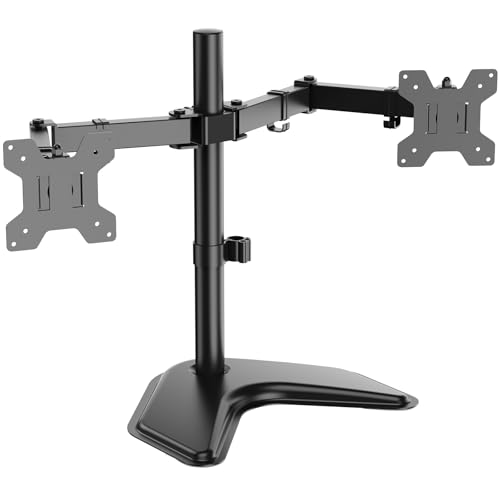
WALI Freestanding Dual Monitor Stand
More Details On Our Top Picks
The BESIGN MS01 works well for desks that carry more than one kind of gear, not just a monitor. Its 14.76 by 9.25 inch board and 4 to 5.9 inch height range give you enough flexibility for a screen, laptop, printer, or speaker without pushing the footprint into oversized territory.
The trade-off is straightforward, it’s a riser rather than a moving arm, so your screen stays where you place it. That makes it a clean fit for steady office setups, and the 44 lb capacity should suit many everyday combinations without feeling delicate.
Strong Points
- Height adjustment helps you set a more natural viewing level for long desk sessions.
- The board size suits a monitor plus small accessories without crowding the surface.
- Works across laptops, printers, and flat-screen displays, which helps in mixed-use rooms.
- Simple structure usually means less fuss during setup and less to clean around later.
Things To Consider
- Fixed placement means no tilt or swivel once it’s on the desk.
- Black finish is plain, so it blends in more than it stands out.
- The open base leaves cable management up to your own setup.
Feature Card
Who It Suits Best
You get the most from this one in a home office or shared desk where one steady riser has to cover several device types.
Where A Sibling Pick Shines
WALI Computer Monitor Stand for Desk makes more sense for a simpler metal-shelf setup, especially for anyone who wants a very straightforward footprint.
OPNICE leans more decorative than the first pick, with a wooden top that gives a desk a warmer look. Four height levels help you set the screen a little lower or higher, which is handy in a room that doubles as a work zone and a living space.
That style comes with a trade-off, you’re paying attention to the finish as much as the function. For home offices, study desks, and laptop setups, though, the cleaner look can make the whole station feel more intentional.
What We Like
- Four height settings make it easier to match your seating position.
- The wood surface gives the stand a more polished presence than plain metal.
- Useful for monitors and laptops, so it works across different desk routines.
- The compact shape suits smaller work areas that still need a raised screen.
Room For Improvement
- Wood surfaces usually need a little more care than bare metal during cleaning.
- The stand is more about tidy organization than heavy-duty hardware feel.
Who Will Love This
You’ll appreciate it most in a home office where the desk is visible all day and the monitor stand needs to look as composed as it functions.
Skip It When
BESIGN MS01 Monitor Stand Riser makes more sense for a work setup that needs a plainer, more utilitarian platform with a larger board.
This monTEK arm is the most ambitious option in the list, and the spec sheet makes that plain. It handles curved monitors from 17 to 57 inches, uses 75 by 75 mm and 100 by 100 mm VESA mounts, and carries up to 59.4 lb, which puts it in a different class from simple desk risers.
For gaming stations, large office displays, or anyone who wants the screen off the desk, that extra range matters. The USB 3.0A/C ports are a practical bonus, though the trade-off is a more involved install than a stand you just place and forget.
Upsides
- Built for very large screens, so it covers setups that smaller stands can’t touch.
- Heavy-duty aluminum construction suits a more permanent workstation.
- Full-motion movement lets you reposition the screen for seated or standing use.
- USB ports add convenience for desk charging and device connection.
- The no-sag design language points to better support for bigger panels.
Points To Note
- Arm mounts ask more from your desk and your setup time than a riser does.
- The hardware focus makes it a poor fit for shoppers who just want a simple shelf.
Core Details
Built With In Mind
You get the most out of it in a serious gaming or office setup where the monitor stays mounted and the desk space underneath needs to stay clear.
Another Choice May Suit
WALI Freestanding Dual Monitor Stand is the better fit for someone who wants two adjustable screens without committing to a wall-style arm setup.
HOOBRO takes a different route from the single-platform risers above, because the whole point here is spreading two monitors across one broad surface. The 39-inch width gives you real room to organize a dual-screen desk without stacking hardware on top of each other.
The two-tier layout also helps with storage and separation, though it does ask you to measure your desk carefully before you commit. For people who split work across apps or keep one screen dedicated to reference material, that extra surface pays off.
Best Bits
- The wide deck suits two monitors and keeps them on one unified platform.
- Two tiers create room for desk items below or beside the screens.
- Particleboard with metal legs gives the stand a more anchored feel than light plastic.
- Good fit for multitasking desks where a single riser would feel too narrow.
Small Caveats
- The broad footprint needs more desk depth than compact single-monitor risers.
- Particleboard surfaces usually call for a bit of care around moisture and scratches.
Right Fit For
You’ll get the most value from it in a dual-monitor workspace where you want a single raised platform instead of two separate stands.
Reach For A Different Pick When
BESIGN MS01 Monitor Stand Riser suits smaller mixed-device desks better, especially where the setup only needs one elevated platform.
The TAVR stand is the most adaptable shelf-style option in this group, especially for desks that keep changing shape over time. Adjustable length and angle matter here because they let you tune how the stand sits across your workspace instead of locking you into one rigid layout.
Its three-shelf layout is useful in a busy office, since it gives you places for accessories, notebooks, or a laptop while your screens stay raised above the main work surface. The catch is that all that flexibility can feel like overkill on a tiny desk, so the fit depends on how much room you really have.
Reasons To Buy
- Adjustable length helps the stand fit different desk widths.
- Angle control gives you a little more control over how the platform lands on the desk.
- Three shelves add useful separation for accessories and working gear.
- The extra-long format suits broader setups that need more than a basic riser.
Areas To Watch
- Three-shelf designs usually ask for more setup planning than a single-board riser.
- The large format can feel excessive in tight home offices.
Who Should Grab It
You’ll like it most in a wide workstation where a flexible, layered shelf arrangement helps keep gear separated and visible.
Swap It Out When
HOOBRO 2-Tier Dual Monitor Stand Riser is the cleaner choice for someone who wants a simpler dual-screen platform with less adjustability.
This WALI stand keeps things straightforward, which is often what a desk actually needs. The 14.6 by 9.3 inch metal shelf gives you a sturdy-looking base for a monitor, laptop, or printer, and the three height settings make it easier to land the screen where your shoulders feel less cramped.
Rubber pads under the shelf are a small but useful detail, since they help keep the stand from sliding around on smoother desktops. Compared with the wooden OPNICE pick, this one feels more plain and less decorative, but that can be a plus in a busy workspace.
Positives
- Metal shelf construction suits a desk that sees daily device changes.
- Three height levels help you adjust screen position without adding clutter.
- Rubber pads support a steadier feel on finished desk surfaces.
- The 44 lb capacity makes it practical for many standard monitor setups.
Worth Noting
- The look is functional rather than decorative.
- Like most open risers, cable routing still depends on your own layout.
Whose Shelf It Belongs On
You’ll get the best fit in a straightforward home office or student desk where simple height control matters more than storage extras.
Look Elsewhere When
OPNICE Adjustable Monitor Stand Riser works better for someone who wants a more finished wood look and a slightly more styled desktop presence.
Klearlook is the most storage-minded pick in the lineup, and that drawer changes the conversation. A foldable frame plus three width settings gives it more flexibility than a fixed riser, while the tablet and phone holder make sense on desks where small devices keep sliding around.
For compact home offices, that combination can be very handy, though it does mean you’re choosing organization over a bare-minimum surface. Compared with WALI’s simpler metal shelf, this one serves more than a monitor, which is the point for clutter-prone desks.
Highlights
- Foldable construction makes storage easier than with fixed risers.
- Three width settings help the stand adapt to different desk layouts.
- Drawer space gives you a place for small office items that would otherwise sprawl.
- The phone and tablet holder supports a more layered work routine.
Minor Gripes
- Foldable pieces and moving parts usually need a little more handling care over time.
- The extra features make it less barebones than a basic screen riser.
Made For
You’ll like this most in a small office or bedroom workstation where the stand also has to store a few everyday items.
Consider Something Else When
TAVR Dual Monitor Stand Riser is the better match for someone who needs a broader multi-shelf layout instead of a compact storage-first frame.
The WALI freestanding dual-arm stand is built for people who want two screens mounted without giving up desk placement flexibility. It supports 13 to 27 inch displays, uses 75 by 75 mm or 100 by 100 mm VESA mounts, and carries 22 lb per arm, which keeps it squarely in the dual-monitor support lane.
The V-base is the big practical detail here, since it avoids the clamp-and-drill feel of some arm setups. That makes it easier to place on a stable desk in a home office or shared workstation, though the arms still ask for more setup than a simple riser.
Bright Spots
- Two independent arms help you set each screen to a useful position.
- Freestanding V-base simplifies placement on desks that can’t take a clamp mount.
- Full motion movement covers tilt, swivel, and rotation for everyday adjustments.
- Fits common VESA patterns, which keeps compatibility broad across many flat monitors.
Honest Caveats
- Arm mounts take more assembly time than a basic monitor riser.
- The 27 inch limit means very large panels need a different solution.
The Right Fit
You’ll get the most from this in a dual-monitor office where each screen needs its own angle and height adjustment.
Look Elsewhere When
monTEK Ultrawide Monitor Arm Max 57″ suits users with a single large curved display who want a heavier-duty arm system instead.
What To Weigh Before Choosing A Black Monitor Stand
Mistakes Worth Dodging
Desk width gets overlooked fast. A wide dual-riser can crowd a compact setup, while a small shelf leaves you with no room for a keyboard, notebook, or dock.
Weight support matters just as much. Match the stand to the screen and any extra gear, then check whether you want a fixed riser or an arm with movement.
Where The Extra Money Goes
Higher-tier models usually spend more on metal arms, stronger joints, wider compatibility, and more adjustment points. That matters most for large displays, curved panels, or workstations that change often.
For a simple laptop on a steady desk, a basic riser is enough. For dual monitors or an ultrawide screen, paying up buys you more control and less compromise.
Things Worth Knowing First
Common Shopping Slip Ups
Many people choose by look alone and miss the footprint. Measure the desk, then match the height range and layout to the way you sit.
The Upgrade Payoff
Arm mounts and broader dual-screen platforms cost more because they solve more problems at once. You’re paying for motion, support hardware, and better fit across changing desk habits.
Frequently Asked Questions
What size monitor stand suits a small desk?
A compact riser with a narrow base usually fits best. Large dual-platform designs can overwhelm a tight workspace.
Do monitor stands help with posture?
They can place the screen higher, which often helps you sit with a more natural head angle. The real benefit depends on chair height and desk depth too.
Is a monitor arm better than a riser?
An arm gives you more movement and clears space under the screen. A riser is simpler and usually easier to place.
Can one stand hold both a monitor and a laptop?
Some wide risers can, and a few are built for mixed-device use. Check the surface size and weight support before you count on that layout.
What should you check before mounting a large display?
Look at screen size, weight support, and VESA pattern first. Those three details decide whether the stand will match the monitor correctly.
