


You want a keyboard and mouse pair that fits real work, not just a clean product photo. The right combo can save desk space, smooth out switching between devices, and keep long typing sessions from feeling clunky. That matters whether you work from home, split time between a laptop and tablet, or just want a tidier setup. The list below focuses on pairing comfort, connection flexibility, and practical fit.
Quick Look At The Shortlist

seenda COE200 Wireless Bluetooth Keyboard and Mouse Combo
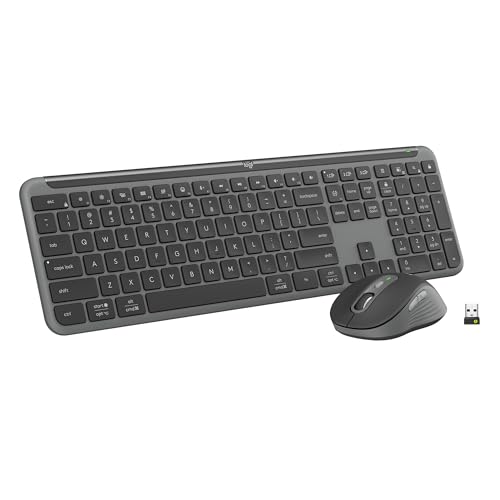
Logitech MK955 Signature Slim Wireless Keyboard Mouse Combo

Logitech MK850 Performance Wireless Keyboard and Mouse Combo Graphite

Logitech Signature MK650 Combo for Business Keyboard and Mouse Graphite

Logitech MK370 for Business Wireless Keyboard and Mouse Combo Graphite

Redragon K745 PRO Wireless 108-Key Gasket RGB Gaming Keyboard 4 Hotkeys

seenda COE401 3-Device Bluetooth Keyboard Mouse Combo Silent Black Gray

Wireless Keyboard and Mouse Combo RGB Backlit Rechargeable 2000 mAh Battery Tri-Mode Blue
More Details On Our Top Picks
The COE200 reads like a comfort-first desk set, not a flashy gadget. The wrist rest matters most for long typing stretches, because it gives your hands a more settled position than a bare board does. That’s the sort of detail that helps in a home office or shared workstation where the keyboard stays out all day.
It also stands out for device flexibility, since the set is built around both Bluetooth and a USB-A receiver. That mix suits you well if you move between a desktop and a laptop, though the connection setup still depends on the computer side supporting the mode you want to use. The honest read is simple: it looks aimed at steady daily use more than travel.
Strong Points
- Wrist support can ease strain during long typing sessions.
- Bluetooth and receiver options give you flexible desk placement.
- It fits neatly into a home office without adding clutter.
Things To Consider
- The setup is more desk-oriented than portable.
- Bluetooth pairing can take a little more attention than a wired set.
Feature Card
Who It Suits Best
You suit this set best if you type for hours and want a calmer hand position at a permanent desk.
A Better Fit Elsewhere
Logitech MK850 Performance Wireless Keyboard and Mouse Combo Graphite suits you better if you want a fuller, more comfort-driven desktop layout with broader workstation appeal.
This slim Logitech set leans toward a cleaner desk profile than the seenda COE200. The lower, laptop-style shape makes sense for you if you want a familiar typing posture without a bulky frame in front of the monitor. It also carries recycled plastic in the build, which adds a practical sustainability angle without changing the day-to-day use case.
The software side matters here, too, because shortcut customization can reduce small workflow annoyances in spreadsheet work, browsing, or app switching. In most home offices, that feels more useful than a long feature list. The trade-off is that slim kits tend to suit neat desk setups more than rough-and-ready travel bags.
What We Like
- Slim shape keeps the desk looking tidy.
- Laptop-like key feel lowers the adjustment curve.
- Shortcut customization helps everyday work feel quicker.
- Fast scrolling is useful for long documents.
Worth Noting
- The lower profile may not suit every typing habit.
- Slim accessories usually feel better on a stable desk than in a bag.
Feature Snapshot
Who Will Love This
You suit this combo best if you work across a laptop and desktop and want a low-profile setup that feels orderly.
Another Choice May Suit
Logitech MK850 Performance Wireless Keyboard and Mouse Combo Graphite fits you better if you want a thicker, more cushioned desk feel.
The MK850 goes after comfort in a more deliberate way than the slimmer MK955. Its full-size layout, curved keyframe, cushioned palm rest, and contoured mouse are all aimed at desk work that runs long. That combination makes sense for spreadsheets, writing, and all-day office use, especially where hand position matters as much as device switching.
Hyper-fast scrolling adds another practical layer, because long documents and web pages move with less wheel churn. You may find the larger footprint less appealing on a cramped desk, though, so this is more of a set-and-stay solution than a compact carry option. It feels built for people who want their keyboard and mouse to disappear into the routine.
Highlights
- Full-size keyboard gives you a traditional typing layout.
- Palm rest and curved frame support longer desk sessions.
- Contoured mouse fits the comfort theme well.
- Fast scrolling helps with dense documents.
- Device switching works across common work gear.
Areas To Watch
- The larger footprint asks for more desk space.
- The comfort-focused shape is less travel-friendly.
Who Should Grab It
You fit this combo best if your desk sees long work blocks and you want comfort to matter as much as speed.
Swap It Out When
Logitech MK955 Signature Slim Wireless Keyboard Mouse Combo suits you better if you want a thinner, lower-profile setup for a smaller desk.
The MK650 is the first set here that clearly speaks to IT deployment as much as individual desk use. Its Logi Bolt wireless path is aimed at secure connections, and the small mouse keeps the footprint practical for office layouts. That matters in environments where the same kit needs to scale across many workstations without becoming a support headache.
The business angle also fits end users who spend long hours typing and mousing at the same desk. Compared with the MK850, this one feels less about plush comfort and more about dependable rollout and secure connectivity. The trade-off is straightforward: it serves a workplace standard better than a home-office statement piece.
Upsides
- Logi Bolt support suits managed office setups.
- Small mouse keeps the desk uncluttered.
- Designed with long work sessions in mind.
- Two connection paths help with mixed hardware environments.
Points To Note
- The business focus may be more than casual home use needs.
- The smaller mouse may not suit larger hands.
Details At A Glance
Built With In Mind
You suit this set best if you manage office gear or want a dependable work combo for a shared workstation.
Where A Sibling Pick Shines
Logitech MK850 Performance Wireless Keyboard and Mouse Combo Graphite fits you better if comfort and a fuller desktop feel matter more than deployment simplicity.
The MK370 leans even harder into office deployment than the MK650. A spill-resistant full-size keyboard, silent-touch mouse, and pre-paired Logi Bolt receiver make it feel ready for a rollout rather than a tinkering session. That kind of setup is useful in shared offices where downtime from a fussy peripheral is the last thing you want.
Eight shortcut keys add a quiet layer of convenience for repeated tasks, though the set remains more utilitarian than plush. Compared with the MK650, this one feels a little more straightforward and a little less polished, which is fine for many workplace desks. It’s the kind of combo that disappears into the routine, and that’s often the point.
Best Bits
- Spill-resistant keyboard suits busy work surfaces.
- Silent-touch mouse keeps office noise lower.
- Pre-paired receiver shortens setup time.
- Shortcut keys help repeated tasks feel faster.
Small Caveats
- The work-focused design gives you fewer personal touches.
- Office-ready features are useful, but not especially flashy.
The Right Fit
You suit this combo best if you manage a workplace desk or need simple, repeatable hardware across several stations.
Look Elsewhere When
Logitech MK955 Signature Slim Wireless Keyboard Mouse Combo fits you better if you want a slimmer, more home-office-friendly feel.
The K745 PRO is the outlier in this roundup, and that’s useful. It brings a 108-key layout, gasket construction, RGB lighting, four hotkeys, and tri-mode connectivity through USB-C, Bluetooth, and 2.4 GHz wireless. In a gaming setup or mixed-use desk, that combination gives you far more room to shape the feel and connection style than the office-focused Logitech sets.
The anti-ghosting design also matters, since rapid multi-key input is part of the point here. The trade-off is plain: it’s a gaming keyboard first, so it won’t suit everyone who only wants a simple desktop pair. Still, the feature load is compelling for anyone who wants a more expressive board without giving up wireless flexibility.
Reasons To Buy
- Tri-mode connectivity gives you flexible pairing options.
- 108-key layout supports full-size use.
- Gasket construction should appeal to feel-focused typing.
- RGB lighting adds visible desk personality.
- Hotkeys keep common actions within reach.
Room For Improvement
- The gaming-first layout is more than some office desks need.
- All those extras can make it feel less understated than the Logitech sets.
Whose Shelf It Belongs On
You suit this keyboard best if gaming, lighting, and connection flexibility all matter at the same desk.
Reach For A Different Pick When
Logitech MK850 Performance Wireless Keyboard and Mouse Combo Graphite fits you better if your priority is office comfort rather than gaming features.
The COE401 is built around device hopping, and that’s where it earns its place. Three-device switching makes sense for anyone juggling a PC, laptop, and tablet during the same workday. Compared with the COE200, this one focuses less on wrist support and more on moving between systems without juggling extra hardware.
Silent operation is another practical touch, especially in shared rooms or late-night work sessions. Bluetooth compatibility stretches across Windows, macOS, iPadOS, iOS, and Android, while the 2.4G receiver path stays Windows-only. The honest read is that it fits mixed-device workflows well, but the connection rules deserve a quick glance before you settle in.
Bright Spots
- Three-device switching suits busy multitaskers.
- Silent keys and clicks keep shared spaces calmer.
- Bluetooth support reaches phones, tablets, and computers.
- A single receiver can simplify the desk layout.
Points To Note
- Bluetooth 4.0 or newer is required for the wireless side.
- The Windows-only receiver path limits flexibility on other systems.
Core Details
Perfect Match For
You suit this combo best if your desk time spills across more than one device and quiet operation matters.
Where A Sibling Pick Shines
Logitech MK650 Combo for Business Keyboard and Mouse Graphite fits you better if secure office deployment matters more than device count.
This combo goes after feature density: 104 keys, RGB backlighting, a 2000 mAh rechargeable battery, floating keycaps, and tri-mode connection support through Bluetooth, 2.4 GHz, and USB-C. That’s a lot for a single desk set, and it makes the most sense for you if you want one setup that can cover wireless work, wired use, and a more visual desktop style. The media knob adds another layer for quick adjustment without hunting through menus.
The trade-off is obvious, too, because more features usually mean more to manage. Floating keycaps can be easier to wipe around than deep-key designs, but the overall package still feels better suited to a dedicated desk than a minimalist carry kit. Compared with the seenda options, this one is the most visibly loaded.
Positives
- Tri-mode connectivity gives you broad setup flexibility.
- RGB lighting adds useful visibility and a personal touch.
- The rechargeable battery cuts down on constant battery swaps.
- Floating keycaps make surface cleaning more straightforward.
- The media knob offers quick control for volume or playback.
Softer Spots
- All the extras can feel busy on a simple office desk.
- A feature-heavy board usually takes more time to learn and set up.
Best Suited To
You suit this combo best if you want a feature-rich desk board with wireless flexibility and visible lighting.
Skip It When
Logitech MK955 Signature Slim Wireless Keyboard Mouse Combo fits you better if you want a cleaner, lower-profile look.
What To Weigh Before Choosing Bluetooth Keyboard And Mouse Comboes
Wrong Turns To Avoid
Do not fixate on Bluetooth alone. Some sets also rely on a USB receiver, and a few modes stay tied to Windows, so the connection path needs to match your devices.
The Upgrade Payoff
Higher-tier sets usually spend the extra money on better materials, richer connection options, quieter input, or stronger software support. That upgrade makes sense for long desk sessions, mixed-device work, and office environments where convenience pays back every day.
Things Worth Knowing First
Common Shopping Slip Ups
Layout matters more than the marketing copy. A full-size board suits spreadsheets and number entry, while a slim set or small mouse may fit a tighter desk better.
Where The Extra Money Goes
You’re usually paying for comfort shaping, multi-device switching, secure wireless tech, or extras like shortcut keys and backlighting. Those details matter most when the combo becomes part of your daily routine instead of a weekend accessory.
Frequently Asked Questions
Do Bluetooth keyboard and mouse combos work with tablets?
Some do, but support depends on the operating system and the connection mode. The seenda COE200 and COE401, for example, include tablet-friendly Bluetooth support in the source details.
Is a USB receiver better than Bluetooth?
Neither is universally better, because each solves a different problem. A receiver can feel simple on a Windows desktop, while Bluetooth helps when you move between more than one device.
Are business combos different from home-office combos?
Yes, business models usually lean toward deployment, security, and predictable support paths. Home-office sets more often emphasize comfort, slim styling, or easier switching across personal devices.
What matters most for long typing sessions?
Look for palm support, a comfortable key shape, and a mouse that sits naturally in your hand. The MK850 and COE200 show how much comfort details can change the daily feel.
Do RGB keyboards make sense for work desks?
They can, but only when you want the lighting or the extra visibility. For a plain office desk, a simpler set like the MK955 or MK650 usually feels more restrained.
