


Budget desktop computers under 500 are still practical for homework, office apps, browsing, streaming, and light multitasking. The trick is choosing a machine that fits your desk, your monitor setup, and the kind of lag you can tolerate after a few browser tabs and a video call. These eight renewed desktops lean on proven business hardware, so you get familiar ports, small footprints, and specs that make sense for everyday use. Some are better for tight spaces, some for heavier multitasking, and a few are simply easier to live with.
The Shortlist At A Glance
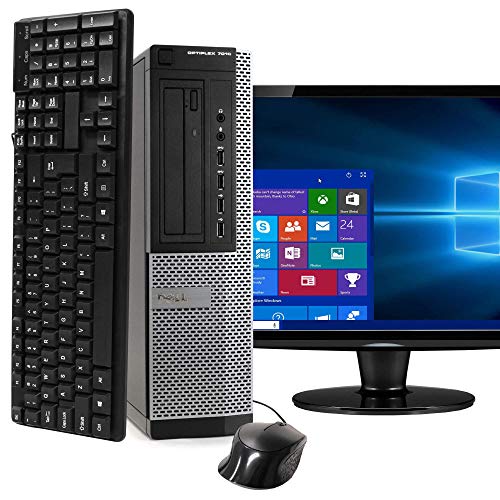
Dell Optiplex 7010 Desktop Package
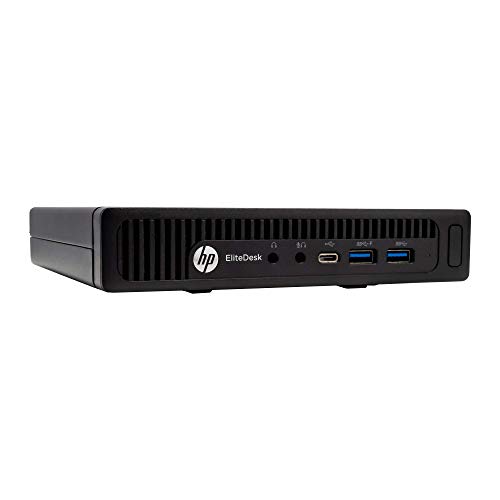
HP EliteDesk 800 G2 Desktop Mini Business PC

Dell Optiplex 7050 SFF Desktop PC

Dell OptiPlex 5060 Desktop Computer

Dell Optiplex 3050 SFF Desktop Computer PC

Dell Optiplex 5050 SFF Business Desktop PC

Lenovo Think Center M73 Tiny Desktop PC

Dell Optiplex 3040 SFF Business Desktop PC
More Details On Our Top Picks
This bundle works like a ready desk kit, not just a tower. You get the Optiplex 7010, a 19-inch LCD, keyboard, mouse, WiFi, and Windows 11 Pro, so setup stays straightforward for a spare room, front office, or student desk.
The i5 CPU and 8GB of memory suit email, spreadsheets, and browser-heavy work without feeling oversized for the job. The 500GB hard drive is the trade-off, because it gives space but not the snap of solid-state storage.
Strong Points
- Complete bundle reduces extra shopping.
- 19-inch monitor helps in smaller work areas.
- Keyboard and mouse make first setup simpler.
- Windows 11 Pro suits basic office routines.
Things To Consider
- HDD storage feels slower than SSD-based picks.
- The display size is fine for basics, but not spacious.
- Best for light to moderate workloads, not heavy editing.
Feature Rundown
Who It Suits Best
You get the most from this one in a small office, guest room, or homework station where a bundled setup saves time.
A Better Fit Elsewhere
Dell Optiplex 5050 SFF Business Desktop PC suits you better if you want faster storage and a stronger everyday response.
Desk space is the whole story here, and this HP keeps its footprint tiny. The mini chassis, 16GB of DDR4 memory, and 240GB SSD make it a tidy fit for a billing station, dorm desk, or side table workstation where clutter gets old fast.
The dual video outputs, VGA and DisplayPort, help you keep older and newer monitors in play. That mix is handy for a second screen setup, though the 6500T processor is clearly aimed at practical office work rather than anything demanding.
What We Like
- Mini chassis leaves room for papers and peripherals.
- 16GB memory supports smoother everyday multitasking.
- SSD storage helps the system feel responsive.
- VGA and DisplayPort widen monitor compatibility.
Small Caveats
- Not the pick for heavy creative workloads.
- Mini desktops can limit easy expansion.
Who Should Grab It
You suit this model best if you want a compact business desktop for documents, email, and web tools.
Skip It When
Dell Optiplex 7050 SFF Desktop PC is the stronger move for you if you want far more headroom for multitasking.
This one is built for heavier days, especially in a home office where tabs, spreadsheets, and meetings pile up. The i7-7700, 32GB of DDR4 memory, and 1TB SSD give it much more breathing room than the 8GB and 240GB picks earlier in the list.
Dual-monitor support matters here, because that often means you can keep email, reference docs, and a main project on separate screens. The small form factor keeps the chassis practical, although the power level makes it a clearer step up than the mini HP above.
Highlights
- 32GB memory suits many open apps at once.
- 1TB SSD provides generous fast storage.
- Dual-monitor support helps with desk productivity.
- Small form factor still saves space.
- WiFi and Bluetooth reduce cable clutter.
Points To Note
- The stronger hardware may be more than basic users need.
- Refurbished units are worth checking for accessory completeness.
Core Details
Built With In Mind
You fit this machine best if you work from a crowded browser, run office tools all day, or want a smoother multitasking setup.
Where A Sibling Pick Shines
HP EliteDesk 800 G2 Desktop Mini Business PC makes more sense if your desk space is the real constraint and your workload stays light.
The 5060 lands in a useful middle ground. You get a six-core i5-8500, 16GB of memory, and a split storage setup with a 500GB SSD plus a 1TB hard drive, so the system can keep active files fast while still leaving room for archives.
That balance suits a family desk or shared office where one machine needs to do a little of everything. Compared with the 7010 package, it gives you a cleaner storage mix, though it still sits below the 7050 in raw headroom.
Upsides
- Six-core CPU helps with busier workdays.
- SSD and HDD together give speed plus storage space.
- WiFi and Bluetooth make placement easier.
- Works well for home or office use.
Areas To Watch
- Mixed storage adds a little file-management effort.
- Not as roomy as the 32GB, 1TB SSD 7050.
The Right Fit
You suit this pick best if you want a balanced desktop for documents, browser work, and media without leaning too far toward either bare minimum or overkill.
A Better Fit Elsewhere
Dell Optiplex 5050 SFF Business Desktop PC is a stronger match if you want faster NVMe storage instead of a hybrid drive setup.
This 3050 keeps the formula tight: i5-6500 processing, 16GB of memory, 256GB SSD storage, and a small form factor that disappears under a monitor shelf. For everyday office work, that mix is easy to live with and easier to place than a tower.
The 4K support and HDMI plus DisplayPort output broaden display options, which matters for a cleaner desk or a more modern monitor. It trails the 5060 in storage flexibility, but the simpler spec list is part of the appeal.
Best Bits
- Compact chassis fits tidy desk layouts.
- SSD storage keeps startup and loading responsive.
- 16GB memory is comfortable for routine multitasking.
- 4K support helps with newer displays.
Room For Improvement
- 256GB storage fills faster than larger-drive picks.
- Best suited to everyday work, not demanding media tasks.
Feature Snapshot
Best Suited To
You fit this desktop best if you want a small, sensible machine for office apps, school work, and everyday browsing.
Look Elsewhere When
Dell Optiplex 5060 Desktop Computer is the better match if you want more storage flexibility and a more capable core platform.
This Dell feels built for people who open and close files all day. The i7-7700, 16GB of DDR4 memory, and 512GB NVMe SSD give it a faster, more polished feel than the 3050, while staying in a size that still disappears beside a monitor.
NVMe means the drive connects in a way that typically moves data faster than a standard SSD, and that matters whenever you bounce between documents, folders, and apps. The included keyboard and mouse are a practical touch, though the real draw is the speed balance rather than extras.
Reasons To Buy
- NVMe storage helps the system feel quick.
- 16GB memory handles everyday multitasking comfortably.
- Small form factor keeps the desk clear.
- Included keyboard and mouse help with setup.
Worth Noting
- Powerful enough that very basic users may not need it.
- Storage capacity is solid, though not the largest here.
At A Glance
Who Will Love This
You suit this desktop best if you want faster app response without jumping to a much larger machine.
Another Choice May Suit
Dell Optiplex 7050 SFF Desktop PC is the better fit if you need more memory and a larger drive for heavier multitasking.
The Tiny name makes sense here, because this Lenovo is built to disappear into a cramped setup. It uses an i5-4570T, 8GB of RAM, and a 240GB SSD, which is enough for email, browsing, and simple office software without demanding much desk real estate.
Its mix of HDMI, VGA, DisplayPort, USB 3.0, WiFi, and Bluetooth 4.0 gives you useful flexibility for older monitors and basic accessories. The trade-off is plain: this is a compact machine, not a roomy one, so expansion-minded shoppers will feel the limits quickly.
Positives
- Extremely small footprint suits tight spaces.
- Multiple display and USB ports widen setup options.
- SSD storage keeps everyday use responsive.
- WiFi and Bluetooth reduce the cable count.
Honest Caveats
- 8GB memory is fine for basics, not heavy multitasking.
- Tiny cases are less forgiving for future expansion.
Perfect Match For
You fit this desktop best if you need a tiny system for a shelf, kiosk-style corner, or travel-heavy setup.
Swap It Out When
HP EliteDesk 800 G2 Desktop Mini Business PC is the stronger choice if you want more memory in a similarly compact body.
This 3040 is the straightforward option in the group. The Core i3-6100, 8GB of RAM, and 256GB SSD make it a sensible fit for email, browsing, forms, and document work, especially in a home office that values quiet, compact hardware over extra muscle.
HDMI and RJ45 keep the setup useful for a monitor and wired network connection, which is enough for many basic desks. Compared with the Lenovo Tiny, this Dell gives you a similar small-footprint approach, but with a more conventional business-desktop layout.
Bright Spots
- SSD storage helps with quicker everyday response.
- Compact SFF case fits under or beside a monitor.
- HDMI and RJ45 cover common setup needs.
- Simple hardware makes maintenance easy to understand.
Areas To Watch
- Core i3 hardware suits basic tasks more than heavy multitasking.
- 8GB memory is serviceable, but not roomy.
Whose Shelf It Belongs On
You fit this desktop best if you want a no-fuss machine for light office use and occasional browsing.
Reach For A Different Pick When
Dell Optiplex 3050 SFF Desktop Computer PC is the better fit if you want a stronger balance of memory, storage, and display support.
What Matters Most Before Choosing Budget Desktop Computers Under 500
Storage And Speed
SSD storage changes the feel of a budget desktop more than many shoppers expect. A solid-state drive helps with boot times, app launches, and general snappiness, while a hard drive mainly gives you more room at a slower pace.
Size And Desk Layout
Small form factor and mini desktops suit cramped desks, shared spaces, and monitor stands. Full bundles help too, because a screen, keyboard, and mouse reduce the number of separate parts you need to source.
Ports And Screen Support
Look at HDMI, DisplayPort, VGA, and RJ45 before you think about anything else. Older monitors, wired internet, and dual-screen workstations all depend on those small details.
A Quick Reality Check
Hidden Buying Traps
Core i3 systems are fine for basic work, but they feel thin once you start piling on tabs and apps. Tiny cases also leave less room for future upgrades, so plan around today’s workload, not a hoped-for future one.
The Upgrade Payoff
Higher-tier desktops cost more because they usually bring faster CPUs, more memory, larger SSDs, and better expansion room. That extra spend makes sense for busy home offices, dual-monitor setups, or anyone who keeps many programs open at once.
Frequently Asked Questions
Are budget desktop computers under 500 good for school work?
Yes, several of these picks handle essays, research, video calls, and browser-based assignments without issue. SSD storage and 8GB to 16GB of memory make the biggest difference for that kind of use.
Which pick is best for a small desk?
The Lenovo Think Center M73 Tiny Desktop PC and HP EliteDesk 800 G2 Desktop Mini Business PC both save a lot of space. The Lenovo is smaller overall, while the HP gives you more memory.
Is 8GB of RAM enough?
It works for basic office tasks, browsing, and streaming. A 16GB model feels more comfortable once you keep many tabs open or switch between apps often.
Why do some renewed desktops include accessories?
Some renewed listings include a keyboard, mouse, or even a monitor because the package is built for easy setup. That can matter a lot in a spare room or office that needs a ready-to-use workstation.
Which desktop suits a home office with many tabs open?
The Dell Optiplex 7050 SFF Desktop PC stands out for that kind of load. Its 32GB of memory and 1TB SSD give you the most breathing room in this roundup.
