


You want a compact controller that fits a desk, a backpack, or a small studio without turning simple sessions into cable chaos. These picks suit beat makers, keyboard starters, and home producers who need velocity-sensitive keys, pad control, and software-friendly layouts that make real work easier.
The difference here comes down to key count, control layout, software bundle value, and how much room you have to grow. A 25-key model keeps things lean, while 32 and 49-key boards give you more room for chords, bass lines, and two-handed parts.
Quick Look At The Shortlist

Akai Professional MPK Mini IV 25-Key USB-C MIDI Keyboard Controller
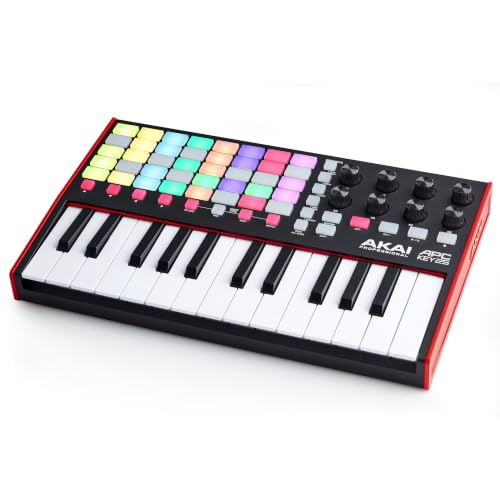
Akai Professional APC Key 25 MK2 25-Key USB MIDI Keyboard Controller

Arturia KeyLab Essential mk3 49 Key USB MIDI Keyboard Controller
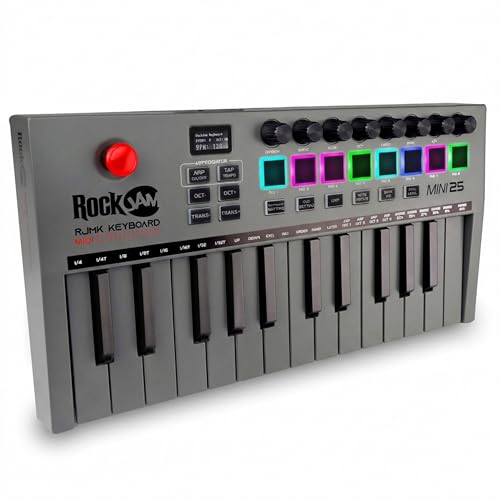
RockJam RJMK25 25 Key USB MIDI Keyboard Controller with Drum Pads

Donner Mini MIDI Keyboard N-25 25 Key MIDI Controller

Donner N-32 MIDI Keyboard Small USB MIDI Controller with 32 Velocity-Sensitive Keys

M-VAVE 25 Key USB MIDI Keyboard Controller With 8 Backlit Drum Pads, Bluetooth Semi Weighted Professional dynamic keybed

Donner USB-C MIDI Keyboard Controller 25 Key Portable Mini MIDI Keyboard with 8 Drum Pads
More Details On Our Top Picks
The MPK Mini IV sits in the sweet spot for desk producers who want a small footprint without giving up hands-on control. The 25 velocity-sensitive keys matter most in sketch sessions, where you need to move quickly between bass lines, chord stabs, and melody ideas.
Compared with the simpler RockJam RJMK25, this one leans harder into control and navigation. The eight assignable 360-degree knobs and full-color screen should suit you well in a busy home studio, though a mini keybed still asks for a lighter touch than a larger controller.
Strong Points
- USB-C keeps the connection modern and tidy on newer desks.
- Velocity-sensitive keys respond to playing dynamics, which helps beat ideas feel less mechanical.
- Eight assignable knobs give you hands-on parameter control without reaching for the mouse every few seconds.
- The screen and push-turn encoder should make preset changes and menu moves faster during fast sessions.
Things To Consider
- Mini keys can feel tight for players with larger hands.
- You may outgrow 25 keys once two-handed parts become a regular part of your workflow.
- The control depth is useful, but it also takes a little setup time to map cleanly in a DAW.
Feature Snapshot
Who It Suits Best
Beat makers and home producers who want compact hands-on control will get the most from this layout.
Where A Sibling Pick Shines
Arturia KeyLab Essential mk3 fits better for you once you want more keys for chord work and longer arrangements.
This pick is aimed squarely at clip-based work, especially on a desk where Ableton Live sits at the center. The 25-note layout and octave buttons keep the form compact, while the pre-mapped style of control should reduce the usual setup drag for session-focused work.
Against the MPK Mini IV, the APC Key 25 MK2 feels more like a software companion than a general-purpose keyboard. That makes it a smart fit for live launching and loop building, although you may want a broader key range elsewhere for piano parts or fuller harmony writing.
Upsides
- Built around session control, so clip launching feels more immediate.
- Dedicated octave buttons help the short key range stretch further.
- The compact shape suits laptop rigs and narrow desks.
- Works well for producers who spend more time arranging than finger-drumming.
Worth Noting
- The focus is specific, so it is less broad than a general controller.
- Five-octave piano work still belongs on a larger board.
- Clip-heavy layouts reward organized software mapping, which takes a little patience at first.
Core Details
Made For
You get the most from this board in Ableton-centered setups where launching clips matters more than playing long piano lines.
Look Elsewhere When
Akai Professional MPK Mini IV suits you better when you want a more general control surface with knobs and a screen.
Once you move past the 25-key crowd, the extra range here starts to matter in a real way. Forty-nine keys give you more room for two-handed parts, which is useful for chord progressions, bass, and melody without constant octave jumping.
Compared with the smaller Akai and Donner options, this board feels better suited to growing studio work than quick sketches alone. The bundled Analog Lab V software adds depth, and the custom DAW integration should appeal to you most if your sessions move between arranging, writing, and sound browsing.
Highlights
- 49 keys give you a far easier path to fuller playing than 25-key models.
- Scale Mode and Chord Mode support faster idea building for writing sessions.
- The arpeggiator helps turn simple notes into motion without extra sequencing work.
- Custom DAW scripts make the surface feel less generic in supported software.
Room For Improvement
- The larger footprint needs more desk depth than the mini boards in this list.
- It makes less sense for ultra-portable setups or backpack travel.
- The richer feature set can feel like more controller than a casual sketch pad needs.
Feature Rundown
Right Fit For
You suit this best if you are building a home studio and want room to grow beyond compact mini-key workflows.
Skip It When
Akai Professional MPK Mini IV makes more sense for cramped desks where portability comes before a fuller key range.
The RockJam RJMK25 keeps the formula straightforward, which is useful in a first studio corner or a bedroom setup where you want the essentials and little clutter. The drum pads add another layer of hands-on work, so you can sketch rhythms without reaching for a mouse.
Compared with the Akai APC Key 25 MK2, this one looks less tied to one software style and more open to general music creation. That broader stance should suit you well for starter beat work, though the compact keybed still asks you to think in short phrases rather than full piano arrangements.
Best Bits
- Drum pads give beat programming a direct, tactile feel.
- The 25-key layout keeps the board easy to place on smaller desks.
- Simple controls lower the learning curve for first-time setup.
- USB connection keeps the rig tidy for studio or travel use.
Points To Note
- The smaller key range can feel narrow for bigger chord voicings.
- More advanced sessions may call for deeper control than this layout provides.
- Drum-pad surfaces and key caps usually reward regular dusting and light cleaning.
Who Should Grab It
You fit this pick well if you want a straightforward controller for basic beat making and general MIDI work.
A Better Fit Elsewhere
M-VAVE 25 Key USB MIDI Keyboard Controller With 8 Backlit Drum Pads, Bluetooth Semi Weighted Professional dynamic keybed suits you better when wireless use and a firmer playing feel matter more.
The N-25 makes a lot of sense for a first controller because it keeps the layout approachable. Velocity-sensitive mini keys matter here more than flashy extras, since they let your finger pressure shape the note attack in a way plain keys cannot.
Compared with the RockJam RJMK25, this Donner leans more toward guided learning. The included teaching courses and light-up controls should help you settle in faster, though the small format means you still trade away range for portability.
Reasons To Buy
- Compact size makes it easy to keep on a desk or store in a bag.
- Velocity-sensitive keys help your phrases feel less rigid.
- Teaching courses add structure for someone still learning the basics.
- Light-up controls can reduce the guesswork during early practice sessions.
Softer Spots
- The 25-key range is limited for fuller two-handed work.
- Mini keys may feel crowded during longer sessions.
- The learning extras help, but they do not replace practice in your DAW.
The Right Fit
You suit this best as a beginner who wants a small controller with built-in guidance and a low-stress layout.
Another Choice May Suit
Donner N-32 MIDI Keyboard fits better once you want a bit more playing room without leaving the portable category.
The N-32 is the sensible middle ground in this group. Thirty-two keys give you more breathing room than the tiny 25-key boards, and that extra space helps a lot once you start writing parts that do not sit neatly in one octave.
It also adds a screen, sequencer, chord functions, and a light-up joystick for pitch bend and sound effects, so the surface feels more expressive than the simpler Donner N-25. In most compact studios, that mix will land well, though the extra controls do make the learning curve a bit steeper.
What We Like
- 32 keys give you more room for melody and chord movement.
- The screen should make settings easier to track while you work.
- Sequencer and chord tools support idea building without extra gear.
- The joystick adds expressive control for bends and effects.
Areas To Watch
- The added controls can take time to learn cleanly.
- It still remains a compact controller, so wide piano work will feel constrained.
- More controls usually mean more setup and a little more desk organization.
At A Glance
Best Suited To
You fit this well if you want a portable controller with a little more room and a few more creative tools than the most basic options.
Reach For A Different Pick When
Arturia KeyLab Essential mk3 makes more sense once your projects need a longer key range and deeper software integration.
This M-VAVE stands apart because it adds Bluetooth and a semi-weighted keybed, which changes the feel more than a typical mini board does. That matters in a mobile setup, where you may want fewer cables and a playing surface that gives a little more resistance under the fingers.
Compared with the RockJam RJMK25, this one feels more polished for wireless sketching and live control. The eight backlit drum pads and eight knobs round out the panel nicely, though the added depth means it makes more sense for someone who wants a stronger feature set than a bare-bones starter board.
Positives
- Bluetooth support helps keep a phone or tablet setup less tangled.
- Semi-weighted keys bring a firmer response than light mini keys.
- Eight backlit pads support beat work and finger drumming in low light.
- Eight knobs add quick control for mixing and sound shaping.
- The compact format still travels well for mobile production.
Minor Gripes
- Wireless use can depend on how clean your device connection stays.
- The more serious feel may be more than a casual sketch session needs.
- Small surfaces like this usually need regular cable and button cleanup.
Whose Shelf It Belongs On
You suit this best if you make beats on a tablet, phone, or laptop and want more tactile feel than a plain mini controller gives.
Where A Sibling Pick Shines
Donner N-32 MIDI Keyboard fits better for you if you want more keys and a screen while staying in a compact wired setup.
This DMK 25 Pro is the most feature-dense mini board in the group. The OLED display, smart scales, arpeggio tools, replay function, and 8 drum pads make it feel built for a creator who wants a lot of help at the surface instead of a plain key strip.
Compared with the Donner N-25, it gives you a far richer control set, but it also asks for a bit more familiarity with controller-style work. The note that it needs a DAW or phone to make sound is important, because this is a control surface first, not a standalone instrument.
Best Bits
- OLED display improves quick status checks in a compact format.
- Smart scales help you stay inside a key while sketching ideas.
- Arpeggio and replay tools support fast pattern building.
- Eight drum pads add a second layer for rhythm work.
- USB-C keeps the connection current and simple.
Small Caveats
- It depends on a phone or computer running DAW software.
- The deeper toolset can feel busy for absolute beginners.
- Mini hardware still leaves less room than a larger board for two-handed playing.
Details At A Glance
Built With In Mind
You suit this best if you want a mini controller that packs in software-friendly tools for sketching and rhythmic work.
Swap It Out When
Akai Professional MPK Mini IV fits better for you if you want a simpler control layout with fewer learning steps.
What Matters Most Before Choosing Budget Midi Keyboards
Key Count And Playing Style
Twenty-five keys suit beat sketches, bass lines, and travel rigs. Thirty-two and 49-key boards make chord work and two-handed parts feel less cramped.
Control Surface Depth
Knobs, pads, screens, and octave buttons change how often you touch the mouse. A lighter layout is easier to learn, while richer controls help once your sessions get busier.
Software Fit And Setup
Some boards favor Ableton-style workflows, while others stay broader. Matching the controller to your DAW usually saves more time than chasing extra features.
A Quick Reality Check
Common Shopping Slip Ups
Mini keys can feel tight for larger hands, so the keybed matters more than the logo. A control-rich board also needs more setup time, especially in a first studio.
Where The Extra Money Goes
Higher-tier models usually add better key feel, more controls, and deeper software integration. That upgrade pays off for regular writing sessions, not casual dabbling.
Frequently Asked Questions
What size controller fits a small desk best?
A 25-key board usually fits most compact setups without crowding the mouse area. A 32-key option gives a little more room while staying portable.
Do velocity-sensitive keys matter for beginners?
Yes, because they help notes respond to how hard you play. That makes practice feel more expressive and less mechanical.
Is a bigger controller always better?
Not always, because more keys also take more space. A larger board helps with chords and full parts, while a smaller one stays easier to move and store.
What matters most for DAW control?
Look for pads, knobs, octave buttons, and any software mapping built into the layout. Those controls reduce menu diving and keep your hands on the surface.
Can a mini controller replace a full keyboard?
It can cover writing, sketching, and beat building for many home setups. It will still feel limited for wide piano parts and serious two-hand performance.
