


Budget monitor arms matter most when your desk feels cramped, your screen sits too low, or your setup keeps changing. A well-matched arm can open space for a keyboard, docking station, notebook, or a second display without forcing a full desk overhaul.
The eight picks below cover light single-screen setups, heavier screens, mechanical-spring designs, and one dual-arm option for multi-monitor work. You get a clear spread of desk clamp and grommet mounting, VESA compatibility, and weight ranges, so you can match the arm to your screen instead of guessing.
Quick Look At The Shortlist
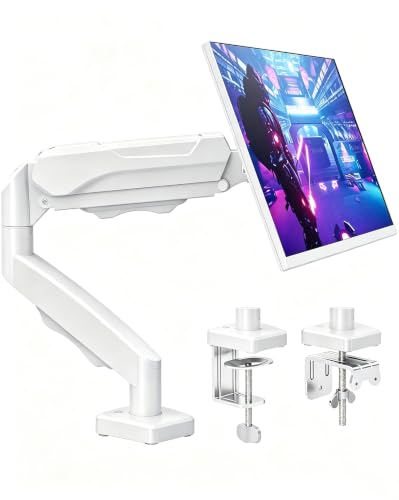
MOUNTUP Single Monitor Desk Mount 32-Inch White

HUANUO FlowLift Pro Monitor Arm 13-32 Screens

HUANUO Single Monitor Mount 16-Inch Height

NB SmooVex Monitor Mount Model-A5 Black

Pivotix Single Monitor Arm Desk Mount

ErGear Single Monitor Arm 13-34 Inch

WALI Adjustable Single Monitor Arm 26.4 Lbs
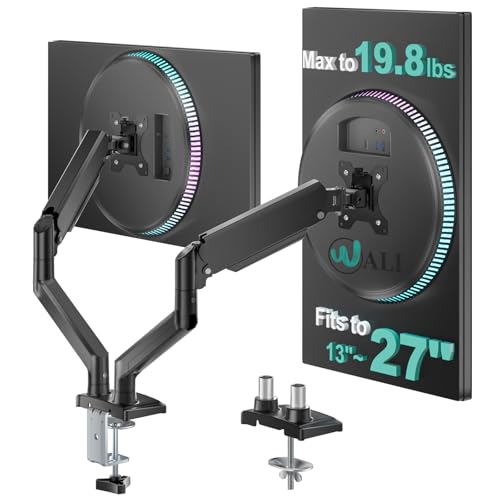
WALI Adjustable Dual Monitor Arm GSMP002 Black
More Details On Our Top Picks
MOUNTUP leans toward simple desktop control rather than flashy extras. The arm supports screens up to 32 inches and uses both clamp and grommet mounting, so you can match it to a desk with a rear lip or a cable pass-through.
The 4.4 to 17.6 lb range keeps it aimed at mainstream single-monitor setups, including office screens and lighter creative displays. The white finish looks cleaner than the usual black steel arm, though it will also show scuffs sooner on a busy desk.
Strong Points
- Clamp and grommet mounting give you flexibility on more desk styles.
- The 32-inch screen limit leaves room for a large work panel.
- Weight support from 4.4 to 17.6 lbs suits many common office monitors.
- The light finish blends in well with pale desks and modern setups.
Things To Consider
- The lighter load ceiling is less suited to thicker ultrawide panels.
- White hardware can pick up marks more easily than darker finishes.
- Long-term tension setup may take a little patience after installation.
Who It Suits Best
Office workers and home desk users with a single standard monitor will get the most from this arm.
A Better Fit Elsewhere
Pivotix Single Monitor Arm Desk Mount suits heavier screens better, while the WALI Adjustable Dual Monitor Arm GSMP002 Black makes more sense for a two-screen desk.
HUANUO gives you a wider fit window than the first pick, which helps when one desk has a flat display and another has a curved one. The tilt, swivel, and rotation range also suits people who change posture through the day, especially in a shared office or a long work session.
The MechaSpring design is the headline feature here, and that means a mechanical spring helping the arm hold position with a smoother feel. The trade-off is simple, you still need to confirm size, weight, VESA pattern, and desk thickness before you assume it will fit cleanly.
Upsides
- Fits 13 to 32 inch screens, so the compatibility range is broad.
- Flat and curved monitor support gives you useful flexibility.
- Tilt, swivel, and rotation help with posture changes and shared workspaces.
- Tool-free VESA mounting reduces setup friction.
- Clamp and grommet options help on different desk layouts.
Points To Note
- Wood desk thickness still matters, so thin or unusual desktops need caution.
- Curved screens have a lower load ceiling than flat panels here.
- More moving joints can mean more fine-tuning during setup.
Built With In Mind
Remote workers and desk sharers who want easy angle changes will get the most from this arm.
Another Choice May Suit
ErGear Single Monitor Arm 13-34 Inch is a cleaner fit for someone who wants quick installation and cable routing over extra motion range.
This HUANUO arm is built for desks where height matters as much as reach. The 16-inch maximum height gives you more vertical freedom than the shorter, simpler arms in this list, and the full-motion design helps you raise or tuck a screen without moving the whole base.
It also keeps the basics tidy with cable clips and both clamp and grommet mounting. The honest read is that it suits a clean single-monitor setup better than a heavy, oversized panel, but that’s exactly why many compact home desks will like it.
Highlights
- The 16-inch height range helps on shallow desks or mixed-height setups.
- Cable clips keep cords from hanging loose behind the arm.
- Clamp and grommet mounting widen placement options.
- Weight support up to 17.6 lbs covers a lot of standard displays.
Softer Spots
- The load ceiling leaves less room for heavier professional panels.
- Small desks still need careful placement to preserve the full motion range.
- Cable clips help organization, though they add a little setup work.
Perfect Match For
Small-office users, students, and anyone who wants a tidy single-screen desk will benefit most from this mount.
Where A Sibling Pick Shines
NB SmooVex Monitor Mount Model-A5 Black makes more sense for someone who wants mechanical-spring movement instead of a taller fixed-height layout.
Feature Rundown
NB ERGONOMIC takes a more controlled approach here with a mechanical spring instead of the older gas-spring style you still see elsewhere. That matters most for daily adjustment, where smoother movement and less sag over time are the real payoff, not flashy packaging.
The 32-inch screen support and VESA 75/100 compatibility keep it broad enough for many standard monitors. A slim-arm profile usually feels less imposing on a compact desk, though you still need to manage cable routing neatly to keep the workspace clean.
Bright Spots
- Mechanical spring action is a strong fit for frequent repositioning.
- Support for up to 32-inch screens makes it broadly useful.
- Standard VESA support keeps monitor matching straightforward.
- The slimmer look helps a desk feel less crowded.
Areas To Watch
- Mechanical springs still require correct tension setup for the screen weight.
- Black finish shows dust more clearly than lighter hardware.
- Compact arms can feel tight on deep monitors with bulky backs.
Who Will Love This
Desk users who adjust screen height through the day and want a cleaner-looking arm will appreciate this design.
Look Elsewhere When
MOUNTUP Single Monitor Desk Mount 32-Inch White is a better fit for someone who wants a lighter visual presence and a white finish.
Core Details
Pivotix looks aimed at desk setups that need a sturdier single arm without moving into oversized hardware. The all-steel build and 19.8 lb support put it above the lighter models in this roundup, so it suits heavier flat monitors that still use a standard VESA pattern.
The tilt, swivel, rotate, and height adjustment range gives you the usual ergonomic flexibility, but the trade-off is a more industrial feel. That’s not a flaw, just a sign that this one cares more about hold and range than a soft visual presence.
Best Bits
- All-steel construction brings a solid, anchored feel.
- Higher load support helps with heavier single monitors.
- Full-motion adjustment supports better screen alignment.
- C-clamp and grommet mounting broaden desk compatibility.
Small Caveats
- The steel look is less discreet than slimmer desktop arms.
- Heavy-duty hardware can take more time to balance correctly.
- Users with very light monitors may find it more arm than needed.
Whose Shelf It Belongs On
Users with heavier single monitors and a plain, durable desk setup will get the most from this arm.
A Better Fit Elsewhere
HUANUO Single Monitor Mount 16-Inch Height is the smarter choice for a smaller workspace that needs a little more vertical lift and cable control.
Feature Snapshot
ErGear puts installation convenience front and center, which matters in a home office where you want the arm mounted, adjusted, and out of the way quickly. The 13 to 34 inch fit range is broader than several picks here, so it covers a lot of flat and curved screens without making the desk feel crowded.
Cable management is a practical touch, not a headline, but it helps a lot once the monitor, charger, and dock all start competing for space. One thing worth considering, though, is that a wider head and tighter VESA panel usually reward careful alignment during setup.
Reasons To Buy
- Fast installation suits busy work-from-home routines.
- Tool-free VESA mounting reduces setup friction.
- Cable management keeps the back of the desk neater.
- Fits both flat and curved screens up to 34 inches.
- 19.8 lb support covers many mainstream and larger displays.
Room For Improvement
- The broader fit range still needs exact size and weight checks.
- More rigid VESA parts can feel less forgiving during alignment.
Right Fit For
Home-office setups and busy desks that need quick installation and cleaner cable routing will benefit most here.
Skip It When
HUANUO FlowLift Pro Monitor Arm suits you better when tilt, swivel, and rotation matter more than a fast setup.
Details At A Glance
WALI gives you the strongest single-arm load ceiling in this list, and that changes the kind of desk it suits. It’s a sensible match for a larger or heavier monitor that still uses a single-arm layout, especially in a workstation where stability matters more than a slim visual profile.
The 13 to 34 inch range keeps it broadly usable, but the real point is headroom. In a busy office, that extra capacity can make the difference between a screen that feels settled and one that slowly drifts out of the angle you set.
Positives
- 26.4 lb support gives you generous single-monitor headroom.
- Works with screens from 13 to 34 inches.
- Higher capacity helps heavier monitors stay more settled.
- Good fit for desks that need a sturdier mounting choice.
Minor Gripes
- The higher-capacity design is less discreet on a tidy desk.
- Heavier arms can take more time to balance during setup.
- Large screens still need careful compatibility checks before mounting.
Made For
Users with heavier single monitors or workstations that need extra support will get the most out of this arm.
Where Another Pick Fits Better
ErGear Single Monitor Arm 13-34 Inch is the better everyday choice for someone who wants faster installation and built-in cable management.
This is the clear choice for a two-monitor desk, and that changes the whole conversation. Each arm supports up to 19.8 lbs, so the setup is aimed at paired screens that need matching height, tilt, swivel, and rotation rather than a single oversized panel.
The C-clamp and grommet base options help it fit different desktop layouts, including desks with limited rear space. Compare it with the single-arm WALI pick above, and you get more screen coverage at the cost of a more involved setup and a larger footprint.
Standout Traits
- Dual-arm layout gives you room for two independent screens.
- Full-motion adjustment supports better side-by-side alignment.
- Per-arm weight support reaches 19.8 lbs.
- C-clamp and grommet mounting widen desk compatibility.
- VESA 75/100 support keeps monitor matching straightforward.
Honest Caveats
- Two arms take up more setup time and desk planning.
- Dual-screen balance can be more sensitive than a single-arm layout.
- Smaller desks may feel crowded once both monitors are mounted.
Who Should Grab It
Dual-monitor office users, editors, and multitaskers who need two screens at a matched height will get the most from this mount.
A Better Fit Elsewhere
HUANUO FlowLift Pro Monitor Arm makes more sense for a single-screen setup that needs broader motion without the extra desk space of a dual arm.
What Matters Most Before Choosing Budget Monitor Arms
Screen Fit Comes First
Start with monitor size, weight, and VESA pattern, which is the hole spacing on the back of the screen. An arm can look compatible and still miss the mark if one of those three details falls outside the range.
Desk Mounting Changes The Whole Fit
C-clamp mounting works well on many desks with a solid edge, while grommet mounting suits desks with a cable hole. Desk thickness matters just as much as the arm itself, especially for heavier screens and dual-arm layouts.
Motion Should Match Your Routine
A basic height-adjustable arm suits a fixed workstation, while tilt, swivel, and rotation help in shared spaces or home offices with changing tasks. More motion usually brings more adjustment time, so the right choice depends on how often you move the screen.
A Quick Reality Check
Wrong Turns To Avoid
Two common mistakes are assuming every 32-inch screen fits the same way and ignoring desk thickness until installation day. You also want to leave enough room behind the monitor for cables, especially on compact desks.
The Upgrade Payoff
Higher-tier arms usually cost more because they use stronger materials, tighter joints, or more refined spring systems. That extra spend makes sense for heavier monitors, frequent repositioning, or setups where sag and wobble would become annoying over time.
Frequently Asked Questions
What VESA size do most budget monitor arms use?
Many of these arms use 75×75 mm or 100×100 mm patterns. That covers a large share of mainstream monitors.
Is a clamp mount better than a grommet mount?
Neither one is universally better. Clamp mounts suit solid desk edges, while grommet mounts work well through a desk opening.
Do heavier monitors need a stronger arm?
Yes, the weight range matters a lot for balance and long-term hold. A heavier screen usually benefits from a higher-capacity arm with firmer tension control.
Are dual monitor arms hard to place on small desks?
They can be, because the footprint grows quickly once both screens are mounted. A single-arm model is usually easier in tight spaces.
What matters more, screen size or weight?
Both matter, along with VESA pattern and desk fit. Screen size tells you the layout range, while weight tells you whether the arm can actually hold it.
