


Streaming on a tight budget is less about flashy extras and more about getting the right mix of CPU, memory, storage, and ports. You want a PC that keeps capture software, browser tabs, chat, and your game or editing app from stepping on each other.
That’s where these eight picks make sense. Some lean toward compact desk setups, some toward gaming and smoother stream handling, and some toward plain office practicality for creators who want a machine that stays out of the way and gets the job done.
Quick Look At The Shortlist

BOSGAME E5 11 Pro Mini PC, AMD Ryzen 5300U Business Home Office PC

Dell Optiplex 3050 SFF Desktop Computer PC, i5-6500, 16GB, 256GB SSD

YAWYORE Gaming PC Desktop Computer AMD R5 5600GT 16GB 1TB NVMe
STGAubron Gaming PC Desktop, Core i7, RX 580 16G, 16G RAM, 512G SSD

HP RGB Gaming Desktop Computer, i5-6500, GTX 750 Ti 4G, 16GB, 512G SSD

STGAubron Gaming PC Desktop, Core i3-10105F, RX 560 4G, 16G DDR4, 512G SSD
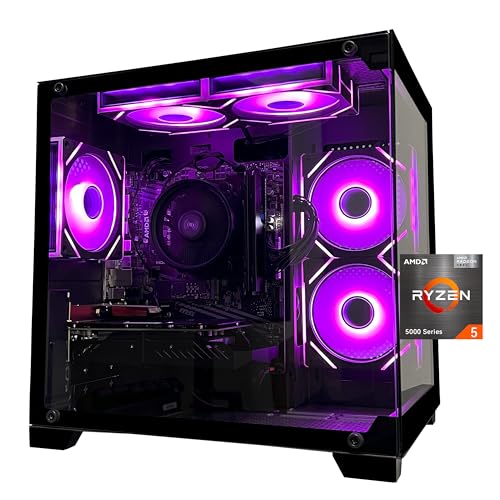
SKYESEV Gaming Desktop Computer PC, AMD Ryzen 5 5600, RTX3050 6GB, 32GB DDR4

Prebuilt Gaming Desktop PC, AMD Ryzen 5 5500, RTX 3050 6GB, 16GB RAM
More Details On Our Top Picks
The BOSGAME E5 11 Pro makes sense for a cramped desk or a secondary streaming station, because the mini-PC format keeps the footprint tiny. The Ryzen 5300U, with 4 cores and 8 threads, gives you enough headroom for browser-heavy work, chat tools, and lighter capture duties without turning the setup into a space heater.
The trade-off is clear, though: compact systems usually leave less room for expansion than a tower like the YAWYORE or STGAubron picks. Still, for a dorm desk, a small office, or a home corner shared with other gear, it’s the most discreet option in this group.
Reasons To Buy
- Mini-PC sizing leaves your desk open for a mic arm, webcam stand, or compact monitor layout.
- 4 cores and 8 threads help with everyday multitasking, including tabs, chat, and basic creator tools.
- Low-profile hardware fits neatly beside a monitor, which helps in small rooms and shared workspaces.
Areas To Watch
- The smaller chassis usually means less room for future hardware changes than a full tower.
- Serious gaming or heavier video work belongs with a stronger desktop such as the SKYESEV or ZYNEEX-style build.
Core Details
Who It Suits Best
Small-space streamers and office users who want a tidy machine for light broadcasts, chat, and day-to-day work will get the most from it.
A Better Fit Elsewhere
The YAWYORE Gaming PC Desktop Computer AMD R5 5600GT suits you better for a fuller tower setup with more local storage and a more gaming-forward feel.
This OptiPlex 3050 leans more office than gaming, and that’s exactly why it earns a place here. The small-form-factor case keeps it unobtrusive, while 16GB of memory gives you enough room for streaming software, tabs, and a few everyday apps without constant shuffling.
The 256GB SSD, or solid-state drive, helps the machine feel quicker at startup and during app loading, but storage fills faster than on the 1TB builds farther down the list. For a bare-bones streaming desk or a workstation that shares duty with calls and documents, it’s a sensible, tidy pick.
What We Like
- SFF sizing saves desk space and slips neatly into a home office.
- 16GB RAM supports smoother multitasking than leaner 8GB-class machines.
- The SSD helps everyday launch times feel brisk, which matters during quick stream setup.
Small Caveats
- 256GB storage can feel tight once you keep recordings, project files, and game installs locally.
- It suits basic streaming work better than graphics-heavy play.
- Renewed hardware asks you to be comfortable with a used-device profile.
Made For
You get the most out of it in a home office, school desk, or simple streaming corner where space matters more than graphics muscle.
Skip It When
STGAubron Gaming PC Desktop, Core i7, RX 580 16G is the stronger choice for streamers who also want room for editing and more graphics headroom.
YAWYORE shifts the conversation toward a more traditional tower, and that matters for streaming because you get a roomier platform around the Ryzen 5 5600GT. The 1TB M.2 NVMe drive is the real practical win here, since it gives you space for games, footage, and project files without forcing you to juggle storage every week.
The 550W power supply also makes it easier to think about future component changes than with the ultra-compact BOSGAME mini-PC. Still, the integrated graphics approach means you should expect a sensible starter machine rather than a heavy production box, which is fair at this level.
Best Bits
- 1TB NVMe storage gives you breathing room for recordings, apps, and game libraries.
- 32GB-class speed is not here, but 16GB DDR4 still handles everyday streaming tasks well.
- The tower format is easier to live with than a tiny chassis when you want future upgrades.
- WiFi and Bluetooth keep the setup flexible for desks without a wired network drop.
Points To Note
- Integrated graphics keep the focus on practical use, not high-end visual horsepower.
- Tower size takes more room than the Dell Optiplex 3050 SFF.
Feature Rundown
Who Will Love This
Streamers who want a roomy tower with generous local storage and everyday flexibility will appreciate the balance here.
Another Choice May Suit
SKYESEV Gaming Desktop Computer PC, AMD Ryzen 5 5600, RTX3050 6GB makes more sense for you if modern graphics matter more than storage-first practicality.
The STGAubron tower pushes further than the budget office-style machines, thanks to its Core i7 platform and RX 580 graphics card. That pairing matters in a streaming setup because the graphics side can help more with game output and light editing than the integrated options above it.
You also get WiFi 6 and Bluetooth 5.0, which are useful details when your desk lives far from a router or you switch between headset and controller often. The ARGB fan adds visual flair, though the honest read is that it matters more to the look of the setup than to everyday productivity.
Highlights
- RX 580 graphics give you more room for game play and creator work than integrated-only desktops.
- 16GB RAM and 512GB SSD form a practical middle ground for streaming and local storage.
- WiFi 6 and Bluetooth 5.0 make peripheral setup easier in a busy room.
- DP and HDMI output options add flexibility for dual-display layouts.
Worth Noting
- 512GB storage is workable, but large capture libraries can outgrow it.
- ARGB lighting is a visual touch, not a performance feature.
- The tower footprint is bigger than the Dell or BOSGAME choices.
Technical Sheet
Right Fit For
You’ll like this most if your streaming desk also doubles as a gaming and editing station.
A Better Fit Elsewhere
ZYNEEX Prebuilt Gaming Desktop PC, AMD Ryzen 5 5500, RTX 3050 6GB suits you better if you want a newer graphics path and a more modern all-round gaming feel.
This HP bundle makes the setup process easier because the keyboard and mouse are already part of the package. For a first streaming desk or a spare room setup, that matters more than flashy spec language, especially when you want to get moving without hunting for extra peripherals.
The GTX 750 Ti 4G is a modest graphics card by current standards, so the honest fit is lighter gaming, older titles, and general streaming work rather than ambitious visuals. It sits below the STGAubron RX 580 build, but the included RGB accessories give it a friendlier out-of-box feel.
Upsides
- Keyboard and mouse are included, which simplifies a starter setup.
- 16GB memory and a 512GB SSD give the desktop a workable everyday base.
- WiFi and Bluetooth keep the desk free of extra adapters and cables.
- RGB lighting adds personality without changing the core layout.
Ongoing Considerations
- GTX 750 Ti graphics are fine for modest use, not demanding visuals.
- Renewed hardware means you should expect a used-device profile.
Whose Shelf It Belongs On
It fits best on a beginner’s desk or in a second room where convenience matters more than graphics muscle.
Look Elsewhere When
STGAubron Gaming PC Desktop, Core i3-10105F, RX 560 4G is the sharper pick if you want a little more gaming headroom without moving far up the price ladder.
The STGAubron Core i3 build lands in the entry lane, which makes it a reasonable fit for lightweight streaming, school tasks, and daily browsing. Compared with the HP RGB desktop, it skips the bundled accessories focus and puts the emphasis on a simple tower with 16GB memory and a 512GB SSD.
The RX 560 4G gives you a basic graphics foundation for older games and modest creative work, but it’s not the sort of card you choose for ambitious visual settings. Still, for a small room or a starter gaming desk, it keeps the whole package practical and easy to understand.
Plus Points
- Core i3 and 16GB RAM create a straightforward base for everyday streaming tools.
- 512GB SSD keeps boot times and loading waits shorter than on hard-drive-only desktops.
- The tower format leaves more room for cable routing than a mini PC.
Trade Offs
- RX 560 graphics are suited to light workloads rather than demanding games.
- It sits below the Ryzen 5 and Core i7 options for heavier multitasking.
- You may outgrow 512GB storage sooner than with the 1TB models.
The Right Fit
It belongs on a starter streamer’s desk or in a dorm where you want simple, usable hardware without much fuss.
Where A Sibling Pick Shines
YAWYORE Gaming PC Desktop Computer AMD R5 5600GT is the better route if you want a stronger storage setup and a more roomier tower profile.
SKYESEV is where the list starts feeling more creator-friendly, because 32GB of DDR4 memory gives you extra breathing room for streaming software, browser tabs, editing tools, and voice apps all at once. The Ryzen 5 5600 and RTX 3050 6GB pairing also shifts it closer to a proper gaming-and-streaming tower than the lighter office-leaning options above.
The 1TB NVMe drive helps keep your local library from feeling cramped, and the ARGB fan adds a visual layer that many stream setups like to show off on camera. It is not subtle, but for a bedroom rig or a visible desk corner, the effect fits the brief.
Standout Traits
- 32GB RAM is generous for streaming, multitasking, and editing at the same desk.
- RTX 3050 6GB gives you a more current graphics foundation than the GTX 750 Ti or RX 560 picks.
- 1TB NVMe storage supports larger game libraries and more local footage.
- WiFi keeps the setup flexible for rooms where Ethernet is awkward.
Minor Gripes
- The ARGB look is great for some desks and busy for others.
- The tower takes more space than the compact mini-PC and SFF options.
At A Glance
Perfect Match For
It suits streamers who keep multiple programs open and want a machine that feels less strained during busier sessions.
Swap It Out When
STGAubron Gaming PC Desktop, Core i7, RX 580 16G is the better fit if you care more about a slightly different tower balance and built-in connectivity extras.
ZYNEEX gives you a straightforward modern tower, and the balance here is easy to read: Ryzen 5 5500, RTX 3050 6GB, 16GB DDR4 3200MHz RAM, and a 1TB NVMe SSD. That combination fits streaming better than the lighter GTX 750 Ti and RX 560 machines because the graphics side is more current and the storage side has room to breathe.
ARGB air cooling adds a visual note and should help the machine keep its look organized around the front fans, though it is still a tower that asks for more desk room than the mini and SFF picks. For gaming, streaming, and editing on one station, it feels like the cleanest step-up in the group without drifting into overkill.
Positives
- Ryzen 5 5500 gives you a modern six-core base for multitasking.
- RTX 3050 6GB is a stronger graphics match than the older budget cards in the list.
- 1TB NVMe SSD keeps storage pressure lower for games and footage.
- 16GB DDR4 3200MHz covers typical stream setups without making the system feel cramped.
Honest Caveats
- The tower takes more room than the BOSGAME and Dell compact options.
- ARGB cooling is a styling touch, so it matters less if you prefer a plain desk.
Built With In Mind
It suits you best when your desk has room for a full tower and your workload mixes gaming, streaming, and editing.
Where Another Pick Suits Better
SKYESEV Gaming Desktop Computer PC, AMD Ryzen 5 5600, RTX3050 6GB, 32GB DDR4 is the smarter move if you want more memory for busier multitasking.
What To Weigh Before Choosing Budget Pcs For Streaming
Common Shopping Slip Ups
A weak GPU can bottleneck a stream setup fast, especially once you add a game, a browser, and chat tools. Storage is the other quiet trap, because 256GB fills much sooner than a 1TB SSD once recordings start piling up.
Where The Extra Money Goes
Higher-tier models usually buy you stronger graphics, more memory, and a roomier case for airflow and future changes. That upgrade matters most when you stream games, edit footage, or keep several apps open at once.
A Quick Reality Check
Traps First Timers Fall Into
Tiny systems are easy to place, but they leave less room for expansion and cooling. Renewed desktops can still make sense, yet you want to be comfortable with a used-device profile and smaller upgrade headroom.
The Upgrade Payoff
Spending more pays off once your setup starts mixing streaming, gaming, and editing on the same desk. A machine like the SKYESEV or ZYNEEX class gives you more memory and a newer graphics path, which makes the whole workstation feel less strained.
Frequently Asked Questions
Are budget streaming PCs good for gaming too?
Some are, but the graphics card decides how far you can push game settings. The RTX 3050 and RX 580 models are the safer fit for that overlap.
How much RAM matters for streaming?
16GB is the practical floor for most simple setups. 32GB is better once you add editing tools, multiple tabs, and background apps.
Is a mini PC a smart streaming choice?
Yes, for a light setup with limited space. You give up upgrade room, so it suits tidy desks more than ambitious gaming stations.
Do I need a 1TB SSD?
A 1TB SSD makes life easier once you save clips, game installs, and project files locally. Smaller drives work, but storage management gets old quickly.
Should you choose renewed desktops for streaming?
Renewed desktops can be a solid value route for basic streaming and office use. The trade-off is a used-device profile and less room for future changes.
