


You need a low-cost laptop that can handle light Steam play without turning every launch into a waiting game. That usually means choosing enough memory, a solid-state drive, and a processor that can keep up with older or modest titles while still handling schoolwork, browsing, and streaming.
The eight options below cover compact 2-in-1 machines, larger screens, and a few renewed picks for tighter budgets. The trade-off is plain, stronger gaming headroom tends to come with more memory, larger storage, or a faster processor, while the cheapest choices stay firmly in casual territory.
Quick Look At The Shortlist

HP 14″ HD Laptop, Windows 11, Intel Celeron, 4GB RAM, 64GB SSD, Webcam

Dell Latitude 3190 11.6″ HD 2-in-1 Touchscreen Laptop, Intel N5030, 4GB RAM, 128GB SSD
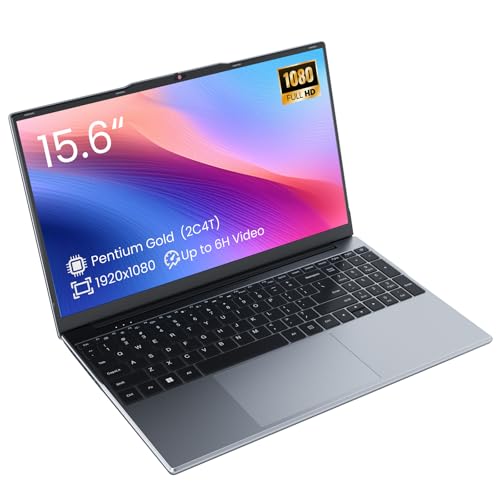
Phatom 15.6″ FHD Laptop, Windows 11, Pentium Gold, 4GB RAM, 128GB SSD

NIMO 15.6″ IPS FHD Laptop, AMD Ryzen 5, 16GB RAM, 512GB SSD

ASUS Vivobook Business Laptop, 14″ FHD Display, Intel Pentium N6000, 4GB RAM, 224GB Storage

HP Essential 2026 Laptop, Office 365, Copilot AI, 4GB RAM, Intel Processor

MALLRACE 17.3-Inch FHD Laptop, Alder Lake N95, 16GB RAM, 256GB SSD

HP Stream 14″ HD BrightView Laptop, Intel Celeron N4120, 4GB RAM, 64GB SSD
More Details On Our Top Picks
For the lightest Steam use, this HP keeps the formula plain: a 14-inch screen, 4GB of memory, and a 64GB solid-state drive. That SSD, a storage drive with no moving parts, helps the machine feel less sluggish than older hard-drive laptops, though the tiny capacity means you’ll manage installs carefully.
The renewed angle makes sense for students or casual desktop use, especially on a desk that never needs a big chassis. It sits closer to a starter machine than a gaming notebook, so older indie titles and very light play fit better than anything demanding.
Strong Points
- 14-inch size stays easy to carry.
- Solid-state storage helps daily loading.
- Windows 11 gives a familiar setup path.
- Webcam support suits classes and calls.
Things To Consider
- 64GB storage fills up quickly with game installs.
- 4GB RAM limits smoother multitasking.
- The HD panel is basic, not sharp.
Who It Suits Best
Budget shoppers who want a compact Windows machine for homework, browsing, and a handful of light Steam titles.
Where A Sibling Pick Shines
Phatom 15.6″ FHD Laptop suits you better for more screen space and a slightly roomier everyday feel.
A small 11.6-inch 2-in-1 has a very specific appeal, and this Dell leans into it hard. The touchscreen and convertible format suit note-taking, browsing, and quick room-to-room carry, while the 128GB SSD gives you more breathing space than the HP above.
The honest read is that the tiny display keeps it best for compact desks, travel bags, and basic Steam library management rather than long gaming sessions. That trade-off makes sense for commuters or students who want flexibility more than raw speed.
What We Like
- 2-in-1 design adds tablet-style flexibility.
- 128GB storage leaves room for more files.
- Touch input helps quick navigation.
- Small footprint fits crowded bags and tables.
Points To Note
- 11.6-inch space feels tight for extended play.
- 4GB RAM still keeps multitasking modest.
- Touch hinges add moving parts to mind during carry.
Built With In Mind
You’ll get the most from this one as a portable school or travel machine with light Steam use on the side.
A Better Fit Elsewhere
MALLRACE 17.3-Inch FHD Laptop suits desk-focused users who want a larger screen and more spacious layout.
This Phatom moves into a more comfortable 15.6-inch class, which makes a difference the second you start juggling a browser, launcher, and game window. The Full HD panel gives you more usable space than the HP and Dell picks, and the cooling fan is a practical touch for long sessions.
Its Pentium Gold chip still keeps expectations grounded, so you’re buying balance, not muscle. For students and casual home use, that usually means less fuss than the smaller machines and a friendlier layout for everyday work.
Highlights
- 15.6-inch Full HD screen feels roomier.
- Cooling fan helps with heat control.
- 128GB SSD offers decent starter storage.
- HDMI support helps on a larger monitor.
- Full-size layout suits school and documents.
Room For Improvement
- 4GB RAM still keeps heavier multitasking limited.
- Pentium Gold fits light Steam titles only.
Who Will Love This
Students and home users who want a bigger display without moving into a bulky or expensive machine.
Swap It Out When
NIMO 15.6″ IPS FHD Laptop suits you better when stronger multitasking and more storage matter more than keeping the entry price down.
Feature Rundown
This NIMO jumps well past the entry-level crowd. Sixteen gigabytes of memory and a 512GB SSD give you real breathing space for Steam installs, browser tabs, and school files at the same time, and the Ryzen 5 class processor is a clearer step up than the Celeron and Pentium machines above.
The 15.6-inch IPS panel should also feel easier on the eyes in a shared workspace or dorm desk. You still need to keep game expectations sensible, but for shoppers who want the least compromised machine in this list, it stands apart quickly.
Upsides
- 16GB RAM supports heavier multitasking.
- 512GB SSD leaves room for more installs.
- Ryzen 5 class chip outpaces the basic picks.
- IPS panel improves off-angle viewing.
- Type-C charging and backlit keyboard add daily convenience.
- Fingerprint login helps quick sign-in at a desk.
Small Caveats
- Higher capability usually means a less budget-stretching spend.
- The full feature set may be more than casual users need.
Right Fit For
Students, office users, and light Steam players who want one laptop to carry more of the load.
Another Choice May Suit
Phatom 15.6″ FHD Laptop is the calmer choice for you if keeping the upfront spend down matters more than stronger multitasking.
Core Details
The ASUS makes a sensible middle ground: larger than the Dell 2-in-1, lighter on the desk than the NIMO, and paired with a storage setup that adds up to 224GB. That split between 64GB eMMC and a 160GB docking station set means the everyday story here is convenience, not raw speed.
In a business bag or dorm room, it should suit document work, web tabs, and the occasional lighter Steam session without feeling stripped down. The Pentium N6000 keeps the expectations modest, but the screen size and storage mix are easier to live with than the most basic renewed models.
Best Bits
- 14-inch Full HD display is easy to use daily.
- 224GB total storage gives more space than the tiny entry picks.
- Bluetooth and webcam support common work tasks.
- Business-friendly size fits travel and desk use.
Worth Noting
- 4GB RAM still caps heavier multitasking.
- Storage is split across two parts, so organization matters.
Whose Shelf It Belongs On
You’ll appreciate this most as a compact work laptop that can handle casual Steam use on the side.
Look Elsewhere When
NIMO 15.6″ IPS FHD Laptop makes more sense for you if stronger memory and storage are worth the jump.
Details At A Glance
The HP Essential 2026 sits in a useful lane for home offices that care more about software bundle value than raw hardware muscle. With Office 365 and Copilot AI listed alongside a 4GB Intel-based setup, it targets everyday work, email, and web use more than game-heavy sessions.
That makes it a practical fit for someone who wants a fresh Windows laptop for documents and light Steam play without chasing a gaming label. Compared with the ASUS Vivobook, this one leans harder on the software side than the storage story.
Positives
- Office software bundle reduces setup hassle.
- Copilot AI features support common tasks.
- Plain Intel-based build suits routine use.
- Works well as a home-office starter.
Areas To Watch
- 4GB RAM keeps performance in the basic range.
- Steam use should stay modest and selective.
- Software extras matter less if you already own similar tools.
The Right Fit
Home users and students who want bundled software with a straightforward everyday laptop.
Reach For A Different Pick When
NIMO 15.6″ IPS FHD Laptop gives you far more hardware breathing room for multitasking and larger game installs.
The MALLRACE feels closest to a desktop replacement in this roundup. A 17.3-inch Full HD screen gives you the most screen real estate here, and the 16GB memory plus 256GB SSD combination pushes it well beyond the starter machines.
You may find the size less pleasant for tiny desks or cramped backpacks, but that’s the trade for a more open workspace. For gaming menus, split-screen work, and media use, it has a roomier presence than the 14-inch HP or ASUS choices.
Bright Spots
- Large display makes multitasking easier to see.
- 16GB RAM supports a broader daily workload.
- 256GB SSD gives useful starter storage.
- Alder Lake N95 sits above the weakest entry chips.
Minor Gripes
- 17.3-inch size is less travel-friendly.
- Desk space matters more with this chassis.
Made For
Desk-bound shoppers who want a large screen for lighter gaming, spreadsheets, and media.
A Better Fit Elsewhere
HP 14″ HD Laptop suits you more if portability matters more than a huge display.
Feature Snapshot
The HP Stream is the most stripped-back option in the group, and that’s exactly why it still matters. It keeps to a 14-inch HD screen, 4GB of memory, and 64GB of storage, which fits cloud-first work, web browsing, and a very modest Steam library.
For a college bag or a home desk used mostly for documents and video calls, it stays straightforward. Compared with the HP 14″ renewed model, it changes the processor and graphics balance rather than the basic footprint, so the real appeal remains simplicity.
Reasons To Buy
- Light chassis is easy to move around.
- HD webcam supports basic calls and classes.
- Intel UHD graphics handle everyday display tasks.
- Good match for cloud storage habits.
Softer Spots
- 64GB storage leaves little room for game installs.
- 4GB RAM keeps multitasking narrow.
- HD resolution is the least spacious here.
Who Should Grab It
Minimalists who want a compact, low-fuss Windows laptop for basic work and only the lightest Steam use.
Skip It When
Phatom 15.6″ FHD Laptop makes more sense for you if a larger screen and fuller workspace matter more.
What Matters Most Before Choosing Cheap Laptops That Can Run Steams
Screen Size And Storage
Steam use on a budget starts with the screen and the drive. A 14-inch or 15.6-inch display is far easier to live with than an 11.6-inch panel, and 128GB of storage gives you more breathing room than a 64GB setup.
Memory And Processor Headroom
4GB RAM can handle the basics, but it keeps multitasking tight. A stronger processor and 16GB memory, like the NIMO, are worth paying for when you want several apps open at once.
Portability Versus Comfort
Small laptops suit bags and trains, yet a larger chassis helps during longer sessions. Your choice comes down to whether you move the machine daily or leave it on a desk most of the time.
Before You Click Forward
Common Shopping Slip Ups
Many shoppers fixate on screen size and ignore storage. A 64GB drive fills quickly once a few games and updates land.
Another miss is treating 4GB RAM like enough for everything. It’s fine for basics, but it keeps the margin thin.
The Case For Spending Up
Higher-priced models usually buy you more memory, larger storage, and a better processor class. That upgrade matters most when you want smoother multitasking or plan to keep the laptop longer.
In this category, the extra spend also tends to bring better screens and convenience features such as backlit keys or fingerprint login.
Frequently Asked Questions
Can Cheap Laptops Run Steam Games?
They can handle lighter titles and older games without much fuss. Demanding releases usually ask for more memory and a stronger chip.
Is 4GB RAM Enough For Steam?
4GB RAM works for simple tasks and very light play. It leaves less room for multitasking, so browser tabs and launchers can slow the experience.
Does SSD Storage Matter More Than HDD?
Yes, a solid-state drive helps the laptop feel quicker during startup and loading. It also gives you a quieter, more modern storage setup.
What Screen Size Works Best?
For most people, 14-inch or 15.6-inch models hit the right balance. Smaller screens stay portable, but they feel cramped during longer sessions.
Should You Choose Renewed Or New?
Renewed can make sense when the hardware spec is better for the same budget range. New makes life simpler when you want a fresh battery cycle and less uncertainty about prior use.
