


Cheap refurbished computers make sense for you when the goal is simple: a dependable desktop that handles email, browsing, streaming, office work, and light multitasking without the cost of a brand-new tower. The strongest options in this roundup lean on older business-class Dell hardware, so you get sturdy cases, sensible port layouts, and enough memory or solid-state storage to keep everyday work moving. Some picks are better for tight desks, some for dual monitors, and some for heavier multitasking. The trade-off is straightforward, refurbished gear asks you to care more about specs, condition, and form factor than flashy marketing.
Quick Shortlist For Everyday Desk Work
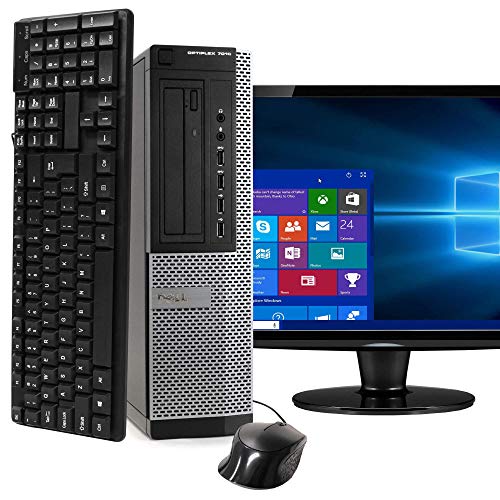
Dell Optiplex 7010 Desktop Package

Dell OptiPlex 7050 Micro Computer

Dell Optiplex 7040 SFF Intel Core i5-6500

Dell Optiplex 7050 SFF Desktop PC i7-7700

Dell Optiplex 3050 SFF Desktop Computer PC i5-6500

Dell OptiPlex 7050 Desktop Computer PC i5 7500

Dell Optiplex 5050 SFF Business Desktop PC i7-7700

Dell OptiPlex 5040 SFF Desktop Computer PC i5-6500T
More Details On Our Top Picks
This package makes sense for a basic home office, a student desk, or a family machine that needs to arrive with the usual accessories already sorted. The 19-inch LCD, keyboard, mouse, DVD drive, and WiFi trim down the extra shopping that often turns a “cheap” computer into a hassle.
The 8GB memory and 500GB hard drive are modest by current standards, so you should think of it as a practical starter setup rather than a speed machine. In a busy kitchen or front room, that all-in-one bundle feel is handy, though the spinning drive will not feel as snappy as an SSD-based pick like the OptiPlex 7050 Micro.
Strong Points
- Keyboard, mouse, and monitor reduce setup friction.
- WiFi and DVD support cover older and newer habits.
- The 500GB drive gives room for documents and media.
- Good fit for straightforward web and office work.
Things To Consider
- Hard drive storage feels slower than SSD-based options.
- The 8GB memory ceiling can feel tight with many tabs open.
- The included monitor adds desk depth, so measure first.
Who It Suits Best
It suits a shopper who wants a ready-to-use desktop for light daily tasks and does not want to piece together a setup from scratch.
A Better Fit Elsewhere
Dell OptiPlex 7050 Micro Computer works better for a cramped desk and faster boot times, especially for a commuter-style home office.
The micro form factor is the story here, and it matters in a tight office, a dorm, or any desk where surface space is precious. Compared with the first pick, this one swaps the monitor bundle for a tiny chassis, which makes it far easier to tuck behind a screen or under a shelf.
The 16GB DDR4 memory and 256GB SSD give it a more modern feel than a hard-drive-based budget tower. DDR4, or fourth-generation desktop memory, helps multitasking stay smoother, while the solid-state drive cuts waiting around during boot and file access. The trade-off is simple, you give up the monitor and full-size convenience.
What We Like
- Micro chassis leaves more desk room open.
- 16GB memory is comfortable for multitasking and browser-heavy work.
- SSD storage helps startup and app launches feel brisk.
- Windows 11 Pro suits a small office environment.
Worth Noting
- The tiny case limits internal expansion.
- You will need to supply your own display and peripherals.
- Airflow and dust cleanup matter more in compact desktops.
Feature Snapshot
Who Will Love This
You benefit most if you want a small desktop that disappears into a compact setup but still handles everyday multitasking with less hesitation.
Skip It When
Dell Desktop Computer Package Compatible with Dell Optiplex 7010 fits better for someone who wants a monitor and peripherals bundled in one purchase.
This one sits in the middle of the pack in a useful way, because the small form factor keeps the footprint tidy without going as tiny as the Micro. The DVD-RW drive is the old-school detail that still helps in offices with discs, archived installs, or local backups.
Compared with the 7010 package, you get a more office-ready storage setup thanks to the SSD, plus 16GB memory for a steadier multitasking experience. The catch is that the feature mix is functional rather than fancy, so it works best for practical desktop use, not for hobby upgrades.
Upsides
- SSD storage keeps everyday use responsive.
- 16GB RAM helps with spreadsheets and web apps.
- DVD-RW remains useful for legacy media and software.
- WiFi support simplifies placement in a home office.
Areas To Watch
- Small form factor cases can feel cramped for expansion.
- Older CPU generation limits how far it can stretch.
Core Details
Best Suited To
You’ll get the most from it in a home office that still leans on discs and wants a tidy tower with enough speed for everyday work.
Look Elsewhere When
Dell OptiPlex 7050 SFF Desktop PC makes more sense for heavier multitasking and a more powerful processor step-up.
For heavier day-to-day use, this one carries the strongest overall spec sheet in the group. The i7-7700, 32GB of DDR4 memory, and 1TB SSD form a combination that makes sense for office work, many browser tabs, media files, and broad multitasking.
Dual-monitor support and HDMI matter too, especially for home offices that need side-by-side windows or a clean desk layout. Compared with the 7040 SFF, this model is the clearer step up for anyone who wants more breathing room before the system starts to feel loaded.
Highlights
- 32GB memory leaves plenty of room for multitasking.
- 1TB SSD offers generous space for files and programs.
- Dual-monitor support helps with work-from-home setups.
- WiFi, Bluetooth, and HDMI cover common desk needs.
Points To Note
- The stronger spec mix usually fits a higher-use desk better.
- Small form factor still limits internal expansion.
Technical Sheet
Who Should Grab It
You fit this pick best if your desktop stays busy all day and you want a compact tower that still feels roomy under pressure.
Swap It Out When
Dell OptiPlex 5040 SFF Desktop Computer PC suits lighter office use better, especially when your needs are basic and budget-first.
The 3050 keeps the footprint small while adding display flexibility that stands out in this price band. DisplayPort and HDMI help in a dual-monitor setup, and the 4K support is useful for sharper office displays or a living-room desk that doubles as a media station.
Its i5-6500, 16GB memory, and 256GB SSD are a sensible middle ground for general work. Compared with the 7050 Micro, it is less about shrinking to the smallest possible shell and more about giving you standard SFF practicality with better display options.
Bright Spots
- DisplayPort and HDMI make monitor matching easier.
- 4K support gives you more screen flexibility.
- 16GB memory handles common office multitasking well.
- Compact case still leaves a neat desktop footprint.
Small Caveats
- Storage capacity is modest for large media libraries.
- The older CPU is fine for basics, not heavy editing.
Details At A Glance
Who It Suits Best
This fits a home office that wants compact hardware with a cleaner monitor setup and enough memory for daily productivity.
Where A Sibling Pick Shines
Dell OptiPlex 7050 Desktop Computer PC is the better call for shoppers who want a larger SSD and a more storage-forward setup.
This 7050 is the sort of desktop that feels balanced from the start, because the 512GB SSD gives you room without pushing into a full workstation class. Built-in WiFi and Bluetooth make it easier to set up in a mixed home office, especially where cable runs are awkward.
Against the 3050, the storage and wireless bundle gives it a slightly more polished feel, while the i5-7500 still stays in the practical business-PC lane. The honest read is that it suits people who want a single desktop for documents, web work, and media without constant tinkering.
Standout Traits
- 512GB SSD gives comfortable storage for daily use.
- WiFi and Bluetooth reduce accessory clutter.
- 16GB memory keeps common tasks moving smoothly.
- Good middle ground for work and home use.
Room For Improvement
- The spec mix is steady, not flashy.
- It still trails the i7-based options for heavier workloads.
Feature Rundown
The Right Fit
You match this one best if you want a no-nonsense desktop that covers work and casual use without feeling cramped.
Another Choice May Suit
Dell Optiplex 7050 SFF Desktop PC i7-7700 is the stronger match for multitaskers who need more processor headroom.
The 5050 SFF lands in a strong spot for you if speed and storage both matter. The i7-7700, 16GB DDR4, and 512GB NVMe SSD form a more responsive setup than the older hard-drive package at the top of the list, and NVMe means a faster-flashing solid-state drive path for data access.
It ships with a wired keyboard and mouse, so the setup feels less pieced together than many refurbished towers. One thing worth considering, though, is that the 5050 still depends on the same compact-business-desktop format, so you gain responsiveness more than expansion freedom.
Best Bits
- NVMe storage keeps the system feeling quick.
- i7-7700 suits heavier multitasking than lower-tier i5 models.
- Keyboard and mouse are already included.
- Small form factor works well in narrow desk setups.
Softer Spots
- Compact design still limits future internal upgrades.
- It is geared more toward speed than extra features.
Core Details
Built With In Mind
You suit this pick best if you want a compact office desktop with noticeably quicker storage and enough CPU muscle for busy daily work.
Reach For A Different Pick When
Dell OptiPlex 7050 SFF Desktop PC i7-7700 is the better fit for shoppers who want dual-monitor support and HDMI built into the spec sheet.
The 5040 is the lightest lift in this list, and that’s useful when you want a small office machine for email, forms, and web apps without overcommitting to extra hardware. HDMI, WiFi, and Bluetooth make the setup practical, while the compact case keeps the desk from feeling crowded.
Its 8GB memory and 256GB SSD are enough for lean use, but they won’t feel roomy beside the 16GB and 512GB models above. In other words, this is the pick for straightforward work, not for a cluttered browser life or heavier multitasking.
Positives
- Compact SFF design saves desk space.
- HDMI, WiFi, and Bluetooth cover common setup needs.
- SSD storage is a real step up from older hard drives.
- Light office tasks feel well matched to the hardware.
Honest Caveats
- 8GB RAM can feel limited with many apps open.
- Storage is modest for photos, video, or large files.
- It fits best where low-intensity use is the norm.
Quick Facts
Whose Shelf It Belongs On
You fit this desktop best if your work is simple, your desk is small, and you want a compact machine that stays out of the way.
A Better Fit Elsewhere
Dell OptiPlex 7050 Desktop Computer PC is the stronger choice for anyone who needs more storage and a roomier memory cushion.
What Matters Most Before Choosing Cheap Refurbished Computers
Wrong Turns To Avoid
Do not judge these desktops by processor name alone. An i7 with a small SSD can still feel more practical than an older chip paired with a mechanical drive, especially for daily sign-ins and browser work.
Also watch the form factor, because micro and SFF cases save space but leave less room for expansion. A monitor bundle looks convenient, yet it only helps when your desk can handle the footprint.
The Case For Spending Up
The higher-tier models usually buy you more memory, faster storage, and stronger monitor support. That matters when you keep many tabs open, use large spreadsheets, or want a desktop that stays responsive as demands grow.
Spending more also tends to buy a calmer ownership experience. Fewer compromises around storage and multitasking often mean you spend less time managing the machine and more time using it.
Frequently Asked Questions
Are refurbished business desktops a good fit for home use?
Yes, they fit home use well when you want email, web browsing, documents, and streaming without a big hardware bill. Business towers usually bring sturdier cases and sensible port layouts.
Which spec matters most in a refurbished desktop?
Storage type usually matters first, because an SSD changes how quick the desktop feels. Memory comes next, especially when you keep several apps open at once.
Is 8GB memory enough for everyday work?
It works for light office tasks, email, and casual browsing. Heavier multitasking feels better with 16GB or more.
Should you choose a micro or small form factor case?
Micro cases suit very tight desks and hidden placements. Small form factor towers give you a little more breathing room for ports and service access.
Do these desktops need extra accessories?
Some listings include a monitor, keyboard, and mouse, while others do not. Check the listing details closely so your setup plan matches what arrives.
