


Accounting work punishes weak hardware fast. Slow boot times, cramped storage, poor port layouts, and flimsy keyboards turn ordinary tasks like bank reconciliation, tax prep, and spreadsheet cleanup into drag.
This roundup focuses on computers for accounting that fit real desk setups, travel days, and small-office routines. You’ll see compact desktops for dual monitors, laptops for portable work, and one software-focused pick for organizing the books that run on the machine.
Quick Shortlist for Accounting Workloads
HP 14 Laptop 2025 Business Student Slim Computer

GEEKOM New IT12 Mini PC i3-12300HE 16GB RAM
HP ProDesk 400 G9 SFF Business Desktop Computer

HP Essential 15.6 2026 Laptop for Students and Professionals

QuickBooks Online for Small Business Owners
HP 15.6 Business and Home Laptop Computer

HP 14 Laptop Ultra-Portable Computer 2026

HP 17.3 Business Laptop Computer 32GB RAM
More Details On Our Top Picks
That 14-inch body makes sense for anyone who moves between a desk, a classroom, and a kitchen table. The 16GB memory gives you more breathing room for spreadsheets, browser tabs, and invoicing tools, while the bundled 500GB external drive adds sensible overflow storage for archived files.
The trade-off is portability, not raw desktop muscle. You may find it a better fit for general accounting work than for very large data models, but the included Microsoft Office access and Windows 11 Pro do line up well with everyday bookkeeping routines.
Strong Points
- 16GB RAM helps keep workbook switching calmer during busy filing sessions.
- 128GB UFS storage plus the 500GB external drive gives you a two-part storage setup for active files and backups.
- 14-inch size stays easier to carry than larger business notebooks.
- Windows 11 Pro suits office environments that want familiar admin tools.
- Office inclusion trims the number of separate purchases you need to plan for.
Small Caveats
- The core internal storage is modest, so large local archives still belong on the external drive.
- A 14-inch screen can feel tight for side-by-side ledgers without an external monitor.
- Rose gold styling reads more personal than corporate, which matters in client-facing offices.
Feature Rundown
Who It Suits Best
Students, solo bookkeepers, and mobile professionals who want a lighter laptop for day-to-day accounting tasks will get the most from it.
A Better Fit Elsewhere
HP ProDesk 400 G9 SFF Business Desktop Computer fits better for accountants who keep a permanent dual-monitor desk and want a tidier cable layout.
A mini PC like this belongs under a monitor, not in the middle of your desk. That small footprint matters in bookkeeping stations, front counters, and apartment offices where every inch counts, and the 16GB memory keeps the machine from feeling stripped down.
The i3-12300HE label sits in the middle of the family tree, yet the source data points to stronger benchmark behavior than the listed i5-12450H comparison. For accounting work, that means quicker app launches and smoother file handling, though the 256GB SSD still asks you to keep long-term archives somewhere else.
What We Like
- Tiny chassis clears desk space for ledgers, receipts, and a second display.
- 16GB RAM supports everyday multitasking without feeling barebones.
- Intel Core i3-12300HE keeps office tasks moving with less waiting.
- Mini PC form factor suits permanent setups better than carry-around laptops.
Areas To Watch
- Storage is limited, so local file hoarding is not the smart play here.
- You’ll need separate display, keyboard, and mouse gear.
- Mini PCs reward tidy cable management, which takes a little setup effort.
Made For
Accountants and office staff who want a small, always-plugged-in desktop for spreadsheets, invoicing, and cloud tools will appreciate it most.
Another Choice May Suit
HP ProDesk 400 G9 SFF Business Desktop Computer fits better for multi-monitor workstations that need more storage and a fuller port mix.
This small-form-factor desktop is the clearest workstation choice in the group. The 32GB memory and 1TB PCIe SSD give you the kind of headroom that matters when you keep several ledger files open, move between reports, and rely on local storage for fast access.
Dual 4K display support is the detail that changes how you work, because accounting often gets easier with one screen for source documents and another for the spreadsheet. The trade-off is obvious, though, since this is a fixed desk machine that asks you to plan around a monitor, keyboard, mouse, and network layout.
Upsides
- 32GB RAM leaves generous room for heavy multitasking.
- 1TB PCIe SSD offers fast local access and sensible file capacity.
- Dual 4K display support fits side-by-side work without crowding.
- USB-C, HDMI, RJ-45, and Wi-Fi cover a wide range of office hookups.
- Wired keyboard and mouse simplify first-time setup on the desk.
Worth Noting
- Desktop-only design suits permanent offices more than shared or mobile work.
- 4K monitors are where the dual-display benefit really shows up.
- Its compact case still needs good airflow and sensible cable placement.
Core Details
The Right Fit
Office staff, in-house bookkeepers, and accountants who sit at a dedicated workstation will get the most from this machine.
Where A Sibling Pick Shines
GEEKOM New IT12 Mini PC i3-12300HE 16GB RAM works better for tight desks that still want a compact desktop footprint.
This is the straightforward notebook in the set, and that simplicity helps in classrooms, back offices, and remote work days. The 15.6-inch FHD panel gives you more room than the 14-inch models above, which makes columns and side-by-side documents easier to manage.
Eight gigabytes of memory is enough for routine Office work and web-based accounting, though it does not leave much slack for heavy multitasking. The lighter build and Type-C plus RJ45 mix give you a practical middle ground, especially for anyone who wants a laptop that moves cleanly from home desk to meeting room.
Best Bits
- 15.6-inch FHD display gives spreadsheets a little more breathing room.
- 8GB RAM suits standard accounting tasks and document work.
- N100 processor keeps the profile focused on everyday productivity.
- Portable layout makes it easy to carry between locations.
- Type-C and RJ45 add flexible connection options for office use.
Room For Improvement
- 8GB memory can feel tight once several large files are open.
- It is better for routine office work than for heavier local processing.
- Built-in battery language is appealing, but exact runtimes still depend on workload.
Best Suited To
Students, field staff, and office workers who want a simple full-size laptop for documents, payroll, and light bookkeeping will feel at home with it.
Swap It Out When
HP 14 Laptop 2025 Business Student Slim Computer is the better move for anyone who wants more memory and bundled storage flexibility in a smaller shell.
Not every accounting setup starts with hardware, and this title leans hard into the software side of the job. It speaks to owners who need cleaner records, less time lost in the books, and a more structured path to tax prep without a formal accounting background.
The video course angle matters because software confidence often comes from knowing where to click, not from memorizing jargon. That makes this a useful companion for newer operators, though experienced bookkeepers will likely want something more advanced and less instructional.
Highlights
- Focuses on daily bookkeeping tasks rather than theory.
- Video guidance helps reduce hesitation inside the software.
- Useful for turning scattered records into organized books.
- Fits owners who want a clearer path to tax season prep.
Points To Note
- This is training material, not a desktop or laptop.
- More experienced accounting hands may outgrow the basics quickly.
- You still need a capable computer to use the software smoothly.
Whose Shelf It Belongs On
Small-business owners, sole proprietors, and first-time bookkeepers who want guided software help will benefit most.
Look Elsewhere When
HP ProDesk 400 G9 SFF Business Desktop Computer is the better fit for you if the priority is a dedicated machine rather than bookkeeping instruction.
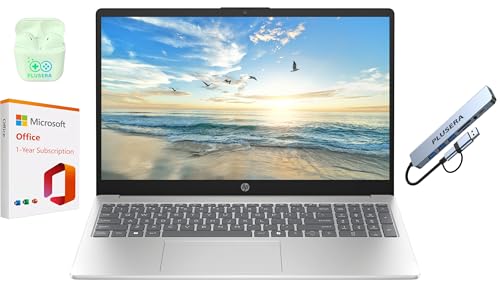
The bundled extras change the appeal here more than the raw laptop shell does. A year of Microsoft Office 365, plus the earphones and 8-in-1 hub, gives you a ready-to-work starter setup for home offices, students, or side businesses that want fewer add-on purchases.
The 16GB memory is the useful part for accounting work, because it helps keep tabs and desktop apps from getting in each other’s way. The 128GB SSD is the tighter constraint, so the honest read is that this fits people who keep most files in cloud storage or on external media.
Reasons To Buy
- 16GB RAM is the right baseline for day-to-day office multitasking.
- Office 365 inclusion lowers the number of separate setup steps.
- 8-in-1 hub adds useful connection flexibility right away.
- Earphones are handy for calls in shared or quiet spaces.
Minor Gripes
- 128GB internal storage asks for disciplined file management.
- The accessory bundle adds value, but not everyone will use every piece.
- It suits lighter local storage habits better than archive-heavy workflows.
Who Should Grab It
Home-office starters and practical shoppers who want a bundle with office software included will find the setup easy to use.
Where A Sibling Pick Shines
HP 14 Laptop 2025 Business Student Slim Computer is the better move if you want more total storage flexibility in a smaller notebook.
Among the laptops here, this one leans most strongly toward carrying easily. The 14-inch format, the lighter storage mix, and the included portable drive make sense for commuters, field staff, and students who need a machine that moves without much fuss.
The catch is the 4GB memory, which is the tightest spec in the roundup. That means it suits lighter accounting chores, quick invoice checks, and basic spreadsheet work more comfortably than all-day multitasking with several heavy applications open.
Bright Spots
- Very portable 14-inch size suits daily transport.
- 628GB total storage gives you room spread across internal and external locations.
- Office and Copilot AI inclusion helps with routine productivity tasks.
- Long-battery positioning makes sense for time away from a desk.
Honest Caveats
- 4GB RAM limits how many heavy tabs and apps you should keep open.
- A small screen can feel cramped for wide accounting sheets.
- Best results come from a light workload and tidy file habits.
Who Will Love This
Commuters, students, and mobile workers who need a light notebook for basic accounting tasks will get the most from it.
Reach For A Different Pick When
HP Essential 15.6 2026 Laptop for Students and Professionals gives you more screen room and a steadier feel for desk-based work.
This is the desk-focused heavyweight in the lineup. The 17.3-inch screen gives spreadsheets, dashboards, and document stacks more breathing room, while the 32GB memory and 1.2TB storage package make it a strong match for work that lives on the desktop.
The numeric keypad is a small but meaningful accounting detail, especially for anyone entering invoices or ledger figures all day. The trade-off is size and portability, because a machine this large is built to stay put and dominate a work surface like a ledger book spread open on a big oak table.
Standout Traits
- 17.3-inch display helps keep rows and columns readable.
- 32GB RAM supports heavier multitasking and larger file sets.
- 1.2TB combined storage gives you a roomy local library.
- Numeric keypad speeds repeated number entry.
- 10-core Intel Core i5 suits busier office workloads.
Softer Spots
- Large size makes it less appealing for frequent travel.
- A big chassis needs more desk depth and carrying room.
- Best value appears in fixed workstations, not portable routines.
The Right Fit
Bookkeepers, accountants, and office admins who spend long hours at a dedicated desk will benefit most.
Look Elsewhere When
HP ProDesk 400 G9 SFF Business Desktop Computer suits multi-monitor offices better if you want a smaller unit under the desk.
What Matters Before You Choose Computers For Accounting
Screen Space Versus Portability
A 14-inch laptop travels well, but a 15.6-inch or 17.3-inch screen gives columns and reconciliations more room to breathe. Desk-based accounting usually benefits from the extra width.
Memory And Storage Balance
RAM, or system memory, affects how many files and apps stay responsive at once. Storage matters just as much, because large client folders, exports, and backups can fill a small drive fast.
Ports And Desk Layout
USB-C, HDMI, RJ-45, and dual-display support matter more than they sound. A clean accounting station usually needs easy monitor connections, stable networking, and enough ports to avoid constant adapter swapping.
A Quick Reality Check
Common Shopping Slip Ups
Skipping memory and screen size is the fastest way to regret a machine in accounting work. Small screens and tiny internal drives look fine on paper, then get cramped once records pile up.
The Upgrade Payoff
Higher-tier models usually pay for stronger multitasking, larger storage, and better multi-monitor support. That extra spend makes sense for full-time desk use, especially around month-end close or tax season.
Frequently Asked Questions
What specs matter most for accounting work?
Memory, storage, and screen size usually matter first. You want a setup that keeps several files open without constant stalling.
Is a laptop or desktop better for bookkeeping?
A desktop works better for a fixed office desk and dual screens. A laptop fits travel, home, and shared spaces more easily.
How much storage do you actually need?
Light cloud-based work can live on a smaller drive. Local archives, exports, and client records push you toward more storage.
Do accounting tasks need a powerful processor?
Routine bookkeeping does not demand a monster chip. Faster processors matter more when you juggle big spreadsheets, browser tabs, and multiple office apps.
Is a numeric keypad important?
It helps a lot for repeated number entry. Accountants and bookkeepers who enter figures all day usually appreciate the speed.
