


Building photo editing PCs in 2026 means matching the machine to your actual workload, not chasing raw numbers. A desktop for layered editing, batch exports, or a mixed office and creative setup needs enough memory, the right graphics support, and a layout that stays comfortable through long sessions. The picks below cover compact mini PCs, midrange towers, and a dedicated controller option for more precise timeline and brush work.
Some choices fit a quiet home office, while others make more sense beside a fast monitor setup or a shared studio desk. You’ll also see where a smaller box keeps things tidy and where a fuller tower is worth the extra footprint.
Quick Look At The Shortlist


BOSGAME E5 11 Pro Mini PC

STGAubron Gaming PC Desktop R5 2600 RTX 2060 6G 16G DDR4 512G SSD

STGAubron Gaming PC Desktop Core I7 RTX 3060Ti 8G 16G RAM 512G SSD
STGAubron Gaming PC Desktop Core I7 RTX 3050 6G 16G RAM 512G SSD
WavePad Free Audio Editor
STGAubron Gaming PC Desktop Core I7 RX 580 8G 16G RAM 512G SSD
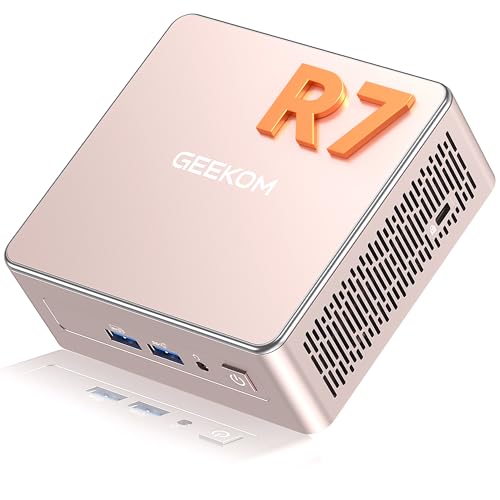
GEEKOM A5 2027 Edition Mini PC Ryzen 7 7730U 16GB RAM 512GB SSD
More Details On Our Top Picks
Long editing sessions feel easier with a controller like this, especially on timelines, brush adjustments, and repetitive shortcuts. The jog wheel gives you tactile scrubbing, while 15 programmable buttons let you map your most-used commands instead of hunting through menus.
That makes it a smart add-on for photo work in a busy studio or a home desk with limited space. The trade-off is simple: it supports speed and precision, but it does not replace a full editing computer, so it fits best beside one.
Strong Points
- Jog wheel control helps you move through edits with more physical accuracy than a mouse alone.
- 15 programmable buttons reduce repetitive keyboard trips during common photo tasks.
- Mac and PC compatibility keeps it flexible across mixed workstations.
- The compact controller layout suits cramped desks better than a full accessory stack.
Things To Consider
- It only adds control, so you still need a capable computer for the actual editing load.
- Shortcut setup takes a little planning, especially for a wide mix of apps.
Who It Suits Best
Photo editors who value shortcut control and scrub-wheel navigation will get the most out of it.
Where A Sibling Pick Shines
BOSGAME E5 11 Pro Mini PC suits a full compact workstation better if you need the computer itself, not just the control surface.
A small desk setup changes the equation fast, and this mini PC is built for that kind of space. The Ryzen 3 5300U brings 4 cores and 8 threads, which helps it handle everyday editing tasks, browser tabs, and office work without demanding a large tower.
It suits someone who edits photos in bursts, then switches back to email, cloud storage, or a second monitor. The honest read is that a mini PC like this makes more sense for lighter creative work than for heavy batch exports, but that’s exactly the point for many home offices.
What We Like
- The small chassis keeps your workspace clear and is easier to place under a monitor or beside a dock.
- 4 cores and 8 threads give it a practical baseline for everyday multitasking.
- The Ryzen 3 5300U is better suited to light creative work than very basic entry chips.
- It fits home-office use where photo editing is only part of the day.
Worth Noting
- Mini PC thermals and upgrade room are usually tighter than in a larger tower.
- Heavier project files will call for more patience than the higher-end STGAubron desktops.
Made For
Home-office users who want a compact machine for light editing and general productivity will like the fit.
A Better Fit Elsewhere
STGAubron Gaming PC Desktop Core I7 RTX 3060Ti 8G 16G RAM 512G SSD suits more demanding editing sessions and larger files.
Once you move from light edits to layered projects, a tower like this starts to make more sense. The Ryzen 5 2600, RTX 2060 6G, 16GB DDR4, and 512GB SSD point to a machine aimed at mixed creative work, with enough headroom for editing, streaming, and day-to-day use in one box.
The included WiFi, Bluetooth 5.0, 4K DisplayPort, HDMI, and ARGB fan are practical touches rather than fluff. You may still want to watch storage space with larger image libraries, but for a home studio that needs a flexible starter tower, this one stays relevant.
Bright Spots
- RTX 2060 graphics help with smoother acceleration in supported creative apps.
- 16GB of DDR4 memory is a sensible floor for layered editing and multitasking.
- Both DisplayPort and HDMI make multi-monitor setups easier to plan.
- WiFi and Bluetooth reduce the need to add basics after setup.
Minor Gripes
- 512GB SSD space can feel tight once you store large catalogs and exports.
- Desktop towers need more room and cable planning than mini PCs.
Right Fit For
Photo editors who also stream, multitask, or work in a shared home office will get solid value from the layout.
Swap It Out When
STGAubron Gaming PC Desktop Core I7 RTX 3060Ti 8G 16G RAM 512G SSD is the better step up for heavier render loads.
This is the kind of tower that starts to feel more serious once your photo work turns into long export queues and bigger canvases. The Core i7, RTX 3060Ti 8G, 16GB RAM, and 512GB SSD give it a stronger ceiling than the RTX 2060 model above, so it makes more sense for heavier editing sessions.
The same practical extras carry over, including WiFi, Bluetooth, HDMI, and 4K DisplayPort support. Storage is still only moderate, so you may end up adding more space for archives, but the core configuration is the reason to look here.
Upsides
- RTX 3060Ti graphics raise the ceiling for demanding creative workloads.
- Core i7 processing is a stronger fit for heavier multitasking.
- 16GB RAM supports layered files and several apps at once.
- The port mix suits a cleaner desk with one or two monitors.
- It has more headroom than the RTX 3050 and RTX 2060 choices.
Points To Note
- 512GB SSD storage still deserves planning if you keep a large image archive locally.
- A tower build asks for more desk space than a mini PC.
- The stronger hardware makes sense only when your edits justify the extra capacity.
Perfect Match For
Photographers and content creators who spend real time in layered projects will benefit most from this configuration.
Where Another Pick Suits Better
BOSGAME E5 11 Pro Mini PC is the tidier choice for basic editing and a minimal desk footprint.
For general studio use, this model sits in a useful middle lane. The Core i7, RTX 3050 6G, 16GB RAM, and 512GB SSD give you a familiar editing-friendly base, but the card choice keeps it a step below the RTX 3060Ti option for heavier workloads.
That balance works well for home offices that also handle browsing, school tasks, and casual creative projects. The RGB fan adds a bit of visual flair, though the real value is still the desktop format and the better-than-basic component mix.
Highlights
- Core i7 and 16GB RAM form a practical baseline for photo editing and multitasking.
- RTX 3050 graphics are a sensible match for everyday creative use.
- 512GB SSD keeps boot and load times responsive for a desktop in this class.
- The tower format leaves room for a straightforward monitor and peripheral setup.
Room For Improvement
- Its graphics headroom trails the RTX 3060Ti desktop in this list.
- Storage capacity may feel tight once your project files and exports pile up.
The Right Fit
Home users who want a dependable general-purpose editing desktop without stepping into the higher tier will find the shape familiar.
Another Choice May Suit
STGAubron Gaming PC Desktop Core I7 RTX 3060Ti 8G 16G RAM 512G SSD makes more sense for faster render-heavy work.
Photo editing PCs often share desks with audio work, and this software helps that side of the workflow stay organized. It offers editing tools for music and tracks, plus level control through envelope shaping and equalizing, which means you can trim problems and shape sound without bouncing between apps.
The extras matter too, especially Batch Conversion, the Sound Library, and text-to-speech tools. The trade-off is that this is software, not hardware, so it only belongs in a build plan where audio work is part of the day.
What We Like
- It adds practical editing tools beyond simple trimming and cutting.
- Envelope and equalizer controls help with more deliberate sound shaping.
- Batch Conversion saves time during repetitive file handling.
- The Sound Library and text-to-speech tools widen its use cases for mixed media work.
Softer Spots
- It does not replace the need for strong computer hardware.
- Audio-first software only helps you if sound work is part of the editing stack.
Built With In Mind
Creators who switch between photo, sound, and simple post-production tasks will make the most of it.
Look Elsewhere When
Contour ShuttlePRO v2 is the better desk accessory choice for hands-on control around editing shortcuts.
This desktop lands as a more restrained entry point than the RTX 3050 and RTX 3060Ti builds. The Core i7, RX 580 8G, 16GB RAM, and 512GB SSD give it enough structure for everyday editing tasks, school work, and general home use without pushing into the more expensive-feeling tier.
There’s a catch, though: the RX 580 sits below the stronger cards in this roundup, so it fits lighter creative demands better than heavy render work. For a first editing tower or a secondary workstation, that trade-off is easy to understand.
Best Bits
- Core i7 processing keeps the platform comfortable for basic multitasking.
- 16GB RAM supports a sensible editing baseline.
- 512GB SSD gives you fast local storage for the operating system and active projects.
- The RX 580 8G offers a practical middle ground for lighter creative work.
Areas To Watch
- Graphics headroom is lower than the RTX 2060, RTX 3050, and RTX 3060Ti machines here.
- Local storage still needs a plan once your archive grows.
Whose Shelf It Belongs On
Budget-conscious shoppers building a starter editing desktop will find the balance reasonable.
Reach For A Different Pick When
STGAubron Gaming PC Desktop Core I7 RTX 3050 6G 16G RAM 512G SSD gives you more graphics breathing room for similar day-to-day use.
The compact body hides a stronger class of hardware than the small size suggests. With a Ryzen 7 7730U, 16GB RAM, and a 512GB SSD, this mini PC is a compelling fit for a tidy workstation that still needs real editing strength for a home studio or small office.
The big advantage is space efficiency, and that matters on crowded desks where every inch counts. The trade-off is the same one that comes with most mini PCs, less physical room for expansion than a tower like the STGAubron systems above.
Reasons To Buy
- Ryzen 7-class processing gives the machine a stronger editing baseline than entry mini PCs.
- 16GB RAM supports multitasking without making the footprint any larger.
- 512GB SSD keeps active projects close at hand in a compact chassis.
- The tiny footprint suits minimalist desks and monitor risers.
Small Caveats
- Mini PC expansion room is naturally tighter than in a tower.
- Large long-term archives may still call for external storage.
Who Will Love This
Creators who want a compact workstation with enough power for serious everyday editing will appreciate the fit.
Skip It When
STGAubron Gaming PC Desktop Core I7 RTX 3060Ti 8G 16G RAM 512G SSD is the better match for the heaviest editing and rendering workloads.
What Matters Before You Build Photo Editing Pcs
Common Shopping Slip Ups
Photo work punishes weak storage and skimpy memory faster than many people expect. A small SSD fills up quickly once you keep source files, exports, and working copies in the same machine, so match capacity to how large your projects get.
Where The Extra Money Goes
Higher-tier builds usually pay for stronger graphics, faster processors, and more comfortable multitasking. That upgrade matters most when you handle layered files, batch exports, or multiple creative apps at once, not just basic touch-ups.
A Quick Reality Check
Mistakes Worth Dodging
Compact mini PCs save space, but they leave less room for upgrades and cooling overhead. Towers bring more breathing room and are easier to grow into, though they ask for more desk area and cable planning.
The Upgrade Payoff
Spending up makes sense when editing is part of your daily workflow, not an occasional task. A stronger desktop turns long waits into shorter pauses, which is where the extra cost starts earning its keep.
Frequently Asked Questions
What specs matter most for photo editing?
Memory, storage speed, and graphics support matter most for layered work and large files. A stronger processor helps too, especially during exports and multitasking.
Can a mini PC handle photo editing?
Yes, for light to moderate editing and general productivity. A mini PC works best when desk space matters more than future expansion room.
Is a gaming PC a good fit for editing?
Often, yes, because many gaming desktops pair capable processors with stronger graphics. That hardware mix can suit editing, streaming, and other mixed creative work.
Do you need a separate controller for editing?
No, but a controller can speed up repetitive tasks and give you finer control over timelines or shortcuts. It makes sense for heavy daily editing and less sense for occasional use.
Should storage start at 512GB or higher?
512GB works for lighter project loads and smaller libraries. Larger photo archives usually benefit from more room or an external storage plan.
