


A good home-office computer has to disappear into the workday, not fight it. You need enough speed for browsers, spreadsheets, calls, and the occasional photo or light video task, plus a setup that fits your desk, your room, and your patience level. This roundup leans on that real-world mix, from compact towers to all-in-ones that keep cables under control.
The Shortlist At A Glance

HP ProDesk 600 G3 SFF Desktop Computer 21.5 FHD Monitor

Dell Tower Desktop Core Ultra 7-265

GEEKOM IT12 Mini PC i3-12300HE

Dell 23.8 All-in-One Desktop Core 3 100U
HP ProDesk 400 G9 SFF Business Desktop
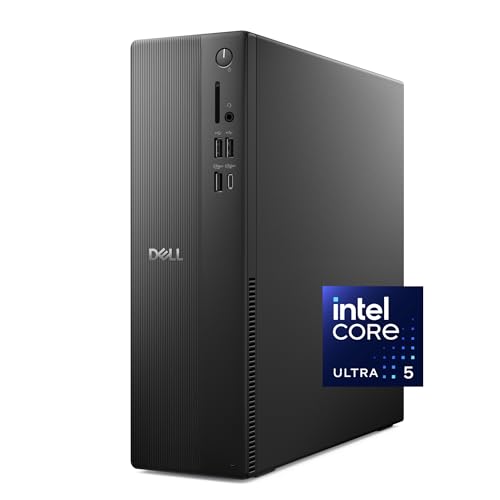
Dell Slim Desktop Core Ultra 5-225

HP 2025 22 FHD All-in-One Desktop
Lenovo IdeaCentre All-in-One Desktop 24 FHD
More Details On Our Top Picks
A ready-made tower-and-monitor bundle keeps this HP setup straightforward for a home office that needs to get moving fast. The 21.5-inch Full HD screen gives you a compact workspace without crowding a desk, while the 16GB of DDR4 memory helps with browser tabs, docs, and messaging apps at the same time.
The 256GB SSD, a solid-state drive, favors quick starts and faster file access over roomy storage, so this suits day-to-day work more than large media libraries. Since it ships with a keyboard, mouse, Wi-Fi, Bluetooth, and Windows 11 Pro, it fits a first-office setup or a spare workstation in a busy house.
Strong Points
- All-in-one bundle trims setup time.
- 16GB memory supports ordinary multitasking well.
- Full HD monitor keeps text clear.
- Wireless connectivity helps reduce desk clutter.
Things To Consider
- 256GB storage can feel tight for lots of local files.
- Older i5-6500 silicon is better suited to routine work than heavy creative loads.
Feature Snapshot
Who It Suits Best
Home-office starters and anyone replacing an aging desk setup will get the most from this bundle.
Where A Sibling Pick Shines
Dell Slim Desktop Core Ultra 5-225 suits you better for a newer platform and more modern memory.
This tower is the strongest spec sheet in the group for people who keep several apps open all day. The 32GB of RAM, which is short for random-access memory, gives you room for larger spreadsheets, many browser tabs, and heavier multitasking without making the desktop feel cramped.
The 1TB PCIe NVMe SSD adds both capacity and speed, and that matters more than people expect once work files, downloads, and project folders pile up. DisplayPort support for multiple monitors also fits a serious desk setup, though the tower itself asks for a little more room than the slim options from HP and Dell.
Upsides
- 32GB RAM leaves ample multitasking headroom.
- 1TB SSD handles larger work libraries.
- DisplayPort suits multi-monitor desks.
- Wired keyboard and mouse are included.
Softer Spots
- Larger tower footprint needs more desk or floor space.
- Intel UHD Graphics fits office work better than graphics-heavy creative tasks.
- The extra power makes sense only for busier workloads.
Who Will Love This
Data-heavy home offices, multitaskers, and anyone running two or more displays will get the most value here.
Look Elsewhere When
HP ProDesk 600 G3 SFF Desktop Computer 21.5 FHD Monitor suits a smaller setup that does not need this much headroom.
A mini PC like this makes sense on a small desk, in a shared office nook, or behind a monitor where a full tower would feel oversized. The metal chassis points to a sturdier feel than many plastic mini systems, and the 16GB of RAM plus 512GB SSD gives it a balanced starting point for office work.
The useful part here is flexibility, because a compact footprint leaves more room for a keyboard, notebook stack, or a second display. You may find the integrated design less convenient for future part swaps than a larger tower, but GEEKOM’s upgrade-friendly positioning softens that trade-off for space-conscious setups.
Best Bits
- Mini size keeps the desk clear.
- 16GB memory suits everyday productivity.
- 512GB SSD gives practical local storage.
- Metal chassis adds a more solid feel.
- USB4 broadens peripheral and display options.
Areas To Watch
- Mini form factor offers less internal breathing room than a tower.
- Shared-workspace use may call for tidy cable routing to keep the setup clean.
Core Details
Built With In Mind
Space-conscious professionals and home offices with tight desk depth will appreciate this mini format.
A Better Fit Elsewhere
Dell Tower Desktop Core Ultra 7-265 suits you better if you want a roomier chassis for heavier multitasking.
All-in-one desktops earn their place by shrinking the visible mess, and this Dell keeps that promise in a practical way. The 23.8-inch Full HD panel is a comfortable middle ground for work and streaming, while the Intel Core 3 100U is aimed squarely at everyday office tasks rather than demanding creative jobs.
You may find the appeal strongest in a shared room, a small apartment, or a front-facing desk where clean lines matter. The trade-off is less upgrade flexibility than a tower, but that is the usual bargain with AIO systems, and this one makes the desk look calm instead of busy.
Bright Spots
- Single-body design reduces cable clutter.
- 23.8-inch screen gives comfortable workspace.
- Full HD panel suits work and media.
- Good fit for tidy shared areas.
Points To Note
- All-in-one layouts usually leave less room for later hardware changes.
- Core 3 100U fits everyday work more than heavier workloads.
Perfect Match For
Home-office users who value a clean look and straightforward setup will feel at home with this one.
Skip It When
HP ProDesk 400 G9 SFF Business Desktop Computer suits you better if you want more ports and a tower-style office build.
For a desk that runs more like a command center, this HP lands in the serious-business lane. The 32GB of RAM and 1TB PCIe SSD give you room to keep documents, project folders, and browser-heavy work moving without making the machine feel crowded.
Dual 4K display support is the headline feature here, especially for spreadsheet users, analysts, or anyone who likes one screen for reference and another for active work. The small-form-factor case keeps it far tidier than a tower, though the value really shows up only when your desk setup can use those extra display outputs.
Reasons To Buy
- Dual 4K support suits multi-screen workflows.
- 32GB RAM helps with heavier office loads.
- 1TB SSD gives generous local storage.
- USB-C adds modern peripheral convenience.
- Compact chassis preserves desk space.
Room For Improvement
- Most of the value shows up in multi-monitor setups.
- Business-focused design may feel plain beside the all-in-ones.
Right Fit For
You get the most from this HP in a serious home office with multiple displays and heavier document work.
Another Choice May Suit
Dell Slim Desktop Core Ultra 5-225 makes more sense if you want a newer platform with a lighter everyday footprint.
This slim Dell sits in a sweet spot for a modern home office that wants newer parts without jumping to a large tower. The Core Ultra 5-225, 16GB of DDR5 memory, and 512GB SSD give it a sensible balance for work apps, streaming, and day-to-day storage.
DDR5 is faster-memory class hardware than older DDR4, so the platform feels more current even before you look at the processor name. Wi-Fi 6 and Bluetooth round out the setup well, though the included wired keyboard means your desk still starts in a practical, no-frills mode.
Highlights
- Core Ultra platform feels current.
- DDR5 memory supports responsive multitasking.
- 512GB SSD works well for everyday files.
- Wi-Fi 6 and Bluetooth improve connectivity options.
Small Caveats
- Integrated graphics fit office work better than visual-heavy projects.
- Slim design gives up some internal expansion room.
Whose Shelf It Belongs On
Anyone wanting a current, tidy desktop for regular work and home tasks should feel comfortable here.
Swap It Out When
Dell Tower Desktop Core Ultra 7-265 is the better call for heavier multitasking and a larger storage target.
For basic home-office use, this HP keeps the spec list lean in a way that makes sense. The 22-inch Full HD all-in-one design saves space, and the 8GB of DDR5 memory gives you enough room for email, web work, and light multitasking.
The 128GB SSD is the sharpest compromise in the group, so this is better for cloud-heavy work than large local file libraries. Still, the presence of HDMI, USB-C, Wi-Fi, and an HD webcam makes it a practical starter desktop for remote check-ins, homework, or a compact family workstation.
Positives
- Space-saving AIO format keeps wiring simple.
- DDR5 memory helps the system stay responsive.
- HD webcam supports remote meetings.
- HDMI and USB-C broaden display and accessory options.
Minor Gripes
- 128GB storage fills faster than larger SSDs.
- Best suited to light work rather than crowded multitasking.
Made For
Students, light office users, and households that want a simple shared computer will get the most from it.
Where A Sibling Pick Shines
Lenovo IdeaCentre All-in-One Desktop Computer 24 FHD suits you better if you want a larger screen and more comfortable viewing space.
Lenovo leans into the sort of all-in-one setup that works well in family rooms, compact offices, and homework corners. The 24-inch Full HD IPS panel, meaning in-plane switching for wider viewing angles, is the feature that stands out first because it makes shared use easier and less fussy.
With 8GB of RAM and a 512GB SSD, this is aimed at everyday computing rather than heavy editing or big project loads. The anti-glare finish and Wi-Fi 6 plus Bluetooth 5.2 round out a clean, easygoing package that feels sensible instead of overbuilt.
What We Like
- 24-inch display gives comfortable viewing space.
- Anti-glare panel helps in bright rooms.
- 512GB SSD offers practical day-to-day storage.
- Wi-Fi 6 and Bluetooth 5.2 modernize connectivity.
Worth Noting
- 8GB RAM is fine for basics, but heavier multitasking pushes it sooner.
- AIO construction limits later upgrades compared with a tower.
Best Suited To
You get the most from this Lenovo in a household or home office that values a larger, easy-view screen.
Consider Something Else When
Dell Tower Desktop Core Ultra 7-265 is the better match for more demanding multitasking and larger app loads.
What Matters Most Before Choosing Computers For Home Office
Space, Screen Size, And Desk Flow
A tower gives you room to grow, but an all-in-one or mini PC keeps the desk cleaner. For cramped work areas, that difference changes how pleasant the space feels every day.
Memory And Storage Shape Daily Comfort
8GB of RAM suits light tasks, while 16GB or 32GB feels calmer once you stack meetings, tabs, and office apps. SSD capacity matters too, because a small drive fills fast once files live locally.
Ports, Displays, And Connection Needs
USB-C, HDMI, DisplayPort, Wi-Fi 6, and Bluetooth matter more than they look on paper. Extra display support helps anyone who works with docs on one screen and reference material on another.
A Quick Reality Check
Common Shopping Slip Ups
Many people focus on the processor name and ignore storage, ports, and monitor needs. A compact desktop can look tidy but still frustrate you later if it lacks the connections your desk already uses.
The Upgrade Payoff
Higher-tier models usually cost more because they bring stronger multitasking headroom, larger storage, and better display support. That extra spend makes sense for long workdays, heavier file use, or a setup built around multiple screens.
Frequently Asked Questions
Are all-in-one desktops good for a home office?
Yes, they suit desks where clean wiring and a small footprint matter. The trade-off is less upgrade flexibility than a tower.
How much RAM works well for office use?
8GB handles light work, but 16GB feels smoother for most home-office routines. 32GB is worth a look for heavier multitasking or larger spreadsheets.
Is a mini PC strong enough for everyday work?
Yes, a mini PC can handle email, docs, web apps, and video calls well. It fits best where desk space is tight.
What storage size makes sense?
512GB is a comfortable middle ground for many work setups. Smaller drives suit cloud-first habits more than local file collections.
Do I need a tower or an all-in-one?
A tower makes more sense for expansion and multi-monitor flexibility. An all-in-one makes more sense for a cleaner look and easier setup.
