


Small business work rarely stays simple. You may be juggling invoices, browser tabs, video calls, and a second monitor before lunch, so the right desktop has to stay quiet, fit the desk, and keep pace without turning into a clutter magnet. These eight picks cover compact mini PCs, small form factor towers, and one planning guide for the security side of ownership. You get a clear spread of performance levels, expansion room, and desk-friendly designs, which makes it easier to match a machine to your workload instead of overbuying hardware you won’t use.
Quick Shortlist For Busy Offices

BOSGAME E5 11 Pro Mini PC

GEEKOM IT12 Mini PC

Dell Optiplex 5050 SFF
HP ProDesk 400 G9 SFF
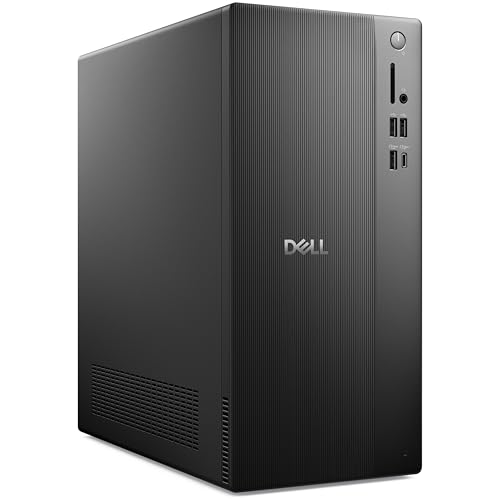
Dell 2026 Pro Desktop Tower PC
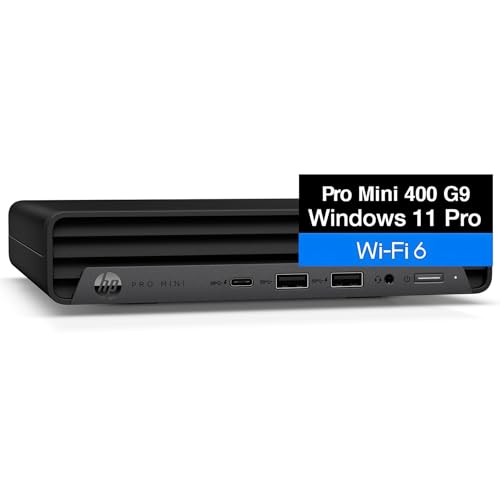
HP 2026 Mini PC Desktop

acer Aspire Business Desktop

The Small Business Owner’s Cybersecurity Guide
More Details On Our Top Picks
The BOSGAME E5 11 Pro keeps the footprint tiny, which matters on a desk already carrying a monitor, phone dock, and paper stack. Its AMD Ryzen 3 5300U, with 4 cores and 8 threads, gives you a sensible step up from very basic office chips, so everyday multitasking feels less strained.
For home offices handling email, spreadsheets, web tools, and several tabs, that balance is the point. The trade-off is simple, a mini PC like this usually asks you to value space and efficiency over expansion room, so it suits focused workstations more than future-heavy builds.
Strong Points
- Small chassis keeps the work area clean.
- 8-thread CPU suits common office multitasking.
- Good fit for browser-heavy daily routines.
- Low-profile design helps in tight spaces.
Areas To Watch
- Mini PC layouts usually leave less room for add-ins.
- Best suited to standard office loads, not heavy creative work.
Who Should Grab It
You fit this well if your workday centers on documents, web apps, and light multitasking in a compact office or apartment setup.
Where A Sibling Pick Shines
HP ProDesk 400 G9 SFF suits you better if you want more memory and storage headroom for busier, longer work sessions.
GEEKOM leans into the practical details that matter in a shared office, starting with a full metal chassis and a preinstalled operating system. That combination usually feels reassuring in a workspace where machines get moved, touched, and rebooted more often than anyone wants.
The 16GB memory and 512GB SSD make it a friendlier starting point than the bare-minimum mini PCs in this group, and the upgrade-friendly design gives you room to adjust later. The honest read is that this one makes more sense for teams that want flexibility without giving up a compact footprint.
What We Like
- Metal chassis adds a sturdier office feel.
- 16GB RAM supports multiple active business apps.
- 512GB SSD gives a roomy baseline for files.
- Upgrade path helps extend its useful life.
- USB4 support helps modern connectivity setups.
Small Caveats
- Compact systems still limit internal expansion compared with towers.
- Low-profile design suits desk use more than mixed hardware roles.
Best Suited To
You benefit most here if you want a small office PC with a sturdier shell and enough room to grow into future work demands.
A Better Fit Elsewhere
BOSGAME E5 11 Pro Mini PC makes more sense for lighter solo work if you want a simpler, more stripped-back setup.
Dell’s Optiplex 5050 SFF goes after a familiar office need, a desktop that fits under or beside the monitor without wasting room. The included wired keyboard and mouse make setup easier for a back-office desk, front counter, or shared workstation.
Its 16GB DDR4 memory and 512GB NVMe SSD are the useful parts of the story, because they support quick boot times and a smoother response under standard business load. Compared with the mini PCs above, this one has the feel of a more traditional office box, which some setups still prefer.
Highlights
- Small form factor keeps the footprint modest.
- NVMe storage helps files open quickly.
- Wired input set simplifies first-day setup.
- Good fit for established office desks.
Points To Note
- Renewed hardware suits value-focused setups more than brand-new builds.
- The older processor is fine for office work, less so for heavy modern workloads.
- Wired accessories add order, though they also add cabling.
Made For
You’ll like this most if you want a familiar desktop shape for accounting, admin, or reception work in a space-conscious office.
Skip It When
HP ProDesk 400 G9 SFF fits better for a shop that wants more memory, more storage, and a newer overall platform.
This HP model stands out for the kind of office that keeps growing into its hardware. With 32GB RAM and a 1TB PCIe SSD, it has more working room than the smaller picks above, which helps once spreadsheets, cloud tools, and multiple browser windows start piling up.
The dual 4K display support, USB-C, HDMI, RJ-45 Ethernet, and Wi-Fi point to a desk that’s meant to stay connected in more than one way. The trade-off is that a fully equipped small form factor desktop still asks for a bit more desk and cable planning than a mini PC.
Upsides
- 32GB RAM suits heavier multitasking days.
- 1TB SSD gives generous room for files and apps.
- Dual 4K display support helps with side-by-side work.
- USB-C and Wi-Fi broaden placement options.
- Wired keyboard and mouse simplify deployment.
Room For Improvement
- The richer feature set can mean more cable management.
- SFF design still takes more space than a mini PC.
The Right Fit
You suit this machine best if you run several office apps at once and want a desktop that can carry a heavier daily load.
Another Choice May Suit
acer Aspire Business Desktop is easier to justify for lighter clerical work and a simpler setup.
Core Details
A tower desktop still earns its place in an office that expects change, because the larger chassis usually leaves more room for future internal growth. Dell’s 8GB DDR5 memory and 512GB PCIe SSD give it a modern starting point, even before you think about add-ons or longer service life.
That makes it a sensible fit for growing teams that may add software, storage, or peripherals later. The trade-off is plain: you give up the tiny footprint of a mini PC and gain a layout that feels more like a central workhorse than a hidden box.
Bright Spots
- Tower format usually leaves more room for expansion.
- DDR5 memory gives it a newer platform feel.
- 512GB PCIe SSD supports brisk day-to-day use.
- Good match for offices that expect to scale.
Softer Spots
- Tower size takes more floor or desk room.
- 8GB RAM is workable, though heavier setups may outgrow it sooner.
Whose Shelf It Belongs On
You fit this best if you want a desktop that starts modestly but leaves more room for future changes than a compact mini PC.
Reach For A Different Pick When
HP ProDesk 400 G9 SFF suits a busier office better if you want stronger memory and display flexibility right away.
This HP mini PC aims at a clean office setup that still needs real multitasking muscle. The Intel i5-12400T, 16GB RAM, and 512GB SSD form a comfortable middle ground for remote work, especially on a desk where a tower would feel like overkill.
WiFi 6 and triple display support help it fit a modern home office or a compact team station. Compared with the BOSGAME and GEEKOM picks, it feels better suited to a user who wants a more established business profile and multiple screen workflow from day one.
Reasons To Buy
- Mini footprint keeps the desk open.
- 16GB RAM handles office multitasking well.
- Triple display support helps spread out work.
- WiFi 6 suits flexible placement.
Worth Noting
- Mini format still leaves less room for upgrades than a tower.
- Best aligned with office tasks rather than heavier media work.
Built With In Mind
You get the most from this model if your day revolves around remote meetings, documents, and several windows spread across more than one display.
Look Elsewhere When
Dell 2026 Pro Desktop Tower PC fits better for a growing office that wants a larger chassis and more internal breathing room.
Feature Card
acer keeps this one straightforward, which helps in a small office that just needs a dependable machine for admin work. The 8GB memory and 256GB PCIe SSD are modest, so the machine makes the most sense where file sizes stay light and the workflow stays orderly.
The ultra-quiet design is the practical hook here, especially for reception, consulting, or shared rooms where fan noise can get distracting. The SD card reader and dual 4K monitor support add a little flexibility, though this pick still sits clearly below the higher-capacity HP systems for heavier multitasking.
Best Bits
- Quiet operation suits shared work areas.
- Compact desktop shape keeps the desk tidy.
- SD card reader helps with quick media transfers.
- Dual 4K support adds monitor flexibility.
Minor Gripes
- 8GB RAM is enough for basics, not for bigger workloads.
- 256GB storage fills faster than the larger picks here.
- Best for lighter office tasks and simpler file habits.
The Right Fit
You suit this desktop best if your daily work is mostly admin, scheduling, customer intake, or other light office duties.
A Better Fit Elsewhere
HP 2026 Mini PC Desktop gives you more headroom for remote work sessions and multi-screen setups.
This title belongs in the roundup because desktop ownership is only part of running a small office. Once you’re handling email, cloud apps, passwords, and client records, the process side of security starts to matter almost as much as the machine itself.
The book format works well for owners who want a calmer, more structured way to think through online protection instead of stitching together advice from random posts. It pairs naturally with the hardware above, especially for shops that are setting up fresh workstations or standardizing a few staff computers.
Positives
- Good companion for new office setup planning.
- Useful for shaping safer daily habits.
- Fits owners handling client information.
- Supports a more organized approach to digital routines.
Honest Caveats
- It is a guide, not hardware.
- Real value depends on putting the advice into practice.
Whose Shelf It Belongs On
You fit this best if you want a plain-language security guide to keep nearby while setting up computers for work, records, and daily admin.
Where A Sibling Pick Shines
Dell Optiplex 5050 SFF is the better physical purchase for a desk that needs an immediate computer rather than planning material.
What Matters Most Before Choosing Computers For Small Business Owner
Mistakes Worth Dodging
Choose by workload, not by headline memory alone. A quiet mini PC can be enough for bookkeeping and email, while a busier office usually needs more storage, more RAM, and better display support.
What The Higher Tier Buys
Higher-tier desktops usually cost more because they give you stronger multitasking headroom, more ports, and a better path for future growth. That extra spend makes sense for offices that keep multiple apps open all day or plan to add staff later.
Things Worth Knowing First
Hidden Buying Traps
Compact desktops can look interchangeable, yet port layouts, monitor support, and upgrade space change the ownership experience fast. A tiny chassis may fit the desk better, but a tower or roomy SFF system often ages with less friction.
The Upgrade Payoff
Spending up pays off most when your team uses dual displays, large files, or several business apps at once. It also helps when you want a desktop that can stay useful after the current workflow gets more demanding.
Frequently Asked Questions
What size desktop works best for a small office?
A mini PC works well for tight desks and light-to-moderate office tasks. A small form factor desktop fits better when you want more ports, more room for memory, or a more traditional setup.
Is 8GB RAM enough for business use?
It handles basic office work, web tools, and email without much drama. Heavier multitasking, larger spreadsheets, and long video meetings usually feel better with 16GB or more.
Why choose a mini PC instead of a tower?
A mini PC saves desk space and usually keeps the setup cleaner. A tower gives you more room for future hardware changes and often feels better for expanding offices.
Do renewed desktops make sense for office work?
They can, especially for standard admin tasks and budget-conscious setups. The main trade-off is that you need to be comfortable with older hardware and a less current platform.
Should you care about display support?
Yes, because two or three monitors change how easily you can switch between apps and files. For bookkeeping, CRM work, and email-heavy days, display support often matters more than raw processor talk.
