


Display Gaming Laptops now span far beyond classic clamshell machines, and that matters when your day moves between work, study, travel, and a few rounds of play. You’re really choosing between screen quality, portability, keyboard comfort, and how much performance you want to carry around.
That’s why this list mixes 2-in-1s, thin notebooks, and portable dual-screen extenders. Some fit a commute bag, some suit a desk setup, and a few make more sense as screen upgrades than as full laptops.
The Shortlist At A Glance

Microsoft Surface Pro (2026) 13-inch 2-in-1
Acer Aspire 16 AI Copilot+ PC 16-inch
HP OmniBook 3 14 inch Next Gen AI PC

Apple MacBook Air 2020 13-inch M1
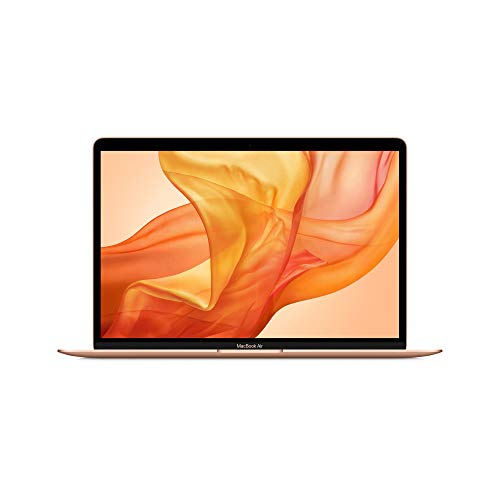
Apple MacBook Air 13-inch Retina 512GB
CIDETTY Laptop Screen Extender 14-inch

CIDETTY Laptop Screen Extender 0.27-inch
More Details On Our Top Picks
Surface Pro fits the person who wants a tablet feel without giving up a real laptop setup. The 13-inch touchscreen and 2-in-1 format make it easier to sketch, annotate, or move between meetings and a couch session.
The Snapdragon X2 Plus and 16GB of memory point to smooth multitasking, while 512GB of SSD storage gives you room for apps and files. The trade-off is obvious, you’re choosing flexibility over a traditional keyboard-first body, so desk-centered gaming is not the point here.
What We Like
- Touchscreen 2-in-1 design supports note-taking, media, and quick mode changes.
- 16GB RAM helps keep multiple apps open without the system feeling crowded.
- 512GB SSD gives you decent local room for documents, projects, and installs.
- Dune finish keeps the look understated rather than flashy.
Things To Consider
- 2-in-1 construction adds convenience, but it usually asks for a more careful carry in a crowded bag.
- The design leans toward portability and touch use, not a wide-screen play surface for long gaming sessions.
Feature Snapshot
Who Will Love This
You’ll get the most from this model as a portable work companion, especially for note-heavy days and light creative tasks.
Where A Sibling Pick Shines
Acer Aspire 16 AI Copilot+ PC suits you better for a larger screen and a more desk-based setup.
That 16-inch panel is the reason this Acer lands near the top for desk work and entertainment. WUXGA means 1920 x 1200 resolution, and 120Hz points to smoother motion than a standard 60Hz screen, which helps scrolling and fast-moving games feel cleaner.
Color coverage at 100% sRGB makes it more appealing for photos, design work, and any task where the screen needs to look consistent. You still carry a full-size notebook, though, so this one makes more sense at home, in a studio, or on a roomy desk than on a cramped tray table.
Highlights
- 16-inch size gives you more room for side-by-side windows.
- 120Hz refresh rate supports smoother motion in games and daily navigation.
- 100% sRGB is useful for color-aware work and cleaner-looking media.
- 16GB LPDDR5X memory keeps the system ready for several active tabs.
- Wi-Fi 7 offers a newer wireless standard for supported networks.
Small Caveats
- The larger chassis takes up more bag space than the 13- and 14-inch picks.
- Its size is a better fit for a desk than for all-day shoulder carry.
Core Details
Who Should Grab It
Desk-heavy gamers, students with split-screen habits, and creative multitaskers will get the most from this larger display.
Skip It When
HP OmniBook 3 14 inch Next Gen AI PC suits you better for a lighter bag and a more travel-friendly footprint.
The HP OmniBook 3 sits in the sweet spot between portability and screen quality. A 14-inch 2K display gives you sharper text and more room than a 1080p panel, which helps when you split time between spreadsheets, browsing, and the occasional game.
Its Snapdragon X chip, 16GB of RAM, and 512GB SSD make it a sensible everyday machine for commuting or hybrid work. The honest read is that it feels built for balance, not excess, so it’s the kind of laptop that stays out of your way.
Upsides
- 14-inch size keeps the machine easier to carry than larger models.
- 2K display gives you cleaner detail for text and media.
- 16GB memory is a practical amount for ordinary multitasking.
- 512GB SSD offers workable space for apps and personal files.
Areas To Watch
- The 14-inch chassis gives up some screen room compared with the Acer Aspire 16 AI Copilot+ PC.
- You may still prefer a bigger panel for long editing sessions at a desk.
Details At A Glance
Made For
You’ll like this most as a daily carry laptop for office work, study, and media on the move.
A Better Fit Elsewhere
Microsoft Surface Pro (2026) suits you better if a touchscreen 2-in-1 matters more than a standard notebook shape.
The older MacBook Air still earns attention because it stays simple, thin, and easy to live with. A 13.3-inch Retina display gives you sharp text and clean-looking media, which helps a lot when you spend long stretches in documents, email, or light creative work.
The M1 chip, 8GB of unified memory, and 256GB SSD point to a machine that handles ordinary daily loads without much fuss. Gaming is limited by its age and configuration, so this makes more sense as a reliable display-first notebook than a performance statement.
Best Bits
- Retina panel makes text and images look crisp for everyday use.
- Backlit keyboard helps in low-light rooms and evening work.
- Touch ID speeds sign-in without a separate password routine.
- 8GB unified memory keeps the interface feeling responsive for common tasks.
Room For Improvement
- 256GB storage fills sooner than the 512GB models in this list.
- The age of the design means you’re not buying a current-generation platform.
- Mac software habits can take some adjustment for Windows-first users.
Quick Facts
Perfect Match For
You’ll get the most from this model as a light-duty notebook for school, home, and travel.
Look Elsewhere When
Apple MacBook Air 13-inch Retina 512GB suits you better if you want more storage without changing the overall feel.
Compared with the 256GB MacBook Air above, this one gives you more room without changing the familiar 13-inch shape. That extra storage matters most for media libraries, project files, and the habit of keeping a few larger apps installed.
True Tone adjusts the display to the room’s light, which makes long work sessions feel less harsh. The Intel Core i5 and Intel Iris Plus Graphics are serviceable for everyday use, though this is still a previous-model machine with older silicon than the M1 Air.
Reasons To Buy
- 512GB SSD provides more breathing room than the smaller-storage MacBook Air.
- True Tone helps the display look comfortable in different lighting.
- Backlit Magic Keyboard improves usability in dim spaces.
- Touch ID keeps sign-in quick and tidy.
Worth Noting
- Older Intel hardware does not feel as current as the M1-based model.
- The design still fits best with light-duty work rather than heavy creative loads.
Core Details
Who It Suits Best
You’ll appreciate this most if you want a compact Mac notebook with more storage headroom than the base model.
Another Choice May Suit
2020 Apple MacBook Air Laptop M1 is a better fit for you if newer chip efficiency matters more than the larger SSD.
This CIDETTY extender changes the conversation, because it is less a laptop and more a space-maker for your laptop. A 14-inch FHD 1080p IPS panel gives you a clearer side screen for calendars, chat windows, reference material, or a second app while the main laptop stays on the lead task.
HDMI and USB-C plug-and-play support keep setup straightforward in a hotel room or at a temporary desk. Built-in speakers are handy, though most people will still treat this as a display tool first and a sound source second.
Positives
- Dual or triple-monitor support expands your workspace fast.
- IPS panel helps keep viewing angles usable from the side.
- HDMI and USB-C coverage broadens compatibility across setups.
- Built-in speakers reduce the need for an extra audio accessory.
Points To Note
- You’ll need to manage extra cables and packing space alongside your laptop.
- The extender makes the most sense with a laptop that already has solid performance.
Feature Rundown
Who Should Grab It
You’ll like this best for travel work, side-by-side spreadsheets, and field setups where a second screen helps a lot.
Swap It Out When
CIDETTY Laptop Screen Extender 0.27-inch suits you better if slim carry weight matters more than speaker presence.
This version is all about packability. At 0.27 inches thin, it aims to slip into a bag with less bulk than a traditional portable monitor, which makes it easier to carry between offices, dorm rooms, and temporary work spots.
The 14-inch FHD IPS panel and USB-C or HDMI hookup keep the setup flexible for 13- to 17-inch laptops. It works well as a travel companion, though you still need to accept the usual trade-off of extra setup steps and another device to keep organized.
Bright Spots
- 0.27-inch thickness keeps the extender easy to slide into a bag.
- 14-inch FHD IPS screen gives you a useful second workspace.
- USB-C and HDMI support help with broad laptop compatibility.
- Works with several platforms, which helps in mixed-device homes.
Honest Caveats
- You’ll manage another screen, another cable path, and another item to store.
- Travel-friendly design is helpful, but it still asks for a bit of desk space.
Who Will Love This
You’ll appreciate this most if you travel often and still want a second screen for work or streaming.
Reach For A Different Pick When
CIDETTY Laptop Screen Extender 14-inch makes more sense if built-in speakers matter more than the thinnest carry profile.
What Matters Most Before Choosing Display Gaming Laptops
Screen First, Then Speed
Panel size, resolution, and refresh rate shape the feel more than marketing labels do. A 16-inch 120Hz screen and a 13-inch touchscreen solve very different problems, so the right choice starts with your desk space and how often you move.
Portability Changes The Deal
Thin notebooks and 2-in-1 designs travel more easily, but they usually trade away some thermal headroom and keyboard depth. A bigger chassis helps at a desk, while a smaller one matters most in a backpack.
Match Memory And Storage To Habit
16GB RAM is a practical floor for smooth multitasking, and 512GB SSD storage gives you breathing room for apps and files. Heavy game libraries, large media folders, or many open projects push you toward the roomier options.
A Quick Reality Check
Common Shopping Slip Ups
Don’t buy on display size alone. A bright, sharp panel still feels wrong if the keyboard layout, weight, or port mix fights your routine.
Where The Extra Money Goes
Higher-tier models often pay for better screens, faster storage, more memory, and newer wireless hardware. That upgrade makes sense when you split time across work, media, and gaming, not just one of them.
Frequently Asked Questions
Do Display Gaming Laptops Need A High Refresh Rate?
Not every machine needs one, but 120Hz feels smoother for motion and scrolling. That matters most for fast games and daily desktop use.
Is A 2-in-1 Good For Gaming?
It can work for lighter play, note-taking, and streaming. A traditional notebook usually fits longer game sessions better.
How Much RAM Makes Sense?
16GB is the most balanced starting point in this group. It handles multitasking better than 8GB and leaves more breathing room.
Is A Portable Screen Extender Worth It?
Yes, for travel work and multitasking at temporary desks. It adds setup steps, so it suits organized carry routines.
Which Size Fits Most People?
Fourteen inches is the easiest middle ground for carry and comfort. Sixteen inches suits you better when screen space matters more than bag weight.
