


External optical drives still matter for laptops that skipped a built-in tray, and they matter most when you need a quick disc install, a family photo archive, or a movie library on the go. You also get a cleaner setup than juggling old desktop hardware. The six picks below lean on simple connections, slim bodies, and mixed compatibility, so you can match the drive to your machine instead of forcing a compromise.
Quick Look At The Shortlist

Alronly External CD/DVD Drive USB 3.0 Type-C Burner Writer Reader

ORIGBELIE External CD DVD Drive 13mm DVD Player
JKNJX 2 in 1 External CD DVD Drive
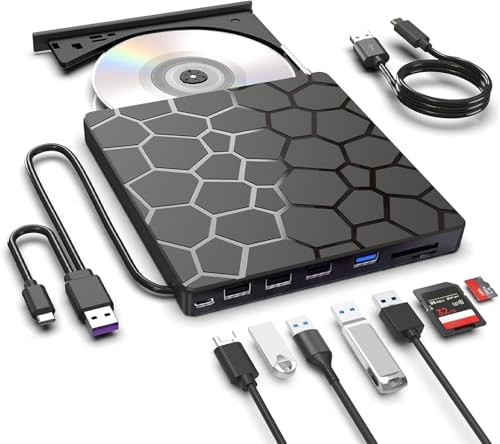
ASHDOL 8 in 1 External CD DVD Drive

LG GP65NB78 8X USB 2.0 Ultra Slim Portable DVD Writer Drive
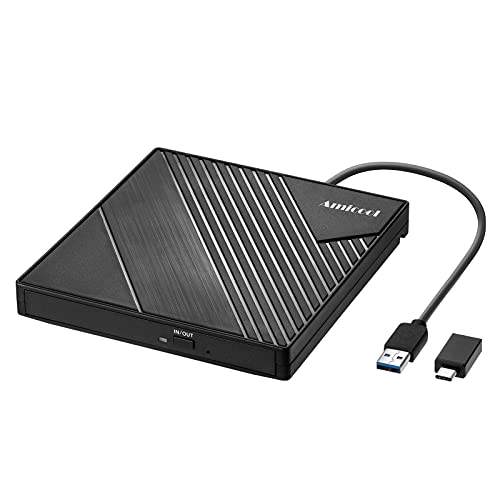
Amicool External DVD Drive USB 3.0 USB C CD Burner
More Details On Our Top Picks
Alronly keeps the focus on convenience, with both USB 3.0 and Type-C connections built into the same drive. That matters for laptops that still split across older and newer ports, especially in a shared home setup where you move between machines.
The dual connection approach is the part that saves you the most hassle, since you do not need to hunt for a separate adapter just to get started. The trade-off is simple: a flexible cable setup helps day-to-day use, but slim external drives still want a steady surface and a direct port rather than a wobbly chain of hubs.
Strong Points
- USB 3.0 and Type-C support broadens laptop compatibility.
- Useful for disc installs, media playback, and file archiving.
- The compact external format keeps desk clutter down.
- Good fit for homes with older and newer devices.
Things To Consider
- You still need a disc-based workflow to make it worthwhile.
- External drives like this usually work best on a direct port.
Who It Suits Best
Busy laptop owners who switch between USB-A and USB-C ports get the cleanest fit here.
Where A Sibling Pick Shines
Amicool External DVD Drive USB 3.0 USB C CD Burner makes more sense for mixed operating systems and a laptop-plus-desktop routine.
ORIGBELIE leans into a slim 13mm profile, so it suits a laptop bag better than a bulkier desktop-style unit. That thin shape helps when your desk is already crowded and you want the drive tucked out of the way between uses.
Its USB 3.0 and Type-C support keeps the setup flexible, which is helpful for everyday disc reading and writing on newer notebooks. The honest read is that compact drives can feel a little less planted than larger models, so a stable desktop surface matters more than it does on something heavier.
Upsides
- 13mm body keeps the footprint small.
- Two connection types help with mixed-port laptops.
- Simple setup works well for quick disc jobs.
- Easier to stash in a travel sleeve.
Small Caveats
- The low profile leaves less room for a heavier feel.
- Like most slim drives, it benefits from careful cable handling.
- Best suited to routine disc tasks, not constant desk churn.
Made For
Commuters and mobile office users who want a slim drive that slides into a bag with the laptop.
A Better Fit Elsewhere
LG GP65NB78 8X USB 2.0 Ultra Slim Portable DVD Writer Drive fits you better if you want a more established brand name and M-DISC support.
The JKNJX model takes the same dual-port idea and packages it in a very straightforward way. That makes it a sensible match for laptops that may change over time, especially in homes where one machine still relies on USB-A and another has moved on to Type-C.
Compared with the slimmer ORIGBELIE pick, this one feels more like a no-drama utility drive than a travel-first accessory. You may find that simple recognition and broad port support matter more than cosmetic flair, and that’s where this design earns its place.
Highlights
- Integrated USB-A and USB-C cable covers common port types.
- Plain setup suits quick use on busy workdays.
- Good match for households with older and newer laptops.
- Useful for reading, writing, and disc-based installs.
Worth Noting
- No standout portability cue like a 13mm shell is listed.
- Direct-port connection tends to be the safer route for stable power.
Best Suited To
Everyday laptop owners who want a simple drive that handles the usual disc jobs without much fuss.
Another Choice May Suit
Alronly External CD/DVD Drive USB 3.0 Type-C Burner Writer Reader is a better fit for you if you want the more explicit 5Gbps-style modern connection story in a shared-device household.
ASHDOL is the most feature-forward name in this group, and the 8-in-1 label tells you it’s aiming beyond the basic disc-only crowd. That can be a smart move for a home office setup where one accessory needs to handle more than a single task.
Compared with the simpler drives above, this option should appeal to you only when the extra functions match your routine. The trade-off is predictable, more features usually mean a bit more to learn, so a first-time disc user may prefer one of the plainer picks.
What We Like
- Extra functions add flexibility for mixed desk setups.
- USB 3.0 and Type-C support broadens laptop fit.
- Good choice for people who want one accessory to do more.
- Works well as a desktop companion in a small office.
Room For Improvement
- The feature-heavy direction can be more than some setups need.
- More functions usually mean more cable awareness and desk planning.
- Shoppers who only need simple disc playback may not use all of it.
Who Will Love This
Home office users who want a disc drive with extra utility in the same compact footprint.
Look Elsewhere When
ORIGBELIE External CD DVD Drive 13mm DVD Player is a cleaner fit for light travel and minimal desk space.
LG takes a more established, understated path than the generic slim drives above. The 14mm height keeps it easy to carry, while the USB 2.0 interface remains backward-compatible with USB 3.0 ports, so it still fits a lot of common laptop setups.
The real draw here is the combination of slimness and support for M-DISC, a disc format built for long-term archiving rather than casual everyday use. That makes this pick feel especially sensible for people backing up photos, documents, or installers they want to keep around.
Bright Spots
- 14mm chassis stays slim without feeling flimsy on paper.
- USB 2.0 compatibility still works with USB 3.0 ports.
- M-DISC support adds value for long-term disc archives.
- Good fit for a tidy desk or a carry bag.
Softer Spots
- USB 2.0 is not as modern as the dual-interface picks.
- Archival support matters most to specific use cases.
Core Details
The Right Fit
Home office users and archive-minded laptop owners who want a slim drive from a recognizable hardware line.
Skip It When
Amicool External DVD Drive USB 3.0 USB C CD Burner is the smarter match for you if port flexibility matters more than archival support.
Amicool stands out for the broad software and operating-system fit suggested by its listing, which helps when your household has a mix of Windows, Mac, and Linux machines. That sort of reach is useful in real life, because a disc drive usually becomes the shared accessory everyone borrows.
The brand also points you toward direct USB power, especially on desktops, and that practical note is worth respecting. Sluggish hubs can turn a simple setup into a headache, so this is a good match for people who want a straightforward drive and plan to plug it in the right way from the start.
Best Bits
- USB 3.0 and USB-C support keep it flexible.
- Works well across mixed computer setups.
- Direct-connection guidance helps with stable day-to-day use.
- Good utility pick for a shared household accessory.
Areas To Watch
- Desktop use works best with a direct rear port.
- Hubs and extension cables can complicate power delivery.
Whose Shelf It Belongs On
Households and small offices that move the same disc drive between different computer brands and operating systems.
Reach For A Different Pick When
LG GP65NB78 8X USB 2.0 Ultra Slim Portable DVD Writer Drive fits you better if archival M-DISC support matters more than broad platform flexibility.
What To Weigh Before You Choose An External Disc Drive
Connection Type And Port Match
USB-A still shows up on older laptops, while USB-C dominates newer ones. A drive with both saves you from adapter clutter, and that matters most in homes where machines change by the year.
Travel Size Versus Desk Stability
Thin models slide into a bag more easily, but very slim shells can feel lighter on the desk. For frequent commuting, a smaller body makes sense, while a home office can tolerate a slightly sturdier footprint.
Disc Jobs You Actually Need
Some households only need playback and the occasional data disc. Others care about writing, archiving, or keeping old software alive, so the drive should match the task instead of just the port.
A Quick Reality Check
Mistakes Worth Dodging
Shoppers often focus on the connector and ignore the laptop’s power behavior. Direct port use is usually the cleaner path, especially on desktops and older notebooks.
When Paying More Pays Off
The higher-tier options usually buy you wider compatibility, slimmer construction, or extras like archival disc support. That extra spend makes sense for heavy disc use, but a basic model can be enough for occasional installs and backups.
Frequently Asked Questions
Do external disc drives work with most laptops?
Most modern laptops can use one, as long as the port matches the drive and the system supports external optical devices. Dual USB-A and USB-C designs give you the easiest path.
Do you need extra software for these drives?
Many external drives are designed for straightforward plug-in use, though writing discs still depends on the software you choose. The drive itself is only part of the setup.
Why does direct USB connection matter?
Direct connection usually gives the drive steadier power and a cleaner signal path. That helps avoid the kind of flaky behavior that can show up with hubs or long extension cables.
What makes a slim drive worth choosing?
A slim drive matters most when you carry it often or work on a cluttered desk. The trade-off is less heft, so a stable surface helps more than it does with bigger units.
Is M-DISC support useful for everyone?
No, it mostly helps you if you want longer-term disc storage for files, photos, or installers. Casual disc playback does not need it.
