


For Sims 4, you want a laptop that handles long saves, mods, and a stack of browser tabs without turning the session into a stuttery mess. That usually means paying close attention to the CPU, integrated or dedicated graphics, memory, and SSD size, not just the screen size on the box.
This roundup keeps the focus on real setup fit: casual households, heavy mod users, creators who also edit video, and anyone who wants a machine that feels steady in daily use. The lineup ranges from leaner budget options to higher-tier builds with more headroom, so you can match the laptop to how you actually play.
The Shortlist At A Glance

Acer Nitro V Gaming Laptop ANV15-52-586Z

Acer Nitro V Gaming Laptop ANV15-52-76NK

Acer Nitro V 16S AI Gaming Laptop ANV16S-41-R2AJ

NIMO 15.6 Light Gaming Laptop Ryzen 7 Pro 6850U

NIMO Gaming Creator Laptop Ryzen 7 8745HS

Acer Nitro V 15 Gaming Laptop RTX 5050
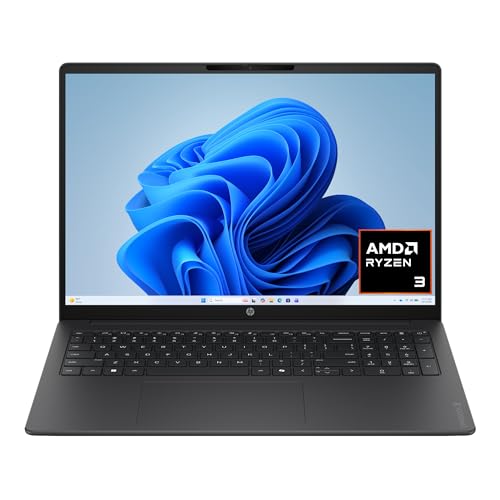
HP OmniBook 3 16 inch Laptop PC 16-by0199nr
MALLRACE Gaming Laptop Ryzen 7 H255
More Details On Our Top Picks
For a Sims 4 setup that stays sensible, this Nitro V keeps the parts aligned: Intel Core i5-13420H, RTX 4050 graphics, 8GB DDR5 memory, and a 512GB Gen 4 SSD. DDR5 is newer, faster system memory, and Gen 4 refers to a quicker solid-state drive interface, so loading and save handling should feel less sleepy than on older budget machines.
The 15.6-inch Full HD IPS panel at 165Hz is more screen than Sims strictly needs, but it helps the whole system feel fluid in daily use. The honest read is that 8GB RAM is the limit here, so heavy mod stacks and multitasking will press it sooner than the stronger picks below.
Strong Points
- RTX 4050 graphics give you more room for visual settings than basic integrated graphics.
- 165Hz IPS panel keeps scrolling and camera movement feeling clean and responsive.
- 512GB SSD gives enough room for the game, saves, and a sensible mod folder.
- Good fit for a desk setup that also handles schoolwork or light content creation.
Things To Consider
- 8GB memory is fine for lighter play, but larger mod collections will want more.
- The storage size is usable, though big libraries can fill it faster than expected.
Who Will Love This
You suit this pick best if you want a straightforward gaming laptop for Sims 4 and don’t plan to load it with heavy multitasking.
A Better Fit Elsewhere
The Acer Nitro V Gaming Laptop ANV15-52-76NK fits better for you if you keep many apps open while playing, because its 16GB memory and 1TB SSD breathe easier.
This version keeps the same 15.6-inch, 165Hz IPS screen and RTX 4050 graphics as the previous Nitro V, but the Intel Core i7-13620H and 16GB DDR5 memory shift the feel from basic to more forgiving. That matters in a Sims household where you leave the game open beside browsers, chat apps, or mod managers.
The 1TB Gen 4 SSD is the quiet upgrade here, because it gives you much more breathing room for saves, expansion packs, screenshots, and extra games. The trade-off is simple, the display and graphics tier still mirror Item 1, so the extra spend is mainly about comfort, storage, and smoother multitasking rather than a dramatic visual leap.
What We Like
- 16GB RAM suits heavier multitasking far better than the 8GB model.
- 1TB SSD leaves real space for a larger Sims library.
- Core i7 chip gives you more headroom for background tasks.
- Same 165Hz IPS panel keeps motion clean and easy on the eyes.
Worth Noting
- RTX 4050 remains the graphics ceiling, so it is not a big jump in visual power.
- For simple Sims use, part of the extra storage may go unused.
Made For
You fit this laptop best if you want Sims 4 plus everyday multitasking without juggling memory limits.
Where A Sibling Pick Shines
The Acer Nitro V Gaming Laptop ANV15-52-586Z makes more sense for lighter Sims use, because you can keep the cost focus on the entry spec set.
Among these eight, this is the clear headroom play, starting with an AMD Ryzen 7 260, RTX 5060 graphics, 32GB DDR5 memory, and a 1TB Gen 4 SSD. The 16-inch WUXGA IPS panel at 180Hz adds more vertical room than the smaller 15.6-inch options, which is handy when you keep Sims windows, chat, and guides open side by side.
The AI Tops figure is a hardware capability marker, not a shopping slogan, and it points to a newer class of GPU support that sits above the RTX 4050 models in this list. The trade-off is size and spend, so you are paying for extra margin rather than a modest Sims-only need.
Upsides
- 32GB RAM handles large mod sets and many background tasks with ease.
- RTX 5060 gives the strongest graphics cushion in this lineup.
- 16-inch WUXGA screen offers more workspace than the 15.6-inch picks.
- 1TB SSD is a comfortable base for a broad game library.
Areas To Watch
- It is more machine than most Sims 4-only households truly need.
- The larger chassis may feel less nimble on a crowded desk.
The Right Fit
You suit this laptop best if Sims 4 sits beside creative work, modding, or heavier multitasking.
Skip It When
The Acer Nitro V Gaming Laptop ANV15-52-76NK is the calmer choice for you if your setup stays closer to basic gaming and everyday use.
This NIMO leans less on raw gaming graphics and more on a strong everyday parts mix: Ryzen 7 Pro 6850U, 32GB LPDDR5 memory, 1TB SSD, Radeon 680M graphics, and a 100W USB-C charging path. LPDDR5 is low-power memory, which usually helps efficiency, while the integrated Radeon 680M is a graphics chip built into the processor rather than a separate GPU.
That makes it a sensible fit for Sims 4, especially for you who value quiet, broad usefulness over flashy frame targets. The fingerprint reader and backlit keyboard add convenient touches, though the light-gaming label is the honest clue that this is better for moderate settings than for pushing every visual slider hard.
Bright Spots
- 32GB LPDDR5 is a strong base for multitasking and heavy browser use.
- 1TB SSD gives generous local space for games and media.
- Radeon 680M can handle lighter gaming far better than plain office hardware.
- 100W Type-C charging is convenient for a simpler desk or travel routine.
Small Caveats
- Integrated graphics are less suited to demanding visual settings.
- The light-gaming focus makes it better for Sims than for high-end play.
Best Suited To
You fit this laptop best if Sims 4 is part of a broader work-and-play routine and you want more memory than most budget models offer.
Another Choice May Suit
The Acer Nitro V 16S AI Gaming Laptop ANV16S-41-R2AJ suits you better if you want a stronger dedicated graphics setup and a larger 16-inch screen.
The creator angle matters here because this NIMO pairs a Ryzen 7 8745HS with Radeon 780M graphics, 16GB memory, and a 1TB SSD. In practice, that mix gives you more versatility than the lighter NIMO above, especially for saves, edits, and a background app or two while Sims is open.
The 100W fast PD support is a useful note for a desk that changes often, since power delivery over USB-C can simplify your setup. The trade-off is that this is still an integrated-graphics machine, so it suits Sims and creator work best at sensible settings rather than as a stand-in for a high-end dedicated GPU rig.
Reasons To Buy
- Ryzen 7 8745HS gives a strong processor base for multitasking.
- Radeon 780M is a capable integrated graphics option for lighter gaming.
- 1TB SSD gives room for projects, saves, and recorded clips.
- 16GB RAM keeps the system steady for editing and streaming tasks.
Honest Caveats
- Integrated graphics still trail dedicated gaming GPUs in heavier titles.
- The creator-first lean is useful, though not every Sims user needs it.
Perfect Match For
You fit this laptop best if you split time between Sims 4, video editing, and remote work.
Look Elsewhere When
The Acer Nitro V Gaming Laptop ANV15-52-76NK is the cleaner fit for you if all you want is a more traditional gaming-first layout with a dedicated RTX 4050.
This Nitro V pairs the same i5-13420H class processor with RTX 5050 graphics, 16GB RAM, and a 512GB PCIe SSD, so it steps up the graphics side without drifting away from the familiar 15.6-inch format. GDDR7 is the graphics memory type here, and 8GB of it gives the GPU more breathing room than the RTX 4050 model above.
That extra graphics margin matters most for Sims users who also play modern games or keep a lot happening on screen. The mouse pad in the bundle is a small convenience, though the SSD size is only moderate, so library growth can press storage sooner than on the 1TB options.
Highlights
- RTX 5050 with 8GB GDDR7 gives you the strongest Nvidia-side graphics spec in this list.
- 16GB RAM makes everyday multitasking more relaxed.
- 165Hz IPS screen keeps the interface feeling smooth and responsive.
- Good choice for Sims 4 plus a wider mix of games.
Minor Gripes
- 512GB SSD is serviceable, but large game collections can crowd it.
- The included extras are handy, though not central to performance.
Built With In Mind
You fit this laptop best if you want a newer graphics tier and plan to use the machine for more than just Sims 4.
Where A Sibling Pick Shines
The Acer Nitro V Gaming Laptop ANV15-52-76NK is the milder alternative for you if RTX 4050 power already covers your needs.
This HP is the most mainstream-looking option here, with a 16-inch 2K touchscreen, Ryzen 3 processor, 8GB memory, 256GB SSD, and Radeon 610M graphics. The large display is pleasant for browsing lots of menu panels in Sims, and the touch layer can make basic navigation feel easier.
The trade-off is obvious: this is the lightest spec mix in the lineup, so it suits simpler gameplay and everyday use more than big mod folders or heavier multitasking. Still, for a casual setup in a shared space, it has a calm, workable feel that many bulkier gaming laptops skip.
Best Bits
- 16-inch 2K touchscreen gives you plenty of room for game menus and multitasking.
- Compact storage needs suit a light Sims install.
- Radeon 610M handles basic display and casual play duties.
Points To Note
- 8GB RAM and 256GB SSD leave little margin for large mod collections.
- Best suited to light Sims use rather than demanding gaming habits.
Whose Shelf It Belongs On
You fit this laptop best if you want a big screen, simple setup, and only occasional Sims 4 sessions.
Reach For A Different Pick When
The Acer Nitro V Gaming Laptop ANV15-52-76NK is a better fit for you if you expect heavier multitasking and more graphics headroom.
This MALLRACE model is built around a Ryzen 7 H255 processor, 24GB DDR5 memory, and a 512GB NVMe SSD, which puts it in a useful middle ground for Sims 4 players who also keep a lot open. NVMe means the solid-state drive uses a fast PCIe-style connection, so the storage side should feel quick in normal use.
Compared with the lighter HP and the entry Nitro V, this one gives you more memory to lean on without jumping all the way to the larger 32GB, 1TB class. The catch is that the source details stop short of a display or graphics spec, so this is the more cautious recommendation in the bunch.
Positives
- 24GB memory gives you a helpful cushion for multitasking.
- Ryzen 7 H255 is a strong processor base for daily gaming use.
- 512GB NVMe SSD should keep the system responsive in routine work.
Room For Improvement
- Missing display and graphics details make the fit harder to gauge.
- 512GB storage is workable, though larger game libraries may outgrow it.
Who Should Grab It
You suit this laptop best if you want extra memory for Sims 4 and general multitasking, without stepping into a much larger chassis.
Swap It Out When
The NIMO 15.6 Light Gaming Laptop Ryzen 7 Pro 6850U is the steadier documented match for you if integrated graphics and clear supporting details matter more.
What Matters Most Before Choosing Gaming Laptops For Sims 4
Screen, Memory, And Storage
Sims 4 is forgiving on raw graphics, but mods, expansion packs, and background apps are not. A 16GB memory floor keeps the system calmer than 8GB, while a 1TB SSD gives you room to grow without constant cleanup.
Graphics Power Versus Everyday Comfort
A dedicated GPU such as the RTX 4050, RTX 5050, or RTX 5060 gives you more ceiling for visual settings and other games. Integrated graphics can still suit lighter play, though the trade-off shows up sooner once your setup gets busy.
Screen Size And Desk Fit
A 15.6-inch laptop stays easier to move and usually feels more compact on a crowded desk. A 16-inch screen helps with menus, multitasking, and long sessions, especially for simmers who keep notes, chat, or music open beside the game.
Key Trade-Offs Across These Gaming Laptops For Sims 4
Mistakes Worth Dodging
Many shoppers fixate on the graphics name and ignore memory or storage, then run into slowdowns once mods pile up. A roomy SSD and at least 16GB RAM matter more than a flashy label alone.
The Upgrade Payoff
Higher-tier models cost more because they pair stronger processors, more memory, larger drives, and newer graphics parts. That extra spend makes sense for heavy multitaskers, creators, and players who want a laptop that stays comfortable outside Sims 4 too.
Frequently Asked Questions
Do you need a gaming laptop for Sims 4?
No, Sims 4 can run on modest hardware, especially for lighter play. A gaming laptop helps more when you use mods, keep many apps open, or want extra space for future games.
Is 8GB RAM enough for Sims 4?
It can work for basic use and a small mod set. For smoother multitasking, 16GB is the safer target.
Is integrated graphics enough for Sims 4?
It can be enough for casual sessions at sensible settings. A dedicated GPU gives you more breathing room for visual settings and other games.
How much storage helps with Sims 4 mods?
256GB fills quickly once the game, expansion packs, and files stack up. 512GB is a more comfortable starting point, and 1TB gives you the least day-to-day tidying.
Is a 16-inch screen better than 15.6-inch for Sims 4?
A 16-inch screen gives you a bit more room for menus and split-screen habits. A 15.6-inch model usually stays easier to carry and fits smaller desks better.
