


Warzone asks for fast motion handling, responsive controls, and enough GPU muscle to keep frame pacing steady during busy fights. You also want a laptop that won’t feel out of place outside the game, whether that means class notes, streaming, or a commute bag.
The eight picks below focus on display speed, processor headroom, memory, storage, and the kind of build choices that matter after the first weekend. Some lean toward value, others toward premium hardware, and a few sit in the middle where most gamers actually shop.
The Shortlist At A Glance

ASUS ROG Strix G16 (2025) Gaming Laptop, 16” FHD+ 16:10 165Hz/3ms, NVIDIA® GeForce RTX™ 5060, Intel® Core™ i7 Processor 14650HX

ASUS ROG Strix G16 (2025) Gaming Laptop, 16” FHD+ 16:10 165Hz/3ms, NVIDIA® GeForce RTX™ 5050, Intel® Core™ i5-13450HX
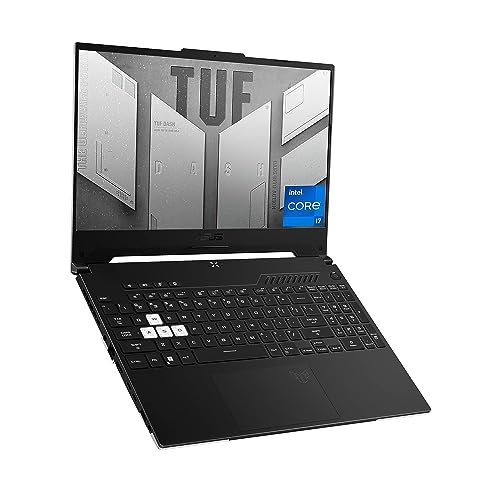
ASUS TUF Dash 15 (2022) Gaming Laptop, 15.6″ 144Hz FHD Display, Intel Core i7-12650H, GeForce RTX 3060, 16GB DDR5, 512GB SSD

Acer Nitro V Gaming Laptop, Intel Core i5-13420H, NVIDIA GeForce RTX 4050 Laptop GPU, 15.6″ FHD IPS 165Hz Display, 8GB DDR5, 512GB Gen 4 SSD

Acer Nitro V Gaming Laptop, Intel Core i7-13620H, NVIDIA GeForce RTX 4050 Laptop GPU, 15.6″ FHD IPS 165Hz Display, 16GB DDR5, 1TB Gen 4 SSD

msi Katana 15 HX 15.6” 165Hz QHD+ Gaming Laptop, Intel Core i9-14900HX, NVIDIA Geforce RTX 5070, 32GB DDR5, 1TB NVMe SSD

Acer Nitro V 16S AI Gaming Laptop, AMD Ryzen 7 260, NVIDIA GeForce RTX 5060 Laptop GPU (572 AI Tops), 16″ WUXGA IPS 180Hz Display, 32GB DDR5, 1TB Gen 4 SSD

Alienware 16 Aurora Gaming Laptop, RTX 5050, Intel Core 7 240H
More Details On Our Top Picks
The ROG Strix G16 sits in the part of the category where screen speed and strong parts matter more than thinness. A 16:10 panel gives you a little more vertical space than a standard 16:9 screen, which helps with menus, maps, and desktop work between matches.
That RTX 5060 and Core i7-14650HX pairing points to a machine that suits serious multiplayer sessions without turning the rest of the day into a compromise. You still get a 1TB Gen 4 SSD and Wi-Fi 7, so loading, storage, and wireless headroom are set up for heavy use.
Strong Points
- 165Hz refresh with 3ms response keeps motion clean during fast camera swings.
- Core i7-14650HX gives you plenty of processor margin for multitasking and background apps.
- 1TB Gen 4 SSD leaves room for a large game library and quick launch times.
- Wi-Fi 7 can help in crowded home networks where latency-sensitive play matters.
Things To Consider
- 16GB memory is solid, though heavy streaming and editing can push beyond it sooner than you’d like.
- The higher-performance parts usually mean more fan activity under load.
Feature Snapshot
Who It Suits Best
Competitive players and all-purpose power users who want a fast screen and a strong CPU-GPU mix will get the most from this one.
Where A Sibling Pick Shines
ASUS ROG Strix G16 (2025) Gaming Laptop, 16” FHD+ 16:10 165Hz/3ms, NVIDIA® GeForce RTX™ 5050, Intel® Core™ i5-13450HX suits you better if you want the same family styling with a gentler hardware step.
This Strix G16 keeps the same 165Hz, 16:10 display style as the RTX 5060 model, so the visual experience stays quick and roomy. The difference sits in the RTX 5050 and Core i5-13450HX pair, which makes more sense for gamers who want the ROG look without stepping all the way up the ladder.
For after-work sessions, Discord in the background, and a few other apps open, 16GB DDR5 and a 1TB PCIe Gen 4 SSD give you the basics in a clean package. The honest read is that this one suits practical gaming more than heavy creative work, and that’s fine for plenty of setups.
What We Like
- 165Hz refresh keeps movement steady in fast shooters.
- 1TB PCIe Gen 4 SSD gives you solid game storage and quick access.
- Wi-Fi 7 is a smart add for newer home networks.
- The Core i5-HX class chip gives you stronger headroom than a basic thin-and-light processor.
Room For Improvement
- RTX 5050 is the step-down part here, so the ceiling is lower than the RTX 5060 model above.
- 16GB memory is workable, though future-heavy multitasking may nudge you toward more.
Core Details
Who Will Love This
Midrange gamers who want the ROG chassis, a fast panel, and a cleaner price step down from the RTX 5060 option will get the best fit here.
Look Elsewhere When
ASUS ROG Strix G16 (2025) Gaming Laptop, 16” FHD+ 16:10 165Hz/3ms, NVIDIA® GeForce RTX™ 5060, Intel® Core™ i7 Processor 14650HX suits you better if you want a more future-proof performance cushion.
The TUF Dash 15 is the older, more practical-feeling option in this roundup, and that can work in its favor. A 15.6-inch 144Hz panel is slower than the 165Hz and 180Hz screens above, yet it still gives you a smooth enough baseline for casual Warzone sessions.
The RTX 3060 and Core i7-12650H are dated next to the newer ASUS and Acer picks, so this one makes the most sense when you care about spend discipline more than future headroom. Thunderbolt 4 is the neat extra here, especially for docks or fast peripherals on a desk.
Positives
- Thunderbolt 4 adds useful connection flexibility for desks and accessories.
- 16GB DDR5 keeps everyday multitasking sensible.
- RTX 3060 still covers lighter gaming with less drama than integrated graphics.
- The 15.6-inch footprint is easier to carry than bulkier 16-inch models.
Points To Note
- 512GB storage fills faster than 1TB options, especially with large game installs.
- The older GPU and CPU combo sits below the newer RTX 4050 and 5060 picks in this list.
Feature Rundown
Perfect Match For
Cost-conscious gamers who want a gaming-class laptop with useful I/O and don’t need the newest GPU tier will fit this best.
Swap It Out When
Acer Nitro V Gaming Laptop, Intel Core i7-13620H, NVIDIA GeForce RTX 4050 Laptop GPU, 15.6″ FHD IPS 165Hz Display, 16GB DDR5, 1TB Gen 4 SSD suits you better if you want newer graphics and more storage space.
This Nitro V keeps the pitch simple, which is useful in a category that can get noisy fast. You get an RTX 4050, a 165Hz IPS display, and a current-gen Intel Core i5-13420H, so the shape of the laptop is more about getting into gaming without paying for extras you may not need.
Eight gigabytes of DDR5 is the main friction point, because modern games and background apps can crowd that quickly. That makes this a starter machine for a student desk or a first gaming setup, not the long-haul choice for someone juggling a big library and a stream at the same time.
Upsides
- 165Hz IPS panel gives motion a smoother feel than a basic 60Hz screen.
- RTX 4050 is a useful step up from older entry graphics.
- 512GB Gen 4 SSD keeps boot and load times brisk.
- Backlit keyboard helps in dim rooms or late-night sessions.
Small Caveats
- 8GB memory is the clear limit here, and upgrades would matter for heavier use.
- 512GB storage can feel cramped once several large games land on it.
Built With In Mind
Beginners and lighter-duty gamers who want a straightforward path into Warzone play will get the most from this model.
A Better Fit Elsewhere
Acer Nitro V Gaming Laptop, Intel Core i7-13620H, NVIDIA GeForce RTX 4050 Laptop GPU, 15.6″ FHD IPS 165Hz Display, 16GB DDR5, 1TB Gen 4 SSD suits you better if you want more breathing room for multitasking and storage.
Among the Acer pair, this is the cleaner everyday fit because it fixes the two pressure points that matter most: memory and storage. Sixteen gigabytes of DDR5 and a 1TB Gen 4 SSD make it easier to keep game files, school work, and launchers in one place without constant triage.
The RTX 4050 is the same class as the cheaper Nitro V above, so the real gain here is breathing room rather than a dramatic graphics leap. That matters in a shared household or a dorm desk, where one laptop tends to do everything and a cramped drive gets old quickly.
Best Bits
- 16GB memory handles multitasking more comfortably than the 8GB version.
- 1TB storage is a far saner match for modern game installs.
- Core i7-13620H gives you stronger general-purpose speed than the i5 model.
- 165Hz IPS panel keeps the Warzone feel responsive.
Softer Spots
- RTX 4050 sits below the newer RTX 5060 and RTX 5070 options in this list.
- The overall design stays functional rather than especially refined.
Details At A Glance
Right Fit For
You’ll get the best value from this one if you want a single laptop for gaming, homework, and normal daily use.
Reach For A Different Pick When
ASUS ROG Strix G16 (2025) Gaming Laptop, 16” FHD+ 16:10 165Hz/3ms, NVIDIA® GeForce RTX™ 5060, Intel® Core™ i7 Processor 14650HX suits you better if a stronger graphics tier matters more than storage balance.
The Katana 15 HX is the heavyweight in this list, and the QHD+ panel is a big part of that story. QHD+ means a resolution above standard 1080p, so you get more detail on the screen, which helps the machine feel sharper for both games and desktop work.
With an Intel Core i9-14900HX, RTX 5070, 32GB DDR5, and 1TB NVMe SSD, this is the kind of laptop you reach for when you want less compromise and more raw capacity. The trade-off is that it’s clearly aimed at the enthusiast desk, not the person who wants a lighter carry every day.
Highlights
- QHD+ resolution gives you more image detail than the FHD models here.
- RTX 5070 is the strongest graphics tier in this roundup.
- 32GB DDR5 is generous for gaming plus background apps.
- Core i9-14900HX gives you serious processor headroom for demanding workloads.
Areas To Watch
- The higher-end hardware usually brings more heat and fan noise under load.
- It makes more sense as a desk machine than a daily carry.
- The extra display sharpness can also ask more from your GPU in some games.
The Right Fit
Enthusiasts who want top-tier parts and a sharper panel for long sessions will get the most from this MSI.
Another Choice May Suit
ASUS ROG Strix G16 (2025) Gaming Laptop, 16” FHD+ 16:10 165Hz/3ms, NVIDIA® GeForce RTX™ 5060, Intel® Core™ i7 Processor 14650HX suits you better if you want strong gaming performance with a less aggressive hardware step.
This Nitro V 16S AI is the most travel-friendly feeling of the bunch without dropping into weak hardware territory. The 16-inch WUXGA IPS display runs at 180Hz, so you get a quicker refresh than the 165Hz models above and a 1920-by-1200 style screen shape that gives you a bit more vertical space.
Ryzen 7 260, RTX 5060, 32GB DDR5, and a 1TB Gen 4 SSD make it the kind of balanced machine that suits a backpack, a coffee shop desk, or a bedroom setup that changes often. The AI Tops figure is a signal of onboard acceleration capability, though the practical value still comes down to the rest of the hardware around it.
Bright Spots
- 180Hz display gives motion a very quick feel.
- 32GB memory is generous for gaming, browsing, and background tools.
- 1TB Gen 4 SSD keeps storage and load times in a healthy spot.
- The slimmer shape should suit regular carry better than chunkier rivals.
Honest Caveats
- The higher-resolution 16-inch panel can ask more from the GPU than 1080p models.
- Thin gaming laptops often run warm under sustained load, so placement on a hard surface matters.
Whose Shelf It Belongs On
Traveling gamers and students who want a strong spec sheet in a more portable chassis will get the clearest fit here.
Skip It When
msi Katana 15 HX 15.6” 165Hz QHD+ Gaming Laptop, Intel Core i9-14900HX, NVIDIA Geforce RTX 5070, 32GB DDR5, 1TB NVMe SSD suits you better if raw desktop-level performance matters more than carrying convenience.
The Aurora brings a more polished look than the sharper-edged gaming machines around it. You get a 16-inch WQXGA display at 120Hz with 300 nits of brightness, plus an anodized aluminum lid, so the hardware leans into a cleaner premium desk presence.
Its RTX 5050 and Intel Core 7 240H put it below the more aggressive gaming rigs in this roundup, yet that can suit you well if your day includes work first and gaming later. The lower refresh rate is the trade-off, and for Warzone that matters, but the chassis and display brightness still give it a clear identity.
Reasons To Buy
- WQXGA resolution gives you a sharper workspace than basic FHD panels.
- 300 nits brightness helps the screen stay usable in brighter rooms.
- Anodized aluminum lid adds a more refined feel on the desk.
- Core 7 240H gives you a modern CPU base for everyday gaming use.
Areas To Watch
- 120Hz is slower than the 165Hz and 180Hz displays in the other picks.
- RTX 5050 is a modest graphics tier for a demanding shooter.
- Available source details are lighter here, so exact storage and memory balance matter more on the product page.
Who Should Grab It
Style-conscious gamers who want a cleaner-looking laptop for mixed work and play will appreciate this one most.
Where Shoppers Go Wrong
ASUS ROG Strix G16 (2025) Gaming Laptop, 16” FHD+ 16:10 165Hz/3ms, NVIDIA® GeForce RTX™ 5060, Intel® Core™ i7 Processor 14650HX suits you better if higher refresh speed matters more than a premium shell.
What Matters Most Before Choosing Gaming Laptops For Warzone
Wrong Turns To Avoid
Don’t let a flashy GPU name distract you from the rest of the machine. A weak memory count, a tiny SSD, or a slower panel can turn a strong spec sheet into a cramped everyday experience.
For Warzone, screen refresh and sustained cooling matter just as much as headline graphics. You want a laptop that can hold its pace after the first few matches, not just in a short highlight moment.
The Upgrade Payoff
Higher-tier models cost more because they usually pack faster processors, stronger graphics, more memory, and better displays in the same chassis. That extra spend makes sense when you keep a laptop for years, stream while playing, or want fewer compromises at higher settings.
For a lighter gaming schedule, the middle of the range often makes more sense. The sharper edge of premium only pays off when your playtime, workload, or display expectations actually call for it.
Quick Notes On The Trade-Offs
Common Shopping Slip Ups
Warzone shoppers often focus on GPU first and ignore memory size. That’s how an otherwise decent machine ends up feeling tight once launchers, chat apps, and game updates pile on.
Why Top Tier Costs More
Premium models buy you room to breathe: faster CPUs, stronger graphics, larger memory pools, and sharper or quicker panels. The jump makes sense for heavy use, especially in a desk setup where size and fan noise matter less.
Frequently Asked Questions
What screen speed works well for Warzone?
165Hz is a strong baseline, and 180Hz gives you a little more motion smoothness. A 120Hz panel can still work, but it leaves less margin for fast tracking.
How much memory should you aim for?
16GB is the practical floor for a modern gaming laptop. 32GB helps more when you keep several apps open while you play.
Is a 1TB SSD worth it?
Yes, because large game installs fill storage fast. A 512GB drive works only when you keep a smaller library and manage space often.
Do thinner gaming laptops run hotter?
They often can, because compact cooling systems have less room to move heat. That’s normal enough that hard-surface placement and airflow matter a lot.
Which pick is the safest all-round choice here?
ASUS ROG Strix G16 (2025) Gaming Laptop, 16” FHD+ 16:10 165Hz/3ms, NVIDIA® GeForce RTX™ 5060, Intel® Core™ i7 Processor 14650HX gives you a strong mix of screen speed, CPU power, and storage. It fits most serious gaming setups without leaning too far into excess.
