


Gaming laptops under 2000 sit in a useful middle ground, where you can get strong graphics, high-refresh screens, and enough memory for modern games without stepping into desktop replacement territory. You also get a clearer choice between performance-heavy machines for long sessions and lighter picks for commuting or mixed work use.
This roundup focuses on the details that change day-to-day ownership, like screen speed, GPU tier, storage size, and cooling layout. You’ll also see where each model cuts back a little, because the honest read is that every laptop here makes a trade-off somewhere.
The Shortlist At A Glance

ASUS ROG Strix G16 (2025) RTX 5060

ASUS ROG Strix G16 (2025) RTX 5050
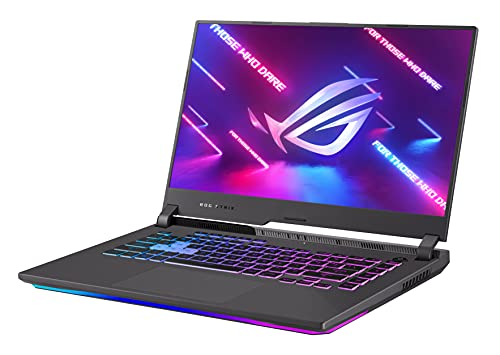
ASUS ROG Strix G17 (2021) RTX 3050 Ti

Acer Nitro 5 AN515-58-525P RTX 3050

acer Nitro V ANV15-51-51H9 RTX 4050


msi Katana 15 HX RTX 5070

Acer Nitro V 16S AI ANV16S-41-R2AJ RTX 5060
More Details On Our Top Picks
That RTX 5060 and Core i7 pairing gives this Strix a clear edge for high-refresh gaming, especially on a 16:10 165Hz panel where quick motion matters. The 1TB Gen 4 SSD also helps you keep a few large installs ready without juggling storage every week.
In a shared room or a dorm desk, the trade-off is easy to see, since a machine tuned for speed and cooling usually runs a bit larger and busier than leaner options like the HP Victus 15. For you, that makes sense if smooth frame delivery matters more than a slim profile.
Strong Points
- RTX 5060 leaves more room for demanding settings in newer games.
- 165Hz display suits fast shooters and motion-heavy play.
- 1TB SSD gives you practical install space for a bigger library.
- Intel Core i7 14650HX suits heavy multitasking and game launch loads.
Areas To Watch
- 16GB memory is fine for gaming, though heavy creative work can fill it faster.
- The higher-power layout is less appealing for quiet library use.
Feature Snapshot
Who It Suits Best
Competitive gamers and multitaskers who want a strong upper-midrange machine get the best fit here.
Where A Sibling Pick Shines
Acer Nitro V 16S AI Gaming Laptop ANV16S-41-R2AJ suits you better if you want 32GB memory and a lighter-feeling setup for mixed gaming and work.
This Strix keeps the same 16-inch, 165Hz foundation as the RTX 5060 model, then trims the GPU to RTX 5050 and the CPU to Core i5-13450HX. That makes it the more measured choice for you if modern games matter, but top-tier frame chasing does not.
For a student desk or family room setup, the balance lands well because you still get 16GB DDR5-5600, a 1TB PCIe Gen 4 SSD, and Wi-Fi 7. The honest read is that it stays close to the premium feel of Item 1, just with less muscle for the heaviest titles.
What We Like
- 165Hz panel keeps fast gameplay looking orderly.
- 1TB SSD gives you room for a healthy game library.
- Wi-Fi 7 is a useful fit for busy home networks.
- DDR5-5600 memory helps keep load-heavy multitasking responsive.
Points To Note
- RTX 5050 sits below Item 1, so you give up some headroom.
- The 16-inch chassis is better on a desk than in a cramped backpack.
Core Details
Who Will Love This
Casual-to-regular gamers who want a strong feature set without paying for extra GPU muscle will fit well here.
Look Elsewhere When
ASUS ROG Strix G16 (2025) RTX 5060 suits you better if you keep several demanding games installed and want more graphics headroom.
The 17.3-inch panel changes the whole feel here, because a bigger frame gives you more room for menus, maps, and split-screen multitasking. Compared with the tighter 16-inch Strix models, this one feels built for a desk first, which suits a home setup better than a daily commute.
Its RTX 3050 Ti and Ryzen 7 4800H now sit below the newer models in raw performance, so you’re paying for screen size and the older ROG layout more than top-end speed. In most living rooms, that trade-off still makes sense for someone who values visibility over portability.
Highlights
- 17.3-inch display is comfortable for long sessions.
- 144Hz refresh helps keep motion cleaner than standard panels.
- Ryzen 7 4800H still handles everyday multitasking capably.
- RGB keyboard adds a clear gaming look without extra clutter.
Small Caveats
- RTX 3050 Ti is older, so settings need more compromise in newer games.
- The larger shell is less convenient for travel.
- Windows 10 is a dated starting point for a 2026 shortlist.
Made For
You get the best fit here if your setup stays mostly at home and you want a large screen for games and multitasking.
A Better Fit Elsewhere
HP Victus 15 RTX 3050 suits you better if you want a smaller, simpler laptop for lighter carry and casual play.
Compared with the larger ROG Strix G17, the Nitro 5 keeps the footprint more manageable while still giving you a 15.6-inch 144Hz IPS panel. That makes it an easier fit for desks with less room, or for a setup that moves between bedroom, study, and living area.
The RTX 3050 and Core i5-12500H are a sensible combo for 1080p gaming, though the 8GB memory is the part you notice first as background apps stack up. For most entry-level gaming use, this is the kind of compromise that feels practical rather than flashy.
Best Bits
- 15.6-inch display keeps the chassis easier to place on smaller desks.
- 144Hz IPS screen supports smoother movement in fast games.
- 512GB PCIe Gen 4 SSD gives you quick boot and load behavior.
- Killer Wi-Fi 6 is useful for busy household networks.
Honest Caveats
- 8GB memory is the main bottleneck for heavier multitasking.
- RTX 3050 is fine for 1080p, but it leaves less room for higher settings.
Right Fit For
You suit this machine best if you want a straightforward gaming laptop for 1080p play without a bulky chassis.
Skip It When
acer Nitro V ANV15-51-51H9 is the better call if you want newer graphics headroom and DDR5 memory for a fresher platform.
The RTX 4050 is the key reason this Nitro V stands apart from the RTX 3050 machines above it. That extra graphics room matters in modern 1080p gaming, and the 144Hz IPS screen gives you a display that can actually keep up with faster motion.
It’s still a leaner setup than the ROG Strix models, so you get a more modest package without losing the newer GPU tier. You may find the 8GB DDR5 memory a little tight for heavy multitasking, but for a focused gaming lane, the balance is sensible.
Upsides
- RTX 4050 gives you a more current graphics base than RTX 3050 models.
- DDR5 memory is a nicer starting point than older DDR4 systems.
- 144Hz screen supports fluid play in esports-style titles.
- 512GB Gen 4 SSD keeps everyday loading quick.
Worth Noting
- 8GB RAM is the first area you may outgrow.
- Battery life expectations should stay modest for a gaming-first machine.
Details At A Glance
Perfect Match For
Students and casual gamers who want a stronger graphics tier without jumping to a larger premium chassis will fit here.
Swap It Out When
ASUS ROG Strix G16 (2025) RTX 5050 is the better fit if you want a fuller storage loadout and a more spacious 16-inch platform.
The Victus 15 keeps things plain in a way that helps daily use, because a 15-inch gaming laptop with a backlit keyboard and Full HD display is easy to place almost anywhere. Compared with the bulkier ROG and MSI models in this list, it feels less demanding on desk space.
Its RTX 3050 and 8GB RAM suit lighter gaming first, then general Windows use second. The trade-off is obvious, though, since the machine leans more toward sensible basics than long-term headroom.
Reasons To Buy
- Compact 15-inch format stays approachable for small desks.
- Backlit keyboard helps in dim rooms.
- Full HD display is a comfortable baseline for mainstream games.
- Enhanced thermals are useful for sustained gaming sessions.
Trade Offs
- 8GB RAM is the clearest limitation.
- RTX 3050 is serviceable, but newer titles will ask for moderation.
- It is a better starter machine than a long-range performance choice.
The Right Fit
You’ll get the most from this laptop if you want simple 1080p gaming and a compact desktop footprint.
Reach For A Different Pick When
acer Nitro V ANV15-51-51H9 is the better move if you want RTX 4050 graphics and newer DDR5 memory in a similar size class.
The Katana 15 HX pushes well past the middle of this list, with an Intel Core i9-14900HX, RTX 5070 graphics, 32GB DDR5, and a 1TB NVMe SSD. That combination is built for people who keep modern AAA games installed and want more room for multitasking on the side.
Its QHD+ 165Hz display also separates it from the FHD options above, since higher resolution gives a sharper desktop and a more detailed game image. The catch is that this class tends to ask more from cooling and battery life, so it makes the most sense as a plugged-in setup.
Bright Spots
- Core i9-14900HX offers very strong CPU headroom.
- RTX 5070 gives you the highest graphics tier in this roundup.
- 32GB DDR5 helps with heavy multitasking and larger game installs.
- QHD+ 165Hz panel adds sharpness without losing speed.
Things To Consider
- Higher-power parts usually mean more fan activity under load.
- The premium hardware set is more than most casual players need.
Feature Rundown
Whose Shelf It Belongs On
Experienced gamers and power users who want a high-spec laptop with extra memory will get the best fit here.
Another Choice May Suit
ASUS ROG Strix G16 (2025) RTX 5060 is the smarter fit if you want strong gaming performance without moving all the way into premium territory.
This Nitro V 16S AI leans into newer hardware in a slim 16-inch frame, and the 32GB DDR5 memory is a major part of its appeal. For gaming plus school or work use, that extra memory can keep the system calmer when tabs, chat apps, and launchers stack up.
The RTX 5060 and 180Hz WUXGA IPS display push it into a more serious gaming lane, while the Ryzen 7 260 keeps the platform current. Compared with the heavier MSI Katana 15 HX, it looks like the easier carry, though the thinner style may not feel as aggressive for all-day high-load use.
Positives
- 32GB DDR5 is a strong fit for multitasking and future-proofed basics.
- 180Hz display supports very smooth motion in competitive games.
- RTX 5060 gives you high-end 1080p and 1200p-friendly headroom.
- 16-inch WUXGA screen adds a little more vertical workspace than standard FHD.
Softer Spots
- The slim form can mean less room for aggressive cooling than bulkier models.
- Ryzen 7 260 is fine for gaming, though the rest of the lineup includes faster CPU options.
Key Specs
Built With In Mind
You’ll like this most if you want a portable-feeling gaming laptop that still brings serious memory and a strong GPU.
Skip It When
msi Katana 15 HX RTX 5070 is the better move if you want the fastest graphics and a higher-tier CPU for heavier game settings.
What Matters Most Before Choosing Gaming Laptops Under 2000
Wrong Turns To Avoid
Do not let the screen size alone make the call. A 17.3-inch panel feels generous, but it also brings more weight and less convenience for daily carry.
Memory matters too, because 8GB can feel tight once game launchers, browser tabs, and chat apps are open together.
When Paying More Pays Off
Higher-tier models usually give you a stronger GPU, more memory, and a faster display, which helps both frame rate and overall comfort. That extra spend makes sense for competitive play, large game libraries, or a setup that handles gaming plus content work.
Frequently Asked Questions
What matters more, the GPU or the screen?
The GPU usually drives gaming performance, while the screen determines how smoothly that power looks. A 165Hz or 180Hz panel helps more when you play fast titles.
Is 8GB RAM enough for gaming?
It works for lighter use and simpler gaming, especially at 1080p. You’ll feel the ceiling faster once you keep several apps open at once.
Is RTX 3050 still worth considering?
RTX 3050 models still make sense for modest 1080p play and general use. They sit below RTX 4050 and RTX 5060 options in headroom, so expectations should stay practical.
Why do some laptops use HX processors?
HX chips are high-power laptop CPUs built for stronger sustained performance. They usually fit gaming machines that stay plugged in more often than ultra-portable systems.
What size works best for travel?
Fifteen- to sixteen-inch models are easier to live with than 17-inch machines. A slimmer 16-inch laptop usually gives you a better middle ground for carry and screen space.
