


Low-cost gaming laptops ask you to balance graphics power, memory, storage, and heat control without drifting into overpriced territory. That matters for dorm rooms, shared apartments, and late-night sessions where you want playable frame rates, a usable keyboard, and a screen that doesn’t feel cramped. The eight picks below lean in different directions, from entry-level systems that keep costs contained to fuller-featured machines that make sense for longer ownership. You’ll also see where each one gives ground, because budget gaming is always a trade-off.
Quick Look At The Shortlist

FUNYET Laptop Computer, Gaming Laptop 2026 Windows 11 Pro

Acer Nitro 5 AN515-58-525P Gaming Laptop

HP Pavilion Gaming 15.6-Inch Micro-EDGE Laptop

HP Victus 15 Gaming Laptop

NIMO 15.6″ FHD Light-Gaming-Laptop
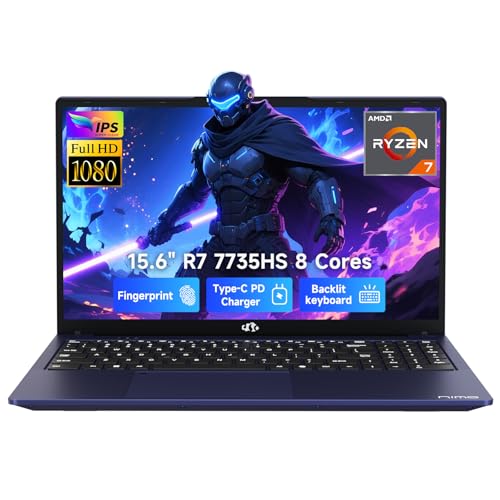
NIMO Thin & Light Gaming Laptop

Lenovo 15 Gaming Laptop

NIMO 15.6″ IPS FHD-Light Gaming-Laptop
More Details On Our Top Picks
The FUNYET lands in the practical middle: 16GB RAM and a 512GB SSD give you room for games, launchers, and school apps without constant cleanup. The 16-inch FHD panel should feel less cramped than a standard 15.6-inch screen, which helps during long sessions at a desk or kitchen table.
Its Intel 12th Gen processor is the sort of spec that suits light gaming, browsing, and everyday multitasking better than heavy graphics work. The trade-off is clear enough, though, because there’s no discrete graphics card listed, so this fits casual play and general use more than demanding titles.
Strong Points
- 16GB memory helps keep several apps open without forcing constant tab closing.
- 512GB storage leaves more breathing room for game installs and documents.
- 16-inch display size gives you a little more visual space than a typical compact machine.
- Fingerprint unlock adds quicker sign-in for shared desks or busy mornings.
- Backlit keys help in dim rooms, which matters more than people admit.
Things To Consider
- No dedicated GPU is listed, so tougher games won’t be the natural fit.
- The large screen helps visibility, but it also makes the laptop less travel-friendly than slimmer 15-inch options.
Feature Card
Who It Suits Best
You get the most from this one as a casual gamer who also wants a roomy screen for coursework, streaming, and office tasks.
A Better Fit Elsewhere
Acer Nitro 5 AN515-58-525P suits you better for graphics-heavy play, thanks to its RTX 3050 and 144Hz panel.
This Nitro 5 moves into more serious gaming territory than the FUNYET, mainly because the RTX 3050 gives you a real entry into discrete graphics. The 15.6-inch Full HD screen with a 144Hz refresh rate should feel notably smoother in fast-moving games, where frame pacing matters as much as raw power.
The i5-12500H is a stronger class of chip for sustained work and play, so the machine suits longer sessions better than barebones budget systems. The catch is that 8GB DDR4 RAM is workable but not roomy, and you’ll feel that sooner once games, browsers, and background apps pile up.
What We Like
- RTX 3050 graphics open the door to more demanding 1080p play.
- 144Hz refresh rate gives motion a cleaner, more responsive feel.
- 12th Gen Intel Core i5-12500H is a stronger match for heavier multitasking.
- 512GB PCIe Gen 4 SSD helps with faster loading and everyday responsiveness.
Room For Improvement
- 8GB RAM is the first thing you may outgrow for modern gaming habits.
- DDR4 is fine, but it is less forward-looking than newer memory options.
- Like many gaming laptops, fan noise and heat management become part of the ownership picture during longer sessions.
At A Glance
Who Will Love This
You suit this pick best as a gamer who wants the clearest step up in frame-rate potential without drifting into premium pricing territory.
Another Choice May Suit
HP Victus 15 Gaming Laptop makes more sense for you if you want similar RTX 3050 graphics in a slightly different chassis and feature mix.
The Pavilion Gaming is older than the Acer and HP Victus picks, but it still has a sensible shape for someone starting out. The GTX 1650 and 8GB SDRAM point to mainstream 1080p gaming rather than ambitious settings, and that honesty is part of its appeal.
Its 256GB SSD keeps the system quick enough for Windows and a few key games, though storage fills fast once modern installs start stacking up. You may find it best as a starter machine for lighter titles, especially because the 15.6-inch Micro-EDGE design keeps the footprint fairly manageable.
Highlights
- GTX 1650 graphics still cover many older or lighter competitive games well.
- 15.6-inch format keeps the machine easier to place on a desk or shelf.
- 256GB SSD provides quicker starts than a traditional hard drive would.
- Shadow Black and Acid Green styling gives it a clear gaming identity without going overboard.
Minor Gripes
- 256GB storage can feel tight once you install several large games.
- 8GB memory is enough for basics, but multitasking headroom is limited.
Perfect Match For
You fit this laptop best as a budget-conscious starter who wants a straightforward gaming setup for school breaks and casual play.
Look Elsewhere When
Acer Nitro 5 AN515-58-525P suits you better once you want newer graphics headroom and a 144Hz display.
The Victus feels like the more polished sibling to the Nitro 5, at least on paper, with RTX 3050 graphics and a 12th Gen i5-12500H working together for modern 1080p gaming. Enhanced thermals matter in a laptop like this, because heat management shapes comfort and consistency during longer sessions.
8GB RAM and a 512GB SSD keep the build grounded in budget territory, so it’s not trying to be a huge all-purpose workstation. That makes it a sensible fit for school tasks, launches into mainstream games, and a desk setup where you care about balance more than flash.
Upsides
- RTX 3050 graphics suit a wide range of mainstream games at 1080p.
- 12th Gen Core i5-12500H gives the system a stronger processing backbone.
- Enhanced thermals can help the laptop feel steadier under longer gaming loads.
- Windows 11 Home and a backlit keyboard round out the everyday experience.
Softer Spots
- 8GB RAM is serviceable, but heavier multitasking will press against it.
- The 2022 design is still relevant, though newer budget models sometimes offer more memory out of the box.
Quick Facts
Best Suited To
You suit this model best as a practical gamer who wants a cleaner mix of performance and everyday usability than older budget machines offer.
Reach For A Different Pick When
Acer Nitro 5 AN515-58-525P is the better fit for you if a 144Hz screen matters more than the Victus chassis style.
This NIMO looks less like a stripped-down gaming notebook and more like a roomy everyday machine that can still handle light play. The 32GB LPDDR5 memory and 1TB SSD are the headline pieces, and together they make a strong case for people who keep a lot open at once.
The Ryzen 7 Pro 6850U and Radeon 680M graphics are a practical pairing for casual gaming, editing, and office work, especially in places where you want one laptop to do several jobs. A small trade-off appears in the “light-gaming” label itself, because that’s a clue to stay realistic about the heaviest titles.
Reasons To Buy
- 32GB LPDDR5 memory gives you real multitasking breathing room.
- 1TB SSD is generous for games, files, and project storage.
- Ryzen 7 Pro 6850U suits work-heavy days and lighter entertainment.
- Fingerprint support and backlit keys add convenience in daily use.
Points To Note
- Light-gaming positioning suggests restraint for demanding 3D titles.
- The bigger memory and storage help a lot, but they do not replace a discrete gaming GPU.
Feature Rundown
Built With In Mind
You suit this pick best as a multitasker who wants a laptop for work, media, and moderate gaming without constant storage stress.
Skip It When
Lenovo 15 Gaming Laptop is the more straightforward alternative for you if you want a simpler, leaner system for lighter spending and lighter play.
Compared with the heavier-feeling gaming notebooks above, this NIMO leans into portability without giving up useful hardware. The Ryzen 7 7735HS, 16GB DDR5 RAM, and 512GB SSD form a solid midrange mix for gaming at a desk, in a café, or between classes.
The 180-degree viewing angle is handy for shared screens and awkward desk positions, and that’s a practical perk more than a headline feature. One thing worth considering, though, is that the thin-and-light shape usually asks you to think a bit more about cooling and sustained load than a bulkier chassis would.
Best Bits
- Ryzen 7 7735HS gives the machine a strong processor base.
- 16GB DDR5 memory suits gaming and everyday multitasking.
- 512GB SSD keeps the balance between speed and reasonable storage.
- Thin build makes it easier to carry than larger gaming laptops.
Areas To Watch
- Thin gaming designs can ask for more care around heat and airflow.
- Portable hardware is convenient, but a smaller chassis can be less forgiving under long, heavy sessions.
The Right Fit
You fit this laptop best as a commuter or student who wants gaming-capable hardware without a bulky carry profile.
Where A Sibling Pick Shines
HP Victus 15 Gaming Laptop makes more sense for you if you prefer a more conventional gaming chassis over the slim NIMO design.
This Lenovo keeps the formula lean, which is useful for dorm desks, smaller apartments, and anyone who wants a gaming-capable laptop without a lot of baggage. Ryzen 5 7535HS, 8GB DDR5, and a 256GB PCIe SSD make it a cleaner starter option than the more feature-heavy NIMO models.
That simpler parts list is also the trade-off, because 256GB fills quickly and 8GB RAM asks you to stay disciplined with apps. For light games and basic everyday use, though, the machine makes sense as a straightforward entry point.
Positives
- Ryzen 5 7535HS gives you current-gen class processing for starter gaming.
- DDR5 memory is a good sign for overall responsiveness.
- Compact storage keeps the laptop lean and simple to manage.
- Lenovo’s plain layout suits people who want function over styling.
Worth Noting
- 256GB SSD will feel small once a few modern games are installed.
- 8GB RAM means you’ll want to keep browser tabs and background tasks in check.
Who Should Grab It
You suit this one best as a first-time gaming shopper who wants a simple machine for lighter titles and everyday work.
A Better Fit Elsewhere
NIMO 15.6″ FHD Light-Gaming-Laptop is the smarter choice for you if you want far more memory and storage in the same broad category.
This NIMO sits in a very usable middle ground, with Ryzen 5 6600H power, 16GB DDR5 RAM, and a 256GB SSD shaping a machine that can handle schoolwork, streaming, and lighter gaming. The 15.6-inch IPS FHD screen should look more natural than a basic panel, especially during long evenings at a desk.
The Radeon 660M is an integrated graphics solution, so you should treat it as a sensible light-gaming option rather than a high-end frame-rate machine. That makes it a smart fit for everyday use, and the fingerprint reader plus backlit keyboard add real convenience without feeling overdone.
Bright Spots
- Ryzen 5 6600H gives the laptop a stronger processor base than many entry-level models.
- 16GB DDR5 RAM helps with multitasking and keeps the system feeling less cramped.
- IPS display is a useful upgrade for color and viewing consistency.
- Fingerprint login and backlit keys make daily use easier in shared or low-light spaces.
Small Caveats
- 256GB SSD is modest once games and media start piling up.
- Integrated graphics suit lighter titles more comfortably than demanding releases.
Details At A Glance
Whose Shelf It Belongs On
You suit this laptop best as a student or home user who wants a cleaner everyday machine with some gaming flexibility.
Swap It Out When
Acer Nitro 5 AN515-58-525P is the stronger choice for you if dedicated graphics matter more than everyday balance.
What Matters Before You Choose A Budget Gaming Laptop
Mistakes Worth Dodging
Memory and graphics should stay at the center of your decision. A machine with a decent processor but only 8GB RAM can feel crowded fast, and integrated graphics will always keep you in the lighter end of the gaming pool.
When Paying More Pays Off
Higher-tier models usually spend more on discrete graphics, faster screens, and better cooling hardware. That upgrade matters most for competitive play, newer games, and long sessions where heat and consistency start to matter.
Screen Size And Storage
A larger display helps visibility, but it also adds bulk. Storage matters just as much, because modern game installs grow quickly and a small SSD turns housekeeping into a habit.
A Few Final Checks Before You Commit
Common Shopping Slip Ups
It’s easy to overfocus on processor names and miss the graphics class underneath. A gaming laptop with weak graphics or tiny storage can look appealing on paper and feel cramped after a few installs.
The Upgrade Payoff
More money usually buys you an RTX-class GPU, a smoother display, and a chassis that handles heat with less strain. That matters most for you if gaming is the main job, not just an occasional side use.
Frequently Asked Questions
Are low cost gaming laptops good for everyday work too?
Yes, many of them handle browsing, writing, streaming, and classwork with ease. The better ones also give you enough memory for multitasking without constant tab management.
How much RAM should you expect for casual gaming?
8GB works for a basic start, but 16GB is the more comfortable long-term choice. That extra headroom helps once games, launchers, and browser tabs run together.
Do you need a dedicated graphics card for gaming?
Not for every game, but it matters a lot for newer or more demanding titles. Integrated graphics are fine for lighter play, while an RTX or GTX card opens up more options.
Is a 256GB SSD enough?
It works for a lean setup, especially when you keep your library small. Modern games are large, so a 512GB or 1TB drive is easier to live with.
What matters more, the processor or graphics?
Graphics usually decide how well a gaming laptop handles the game itself. The processor still matters for multitasking, load times, and keeping everything responsive outside the game.
