


Touch screens make a laptop feel more direct, especially for schoolwork, casual games, streaming, and everyday multitasking. For you, that means fewer mouse-heavy steps and a screen that’s easier to tap, scroll, and manage in a hurry. The seven picks below lean toward practical performance, useful screen sizes, and enough memory or storage to keep daily life moving without feeling cramped.
Quick Look At The Shortlist

HP 15.6 inch Laptop 15-fc0499nr
Acer Aspire FHD Touchscreen Laptop
Dell Inspiron 15 Touchscreen Laptop

HP Touchscreen Laptop 15.6 FHD IPS
HP OmniBook 3 16 inch Laptop PC

HP 17.3 Touchscreen Laptop Ryzen 5

Dell 16 inch Touchscreen Laptop 2026
More Details On Our Top Picks
That 15.6-inch HD touch panel keeps this HP squarely in everyday territory, not flashy territory. You get a Ryzen 5 7520U, 8 GB of memory, and a 512 GB solid-state drive, so school tabs, streaming, and lighter games stay within reasonable limits.
The honest read is that this suits you best as a practical family or commute laptop, especially when you want touch without chasing a bulky setup. Compared with the Acer Aspire and Dell Inspiron below, it feels more modest, but that restraint helps keep it approachable for simple daily use.
Strong Points
- Touch input makes scrolling, tapping, and quick note work feel simple.
- 512 GB SSD gives you room for documents, apps, and a fair amount of media.
- AMD Radeon graphics support casual entertainment without adding bulk.
- Natural Silver finish keeps the look clean and low-key.
Things To Consider
- HD resolution is modest beside the sharper screens in this roundup.
- 8 GB RAM suits lighter multitasking better than heavy creative workloads.
- Owners usually keep this class of laptop clean with a soft cloth, since the touch display shows fingerprints quickly.
Who It Suits Best
Students, casual shoppers, and anyone who wants a straightforward touch laptop for browsing and entertainment fit this one well.
A Better Fit Elsewhere
The Acer Aspire FHD Touchscreen Laptop suits you better for heavier multitasking, because its 32 GB memory and 1 TB drive leave far more breathing room.
This Acer is the most future-facing spec sheet in the group, mostly because of the Intel Core Ultra 7 258V, 32 GB RAM, and 1 TB SSD combination. The NPU, or neural processing unit, handles on-device AI tasks, so features like background blur and auto-framing can stay local instead of leaning on a cloud service.
That matters for remote work, content planning, and heavier multitasking, where lots of browser tabs and app switching can chew through weaker laptops. Compared with the HP 15.6-inch model, this one has far more headroom, though you’re paying for that comfort with a package that feels aimed at demanding use.
What We Like
- 32 GB RAM keeps multitasking from feeling cramped.
- 1 TB SSD gives you generous space for files, games, and projects.
- Core Ultra 7 chip suits demanding everyday work.
- Touchscreen input helps with fast navigation and quick edits.
Worth Noting
- This level of power makes the laptop feel more specialized than casual.
- The extra performance is more than basic browsing usually needs.
Made For
Remote workers, power users, and creative multitaskers get the most from this Acer.
Skip It When
The HP OmniBook 3 16 inch Laptop PC is a calmer choice for lighter everyday tasks and simpler screen needs.
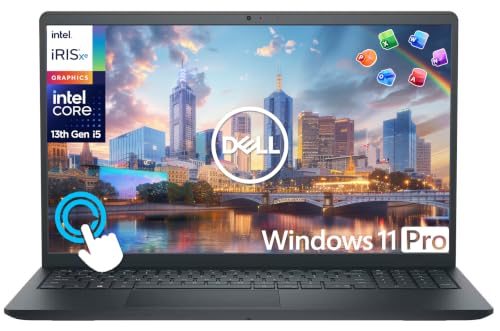
With 16 GB RAM and 1 TB of total storage, this Inspiron sits in a useful middle ground for class notes, work docs, and light gaming. The 10-core Intel i5 gives it a little more stride than the entry-level HP, while still staying in a range that feels sensible for students and home use.
One thing worth considering is the bundled software and storage mix, because that makes it attractive for someone who wants a ready-to-go setup rather than a bare laptop. Compared with the Acer Aspire, it gives up some raw muscle, but many people will prefer the more balanced spec sheet.
Highlights
- 15.6-inch touch display keeps navigation quick and familiar.
- 16 GB RAM supports multitasking better than basic entry models.
- 1 TB storage gives you room for classes, media, and smaller game libraries.
- Windows 11 Pro suits work or school setups that need a more managed feel.
Small Caveats
- Storage comes from more than one source, so the setup feels less simple than a single-drive machine.
- The touch panel and bundled extras may appeal more to utility-focused shoppers than minimalists.
Right Fit For
Students, office users, and home multitaskers who want a practical all-rounder should look closely here.
Another Choice May Suit
The HP Touchscreen Laptop 15.6 FHD IPS fits better for anyone who wants a stronger Ryzen 7 platform and more memory from the start.
This HP pushes harder than the earlier models, starting with the Ryzen 7 7730U and 32 GB RAM. The 15.6-inch FHD IPS display, or in-plane switching panel, should give you steadier viewing angles, which helps in shared spaces or long work sessions.
Features like WiFi 6, a numeric keypad, and a webcam make it feel well suited to people who split time between productivity and occasional entertainment. The trade-off is simple: it’s less compact than the 15-inch picks, but you gain a more serious workstation feel.
Reasons To Buy
- Ryzen 7 and 32 GB RAM handle busy multitasking with ease.
- FHD IPS screen brings a cleaner viewing experience than basic panels.
- Numeric keypad helps with data entry and spreadsheet work.
- WiFi 6 supports modern home and office networks.
Areas To Watch
- The larger keyboard deck takes up more desk space.
- Touchscreen glass benefits from regular wiping to stay clear.
Whose Shelf It Belongs On
You’ll appreciate this one most in a home office, dorm setup, or anywhere spreadsheets and multitasking matter.
Reach For A Different Pick When
The Dell 16 inch Touchscreen Laptop 2026 is the stronger match for you if you want a newer platform with DDR5 memory and a broader upgrade feel.
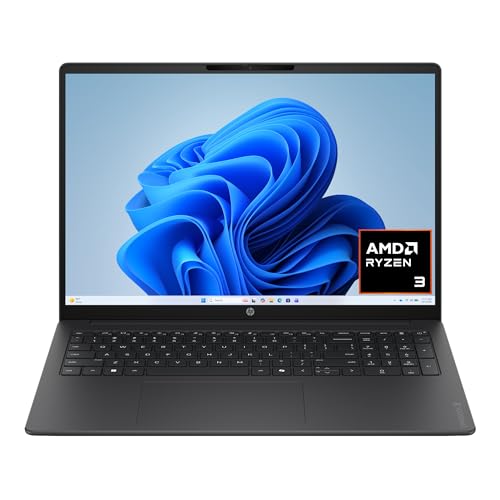
The 16-inch 2K touchscreen is the first thing you notice here, because it gives you more room than the smaller 15.6-inch machines without going all the way to a giant chassis. Ryzen 3, 8 GB RAM, and a 256 GB SSD place this HP in the lighter-use camp, so it feels best for browsing, video, and basic home tasks.
That balance is useful for you if screen size matters more than raw speed. Compared with the HP 17.3-inch model, it’s easier to live with on a couch or small desk, though you trade away the extra storage and memory that heavy multitaskers like.
Best Bits
- 2K resolution gives the panel a sharper, more detailed look.
- 16-inch size helps with split-screen work and relaxed viewing.
- AMD Radeon 610M graphics handle everyday media smoothly.
- Mica Silver finish keeps the design understated.
Trade Offs
- 8 GB RAM keeps it in the lighter multitasking lane.
- 256 GB storage fills faster than the larger-capacity models here.
- Touch displays like this benefit from a regular microfiber wipe in daily use.
Perfect Match For
Casual streamers, home users, and anyone who wants a larger display without a bulky workstation should like this HP.
Where A Sibling Pick Shines
The Dell Inspiron 15 Touchscreen Laptop suits you better for a more balanced storage setup and a slightly lighter feel.
The 17.3-inch size makes this HP feel closer to a compact desktop replacement than a travel machine. With Ryzen 5 7430U, 32 GB RAM, and 1 TB SSD storage, it’s clearly built for heavier workloads like long spreadsheets, research, and a crowded browser session.
That wide screen is a real comfort for split windows, though it’s not the kind of laptop you’ll want to carry everywhere. Compared with the 16-inch OmniBook 3, this one gives you much more workspace and much more memory, so it makes sense for a desk-first setup.
Positives
- Large display gives you plenty of room for side-by-side work.
- 32 GB RAM handles demanding multitasking better than leaner models.
- 1 TB SSD leaves ample space for projects, media, and apps.
- Windows 11 Pro suits work setups that want more control.
- Ryzen 5 keeps performance sensible for everyday heavy use.
Room For Improvement
- The bigger body is less convenient for frequent travel.
- Larger screens usually need a bit more desk room and bag space.
Built With In Mind
Home-office users, spreadsheet-heavy workers, and anyone who wants a large touch screen on a desk should feel at home here.
Look Elsewhere When
The HP Touchscreen Laptop 15.6 FHD IPS is the easier carry for you if portability matters more than workspace.
This Dell leans into newer hardware with Ryzen 7 170, 32 GB DDR5 memory, and a 1 TB SSD. DDR5, the newer memory standard, usually helps a laptop feel ready for heavier multitasking, so this one makes sense for demanding workdays that mix documents, tabs, and creative tools.
Compared with the HP 17.3-inch model, it gives you a similar memory class in a slightly more manageable 16-inch frame. That makes it a strong fit for people who want serious performance without stepping up to the biggest chassis in the group.
Highlights
- Ryzen 7 platform suits demanding everyday and creative work.
- 32 GB DDR5 RAM gives you broad multitasking headroom.
- 1 TB SSD keeps storage generous for projects and media.
- 16-inch touch screen stays easier to place than a 17-inch unit.
Honest Caveats
- The upgraded internals make it feel aimed at serious work rather than casual use.
- Touch glass and a larger panel still need routine wiping to stay clear.
The Right Fit
You’ll get the most from this Dell in a busy home office, creator setup, or high-task school routine.
Where A Sibling Pick Shines
The HP OmniBook 3 16 inch Laptop PC fits better for lighter daily tasks and a simpler, less demanding spec profile.
What Matters Before You Choose A Touch Screen Gaming Laptop
Common Shopping Slip Ups
Touch panels can make a laptop feel handy, but weak memory still slows everything down. A 15.6-inch screen can also feel cramped for split windows, so match the display size to your desk and bag routine.
Where The Extra Money Goes
Higher tiers usually pay for faster processors, more RAM, larger SSDs, and better panels such as IPS or higher-resolution screens. That upgrade makes sense for heavier multitasking, creative work, or a setup that needs to stay smooth for years.
Frequently Asked Questions
Are touch screen gaming laptops good for everyday use?
Yes, especially for browsing, streaming, note taking, and quick app navigation. You still want enough RAM and SSD space so the touch feature doesn’t sit on a sluggish laptop.
Do you need a high-resolution screen for casual gaming?
Higher resolution usually looks cleaner, especially on 16-inch and 17.3-inch displays. That said, hardware balance matters more than resolution alone, because a strong screen on a weak laptop can still feel slow.
Is 8 GB RAM enough for this category?
It works for lighter use, simple games, and routine school tasks. For heavier multitasking, 16 GB or 32 GB feels more comfortable.
Why do some of these laptops feel more like work machines?
Touch screen laptops often sit at the crossroads of productivity and casual play. You’re seeing that mix here in the processors, larger screens, and storage choices.
What screen size fits most people best?
15.6 inches is the easiest all-around size for carrying and desk use. A 16-inch or 17.3-inch model gives you more room for split windows, but it takes up more space.
Final Thoughts
You’ve got a solid mix here, from the simple HP 15.6-inch model to the more serious Dell and Acer options. The right choice comes down to how much multitasking, screen space, and storage you want in daily use. For a balanced touch laptop, the middle of this list is where the sweet spot lives.
