


Desktop-style multitasking gets a lot easier once your laptop has more room to breathe. These monitor extenders for laptop use cases suit commutes, hotel desks, shared workspaces, and home offices where one screen keeps turning into a juggling act.
You’ll see a mix of lighter dual-screen picks and broader triple-screen setups, plus a few models that lean toward travel and a few that suit a more settled desk routine. The differences matter, because weight, display size, and laptop fit can change how natural the setup feels day to day.
Quick Look At The Shortlist

Vixtan 14″ Triple Laptop Screen Extender
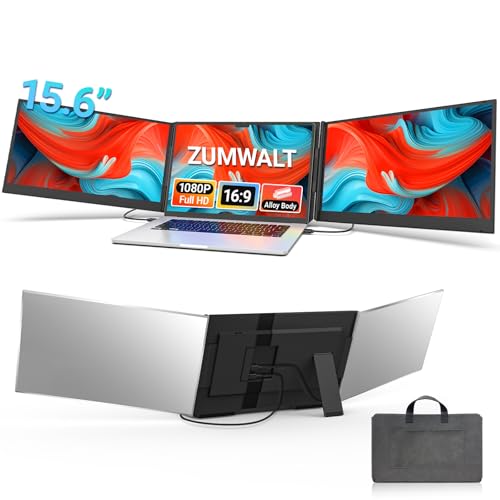
ZUMWALT 15.6″ Laptop Screen Extender

Orfibz Laptop Screen Extender 1.87lbs Ultra-Portable
SMISEACOW Laptop Screen Extender Triple 15.6″

APILDELLA 14” Dual Laptop Screen Extender

Anyking Laptop Screen Extender 14” FHD 1080P

Synnov 15.6“ Laptop Screen Extender
More Details On Our Top Picks
Vixtan leans into portability without giving up the extra panel count that makes laptop work feel less cramped. At 3.0 lbs, it stays in the category of travel-friendly add-ons rather than desk anchors, which matters for commuters and business trips.
The 14-inch class screen size keeps the footprint manageable, while the USB-C plug-and-play approach suits a fast setup at a hotel desk or a shared office table. The honest trade-off is that triple-screen layouts ask more from your bag and your laptop’s space, so this suits you best when screen room matters more than absolute minimal carry weight.
Strong Points
- Triple-screen layout gives you room for mail, documents, and reference windows at the same time.
- 3.0 lb weight keeps the carry burden sensible for regular travel.
- USB-C setup reduces the usual tangle that comes with mobile multi-monitor gear.
- Fits a wide 13 to 17.3 inch laptop range, so it works across many common machines.
Things To Consider
- Triple panels take up more space in a bag than a dual-screen option like Orfibz.
- Windows, Mac, and Chrome support is broad, though your exact port layout still matters.
- Owners commonly end up checking hinge tension and cable routing before each trip.
Who It Suits Best
Remote workers and frequent travelers who want a compact triple-screen setup will get the most from this model.
Where A Sibling Pick Shines
Anyking Laptop Screen Extender 14” FHD 1080P suits you better when you want a simpler dual-screen layout with a color-focused panel.
ZUMWALT takes a practical route by focusing on simpler connections, and that can save you time on a work trip or a temporary desk. The source notes a reduced-cable setup, with two USB-C to USB-C links doing the job on fully supported devices, so the desk stays tidier than many rival extenders.
Its 15.6-inch panel size gives you a little more visual room than the smaller entries in this list, which helps during spreadsheets or long email sessions. The trade-off is the broader body that usually comes with bigger screens, so it suits you best when desk comfort matters more than the most compact carry profile.
Upsides
- Two-cable setup can make packing and setup less fussy.
- 15.6-inch display size gives you more room for side-by-side windows.
- 1080P FHD panel is a sensible match for everyday office work.
- Works across Windows, Mac, and Android use cases in the source details.
Softer Spots
- Your device still needs the right USB-C support for the simplest connection path.
- That larger screen area can feel less nimble in a slim day bag.
Whose Shelf It Belongs On
Mobile professionals who value a tidier setup and a larger portable display will appreciate this one most.
Look Elsewhere When
Vixtan 14″ Triple Laptop Screen Extender is the better match for you if three screens matter more than a cleaner two-cable routine.
Orfibz is the lightest-feeling option in this group on paper, and that matters most when your laptop bag already carries a charger, notebook, and a few extras. The 14.2-inch FHD panel keeps the setup useful for split-screen work without asking for a bulky footprint.
For train rides, coworking days, or campus use, the simpler dual-screen format is easier to live with than a triple-panel rig like Synnov. You may find the smaller display count a smarter trade when portability outranks everything else, which is often the case for short trips.
Highlights
- 1.87 lb weight makes this the easiest carry in the lineup.
- 14.2-inch 1080P screen still gives you useful side-by-side space.
- Extend, mirror, and portrait modes cover different work styles.
- Compatible with Windows, Mac, Chrome, and Android in the source info.
Areas To Watch
- Dual-screen layout offers less total workspace than triple-screen picks.
- The ultra-light build may feel less substantial than thicker travel monitors.
Perfect Match For
Students, commuters, and digital nomads who pack light will get the most value from this pick.
Reach For A Different Pick When
SMISEACOW Laptop Screen Extender Triple 15.6″ suits you better if you want more display area for office-style multitasking.
SMISEACOW pushes toward a larger-screen feel while staying within a travelable form factor. The 15.6-inch IPS panel, with 1080P resolution, a 1000:1 contrast ratio, and 300 nits brightness, gives you the sort of visual room that helps during document work and side-by-side tabs.
The included soft leather carry bag is a nice touch for hotel stays and airport days, though the 3.9 lb weight means you’ll notice it more than the Orfibz model. That’s the trade-off: more panel presence and a more polished travel kit, at the cost of a bit more carry load.
Bright Spots
- Triple 15.6-inch panels create a roomy workspace for multitasking.
- IPS display technology helps keep colors and viewing angles practical for shared use.
- The carry bag makes storage and transport feel more organized.
- Plug-and-play use reduces the setup hassle during short work sessions.
Room For Improvement
- 3.9 lb weight is still portable, but not especially featherlight.
- Triple panels can feel like overkill for simple email-and-browser routines.
- Cleaning and packing the larger frame takes a little more care.
Right Fit For
Travelers who want a wider visual workspace and do a lot of document-heavy work will appreciate this setup.
Another Choice May Suit
Orfibz Laptop Screen Extender 1.87lbs Ultra-Portable fits you better when the lightest carry matters more than screen size.
APILDELLA keeps the format simple, and that often suits daily laptop work better than a more elaborate triple-screen setup. The zero-contact frame design is meant to avoid rubbing against your laptop screen, which is a sensible detail for anyone who carries the same machine into class, a co-working space, or a packed briefcase.
The sliding support arm gives it a wider fit range for 13 to 16 inch laptops, so the clamp style feels more adaptable than a fixed mount. There’s also a built-in speaker, which may help in a pinch during casual meetings, though most people will still prefer their usual headphones for clear audio.
Best Bits
- Dual-screen format is easier to live with for everyday office tasks.
- Zero-contact frame is a thoughtful touch for laptop protection during mounting.
- Sliding support arm broadens fit across several laptop sizes.
- Built-in speaker adds one more useful function without extra gear.
Minor Gripes
- Dual screens bring less total space than the triple-monitor choices here.
- Speaker quality is usually secondary on this kind of gear, so headphones still matter.
Made For
Office workers and students who want a straightforward second-screen routine will get the best fit here.
Skip It When
Synnov 15.6“ Laptop Screen Extender makes more sense when you want a full triple-monitor layout for deeper multitasking.
Anyking stands out most for its 100% sRGB panel support, which matters if you spend part of your day in color-sensitive work like design drafts, content review, or presentation prep. The 14-inch FHD panel and dual-screen format keep it practical without drifting into the bulk of a triple-screen system.
For business travel or a home office desk, that color detail can make the extra screen feel more deliberate and less like a convenience add-on. The limitation is obvious enough: you’re buying a more focused portable monitor, not the largest work surface in the roundup, so it fits best when color consistency matters.
Positives
- 100% sRGB support is useful for color-aware work.
- 14-inch FHD size keeps the format compact and practical.
- Dual-screen layout is easier to transport than bigger triple options.
- Good fit for business travel and a steady home-office desk.
Points To Note
- The two-screen format gives less workspace than the triple-screen picks.
- Color coverage matters most for visual work, so casual users may not use the full upside.
The Right Fit
Design-minded professionals and presentation prep work suit this model especially well.
Where A Sibling Pick Shines
APILDELLA 14” Dual Laptop Screen Extender is the better match if you want a simpler everyday setup with a speaker built in.
Feature Rundown
Synnov is built for the kind of desk work that gets messy fast, especially when you’re juggling chat, documents, and reference material at once. The triple-monitor layout gives you a broad spread of space, and the 15.6-inch size makes the setup feel more like a portable workstation than a casual side screen.
The catch is predictable: more panels usually mean more structure to handle, so this is less of a throw-in-the-bag choice than Orfibz. For home office use, though, that trade-off can feel worthwhile, because the wider view helps you keep more open at once without constant tab hopping.
Plus Points
- Triple-screen format gives you serious room for multitasking.
- 15.6-inch panels make the workspace feel less cramped.
- Works with Windows, MacOS, and Chrome according to the source.
- FHD resolution keeps the displays useful for everyday office work.
Small Caveats
- Triple screens add bulk, so packing takes a little more planning.
- The larger footprint suits desk use better than ultra-light travel.
Who Should Grab It
Home-office multitaskers and anyone living in spreadsheets will get the most out of this layout.
Swap It Out When
Orfibz Laptop Screen Extender 1.87lbs Ultra-Portable fits you better when carry weight matters more than total screen space.
Core Details
What Matters Most Before You Choose
Screen Count And Carry Weight
Triple-screen extenders make the most sense for document-heavy work, while dual-screen models stay easier to pack and manage. The right answer usually depends on how often you move between desk, hotel, and home.
Fit, Ports, And Daily Setup
Laptop size range matters just as much as display size, because a stable mount keeps the whole setup from feeling fussy. USB-C support can simplify life, but your laptop’s port layout still needs to line up with the model you choose.
Display Quality And Work Type
FHD is enough for most office tasks, but color-sensitive work benefits from stronger color coverage like 100% sRGB. A sharper or better-tuned panel can feel worth it for design review, reports, and presentation prep.
Travel Comfort Versus Desk Comfort
Lighter models suit people who pack often, while larger panels are easier to live with during long work sessions. Pick the setup that matches your most common day, not the occasional one.
Two Things Worth Keeping In Mind
Hidden Buying Traps
Many shoppers focus on screen size and forget the laptop fit range, which leads to awkward mounting later. Port compatibility deserves the same attention, especially on older laptops with limited USB-C support.
The Upgrade Payoff
Higher-tier models usually spend the extra cost on larger panels, stronger build details, or better color handling. That extra spend makes the most sense for people who work longer hours on a laptop and want a setup that feels less cramped.
Frequently Asked Questions
Are laptop screen extenders useful for everyday office work?
Yes, they make it easier to keep email, documents, and chat open at the same time. That usually saves more time than a single laptop screen can.
Should you choose a dual or triple-screen setup?
Dual-screen models stay easier to carry and set up. Triple-screen models make more sense for heavier multitasking and larger work surfaces.
Does USB-C matter for these extenders?
USB-C can simplify the cable setup and reduce clutter. Your laptop still needs the right support for the smoothest connection path.
What screen size works best for portable use?
Fourteen to 15.6 inches is a practical middle ground for many people. Smaller sizes travel more easily, while larger panels feel roomier on a desk.
Who benefits most from monitor extenders for laptop setups?
Remote workers, students, and frequent travelers usually get the strongest benefit. Any job that involves lots of tab switching can feel less cramped.
Closing Thoughts
For laptop work that feels cramped, a good screen extender can change the rhythm of your day without forcing a full desktop setup. Vixtan and Synnov suit heavier multitaskers, while Orfibz and APILDELLA keep things simpler. Pick the shape that matches your routine, then let the extra space do the quiet work.
