


You want a laptop that games, edits, and streams without draining your savings, and that’s exactly what this list solves. Every machine here pairs a dedicated or capable integrated GPU with enough RAM and SSD storage to feel quick in daily use. Students, first-time gamers, and creators on a budget all have a fit below. The trade-offs are honest ones, spelled out so nothing surprises you after checkout.
The Shortlist At A Glance

NIMO Gaming Laptop Ryzen 7 7735HS 16GB DDR5 1TB SSD

NIMO Gaming Laptop Ryzen 7 7735HS 16GB DDR5 1TB SSD

ASUS ROG Strix G16 (2025) RTX 5060 G615JMR-AS74
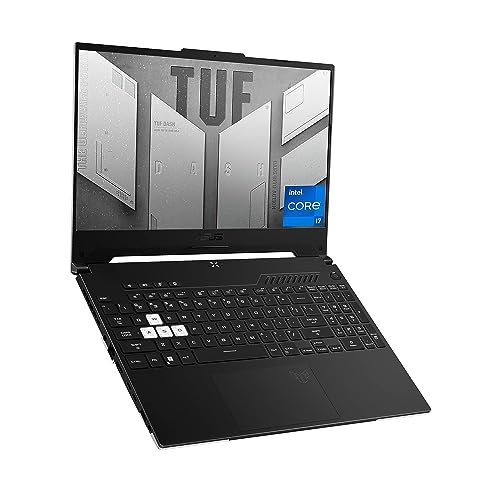
ASUS TUF Dash 15 RTX 3060 FX517ZM-AS73

Acer Nitro V 16S AI RTX 5060 ANV16S-41-R2AJ

HP Victus 15.6 FHD 144Hz RTX 3050

NIMO 15.6 AI Creator Ryzen 5 6600H

HP Victus RTX 4050 i5-13420H

NIMO 15.6 IPS Light Gaming Ryzen 5 6600H

NIMO Light Gaming Laptop Ryzen 7 7735HS
More Details On Our Top Picks
This one leans on AMD’s Radeon 680M, an integrated GPU built on RDNA 2 architecture that punches well above typical onboard graphics. Paired with the eight-core Ryzen 7 7735HS, it handles 1080p gaming at modest settings and video editing without choking. For dorm rooms and shared apartments where a bulky gaming rig isn’t welcome, that combination makes a lot of sense.
The 1TB SSD means you won’t be uninstalling games every month, and the fingerprint reader plus backlit keyboard round out a package aimed at people who use one machine for everything.
Strong Points
- Radeon 680M graphics deliver playable 1080p performance without a discrete GPU’s heat or fan noise.
- A full terabyte of storage holds a large game library plus coursework or project files comfortably.
- 100W USB-C charging lets you top up from a single compact brick instead of a heavy barrel charger.
- The screen folds flat to 180 degrees, handy for sharing work across a desk.
Things To Consider
- Integrated graphics still trail dedicated cards in demanding modern titles, so expect lowered settings in newer releases.
- The 256GB-class alternatives elsewhere on this list cost less, but you give up half the storage here.
Who It Suits Best
Students and hybrid workers who game casually, edit occasionally, and want one dependable machine rather than two.
Where A Sibling Pick Shines
Competitive players chasing high frame rates will get more from the ASUS ROG Strix G16’s 165Hz panel and RTX 5060.
On paper this listing mirrors the pick above almost exactly: same Ryzen 7 7735HS, same Radeon 680M graphics, same 16GB of DDR5 memory and terabyte drive. In practice the difference comes down to availability and pricing at any given moment, since sellers rotate stock between separate listings. Checking both before you commit is the smart move.
Everything said about real-world behavior applies here too. The 28W processor sips power compared to HX-class chips, so fan noise stays reasonable during long study sessions, and the USB-C charging setup travels light in a backpack.
What We Like
- Identical core hardware to our top choice, giving you a second route to the same value.
- DDR5 memory keeps multitasking smooth when dozens of browser tabs meet a game launcher.
- Fingerprint login saves typing passwords between classes or meetings.
Worth Noting
- Stock on secondary listings tends to fluctuate more than flagship pages, so confirm the exact configuration before ordering.
- Like its twin, this unit relies on integrated graphics, which caps headroom in graphically heavy 2026 releases.
Key Specs
Made For
Shoppers comfortable comparing live listings to land the strongest configuration-to-cost ratio in this exact spec.
Consider Something Else When
Dedicated-GPU performance matters more than price, in which case the HP Victus RTX 4050 model is the better spend.
Step up from the NIMO machines and the difference is immediate: a dedicated GeForce RTX 5060 driving a 165Hz panel with a 3ms response time. That refresh rate, meaning the screen redraws 165 times per second, turns fast shooters and racing games noticeably smoother than a standard 60Hz display. Esports players will feel it within minutes.
The Intel Core i7-14650HX brings serious multicore muscle for streaming while you play, and Wi-Fi 7 keeps latency low on compatible networks. Owners commonly report the ROG Intelligent Cooling doing its job well, though you’ll hear the fans under sustained load, which is normal for this class.
Highlights
- The 165Hz/3ms FHD+ 16:10 display gives competitive games a fluidity cheaper panels can’t match.
- RTX 5060 graphics handle modern titles at high settings with ray tracing where supported.
- Dolby Atmos audio adds depth to games and films without external speakers.
- ROG Intelligent Cooling sustains performance through long sessions.
Trade Offs
- Fan noise ramps up noticeably during demanding games, worth knowing for shared spaces.
- The larger 16-inch body and heavier build make it a desk machine more than a daily commuter.
Right Fit For
Competitive and AAA gamers who prioritize frame rates and cooling over portability.
Not Your Match When
You carry your laptop daily; the slimmer Acer Nitro V 16S balances similar GPU power in a lighter shell.
The TUF Dash 15 occupies a sweet spot: a true dedicated GPU, the GeForce RTX 3060, inside a chassis thin enough to actually carry. Its MUX Switch deserves a mention, since it routes the display directly to the graphics card rather than through the CPU’s integrated chip, squeezing out extra frames in games. That’s a feature some pricier laptops skip.
Thunderbolt 4 support means fast external drives and docking setups, useful for streamers moving large files. The 144Hz screen keeps motion clean, though it trails the Strix G16’s 165Hz panel slightly. Multiple upgraded configurations exist with larger RAM and SSD options if you’d rather buy capacity upfront than open the case later.
Upsides
- MUX Switch directs full RTX 3060 power straight to the display for better frame rates.
- Thunderbolt 4 enables rapid external storage and single-cable docks.
- Thin profile for a dedicated-GPU laptop, easier on shoulders during commutes.
- Higher-memory configurations are available for heavy multitaskers.
Minor Gripes
- The base 512GB SSD fills quickly with modern game installs, so plan on an upgrade eventually.
- As a 2022-era design, its CPU generation trails the newer chips elsewhere on this list.
Quick Facts
Who Will Love This
Streamers and students who need genuine GPU power but refuse to haul a brick-thick machine around campus.
Look Elsewhere When
Storage space outranks everything else; the NIMO Ryzen 7 with its 1TB drive removes that worry entirely.
Where most budget gaming laptops ship with 16GB of memory, the Nitro V 16S starts at 32GB of DDR5, and that changes how you use it. Video editors juggling 4K timelines, or anyone running a game, Discord, and Chrome simultaneously, simply won’t hit the memory wall as soon. The RTX 5060 underneath matches the Strix G16’s graphics muscle.
The slim build is the surprise here. Acer managed a portable footprint around a 16-inch WUXGA IPS panel refreshing at 180Hz, which edges even the ASUS on smoothness. You may find the plastic-leaning construction feels less premium than metal-clad rivals, but the internal hardware earns its keep.
Bright Spots
- 32GB of DDR5 memory future-proofs heavy creative and multitasking workloads.
- 180Hz WUXGA IPS display delivers crisp color and very fluid motion.
- RTX 5060 laptop GPU brings current-generation features including strong AI-assisted rendering.
- Slim chassis makes it genuinely travel-friendly for a 16-inch gaming machine.
Small Caveats
- Wi-Fi 6 rather than the newer Wi-Fi 7 found on the ASUS ROG Strix G16.
- Slim bodies leave less room for massive cooling, so expect warm exhaust during marathon sessions.
At A Glance
Perfect Match For
Content creators and heavy multitaskers who want workstation-grade memory without workstation pricing.
Skip It When
Your network gear already supports Wi-Fi 7 and low-latency wireless matters; the ASUS ROG Strix G16 covers that.
For many first-time gaming laptop owners, this Victus is the sensible entry point. The GeForce RTX 3050 is an older card by 2026 standards, yet it still plays esports staples like Valorant, Rocket League, and CS2 at high frame rates, and older AAA titles at medium settings. The 144Hz display makes those frames count.
Windows 11 Pro comes preinstalled, a small but real perk for anyone connecting to school or workplace domains. The Performance Blue finish stands out in a sea of black plastic, and the backlit keyboard keeps late-night sessions usable. Compared to the NIMO picks earlier, you trade integrated-GPU efficiency for a proper discrete card.
Reasons To Buy
- Dedicated RTX 3050 graphics bring ray-traced lighting and DLSS support to a budget tier.
- 144Hz Full HD panel keeps competitive games looking fluid.
- Windows 11 Pro included, handy for remote-work and campus management tools.
- Distinctive blue styling that doesn’t scream “gamer” in a lecture hall.
Points To Note
- The i5-12450H and RTX 3050 combo shows its age against newer chips in demanding 2026 releases.
- 512GB of PCIe storage disappears fast once several large games move in.
Who Should Grab It
Casual and esports-first players buying their first dedicated-GPU laptop on a tight budget.
Another Choice May Suit
Anyone wanting longer relevance should stretch toward the HP Victus RTX 4050 version later in this list.
This 2026-edition NIMO targets a different crowd than the gaming-first models above. The Ryzen 5 6600H is a six-core chip tuned for creator work like photo editing and business productivity, backed by Radeon 660M graphics that handle light gaming and 1080p playback gracefully. A premium metal top cover sets it apart from the all-plastic norm at this level.
The catch is storage: 256GB fills quickly once creative projects and a few games land on the drive. Treat it as a starting point and budget for an external SSD, or lean on cloud storage. For writers, marketers, and students whose heaviest task is a timeline in Premiere, the trade is easy to accept.
Plus Points
- Metal lid adds a sturdier, more professional feel than typical budget plastics.
- Radeon 660M graphics cover light gaming and smooth media editing.
- Backlit keyboard and fingerprint reader suit early-morning library sessions.
- 100W USB-C charging keeps the bag light for commuters.
Honest Caveats
- The 256GB SSD is the smallest on this list; plan additional storage from day one.
- Not built for modern AAA gaming, despite the gaming-laptop label.
Best Suited To
Video editors, business users, and students who value build quality and portability over raw gaming frames.
Swap It Out When
Gaming leads your priority list; the similarly priced NIMO Ryzen 7 7735HS model offers stronger graphics and double the storage.
Think of this Victus as the middle rung between the RTX 3050 model earlier and the RTX 5060 machines near the top. The GeForce RTX 4050 brings current-generation features, including DLSS frame generation, which can meaningfully lift frame rates in supported titles. Combined with the 144Hz Full HD panel, mainstream 1080p gaming feels appropriately modern.
The Intel Core i5-13420H provides plenty of everyday speed for schoolwork and content editing alongside play. Owners commonly report the Victus line runs warm under load, so a hard flat surface helps airflow; soft bedding tends to choke the vents. Against the Acer Nitro V 16S, you give up half the RAM but gain a lower entry commitment.
Standout Traits
- RTX 4050 supports DLSS frame generation for smoother gameplay in modern titles.
- 144Hz display keeps fast action readable and responsive.
- Balanced CPU-GPU pairing suits gaming and creative work equally.
- 16GB of RAM handles typical multitasking without upgrades.
Softer Spots
- Thermals run warm during extended sessions per widely reported owner feedback, so ventilation placement matters.
- 512GB SSD again demands a storage plan for large game libraries.
Feature Snapshot
The Right Fit
Mainstream gamers who want current-generation GPU features without paying flagship prices.
Reach For A Different Pick When
Heavy video editing drives your purchase; the Acer Nitro V 16S doubles the memory for that workload.
This is the tinkerer’s option on the list. The Ryzen 5 6600H and Radeon 660M pairing covers esports titles and coursework comfortably, but the real story is expandability: the design lets you swap in a larger SSD and more memory down the road without much fuss. Starting small and upgrading later stretches a tight budget further than buying capacity upfront.
The 256GB drive again asks for patience, and the IPS panel prioritizes accurate color over blistering refresh rates. Compared to the AI Creator edition reviewed earlier, you’re getting essentially the same platform in a configuration aimed at hands-on owners rather than out-of-the-box polish.
Best Bits
- Accessible upgrade path for storage and memory extends usable life significantly.
- IPS panel renders colors accurately for photo work and media.
- Ryzen 5 6600H stays cool and quiet in everyday tasks.
- Fingerprint reader and backlit keyboard come standard.
Areas To Watch
- Base storage is minimal, so an SSD purchase is effectively part of the total cost.
- Light-gaming positioning means no discrete GPU headroom for demanding new releases.
Core Details
Built With In Mind
Hands-on students and first-time owners happy to add storage themselves in exchange for a lower starting cost.
Where Another Pick Suits Better
Anyone who never opens a laptop case should choose the pre-loaded 1TB NIMO Ryzen 7 configuration instead.
Closing the list is another take on NIMO’s proven Ryzen 7 7735HS platform, the same efficient eight-core chip and Radeon 680M graphics seen in our opening pick. The emphasis here sits on the “light” part of the name: a modest 28W thermal envelope keeps the chassis slim, the fans quiet, and battery drain reasonable through a day of lectures or café work sessions.
You give up some peak performance versus higher-wattage gaming laptops, and the exact memory and storage configuration varies by listing, so read the spec sheet carefully before ordering. For commuters who game in the evenings rather than tournament players, that efficiency trade reads as a feature, not a flaw.
Positives
- Low-power Ryzen 7 design runs cooler and quieter than typical gaming laptops.
- Radeon 680M graphics remain genuinely playable for 1080p esports and indie titles.
- USB-C charging simplifies travel with one compact adapter.
Room For Improvement
- Configuration details differ between listings, so verify RAM and SSD size on the product page itself.
- Peak gaming performance trails the dedicated-GPU options higher up this list.
Whose Shelf It Belongs On
Daily commuters and note-takers who want evening gaming capability without carrying a hot, loud machine.
A Better Fit Elsewhere
Desk-bound players chasing maximum frames should head straight for the ASUS ROG Strix G16 instead.
What Matters Most Before Choosing Bangs For Buck Laptops With Graphics Cards
Dedicated Versus Integrated Graphics
A dedicated GPU, like the RTX 3050 or RTX 5060, carries its own memory and processing cores, delivering far more gaming headroom than integrated solutions such as the Radeon 680M. Integrated chips draw power from the same system resources as your CPU, which keeps laptops cooler, quieter, and cheaper. Casual and esports players lose little with integrated graphics; anyone chasing modern AAA titles needs the dedicated route.
Memory And Storage Realities
Sixteen gigabytes of DDR5 is the practical floor for smooth multitasking in 2026, and the Acer Nitro V 16S shows why 32GB appeals to creators. Storage matters just as much, because modern games routinely consume 100GB or more apiece. A 256GB drive forces constant housekeeping, while 1TB buys years of breathing room.
Displays And Daily Comfort
Refresh rate, measured in hertz, describes how often the screen updates each second. Panels at 144Hz or above make fast games visibly smoother, a difference competitive players notice immediately. Weight and charging style matter too: USB-C charging and sub-five-pound builds reward anyone hauling a laptop across campus daily.
Cooling And Long-Term Ownership
Slimmer bodies trap heat, and trapped heat throttles performance. Widely reported owner experience suggests keeping vents clear and using hard surfaces during long sessions. User-upgradeable designs, like the NIMO models, let you extend lifespan with a simple SSD swap years from now.
Key Considerations Across These Picks
Traps First Timers Fall Into
The most common mistake is buying for today’s favorite game only. Titles grow heavier each year, so a GPU tier above your current need ages better. Another slip is ignoring storage math: a 512GB drive sounds generous until three large installs arrive. Check the exact configuration on the listing page, since identical-looking models often ship with different memory or drive sizes.
What Separates Premium From Basic
Higher-tier machines pay for cooling engineering, faster displays, and newer GPU generations with features like DLSS frame generation. That extra spend translates directly into higher frame rates and more years before an upgrade feels necessary. Competitive players and content creators recover that value quickly; casual users often don’t need it yet.
Frequently Asked Questions
Can integrated graphics really handle gaming?
Yes, for esports titles and older releases at 1080p. Modern AAA games demand a dedicated GPU for comfortable settings.
Is 16GB of RAM enough in 2026?
For gaming and general productivity, yes. Heavy video editing or virtualization benefits from 32GB.
How important is a 144Hz or higher display?
Very noticeable in fast-paced games, less so in strategy titles or office work. Competitive players benefit most.
Are budget brands like NIMO reliable?
Their spec sheets are competitive, and owner feedback on the Ryzen platforms is generally positive. Established brands offer broader service networks, which matters to some shoppers.
Should I upgrade the SSD myself?
Many of these laptops allow straightforward drive swaps. It’s usually cheaper than paying for factory storage upfront.
Closing Thoughts
Value in this category comes from matching the GPU tier to your actual games, then spending what’s left on memory and storage. The NIMO Ryzen 7 models reward budget-conscious all-rounders, the Victus pair anchors the mainstream, and the Strix G16 and Nitro V 16S serve players ready to invest. Whichever direction fits your desk and backpack, the honest specs above should make the decision a calm one.
