


A dedicated graphics chip changes what a laptop can do, from smooth high-refresh gaming to video editing that doesn’t stutter. The catch is sorting through dozens of near-identical spec sheets without overspending on power you’ll never touch. This roundup narrows the field to ten machines across gaming, creative work, and everyday use, each matched to a specific kind of owner.
A Snapshot Of The Selections

ASUS ROG Strix G16 (2025) RTX 5060 Gaming Laptop

ASUS TUF Gaming F16 (2025) RTX 5050

Apple MacBook Pro M5 14.2-inch (24GB)

Acer Nitro V ANV15-52-76NK

Acer Nitro V 16S AI RTX 5060
Apple MacBook Pro M5 14.2-inch (16GB)
ASUS TUF Gaming F16 FX607VU-SS53

Acer Nitro V i5-13420H RTX 5050
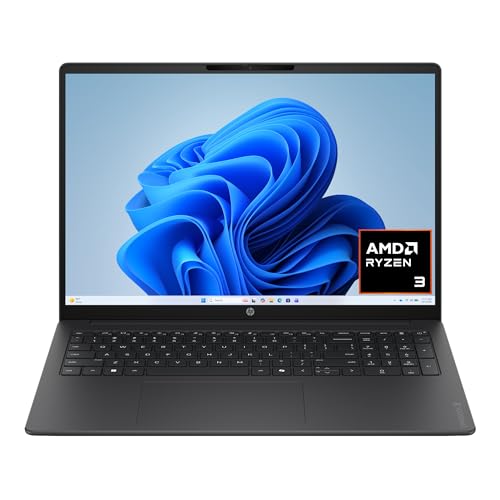
HP OmniBook 3 16-inch Touchscreen

Acer Nitro 16S AI Copilot+ RTX 5070 Ti
A Breakdown Of The Leading Choices
The Strix G16 pairs a 16-inch FHD+ panel running at 165Hz with a 3ms response time, which matters most in fast shooters where motion blur costs you kills. Under the hood sits an Intel Core i7-14650HX alongside the RTX 5060, a combination aimed squarely at players who want high frame rates rather than just playable ones.
In a dorm or shared apartment, the ROG Intelligent Cooling system earns its keep by holding fan noise down during long sessions. The esports-style keyboard and Dolby Atmos audio round out a package built for people who game most evenings.
Notable Upsides
- 165Hz refresh with 3ms response keeps competitive play fluid and readable.
- RTX 5060 graphics handle modern titles at high settings without constant tweaking.
- 1TB Gen 4 SSD means your library lives locally instead of on slow external drives.
- Wi-Fi 7 support future-proofs home networking for the next few router upgrades.
- ROG Intelligent Cooling sustains performance through marathon sessions.
Things To Consider
- Owners commonly report gaming laptops this size run warm, so keep vents clear and dust the fans every few months.
- 16GB of DDR5 fills up quickly once a game, Discord, and a browser share memory.
Who It Suits Best
Competitive players and anyone who treats their laptop as their main gaming rig will get the most from this machine.
Where A Sibling Pick Shines
Shoppers wanting similar power in a slimmer chassis should look at the Acer Nitro V 16S AI instead.
TUF stands for “The Ultimate Force,” and the line’s reputation rests on durability first. This 2025 version carries an embossed logo and understated styling that won’t look out of place in a lecture hall, backed by an Intel Core i5-13450HX and the newer RTX 5050 GPU with Advanced Optimus, which switches graphics automatically between battery-saving integrated chips and the dedicated one.
The 100% sRGB color coverage on the 165Hz panel is a genuine bonus for photo work between matches. Compared to the pricier ROG Strix above, you give up some CPU muscle but keep the same screen philosophy.
Strengths Worth Knowing
- Advanced Optimus extends unplugged time during classes or commutes.
- Full sRGB coverage makes streaming and casual editing look accurate.
- TUF builds are widely reported to shrug off daily backpack life better than glossy rivals.
Small Caveats
- The 512GB SSD fills fast with modern games, so budget for an external drive or a later upgrade.
- An HX-class i5 runs warmer than lower-wattage chips in thin laptops.
Made For
Students and first-time gaming laptop owners who want current-generation graphics without stretching their budget.
Swap It Out When
Heavy multitaskers juggling large projects may prefer the extra headroom of the Acer Nitro V 16S AI’s 32GB configuration.
Apple’s approach to graphics differs from the Windows crowd: the M5’s 10-core GPU shares unified memory with the CPU, so video editors and 3D artists see large files handled without the swap-file lag cheaper machines suffer. The 14.2-inch Liquid Retina XDR display reaches very high peak brightness, which makes HDR footage and outdoor editing genuinely usable.
On a long-haul flight or a full day of meetings away from an outlet, the battery endurance is the quiet headline here. Space Black finish also hides fingerprints better than silver, a small thing you notice daily.
What Works In Its Favor
- XDR display delivers deep contrast and strong HDR for color-critical work.
- Unified memory architecture lets the 24GB pool serve both CPU and GPU efficiently.
- All-day battery life suits travel-heavy schedules.
- Runs cool and quiet under typical creative loads, per widespread owner reports.
Points To Note
- Windows-only games and some professional software simply don’t run here, so check your app list first.
- Storage upgrades after purchase aren’t practical, so choose capacity carefully upfront.
Right Fit For
Video editors, photographers, and developers already living in the Apple ecosystem who want pro-level output on the go.
Another Choice May Suit
PC gamers should stay with the ASUS ROG Strix G16, since macOS gaming libraries remain limited.
This Nitro V config splits the difference nicely: an Intel Core i7-13620H gives it more processing threads than the entry TUF below, while the RTX 4050 handles 1080p gaming comfortably. The 15.6-inch IPS panel refreshes at 165Hz, so fast motion stays clean even though resolution is standard Full HD.
For a student hauling one machine between dorm and library, the 1TB drive is the standout, since it swallows a full semester of coursework plus several large games. Backlit keys help with late-night sessions too.
Standout Benefits
- 1TB Gen 4 SSD removes the storage anxiety most budget gaming laptops carry.
- i7 processor keeps streaming, browsing, and coursework running alongside games.
- IPS panel offers wide viewing angles for shared-screen movie nights.
- Backlit keyboard makes dim rooms workable.
Worth Bearing In Mind
- Wi-Fi 6 rather than the newer 6E or Wi-Fi 7 standards found elsewhere on this list.
- The RTX 4050 trails the 50-series GPUs here in ray-traced titles; owners commonly report lowering settings in the heaviest releases.
Key Specs
Who Will Love This
College students who need one dependable machine for lectures, essays, and evening gaming sessions.
Reach For A Different Pick When
Anyone prioritizing the newest GPU generation over raw storage should step up to the Acer Nitro V i5-13420H model further down.
Where the ROG Strix chases raw frame rates, this Nitro V 16S trades a little thickness for portability while keeping the same RTX 5060 class of graphics. The AMD Ryzen 7 260 processor sips power compared to big HX chips, which helps in a slim chassis, and the 180Hz WUXGA panel adds a touch more sharpness than plain Full HD.
That 32GB of DDR5 is the real differentiator. Streamers running OBS alongside a game, or anyone keeping dozens of browser tabs alive, will feel the difference immediately against the 16GB machines earlier on this list.
What Stands Out
- 32GB DDR5 handles streaming, editing, and heavy multitasking without swapping.
- RTX 5060 brings current-generation features like improved frame generation.
- 180Hz refresh edges past the 165Hz panels on most rivals here.
- Slim profile slips into a backpack more easily than chunky 15-inch rigs.
Details To Watch
- Thin bodies leave less room for cooling, so expect fans to spin up sooner under sustained load, something owners of slim gaming laptops commonly note.
- Wi-Fi 6 only, despite the otherwise modern spec sheet.
Feature Snapshot
Best Suited To
Commuters and travelers who game seriously but refuse to carry a five-pound brick everywhere.
Look Elsewhere When
Desk-bound players chasing maximum frames per dollar will find the ASUS ROG Strix G16’s cooling advantage worth the extra bulk.
This is the same 14.2-inch MacBook Pro as the 24GB version reviewed earlier, trimmed to 16GB of unified memory. Everything else carries over: the M5’s 10-core CPU and GPU, the XDR display, and the battery life that makes wall outlets optional for a day.
For most photographers, writers, and mid-weight video editors, 16GB covers the workload comfortably. You may find the ceiling when juggling multiple 4K timelines or huge Lightroom catalogs, and that’s exactly the moment the 24GB sibling earns its premium.
A Strong Showing
- Identical XDR display quality to the higher-memory model.
- M5 efficiency keeps the chassis silent during everyday creative work.
- Lower entry cost than the 24GB variant for lighter workflows.
Less Ideal Details
- 16GB unified memory can pinch in memory-hungry pro apps; there’s no upgrade path later.
- Same macOS software limitations as its sibling regarding Windows-exclusive tools.
Whose Shelf It Belongs On
Freelance designers, podcast editors, and students in creative programs whose projects fit comfortably within 16GB.
Consider Something Else When
Anyone cutting multi-camera 4K regularly should pay the difference for the 24GB MacBook Pro M5 instead.
Entry into RTX gaming doesn’t get much cleaner than this. The Core 5 210H is a mainstream chip rather than an HX monster, and paired with the RTX 4050 it targets steady 1080p play instead of record-breaking frame counts. The 144Hz IPS-level panel still beats any office laptop’s 60Hz screen by a wide margin.
Against the 2025 TUF F16 earlier in this list, you’re trading 21Hz of refresh rate and the newer 5050 GPU for a friendlier outlay. For someone upgrading from integrated graphics, either jump feels enormous; this one just costs less to make.
Real-World Strengths
- RTX 4050 delivers genuine ray tracing and DLSS at an accessible tier.
- 144Hz panel transforms how older 60Hz screens feel in motion.
- Advanced Optimus preserves battery during non-gaming hours.
- TUF chassis holds up to daily transport, based on the line’s track record.
Trade Offs
- 512GB storage and a midrange CPU mean this is a starting point, not an endgame build.
- 144Hz trails the 165Hz and 180Hz panels elsewhere here.
The Right Fit
Teenagers, casual players, and anyone buying their first dedicated-GPU laptop on a tight budget.
Not Your Match When
Players wanting current-generation graphics should stretch for the Acer Nitro V i5-13420H with its RTX 5050.
The interesting bit here is the RTX 5050’s 8GB of GDDR7 VRAM, the faster memory type debuting with Nvidia’s Blackwell generation. More VRAM helps textures and mods in open-world games, and having it at this tier is unusual. The familiar 15.6-inch 165Hz IPS panel and Core i5-13420H complete a straightforward, no-surprises package.
It also ships with a mouse pad bundled in, a small courtesy for someone setting up a first proper battlestation. Compared to the older RTX 4050 TUF above, this is the smarter buy purely on GPU generation.
Useful Highlights
- 8GB GDDR7 VRAM gives texture-heavy games breathing room.
- 165Hz refresh matches pricier panels on this list.
- Bundled mouse pad saves a separate purchase for new setups.
Some Limits To Know
- The i5-13420H has fewer cores than the i7 in the ANV15-52, so heavy streaming plus gaming simultaneously feels tighter.
- 512GB SSD again demands external storage planning for large libraries.
Quick Facts
Who Should Grab It
First-time gaming laptop shoppers and casual players who want the newest GPU generation without paying enthusiast prices.
Where Another Pick Suits Better
Streamers needing more CPU cores should pick the Acer Nitro V ANV15-52-76NK with its i7 processor.
Not everyone needs a gaming rig, and the OmniBook 3 exists for exactly those people. Its Radeon 610M is integrated graphics built into the Ryzen 3 processor, fine for streaming video, Office work, and browser-based games, but not for modern AAA titles. The honest framing: this is the value anchor of the list, included because a big 16-inch 2K touchscreen at this level is genuinely rare.
Eight gigabytes of RAM and a 256GB SSD keep things simple. Light users report no complaints; heavier multitaskers will feel the limits within a year.
The Case For It
- 16-inch 2K touchscreen offers far more workspace than typical budget screens.
- Ryzen 3 efficiency supports all-day battery for classes and couch browsing.
- Mica Silver finish looks more expensive than the category usually does.
Factors To Consider
- 256GB storage fills quickly with photos and videos; plan on cloud or external storage.
- Integrated graphics rule out demanding PC games entirely.
Best Suited To
High school students, note-takers, and households needing a reliable second computer for browsing and streaming.
Skip It When
Any gaming ambition at all points you toward the ASUS TUF Gaming F16 FX607VU-SS53 instead.
Sitting at the top of this list, the Nitro 16S combines the strongest GPU here, an RTX 5070 Ti, with a Ryzen AI 9 365 processor and a 2560×1600 WQXGA panel refreshing at 180Hz. That resolution bump over the Nitro V 16S makes text crisper and games noticeably sharper on a 16-inch screen.
The 2TB Gen 4 SSD deserves mention too: two terabytes means years of installs before you think about cleanup. Copilot+ certification adds on-device AI features for supported apps, which matters more each quarter as software catches up.
What Makes Sense
- RTX 5070 Ti pushes high settings at WQXGA resolution in demanding titles.
- 2TB storage eliminates library management stress for years.
- Ryzen AI 9 365 brings strong multi-core performance for streaming and rendering.
- 32GB DDR5 matches the multitasking headroom of the Nitro V 16S.
- Wi-Fi 6E support suits crowded networks in apartments and dorms.
Potential Sticking Points
- High-end components generate real heat; regular vent cleaning keeps sustained performance steady, as slim gaming laptops commonly require.
- You’re paying for capability many casual players won’t fully exercise.
Core Details
Who Should Grab It
Enthusiast gamers, aspiring streamers, and creators who want one machine to handle everything for the next four-plus years.
Another Choice May Suit
Budget-focused players get 90% of the experience from the ASUS TUF Gaming F16 (2025) RTX 5050 at a much gentler cost.
What Matters Most Before Choosing Laptops With Gpu
Match The GPU Tier To Your Games
A dedicated GPU (graphics processing unit) renders game visuals independently of the main processor. Entry cards like the RTX 4050 and 5050 deliver smooth 1080p play, while the 5060 and 5070 Ti push higher resolutions and ray tracing, a lighting technique that simulates realistic reflections. List the three games you actually play, then check their recommended requirements before spending upward.
Memory And Storage Shape Daily Life
Sixteen gigabytes of RAM covers gaming plus normal multitasking; streamers and editors benefit from 32GB. Storage works the same way: modern titles routinely exceed 100GB each, so a 512GB drive fills within a handful of installs. Choosing 1TB or 2TB upfront avoids juggling external drives later.
Screens Decide How Good Performance Feels
Refresh rate, measured in hertz, is how many times per second the display redraws. A 165Hz panel shows motion far more cleanly than a basic 60Hz screen, which is why nearly every gaming option here uses one. Resolution matters too: Full HD looks fine at 15 inches, while 1600p panels reward the stronger GPUs that can drive them.
Weight Is A Real Cost
Slim machines like the Nitro V 16S trade some cooling headroom for portability. Desk-bound players lose nothing choosing a thicker chassis; commuters feel every pound daily.
Key Considerations Across These Picks
Traps First Timers Fall Into
The most common mistake is buying maximum GPU while ignoring RAM and storage, then wondering why the machine stutters with a browser open. Another frequent slip: assuming every “gaming” badge means good thermals. Slim designs throttle sooner, so read cooling descriptions, not just marketing names.
When Paying More Pays Off
Higher tiers bundle faster memory standards, bigger SSDs, and brighter panels together, which is why the gap between a 4050 machine and a 5070 Ti one feels larger than the spec sheet suggests. Paying up makes sense when you keep laptops four years or more; short-term owners rarely recoup the difference.
Frequently Asked Questions
Do I need a dedicated GPU for everyday tasks?
No, integrated graphics handle browsing, office work, and streaming easily. A dedicated card matters for gaming, 3D work, and video editing.
Is more VRAM always better?
More VRAM helps with high-resolution textures and large creative files. Beyond your actual workload, though, extra capacity adds cost without visible benefit.
Can I upgrade a laptop GPU later?
In virtually all modern laptops, the GPU is soldered and cannot be swapped. Buy the performance level you expect to need for the machine’s whole life.
Does a 165Hz screen matter outside gaming?
Yes, scrolling and window movement feel smoother at higher refresh rates. The benefit is most obvious in games, but everyday use feels nicer too.
How much storage should a gaming laptop have?
One terabyte is the comfortable minimum for a growing library. Two terabytes suit anyone installing many large titles or editing video locally.
Closing Thoughts
The right choice comes down to honesty about how you actually use a laptop. Gamers should start with the ASUS ROG Strix G16 or stretch to the Acer Nitro 16S for top-tier power, while students on a budget get remarkable value from the TUF F16 or the entry Nitro V. Creative professionals remain well served by either MacBook Pro M5. Whichever direction fits, matching the machine to your real routine beats chasing spec sheets every time.
