


Choosing a headset for your PC sounds simple until you’re three returns deep into ear cups that pinch or mics that make you sound underwater. Whether you spend your days in video calls, your evenings in ranked matches, or your commute wrapped in music, the right pair changes how the whole setup feels. This list covers ten options across gaming, office work, and everyday listening, from budget-friendly picks to feature-loaded flagships. Each one earned its spot through real-world fit rather than spec-sheet padding.
The Lineup, Simplified

Soundcore Q20i Hybrid ANC Headphones (White)
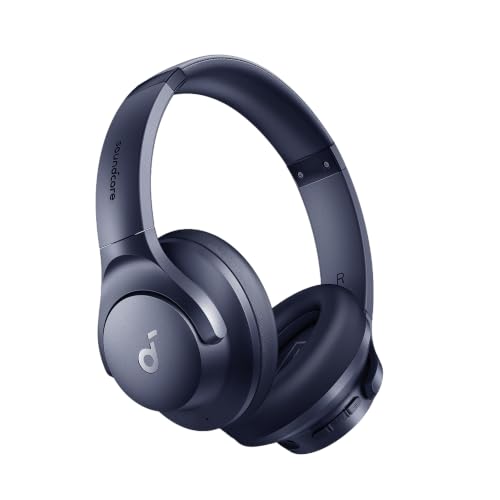
Soundcore Q20i Hybrid ANC Headphones (Blue)

Soundcore Q20i Hybrid ANC Headphones (Pink)

Razer BlackShark V3 X HyperSpeed Wireless Headset

Wireless Bluetooth Headset with Mic for Work

Logitech G325 Lightspeed Wireless Gaming Headset

SteelSeries Arctis Nova 5P Wireless Headset (White)

Redpepper 2.4GHz Wireless Gaming Headset
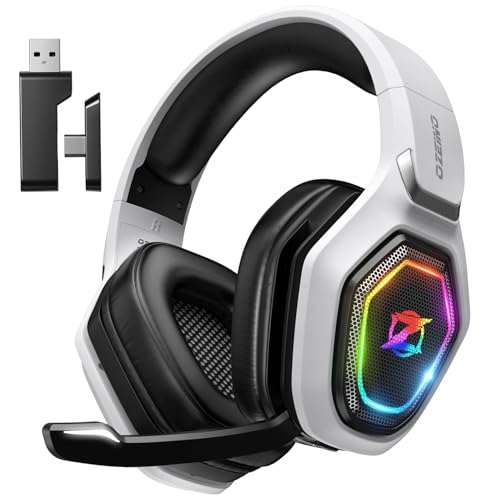
Ozeino Wireless Gaming Headset for PS5, PC, Switch
Ozeino Wireless Gaming Headset with Flip Microphone
More On The Choices That Made The List
The white Q20i is the pair you reach for when the office hums and the train rattles. Its hybrid active noise cancelling uses multiple microphones to sample outside sound and cancel it before it reaches your ears, which is the approach usually reserved for pricier cans. On a packed commute, that difference is easy to feel.
Anker’s BassUp processing pushes low frequencies forward in wireless mode, so podcasts stay warm and playlists hit harder than most budget over-ears manage. There’s also a wired AUX fallback, handy when the battery runs dry mid-flight.
Advantages To Know
- Hybrid ANC quiets engine drone and chatter well enough to lower your volume overall
- BassUp tuning gives music genuine punch without drowning vocals entirely
- AUX-in keeps the headphones usable even with a dead battery
- Over-ear cushions spread pressure across a wide area for longer sessions
- Neutral white finish looks tidy in shared spaces and home offices alike
Things To Consider
- Noise cancelling doesn’t operate in AUX mode, so wired listening loses that benefit
- Earpad foam compresses over months of heavy use and may eventually need replacing
Key Specs
Who It Suits Best
Daily commuters and open-office workers who want dependable noise cancelling without stretching into premium pricing.
Where Another Pick Suits Better
Gamers who need a boom microphone for team chat will get more mileage from the Razer BlackShark V3 X HyperSpeed.
This is the same headphone you just read about, dressed in a deep blue finish instead of white. Nothing about the audio hardware changes, which means you get the identical four-microphone hybrid noise cancelling and BassUp-enhanced low end. The color is the whole decision here.
In practice, blue hides scuffs and smudges better than lighter finishes, something frequent travelers tend to appreciate after a few months of bag life. Owners commonly report the plastic frame holds up fine with ordinary care, though tossing it loose into a backpack never helps any headphone.
Useful Strengths
- Identical ANC performance to the white version at the same tier
- Darker shell masks everyday wear more forgivingly
- Bass-forward tuning suits hip-hop, EDM, and cinematic soundtracks
- Wired AUX option doubles as a backup for dead-battery moments
Worth Noting
- ANC cuts out in wired mode, a limitation baked into the design
- Clamping force can feel snug during the first week before the headband relaxes
Made For
Listeners who want the Q20i’s noise cancelling and bass character but prefer a finish that tolerates daily handling.
Consider Something Else When
Anyone prioritizing a softer, pastel aesthetic may prefer the pink variant listed next.
Most budget noise cancelling headphones come in black, full stop. The pink Q20i breaks that monotony while keeping every technical trait of its siblings: hybrid ANC, BassUp bass shaping, and an AUX input for wired listening. You lose nothing but convention.
For students setting up a dorm desk or anyone whose desk setup leans colorful, this finish earns its keep. One practical note: pale ear cushions show makeup and denim transfer more readily than darker versions, so a quick wipe-down now and then keeps them looking fresh.
Real Benefits
- A genuinely uncommon colorway in the budget ANC segment
- Same multi-mic noise cancelling found on the white and blue models
- BassUp gives lo-fi and pop playlists a fuller, roomier sound
Trade Offs
- Light cushions demand occasional cleaning to stay presentable
- Noise cancelling remains unavailable while using the AUX cable
Right Fit For
Students, creators, and style-conscious listeners building a coordinated desk or study space.
Look Elsewhere When
Shared households with messy hands might favor the smudge-resistant blue Q20i instead.
Where the Q20i tunes for music, the BlackShark V3 X tunes for footsteps. Razer’s TriForce 50mm Gen-2 drivers split highs, mids, and lows into separate zones inside the driver itself, which sharpens directional cues like reload clicks and distant movement. In tactical shooters, that separation is the difference between reacting and guessing.
HyperSpeed is Razer’s low-latency 2.4GHz wireless protocol, fast enough that most players won’t notice any lag versus a cable. The matte black shell keeps things understated, and owners generally find the build shrugs off daily desk use without complaint.
Where It Delivers
- TriForce driver architecture makes positional audio noticeably crisper in competitive games
- HyperSpeed wireless removes cable drag without adding perceptible delay
- Tuned specifically for PC play rather than stretched across too many platforms
- Understated black design fits streaming setups that avoid RGB flash
Minor Gripes
- Gaming-first tuning can sound thin for bass-heavy music compared with the Soundcore Q20i
- Plastic construction feels serviceable rather than premium up close
Best Suited To
Ranked-match PC players who treat audio cues as information and want a dedicated gaming headset.
A Better Fit Elsewhere
Players splitting time across PS5 and Switch will find the SteelSeries Arctis Nova 5P far more flexible.
Eight-hour meeting days punish heavy headphones. This one weighs just 2.56 ounces, among the lightest in its category, and its ear cups tilt up to eight degrees to follow the shape of your head instead of pressing flat against it. By hour five of back-to-back calls, that difference stops being trivia.
The built-in microphone targets voice clarity for calls and meetings rather than music fidelity, which is exactly the right trade for a work headset. Colleagues hear you clearly; you don’t need studio monitoring between slides.
Everyday Perks
- Featherweight frame minimizes neck strain through marathon call blocks
- Tilting cups reduce hot spots where rigid pads usually press hardest
- Call-focused mic tuning keeps voices intelligible on crowded conference lines
- Bluetooth pairing hops easily between laptop and phone
Points To Note
- Not built for music enjoyment; expect a flatter, voice-oriented sound signature
- Lightweight plastics ask for gentler handling than gaming-grade builds
At A Glance
Who Should Grab It
Remote workers and support agents stacking hours of calls who care more about comfort than bass.
Skip It When
Evening gamers should step down the list to the Logitech G325, which handles both chat and game audio properly.
Logitech built the G325 around a simple promise: 24-bit game audio over a reliable LIGHTSPEED wireless link, with enough battery for a day-plus of play. The 24+ hour rating means most people charge it once or twice a week, not nightly.
Comfort gets real attention here too. Dual-layer foam padding softens the ear contact, and extendable arms let you dial in fit without fuss. Notably, there’s no boom arm; the microphone lives in the ear cup housing, giving the headset a clean silhouette that wouldn’t look odd on a video call. Compared with the Razer BlackShark earlier in this list, the G325 trades some competitive edge for a tidier look and longer runtime.
What Earns Its Place
- 24+ hour battery covers multi-day gaming stretches between charges
- LIGHTSPEED wireless delivers stable, low-delay audio on PC
- Dual-layer foam padding stays comfortable through long sessions
- Boom-free design reads as a regular headphone in meetings
Softer Spots
- Without a boom mic, voice pickup depends more on positioning than dedicated arms allow
- 24-bit audio shines in games but won’t transform casual music listening
Who Will Love This
Players whose desk doubles as a work station and want one headset that passes for both jobs.
Swap It Out When
Hardcore competitors chasing maximum positional detail should lean toward the Razer BlackShark V3 X instead.
Few headsets let you change how a game sounds without leaving it. The Nova 5P ships with more than 100 audio presets crafted by pros and engineers, selectable in real time through SteelSeries’ companion app, so Fortnite can sound tuned one moment and GTA V the next. Neodymium magnetic drivers handle the actual playback with the kind of detail that makes preset differences audible.
The 60-hour battery outlasts nearly everything else here, and dual connectivity means you can run 2.4GHz to a console while staying linked over Bluetooth to your phone. The white finish looks sharp, though it will show grime faster than black alternatives.
Good Reasons To Consider
- 100+ per-game presets adjust audio profiles mid-session through the app
- 60-hour battery dwarfs typical gaming headset runtimes
- Simultaneous 2.4GHz and Bluetooth lets you mix console audio with phone notifications
- Works across PS5, PS4, PC, Switch, and mobile from one headset
- Gen2.X microphone keeps squad chat clean
Small Caveats
- White earcups need regular wiping to stay bright
- The preset ecosystem rewards app tinkering that some players won’t bother with
Feature Snapshot
Built With In Mind
Console-first households juggling PS5, Switch, and mobile who want one premium headset to rule them all.
Another Choice May Suit
Strictly PC players on tighter budgets get comparable core performance from the Redpepper headset further down.
First wireless headsets don’t need to cost much, and this Redpepper proves the point. You get 7.1 surround sound, which simulates audio coming from seven directions plus a subwoofer channel to place enemies spatially, alongside a 40-hour battery and both USB and Type-C dongles. A wired fallback exists too, rare at this tier.
Bluetooth 5.3 handles mobile connections, and LED lighting adds a bit of desk personality without driving the price up. The honest read: materials and tuning sit below the SteelSeries Nova 5P, but for someone testing whether wireless gaming audio suits them, the gap rarely matters.
Why It Works Well
- 7.1 surround adds spatial depth to shooters and RPGs
- 40-hour battery comfortably outlasts weekend gaming binges
- USB, Type-C, and wired options cover nearly any setup
- LED accents give budget builds some visual flair
Areas To Watch
- Build materials feel lighter-duty than name-brand rivals
- Surround processing varies by game and can muddy vocals in some titles
- Brand support networks are thinner than Logitech or Razer offer
Quick Facts
The Right Fit
Students and first-time wireless shoppers who want full features without a flagship commitment.
Reach For A Different Pick When
PS5-focused players wanting proven brand backing may prefer the Ozeino headset reviewed next.
Latency, the tiny delay between a game event and hearing it, decides whether wireless audio feels instant or laggy. Ozeino quotes under 30ms on this model’s 2.4GHz USB and Type-C link, quick enough that footsteps and gunshots land right when they happen on screen. The 50mm drivers carry enough range and punch to separate a reload click from ambient noise in crowded matches.
Coverage spans PS5, PC, and Switch, making it a natural companion for couch-and-handheld households. Battery life stretches to roughly 40 hours, so charging becomes a weekly chore rather than a nightly ritual.
Points In Its Favor
- Sub-30ms wireless latency keeps audio synced with on-screen action
- 50mm drivers deliver strong bass and clear vocal separation
- 40-hour battery supports extended weekend sessions
- One dongle family covers PS5, PC, and Switch
Honest Caveats
- Plush ear pads attract dust and lint over time and benefit from occasional cleaning
- Xbox users are left out of the compatibility picture
Feature Rundown
Whose Shelf It Belongs On
PlayStation and Switch owners who want near-flagship responsiveness at a mid-range cost.
Where A Sibling Pick Shines
Streamers who want visible RGB personality should jump to the flip-mic Ozeino model closing this list.
This sibling to the previous Ozeino adds two things streamers love: RGB lighting that cycles color along the ear cups, and a flip-up microphone that mutes the moment you raise it. That physical mute switch matters in real lobbies; there’s no fumbling for a button while your squad hears the dog bark.
Underneath the lights sits the familiar formula: 50mm drivers over a lossless 2.4GHz USB and Type-C connection, tuned to surface footsteps and dialogue in shooters and RPGs. Compared with the plain version above, you trade nothing functionally and gain presentation. Just note the lighting draws extra power, so expect somewhat shorter real-world runtime than the non-RGB model delivers.
What Pays Off
- Flip-to-mute mic gives instant privacy without menu digging
- RGB lighting livens up streaming frames and dark rooms
- Lossless 2.4GHz audio keeps competitive cues crisp
- Works across PS5, PS4, and PC from one transmitter set
Practical Considerations
- RGB drain shortens battery life versus the standard Ozeino model
- Flip mechanism is a moving part worth treating gently over years of use
Perfect Match For
Casual streamers and late-night players who enjoy a little visual theater with their audio.
Not Your Match When
Battery-maximalists should stick with the non-RGB Ozeino for PS5, PC, and Switch instead.
What Matters Most Before Choosing Pc Bluetooth Headphones
Connection Style Sets The Ceiling
Bluetooth suits mixed device hopping, but dedicated 2.4GHz dongles deliver the lowest latency for gaming. Dual-connect models like the SteelSeries Arctis Nova 5P bridge both worlds. Match the link type to your primary activity first, everything else second.
Fit Decides Long Sessions
Weight, clamp force, and pad material matter more than any driver spec once hour three arrives. Featherweight office headsets such as the 2.56-ounce work pick exist precisely because heavy cans cause fatigue. Try to learn the weight figure before committing.
Microphone Placement Shapes Your Voice
Boom arms capture speech closest and cleanest; inline and cup-mounted mics trade some clarity for aesthetics. Flip-up designs add instant muting. Frequent callers should prioritize dedicated mic hardware over looks.
Battery Ratings Deserve Skepticism
Manufacturer figures assume moderate volume with extras disabled. RGB lighting, high volume, and ANC all trim real-world runtime. Treat advertised hours as a best case and subtract accordingly.
Key Considerations Across These Picks
Common Shopping Slip Ups
The classic mistake is buying a music-tuned headphone for competitive gaming, then wondering why footsteps blur together. The reverse happens too: gaming headsets often sound thin for albums. Also check platform lists carefully, since several strong picks here exclude Xbox despite covering everything else.
What The Higher Tier Buys
Premium models add per-game audio presets, simultaneous Bluetooth mixing, and batteries pushing 60 hours, as the Arctis Nova 5P demonstrates. Mid-range buys like the Ozeino cover latency and drivers well. Paying up pays off mainly for multi-platform households and daily heavy users.
Frequently Asked Questions
Do Bluetooth headphones work well for PC gaming?
They connect reliably, but standard Bluetooth adds noticeable audio delay in fast games. A 2.4GHz dongle headset remains the safer choice for competitive play.
Can I use one headset for both work calls and gaming?
Yes, and several picks here handle both, like the Logitech G325 with its understated boom-free design. Expect some compromise in whichever role isn’t the headset’s primary focus.
How long do wireless headset batteries really last?
Advertised figures assume moderate volume with lighting and ANC off. Real-world runtime typically lands somewhat shorter depending on your settings.
Is active noise cancelling useful at a desk?
In open offices or noisy homes, it meaningfully reduces fan hum and chatter. In quiet rooms, the benefit shrinks and passive isolation alone often suffices.
What does 7.1 surround sound actually do?
It processes stereo audio into virtual channels positioned around your head, helping you judge direction in games. Quality varies by implementation, so results differ between titles.
Bottom Line
Your best match depends on how your hours split. Music and commute time point toward the Soundcore Q20i family, marathon calls favor the featherweight work headset, and serious play belongs to the Razer or SteelSeries depending on platform spread. Budget-conscious gamers have genuinely capable options in the Redpepper and Ozeino models. Whichever direction you lean, prioritize comfort and connection type first; those two traits shape daily satisfaction more than anything else on the spec sheet.
